

Brands on Shopify are hitting a wall. They want faster storefronts, richer design control, and the ability to sell across mobile apps, voice devices, and custom web experiences from a single backend. The traditional Shopify setup does a lot, but it was not built for this level of flexibility.
That gap is exactly why headless Shopify commerce has moved from a niche architecture decision to a mainstream strategy for growing brands. This guide covers what headless commerce is, how it works on Shopify, what it costs, who should consider it, and how to get started without wasting months or budget.
Quick Answer
Headless Shopify commerce separates your store’s frontend from its backend. The frontend is what customers see, while the backend powers orders, inventory, products, and checkout. Both layers connect through Shopify’s Storefront API.
This setup gives brands full control over design, speed, and user experience while keeping Shopify’s commerce engine active in the background.
What Is Headless Commerce in Shopify?
Headless commerce is a store architecture where the frontend and backend work as separate systems. In a traditional Shopify store, your theme controls what customers see, while Shopify manages products, checkout, orders, and inventory.
Going headless means you replace the Shopify theme with a custom frontend. Shopify still powers the backend, but your customer-facing experience runs separately.
How the Frontend and Backend Work Separately
The frontend, also called the “head,” is everything a customer interacts with. This includes your website, mobile app, voice interface, kiosk, or any connected digital channel.
In a headless setup, you can build this layer using React, Next.js, Vue, or another frontend framework. The backend still handles product data, pricing, payments, orders, inventory, and checkout through Shopify.
Why Brands Choose to Separate Them
Brands choose headless because they want more flexibility. When the frontend and backend stay locked together, every design or performance change depends on the theme structure.
A headless setup removes that limit. Teams can redesign pages, test layouts, create custom user journeys, and launch new frontend experiences without changing the core commerce backend.
How Does Headless Shopify Commerce Work?
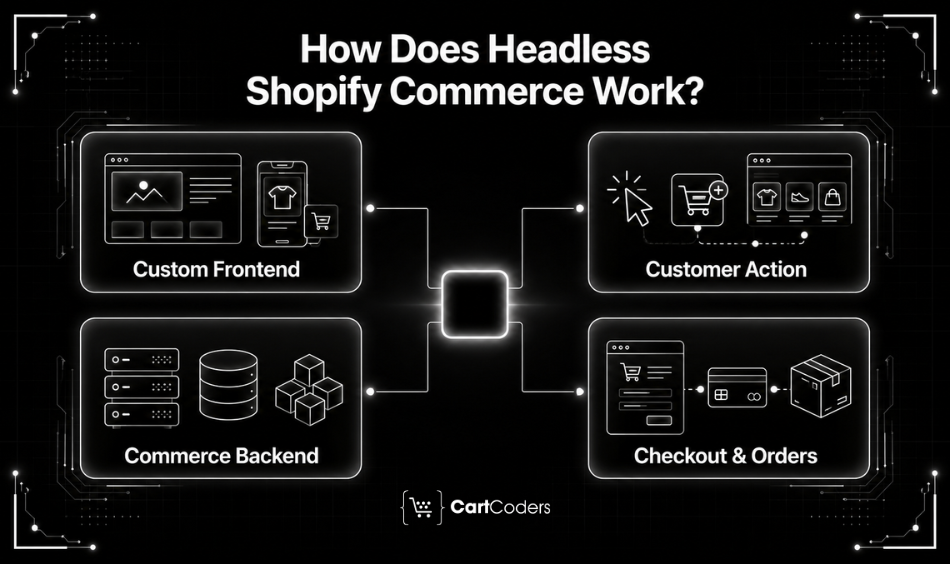
Shopify connects the frontend and backend through its Storefront API. This GraphQL-based API lets your custom frontend request product data, cart details, customer information, and checkout flows in real time.
Every customer action on the frontend sends an API request to Shopify. Shopify then returns the data needed to show products, update carts, manage checkout, or complete the purchase.
The Role of the Storefront API
The Storefront API acts as the bridge between your custom frontend and Shopify’s backend, which makes Shopify integration services important for connected store operations. It gives developers access to products, collections, customer accounts, carts, checkout, and other commerce data.
A brand can build a Next.js website, a React Native mobile app, and a voice shopping interface. All these channels can pull data from the same Shopify backend.
What Shopify Hydrogen Brings to Headless Builds
Shopify Hydrogen is a React-based framework built for headless Shopify development. It includes ready-made commerce components such as product cards, carts, product pages, and checkout flows.
Hydrogen connects directly with the Storefront API. Shopify Oxygen then hosts Hydrogen storefronts on Shopify’s infrastructure. Together, they reduce the time and technical effort needed to build a headless storefront.
Is Headless Commerce Right for Your Shopify Store?
Headless commerce is powerful, but not every Shopify store needs it. Traditional Shopify works well for many stores, especially those that rely on themes, apps, and standard checkout flows.
The right decision depends on your store size, frontend needs, team capability, and growth plans.
Signs Your Store Is Ready to Go Headless
Your store may be ready for headless if it needs deep frontend customization that Shopify themes cannot support. It also makes sense when your brand sells across multiple channels, such as a website, app, kiosk, or custom portal.
Headless can also help stores with high traffic, poor Core Web Vitals, complex content needs, or advanced personalization goals, especially for brands already using Shopify Plus development services.
When Traditional Shopify Still Works Better
Traditional Shopify works better when your store needs a faster launch, lower cost, and simpler maintenance. If your current theme supports your design, content, checkout, and performance needs, headless may add unnecessary complexity.
Stores without dedicated developers should also think carefully before going headless. A headless setup usually needs ongoing frontend support.
What Are the Benefits of Headless Shopify Commerce?
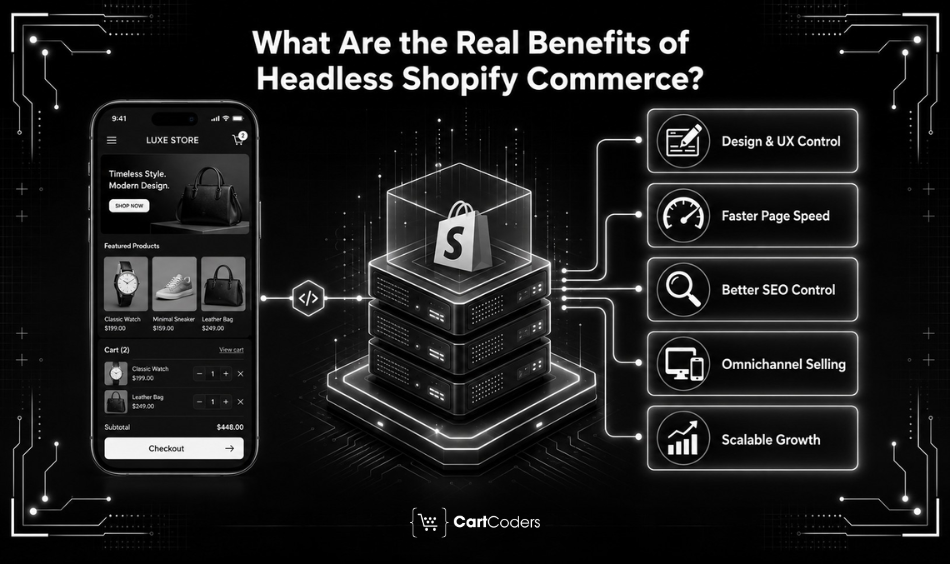
The benefits of going headless go beyond design flexibility. Brands can improve speed, SEO control, content freedom, and omnichannel selling from a single Shopify backend.
Full Design and UX Control
Headless removes the frontend limits of Shopify themes, while standard Shopify store development services still work well for stores that need a conversion-focused theme-based setup. Your team can create custom layouts, unique user flows, and branded shopping experiences without relying on theme restrictions.
This matters for brands where the store experience plays a big role in conversion and brand identity.
Faster Page Performance
A headless frontend can load only the content and scripts required for each page. This helps reduce page weight and improve speed.
A fast storefront can improve user experience, lower bounce rates, and support better Core Web Vitals performance.
Greater SEO Control
Traditional Shopify has some limits around URLs, rendering, and technical SEO structure. A headless setup gives more control over metadata, canonical tags, page rendering, and URL architecture.
This can help brands compete better in organic search when technical SEO matters.
True Omnichannel Selling
With headless Shopify commerce, one backend can power many customer touchpoints. A customer can browse on the website, add products through an app, and complete checkout through another interface.
This creates a more consistent experience across channels.
Scalability Without Architecture Limits
Headless helps brands add new channels and experiences without rebuilding the backend. You can create regional storefronts, campaign pages, mobile experiences, or brand microsites using the same Shopify backend.
This makes future growth easier when your store needs more than a standard theme.
What Are the Challenges of Going Headless on Shopify?
Headless Shopify also comes with real trade-offs. These challenges are not deal-breakers, but they need proper planning before the project starts.
Higher Upfront Development Cost
A headless build needs more planning, frontend development, API work, testing, and launch support than a theme-based Shopify store.
You need developers who understand GraphQL, Shopify’s Storefront API, React-based frameworks, and performance-focused frontend development.
Increased Technical Complexity
A headless setup has two layers to manage instead of one. Your team needs to maintain the frontend and backend connection carefully.
Testing also becomes more detailed because every product, cart, checkout, and customer action depends on API communication.
Shopify App Compatibility Issues
Many Shopify apps rely on Liquid templates to inject code into the storefront. In a headless setup, those templates may not exist.
You may need API-compatible apps, custom integrations, or Shopify app development services before moving to headless.
Ongoing Developer Dependency
Traditional Shopify allows teams to edit many storefront elements through the theme editor. Headless stores often need developer support for frontend changes.
This can increase long-term maintenance costs if your team does not have in-house technical resources.
How to Build a Headless Shopify Store
There are several ways to build a headless Shopify store. The right path depends on your budget, timeline, internal skills, and customization needs.
Build It Yourself Using Shopify APIs
If your team has experienced frontend developers, you can build a custom headless storefront from scratch. Otherwise, it is better to hire a Shopify headless commerce expert who can handle frontend architecture, APIs, and performance planning. This gives full control over architecture, frontend framework, hosting, and user experience.
This approach offers maximum flexibility, but it also needs more time and technical planning.
Use Shopify Hydrogen and Oxygen
Shopify Hydrogen is built specifically for headless Shopify storefronts. It provides ready-made commerce components that connect with Shopify’s Storefront API.
Oxygen hosts Hydrogen storefronts on Shopify’s infrastructure, which reduces hosting and DevOps complexity.
Work With a Headless Shopify Agency
A headless Shopify agency can handle frontend architecture, Storefront API integration, performance work, app compatibility, testing, and launch.
This option works well for brands that want a production-ready store without building a full internal team.
Use a Frontend-as-a-Service Platform
Frontend-as-a-service platforms offer ready-made headless storefront structures. They can reduce development time and offer visual editing tools for non-technical teams.
The trade-off is less freedom compared to a fully custom build.
How Much Does Headless Shopify Commerce Cost?
Headless Shopify cost depends on the build approach, frontend complexity, integrations, app replacements, CMS needs, and developer involvement.
| Approach | Estimated Cost | Timeline | Best For |
| Custom agency build | $80,000 to $500,000+ | 5 to 9 months | Enterprise brands |
| Shopify Hydrogen + Oxygen | $30,000 to $150,000 | 3 to 5 months | Shopify Plus brands |
| Frontend-as-a-service | $5,000 to $50,000 setup + monthly fees | 1 to 3 months | Teams with limited dev resources |
| In-house DIY build | Developer salaries + 4 to 8 months | 4 to 8 months | Strong frontend teams |
Beyond the build cost, brands should also plan for annual maintenance, third-party CMS fees, hosting costs, app replacements, and ongoing frontend updates.
Many brands spend around 20% to 30% of the build cost each year on maintenance and support.
Dig Deeper: Shopify Headless Commerce Cost
Ready to Build a Faster, More Flexible Shopify Store?
CartCoders is a Shopify development agency with over 9 years of experience and 250+ completed projects across 30+ countries. The team builds custom Shopify storefronts using Hydrogen, Next.js, React, and Shopify’s Storefront API.
Whether you are moving from a traditional Shopify theme or building from scratch, CartCoders can support API integration, frontend architecture, checkout customization, performance work, testing, and launch.
If your Shopify store is outgrowing its current theme, headless may be the next step. The right setup can improve speed, design freedom, SEO control, and customer experience across channels.
Conclusion
Headless Shopify commerce gives brands the freedom to build custom shopping experiences without leaving Shopify’s backend. It helps improve performance, design control, SEO flexibility, and omnichannel selling.
The trade-off is cost and complexity. For stores at the right scale, the investment can support better conversions, stronger customer experiences, and long-term flexibility. The key is choosing the right build approach based on budget, timeline, and technical resources.
Frequently Asked Questions
Headless Shopify commerce separates your store’s frontend from its backend. The frontend handles customer experience, while Shopify manages products, checkout, orders, and inventory.
Traditional Shopify uses themes for the frontend. Headless Shopify replaces the theme with a custom frontend that connects to Shopify through APIs.
You do not strictly need Shopify Plus, but most larger headless builds use it because it offers stronger infrastructure, support, and API capabilities.
Shopify Hydrogen is a React-based framework for building headless Shopify storefronts. It includes commerce components that connect directly with Shopify’s Storefront API.
A headless Shopify store can take 2 to 8 months depending on complexity, approach, integrations, frontend design, and testing needs.
Some Shopify apps may not work because they depend on Liquid theme code. You may need API-ready apps or custom-built replacements.
A headless Shopify store can cost from $30,000 to $500,000 or more, depending on the build approach, features, and technical complexity.


