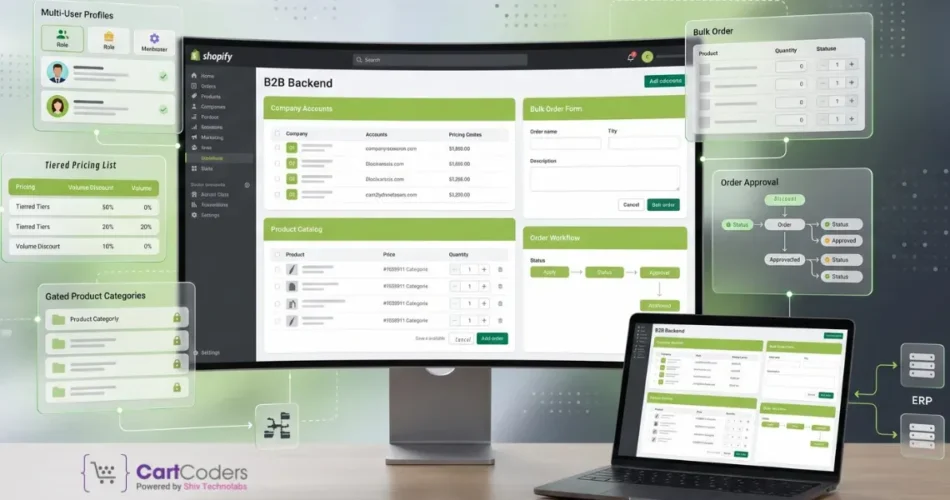
Most B2B Shopify stores fail at launch because they focus on design and ignore buying logic. B2B Shopify features define how buyers access products, see pricing, place orders, and manage accounts. If these are not ready before launch, even a well-designed store will struggle.
This guide breaks down the b2b shopify features you must set up before launch. It also shows what can wait, so you avoid delays and still launch with confidence.
Quick Overview: Which Shopify B2B Features Matter Most Before You Launch?
If these are in place, your launch will support real B2B buying behavior, not just product display.
Why Launch Planning Matters More in B2B Than in D2C?
B2B buyers expect structured access, not open browsing
B2B buyers do not shop like retail customers. They expect login-based access, assigned pricing, and product visibility based on their account. If your store shows the same catalog to everyone, it creates confusion and pricing risks.
Pricing and workflows must be ready before first login
In B2B, pricing depends on customer type, order volume, and agreements. You cannot fix pricing after launch without affecting orders. Payment terms and approval flows must also work from day one.
Manual processes slow down operations
If your team handles orders manually after launch, your system is not ready. B2B Shopify features should reduce dependency on emails, calls, and spreadsheets.
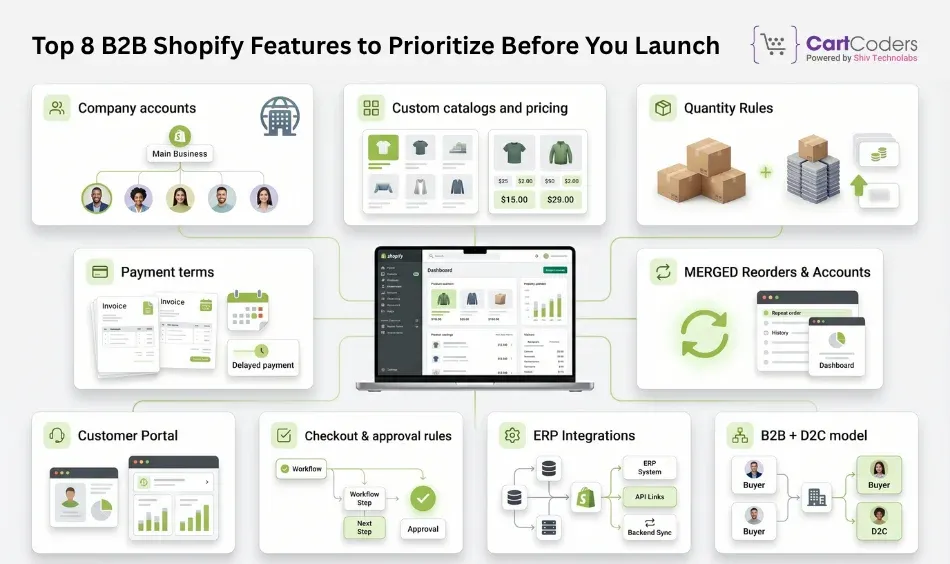
Top 8 B2B Shopify Features to Prioritize Before You Launch
1. Company Accounts and Buyer Access Controls
Company accounts allow you to group buyers under a single business profile. Each company can have multiple users, locations, and permissions.
You can:
Assign roles such as admin or buyer
Control who can place orders
Manage multiple branches under one account
This feature sets the foundation for B2B selling. Without it, you cannot manage real wholesale relationships.
2. Customer-Specific Catalogs and Pricing
B2B buyers should not see the same pricing or products. Shopify allows you to create catalogs based on customer groups.
You can:
Assign different prices to different companies
Show only selected products
Create account-based catalogs
This is where custom pricing and account-based catalogs become critical. It prevents pricing errors and supports long-term contracts.
3. Quantity Rules and Volume Pricing
B2B orders usually follow bulk patterns. Shopify supports quantity rules to control how buyers place orders.
You can set:
Minimum order quantities
Case pack requirements
Increment-based ordering
Volume discounts
These rules help maintain consistency in operations and reduce manual corrections.
This feature is essential for building trust with wholesale buyers. It also aligns your store with real-world business practices.
5. Customer Accounts, Reorder Flows, and PO Support
B2B buyers place repeat orders. Shopify allows customers to access order history and reorder easily.
Key capabilities include:
Order history tracking
Quick reorder options
Purchase order number support
Account-level dashboards
Strong reorder flows reduce friction and improve customer retention.
6. Checkout, Shipping, and Order Review Rules
B2B checkout is more complex than standard checkout. You may need to control shipping methods, payment visibility, and order approvals.
You can configure:
Shipping rules by customer type
Payment methods based on account
Draft order review before final submission
Approval-based ordering for large accounts
This ensures that every order follows your business rules.
7. ERP and Operational Integration Readiness
A B2B store must connect with backend systems. Without integration, your team will handle data manually.
Key integration areas:
Integration Area
Purpose
ERP
Sync orders, inventory, and invoices
CRM
Manage customer relationships
Inventory systems
Maintain accurate stock levels
Accounting tools
Handle billing and payments
Strong erp integration helps maintain accuracy and saves time.
8. Blended B2B and D2C Store Structure
Many brands sell both retail and wholesale. Shopify supports a blended model where one store serves both audiences.
You can:
Separate pricing for B2B and D2C
Show different catalogs based on login
Maintain one backend for both channels
Planning this early avoids rework later. A wrong structure can lead to duplicated efforts and higher costs.
Which Features Are Core at Launch, and Which Can Wait?
Must-Have Before Launch
These features directly control how your buyers access products, view pricing, and place orders. If any of these are missing, your store may go live, but it will not function as a true B2B system.
Feature
Why It Matters
Company accounts
Groups buyers under a business profile, lets you manage roles, permissions, and multiple users within one company.
Catalogs and pricing
Shows the right products and pricing to each customer group, prevents pricing conflicts, and supports contract-based selling.
Quantity rules
Controls how products are ordered in bulk, such as minimum order quantities, case packs, and volume-based pricing.
Payment terms
Allows buyers to place orders with terms like Net 15 or Net 30, which is standard in B2B transactions.
Customer accounts
Gives buyers access to their order history, saved details, and reorder options, reducing manual communication.
Checkout logic
Applies rules for shipping, payments, and order validation based on the buyer, preventing incorrect or incomplete orders.
Integration setup
Connects your store with ERP, inventory, and accounting systems to sync data and avoid manual processing after launch.
Can Be Added After Launch
These features improve experience and efficiency but are not critical for initial operations:
Advanced quote request systems for negotiation-based orders
Custom dashboards for buyers with deeper insights
Automation workflows for order processing and approvals
Advanced reporting layers for performance tracking
Headless storefront enhancements for custom frontend experiences
Start with what directly impacts buying behavior and order flow. Add advanced capabilities once your store runs smoothly and your operations are stable.
Shopify vs Shopify Plus for B2B Launch Planning
When Standard Shopify Works
Standard Shopify can support basic B2B setups if:
You have a small number of customer groups
Pricing complexity is limited
Catalog variations are minimal
You do not need deep customization
When Shopify Plus Becomes Necessary
Requirement
Why Plus Helps
Multiple catalogs
Better catalog control
Complex pricing structures
Advanced pricing flexibility
Large customer base
Scalable account management
Custom checkout logic
More control over ordering flows
Integration-heavy workflows
Better system compatibility
Simple Decision Framework
Choose based on your business needs:
Fewer customers, simple pricing → Standard Shopify
Multiple buyer groups, complex pricing → Shopify Plus
Heavy integration and automation → Shopify Plus
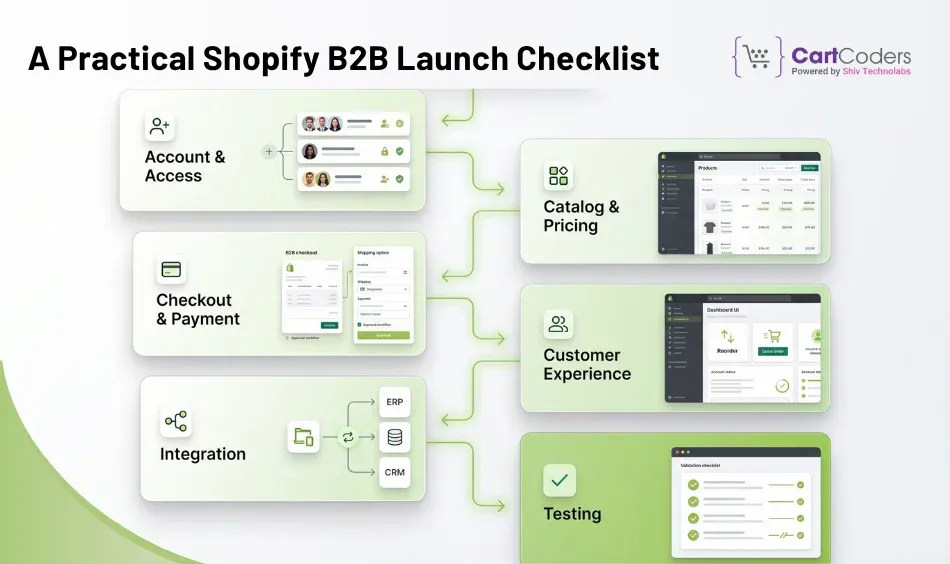
A Practical Shopify B2B Launch Checklist
This checklist covers the key steps you need to complete before going live with your B2B Shopify store. It helps you set up accounts, pricing, checkout, and workflows correctly so your launch runs without operational gaps.
Account and Access Setup
Create company profiles
Assign user roles
Define permissions
Catalog and Pricing Setup
Build catalogs for each customer group
Assign custom pricing
Set product visibility
Checkout and Payment Setup
Configure payment terms
Define shipping rules
Set approval workflows
Customer Experience Setup
Enable customer accounts
Add reorder functionality
Include PO number fields
Integration Setup
Connect ERP systems
Sync inventory
Set up accounting tools
Testing Before Go-Live
Test ordering flows
Validate pricing accuracy
Check payment and shipping rules
Run real-world scenarios
Common Mistakes That Slow Down a Shopify B2B Launch
Treating B2B like a retail store
Many stores use tags or simple apps to mimic B2B. This leads to limited control and scaling issues.
Better approach: Use native B2B capabilities like company accounts, catalogs, and structured pricing from the beginning. Build for scale, not shortcuts.
Ignoring catalog structure
Without proper catalogs, pricing becomes inconsistent and hard to manage.
How to fix this: Define customer segments early and assign catalogs based on pricing tiers, regions, or agreements. Keep pricing centralized and structured.
Skipping company-level setup
Managing customers individually instead of as companies creates operational challenges.
Recommended setup: Create company profiles with multiple users, roles, and locations. This keeps account management organized and scalable.
No reorder flow
If buyers cannot reorder easily, they rely on manual communication.
What works better: Enable customer accounts with order history and quick reorder options. Make repeat purchasing fast and friction-free.
Delaying integration planning
Late integration leads to duplicate data and manual work.
Best practice: Plan ERP, inventory, and accounting integrations before launch. Define how orders, stock, and customer data will sync.
Not deciding store structure early
Switching from separate stores to blended setup later increases complexity.
Right way to approach it: Decide early whether you need a blended B2B and D2C setup or separate stores. Base this on pricing logic, audience, and operations.
Is Shopify the Right Fit for Your Wholesale Launch?
Launching a B2B store is not just about features. It is about setting up the right structure from day one. If pricing, catalogs, and workflows are not aligned, growth becomes difficult.
At CartCoders, we work as a Shopify development company that focuses on real B2B execution. We help brands set up company accounts, custom pricing, reorder flows, and integration-ready systems that match actual business operations.
Our approach is simple. We do not just build stores. We build systems that support wholesale buying, reduce manual work, and handle scale without breaking.
If you are planning your B2B launch or facing issues with your current setup, it is better to fix the foundation early.
FAQs About B2B Shopify Features
What are the most important B2B Shopify features before launch?
The most important B2B shopify features before launch include company accounts, customer-specific catalogs, custom pricing, quantity rules, payment terms, and customer login with reorder access. These features control how buyers interact with your store. If any of these are missing, your store may require manual intervention after launch, which slows down operations.
Does Shopify support wholesale pricing for different customers?
Yes, Shopify supports wholesale pricing through catalogs and company-based pricing. You can assign different price lists to different companies or customer groups. This allows you to manage bulk discounts, negotiated rates, and product visibility without creating multiple stores.
Do I need Shopify Plus for B2B selling or can I start with standard Shopify?
You can start with standard Shopify if your B2B setup is simple, with limited pricing variations and fewer customer groups. However, if your business requires multiple catalogs, complex pricing logic, advanced checkout control, or deeper integrations, Shopify Plus becomes a better choice.
How do company accounts work in Shopify B2B setup?
Company accounts allow you to group multiple buyers under one business profile. You can assign roles, manage permissions, and control access to catalogs and pricing. This helps you manage wholesale customers efficiently instead of handling each user individually.
Can Shopify handle both B2B and D2C in one store?
Yes, Shopify supports a blended model where you can run both B2B and D2C in a single store. You can show different pricing, products, and checkout options based on whether a customer is logged in as a wholesale buyer or a retail customer.
What should be included in a Shopify B2B launch checklist?
A proper shopify b2b launch checklist should include company account setup, catalog creation, pricing rules, quantity logic, payment terms, checkout configuration, and integration setup. You should also test real ordering scenarios before going live to avoid errors after launch.
As the CTO at Shiv Technolabs & CartCoders, I am liable for instigating, planning, integrating, and implementing the organization's strategic orientation.
I gather the most significant tech news in addition to sharing the information I gained while serving as the CTO of Shiv Technolabs, a renowned web and mobile app development company. I am pleased to answer questions as a most valuable expert for Shiv Technolabs Private Limited and to share my experience. I offer a keen insider's perspective on technical advancements.
 eCommerce
Solution
eCommerce
Solution








 INDIA
INDIA


 USA
USA
 CANADA
 AUSTRALIA