Shopify inventory planning means you decide what to stock, where to stock it, and when to reorder it. You also decide how much cash you tie up in products. If you plan well, you avoid stockouts. You also avoid piles of slow-moving stock.
AI fits into this job because inventory planning runs on patterns. Sales rise and fall by season. Certain SKUs sell in bundles. Some variants move fast. Others sit. Supplier lead times change. Returns spike after sales events. Manual planning misses many of these signals. Shopify AI Development helps you spot them sooner and act with fewer errors.
Fix Shopify Inventory Problems With Proper Setup
Clean tracking for products, variants, and locations.
AI inventory management on Shopify does not replace basic inventory rules. It sits on top of them. It reads your sales history, stock levels, supplier lead times, and event calendar. Then it suggests reorder timing and reorder quantity. Many tools also help you create purchase orders, set stock alerts, and plan inventory across locations.
How AI changes inventory planning in Shopify
A manual process often looks like this:
You check best sellers.
You check current stock.
You guess next month’s demand.
You reorder with a fixed buffer.
That process breaks when your catalog grows. It also breaks when you sell through many channels or store stock at multiple locations. AI improves the workflow in three clear ways:
It updates forecasts often. A spreadsheet forecast stays static until you refresh it. AI systems refresh forecasts when fresh sales data arrives.
It spots hidden demand patterns. Some items sell together. Some variants sell in waves. AI picks up these relationships faster than manual checks.
It links planning to actions. Forecasting alone does not stop stockouts. You need reorder points, reorder quantity rules, and purchase order planning. AI tools often connect these steps.
You still need to feed AI clean data. Garbage data produces garbage suggestions. Your first win comes from tracking the right signals and fixing common inventory errors.
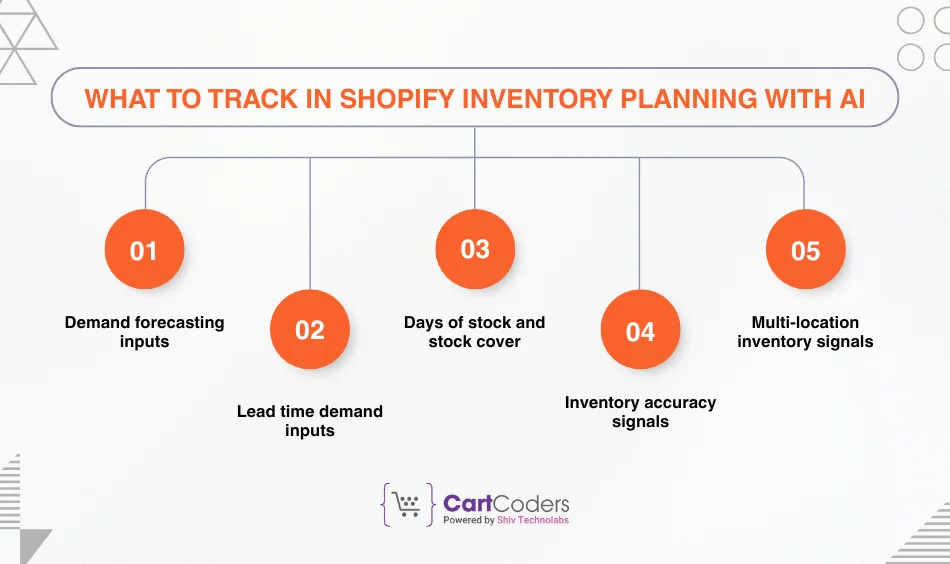
What to track in Shopify inventory planning with AI
Think of tracking as building a “signal set.” Each signal answers a planning question:
How fast does this SKU sell?
How long does replenishment take?
How often does demand spike?
How accurate is my available stock count?
Which location should hold the units?
Start with the following groups.
1) Demand forecasting inputs
AI demand forecasting relies on consistent sales data. You should track:
Units sold per day (by SKU and by variant) This gives you sales velocity.
Orders per day and conversion changes A spike in orders changes demand curves.
Promo periods and price changes Discounts can shift demand for weeks.
Season tags (seasonal vs steady sellers) A seasonal SKU needs a different reorder rule.
If you run frequent sales events, keep a simple event log. You can store it in a sheet. You can also keep it inside a planning tool if it supports notes or event flags. This helps you explain sudden demand spikes.
Quick tip: Separate “organic demand” from “event demand.” AI can learn both, but you should label big events like Black Friday, clearance, or influencer pushes. This keeps the forecast from treating a one-time spike as normal demand.
2) Lead time demand inputs
Lead time demand answers one question: How much will you sell while you wait for replenishment?
To track it, you need:
Supplier lead time (average)
Supplier lead time (range)
Days when suppliers do not ship
Inbound delays (customs, port delays, courier delays)
Many stores store lead time in someone’s head. That creates reorder mistakes. Track lead time in days for each supplier, and review it monthly. Even a simple range helps. For example: “7–12 days” beats “about a week.”
3) Days of stock and stock cover
Days of inventory on hand (also called days of stock) gives you a simple view of runway:
If you have 300 units on hand
And you sell 10 units per day
Then you have about 30 days of stock
AI tools often show this as “stock cover.” It helps you plan by time, not just by units. It also helps you compare SKUs with different sales velocity.
Track days of stock by:
SKU
Variant (when variants behave differently)
Location (if you have more than one location)
4) Inventory accuracy signals
Forecasting fails when your available stock count lies. Inventory accuracy problems often come from:
Returns not processed on time
Manual adjustments without notes
Overselling across channels
Stock held for wholesale orders but not reserved
Bundles and kits that do not reduce component stock correctly
Your goal is simple: Make “available” match reality. Track these accuracy signals:
Adjustment count per week (too high means tracking issues)
Negative stock events (a strong warning sign)
Stock mismatches found during cycle counts
Sell-through with “zero stock” (indicates sync delays or bad location rules)
5) Multi-location inventory signals
Multi-location inventory adds a second planning layer: allocation. You might have stock in:
A warehouse
A retail store
A 3PL
A pickup location
Track:
Sales velocity by location
Transfer time between locations
Location-level stockouts
Split shipment frequency (too many split shipments raise shipping cost)
Allocation errors create silent stockouts. You might hold units, but in the wrong place. AI systems can suggest transfers when they see location demand differences. That only works when you track location data correctly.
What to track and why it matters
What to track
What it tells you
Why it matters for AI planning
Common mistake
Units sold per day (SKU + variant)
Sales velocity
Drives demand forecasting and reorder timing
Mixing variants into one number
Promo dates and discount depth
Event-driven demand
Helps forecast spikes and post-sale dips
Forgetting to label big promos
Supplier lead time (avg + range)
Replenishment delay
Shapes lead time demand and reorder point
Using one fixed lead time forever
Days of stock (by location)
Stock runway
Helps avoid stockouts and overbuying
Looking only at total stock
Stock adjustments and negative stock
Data health
AI suggestions depend on clean stock data
Adjusting inventory without reason codes
Returns processing time
Real available stock
Fixes false stockouts or false availability
Processing returns in batches too late
Multi-channel order flow
Overselling risk
Prevents double-selling the same unit
Delayed sync across channels
Data checklist before you rely on AI suggestions
You can start simple. You do not need a perfect system. You need a consistent one.
Sales data
SKUs and variants follow one naming rule.
Duplicate SKUs do not exist across different products unless you plan it.
You track promo periods and major campaigns.
Stock data
Each location has a clear role (fulfillment vs pickup vs store-only).
You process returns within a defined time window.
You document manual stock adjustments.
Supplier data
You track lead time in days per supplier.
You track minimum order quantity where it applies.
You track pack size or case size for each SKU.
When you track these signals, AI forecasting becomes more useful. You reduce stockouts. You reduce overselling. You also make purchase order planning easier because reorder suggestions start to match reality.
If you want, share your store type (DTC or B2B), number of SKUs, and whether you run multi-location inventory. I’ll tailor the next section to the most common “fix” issues for that setup.
Inventory planning fails more often because of weak rules than weak tools. Many Shopify stores collect data but still face stockouts, overselling, or excess stock. These problems usually come from a few repeat mistakes. When you fix them, AI suggestions start to make sense and planning becomes stable.
The most common issues sit around reorder points, safety stock, stock accuracy, and overselling. These areas decide whether forecasts turn into action or stay as charts.
Reorder point mistakes that break inventory planning
A reorder point tells you when to reorder, not how much. Many stores treat it as a fixed number. That approach works only when demand and lead time stay flat. In real stores, both change often.
Why reorder points fail in Shopify stores
Reorder point problems usually come from one of these:
Lead time is guessed, not tracked
Demand spikes are ignored
One reorder point is used for all locations
Reorder points do not change after promotions
Variants share one reorder rule even when they sell at different speeds
A simple reorder point calculation looks like this:
Reorder point = average daily sales × lead time (in days)
That formula gives a base level. It does not protect you from delays or demand jumps. This is where many stores run into stockouts even when they “reordered on time.”
How AI improves reorder point planning
AI systems do not rely on one static number. They look at:
Recent sales velocity changes
Lead time history, not just an average
Past stockout events
Demand changes after discounts or price shifts
Instead of asking “Have we hit the reorder point?”, AI asks “Will we hit zero stock before the next delivery arrives?”
This shift matters. It turns reorder points into early warning signals rather than last-minute alerts.
Talk To Experts About Shopify Inventory Management
Discuss stock flow, sync rules, and reporting.
Safety stock confusion and cash flow loss
Safety stock acts as a buffer. It protects you from late suppliers and demand swings. Many stores misuse it.
Common safety stock problems
The buffer is set once and never reviewed
The same buffer applies to all SKUs
Safety stock covers too many days
Safety stock is confused with reorder quantity
When safety stock stays too high, cash gets locked in slow-moving stock. When it stays too low, stockouts rise.
Safety stock vs reorder point
These two concepts serve different jobs:
Item
Purpose
Key question it answers
Safety stock
Risk buffer
“What if things go wrong?”
Reorder point
Timing trigger
“When should I reorder?”
Safety stock does not decide when you reorder. It decides how much risk you can absorb. AI systems often adjust safety stock by SKU based on demand volatility. Fast and stable sellers need less buffer. Unstable or seasonal items need more.
Lead time demand errors that cause silent stockouts
Lead time demand tells you how many units you will sell while waiting for replenishment. Errors here do not show up right away. They show up weeks later as sudden stockouts.
Where lead time demand goes wrong
Supplier lead times are outdated
Shipping delays are ignored
Holidays and non-shipping days are skipped
Multiple suppliers share one lead time rule
A supplier that usually ships in 7 days might take 12 days during peak season. If your system still plans for 7 days, your reorder timing breaks.
AI models work better when lead time data includes ranges, not just averages. Even a simple “best case” and “worst case” helps planning logic stay realistic.
Inventory accuracy issues that damage forecasts
AI forecasting depends on clean stock data. If your available stock is wrong, forecasts drift away from reality.
What hurts inventory accuracy most
Returns processed days or weeks late
Manual adjustments without notes
Bundles that do not deduct component stock
Stock reserved for wholesale but not marked
Location rules that allow selling from the wrong place
When stock accuracy drops, you may see:
Sales while stock shows zero
Stockouts while units still exist
Forecasts that look too low or too high
These problems feed bad signals into AI systems.
How to stabilize inventory accuracy
Start with simple rules:
Process returns on a fixed schedule
Track adjustment reasons
Review negative stock events weekly
Audit bundles and kits monthly
Lock selling rules per location
Once accuracy improves, forecasting and reorder suggestions improve without any other changes.
Overselling problems across channels and locations
Overselling hurts trust. It also creates reactive planning. Many Shopify stores face this when they sell through more than one channel or location.
Common overselling causes
Delayed inventory sync between channels
Shared stock across locations without rules
Manual orders added after the fact
Fast-selling SKUs with slow sync speed
Overselling also creates false demand signals. AI may read oversold units as real demand, which leads to overbuying later.
How AI helps reduce overselling
AI tools often help by:
Reserving stock as soon as orders place
Prioritizing fulfillment locations
Flagging SKUs at risk of oversell
Suggesting stock transfers between locations
These actions work only when selling rules stay clear and consistent.
Problems to fix before relying on AI inventory planning
Problem area
What usually goes wrong
Impact on planning
What to fix first
Reorder point rules
Static values
Late reorders and stockouts
Track lead time and demand changes
Safety stock
One-size buffer
Cash locked or stockouts
Adjust by SKU volatility
Lead time demand
Old supplier data
Hidden stock gaps
Track ranges, not guesses
Inventory accuracy
Delayed updates
Bad forecasts
Process returns and audits
Overselling
Channel sync gaps
Customer issues
Reserve stock early
Multi-location stock
Poor allocation
Wrong stock in wrong place
Set clear location rules
Why fixing these issues changes everything
Many store owners try new forecasting tools without fixing these basics. The result feels disappointing. Forecasts look smart, but outcomes do not change.
When you fix reorder logic, safety buffers, accuracy, and overselling, AI starts working as intended. Forecasts align with reality. Reorder alerts arrive earlier. Purchase order planning becomes calmer. Firefighting drops.
Inventory planning then shifts from reaction to control. You spend less time checking stock levels and more time planning growth.
Automation in Shopify inventory planning usually starts with forecasting. It then moves into replenishment, purchase orders, and allocation. Each layer builds on the previous one.
Automated demand forecasting in Shopify inventory planning
Demand forecasting answers one question: How many units will sell in the coming days or weeks? Manual forecasting often relies on averages. AI-based forecasting reacts to change faster.
What automated forecasting looks at
Automated forecasting tools usually track:
Recent sales velocity by SKU and variant
Demand changes after price updates
Season-based demand patterns
Event-driven spikes
Sales differences by location
Instead of giving one number, AI often provides a range. This range reflects uncertainty. It helps planners decide how much risk to take.
Why frequent forecast updates matter
Demand does not change once a month. It changes daily. Automation allows forecasts to refresh as new data arrives. This keeps reorder timing aligned with reality.
When forecasts update often, you avoid two issues:
Late reorders caused by sudden demand growth
Overbuying after short-term spikes
Automated forecasting works best when it feeds directly into reorder rules. A forecast without action still leaves work on your plate.
Reorder timing automation
Reorder timing decides when a reorder alert should fire. Manual alerts often trigger too late. Automation helps move the alert earlier.
How automated reorder timing works
Reorder timing automation usually combines:
Forecasted daily demand
Supplier lead time
Safety stock levels
Current stock by location
Instead of checking “stock below X,” the system checks “days of stock left versus days until next delivery.”
This approach reduces last-minute decisions. It also gives teams time to react when suppliers delay shipments.
Benefits of automated reorder timing
Fewer emergency orders
Better use of supplier lead times
More predictable inventory flow
Less manual stock checking
Automated timing works best when safety stock rules stay realistic. Overly high buffers still cause overbuying, even with automation.
Reorder quantity calculation and automation
Knowing when to reorder solves only half the problem. You also need to know how much to reorder.
Manual reorder quantity decisions often rely on gut feeling. Automation replaces this with demand-based rules.
What automated reorder quantity considers
Forecasted demand for a defined period
Supplier minimum order quantity
Case or pack size rules
Available storage capacity
Budget limits
AI-based systems often suggest a reorder quantity that covers a defined future window, such as 30 or 45 days. This window can change by SKU based on demand stability.
Why reorder quantity automation reduces waste
Overordering often happens when teams panic after stockouts. Automation smooths this behavior. It bases reorder size on forecasted need, not fear.
This also improves cash flow planning. You place more frequent, smaller orders instead of large reactive ones.
Purchase order automation in Shopify inventory planning
Purchase orders connect planning to suppliers. Manual PO creation slows teams down and invites errors.
How purchase order automation helps
Automated purchase orders can:
Pre-fill SKUs and quantities
Group items by supplier
Apply case size rules
Flag items below reorder levels
Track open orders and expected arrival dates
This reduces admin work. It also creates a clear trail of inbound stock.
Planning benefits of automated purchase orders
When purchase orders stay linked to forecasts, you gain visibility:
You see how inbound stock affects future availability
You avoid double ordering
You spot supplier delays earlier
Automation does not remove human control. Teams can still review and approve orders before sending them.
Multi-location inventory allocation automation
Multi-location inventory adds complexity. Automation helps place stock where it sells best.
What allocation automation tracks
Sales velocity by location
Current stock by location
Transfer time between locations
Location-level stockouts
AI systems can suggest stock transfers instead of new purchases. This helps use existing stock before ordering more.
Benefits of allocation automation
Fewer split shipments
Lower shipping cost
Faster order fulfillment
Better stock balance across locations
Allocation automation works only when location rules stay clear. Each location must have a defined role.
Overselling prevention through automation
Overselling creates customer issues and planning noise. Automation reduces this risk.
How automation reduces overselling
Automated systems help by:
Reserving stock when orders place
Syncing stock updates faster
Blocking sales when stock reaches risk levels
Prioritizing fulfillment locations
This keeps available stock closer to reality. It also improves forecast accuracy by removing false demand signals.
What to automate and why it matters
Automation area
Manual risk
Automated benefit
Result
Demand forecasting
Slow updates
Frequent forecast refresh
Better reorder timing
Reorder alerts
Late reactions
Early warnings
Fewer stockouts
Reorder quantity
Guesswork
Demand-based sizing
Lower excess stock
Purchase orders
Admin errors
Pre-filled, linked POs
Faster ordering
Stock allocation
Manual transfers
Smart location suggestions
Lower shipping cost
Overselling prevention
Sync delays
Early stock reservation
Fewer order issues
Setting limits for automation
Automation should follow rules, not replace judgment. Set clear limits:
Maximum reorder quantity per SKU
Budget caps per cycle
Manual approval for high-value orders
Review points for new products
These limits keep teams in control while still saving time.
How automation changes daily inventory work
Before automation, teams check stock levels often. They react to alerts late. They rush orders. After automation, work shifts to review and planning.
Teams spend less time counting units and more time reviewing exceptions. This leads to calmer operations and fewer surprises.
In the next section, the focus moves to planning for special cases. This includes new products, seasonal demand, and sales events. These scenarios test inventory systems the most and reveal how strong your planning rules really are.
Inventory planning feels easy when sales stay steady. It becomes harder when demand shifts fast, new products launch, or large sales events hit. These moments test whether your planning rules truly work. AI helps most in these edge cases because it reacts faster than manual checks.
This section focuses on special scenarios that often break inventory planning and how AI-driven planning keeps control without chaos.
Inventory planning for seasonal demand
Seasonal demand creates uneven sales patterns. Some SKUs sell fast for short periods. Others stay quiet most of the year. Treating both the same causes problems.
Where seasonal planning fails
Reordering based on yearly averages
Ignoring early demand signals
Treating last year’s peak as a fixed rule
Holding excess stock after the season ends
Seasonal items need tighter planning windows. AI systems look at how demand rises and falls, not just how much sold last year.
How AI supports seasonal planning
AI models track:
Early sales lift before peak season
Speed of demand rise
Drop-off rate after the season ends
This helps you reorder earlier when demand starts climbing and slow down sooner when demand fades. The result is fewer stockouts during peak weeks and less leftover stock after the season.
Inventory planning for sales events and promotions
Sales events change demand behavior. Customers buy faster. They also buy in bundles. Planning for these events requires different rules.
Common planning mistakes during sales events
Using normal reorder rules during promotions
Forgetting post-sale return spikes
Treating event demand as long-term demand
Reordering too late during fast sell-through
Events like clearance sales or major discount periods compress demand into a short window. Planning must account for speed, not just volume.
How AI handles event-driven demand
AI systems read:
Real-time sales velocity
Promotion start and end dates
Product-level uplift patterns
Post-event demand drops
This allows planners to adjust reorder timing before stock hits zero. It also helps reduce overbuying after the event ends.
Inventory planning for new products
New products create a planning gap. There is no sales history. Many teams guess and hope for the best.
Risks with new product planning
Overordering based on excitement
Underordering due to fear
Applying old SKU rules to new items
Ignoring early sales signals
AI cannot predict exact demand for new items. It can still guide decisions by using similar product data.
How AI supports new product forecasting
AI tools often compare:
Category-level demand patterns
Similar product sales behavior
Price range performance
Variant-level uptake
Early sales matter more than forecasts here. AI adjusts quickly when real data appears. This allows fast correction before stock issues grow.
Inventory planning for bundles and kits
Bundles create hidden inventory risks. A single bundle sale affects multiple SKUs. If tracking breaks, stock counts lie.
Where bundle planning goes wrong
Component stock not reduced correctly
One fast-selling component blocking bundle sales
Bundles treated as standalone products
No forecast at component level
These issues cause silent stockouts. You may see bundle stock available while one component has already run out.
How AI improves bundle planning
AI systems track:
Component-level demand
Bundle sales impact on individual SKUs
Risk points where one item blocks sales
This helps planners reorder components before bundles break. It also helps adjust bundle availability during low stock periods.
Inventory planning across multiple warehouses
Multiple warehouses improve delivery speed. They also add planning complexity.
Common multi-warehouse problems
Stock placed in low-demand locations
High transfer costs
Stockouts in one location while another has surplus
Manual transfer decisions
Without allocation logic, stock sits in the wrong place.
How AI supports warehouse allocation
AI-based planning systems watch:
Location-level sales velocity
Transfer time between locations
Fulfillment priority rules
Instead of reordering new stock, the system may suggest moving units from one location to another. This improves service without raising inventory levels.
Planning with returns and restocks
Returns change available stock. Many plans ignore them.
Why returns matter in planning
Returns delay creates false stockouts
Late restocks distort forecasts
Return spikes after sales events
Ignoring returns makes stock appear lower than it is.
How AI adjusts for returns
AI systems factor in:
Average return rate by SKU
Time between return and restock
Seasonal return patterns
This helps forecasts stay closer to reality and avoids unnecessary reorders.
AI does not remove responsibility. It removes blind spots. When planning rules stay clear and data stays clean, AI turns inventory into a controlled system instead of a daily struggle.
Frequently Asked Questions
1. What is Shopify inventory planning with AI?
Shopify inventory planning with AI uses sales data, lead time, and stock levels to predict demand and guide reordering. It helps stores decide what to reorder, when to reorder, and how much to reorder. This reduces stockouts, overselling, and excess inventory.
2. Can AI really improve Shopify inventory forecasting?
Yes. AI improves Shopify inventory forecasting by tracking demand changes in near real time. It adjusts forecasts based on sales velocity, seasonality, and promotions. This helps stores react faster than manual planning methods.
3. How does AI help calculate reorder points and safety stock?
AI calculates reorder points by combining forecasted demand, supplier lead time, and buffer stock needs. It adjusts safety stock based on demand volatility instead of using a fixed number. This lowers risk without locking extra cash in inventory.
4. Can AI prevent overselling in Shopify stores?
AI helps reduce overselling by reserving stock when orders are placed and syncing inventory faster across channels and locations. It also flags SKUs that are close to running out. This keeps available stock closer to reality.
5. Is AI inventory planning useful for small Shopify stores?
Yes. Small Shopify stores benefit from AI inventory planning because it reduces manual work and planning errors. Even with a small catalog, AI helps track demand trends, set better reorder timing, and avoid common stock issues as the store grows.
6. What data is required for AI inventory planning in Shopify?
AI inventory planning needs sales history, current stock levels, supplier lead time, and location data. Promo dates and return patterns also improve accuracy. Clean and consistent data leads to better forecasts and reorder suggestions.
Conclusion
Shopify inventory planning works best when decisions rely on data instead of guesswork. Tracking the right signals, fixing weak rules, and automating key actions creates stability. AI helps turn inventory planning into a controlled process rather than daily firefighting.
As Shopify stores grow, manual planning becomes harder to manage. AI-driven inventory planning supports smarter forecasting, better reorder timing, and smoother stock flow across locations and channels.
At CartCoders, we help merchants build advanced Shopify AI Development solutions that connect forecasting, inventory logic, and automation into one system. The goal stays simple: fewer stockouts, less excess inventory, and better control as your store scales.
If you want Shopify inventory planning that actually works in real selling conditions, AI-backed systems make the difference.
As the CTO at Shiv Technolabs & CartCoders, I am liable for instigating, planning, integrating, and implementing the organization's strategic orientation.
I gather the most significant tech news in addition to sharing the information I gained while serving as the CTO of Shiv Technolabs, a renowned web and mobile app development company. I am pleased to answer questions as a most valuable expert for Shiv Technolabs Private Limited and to share my experience. I offer a keen insider's perspective on technical advancements.
 eCommerce
Solution
eCommerce
Solution









 INDIA
INDIA


 USA
USA
 CANADA
 AUSTRALIA