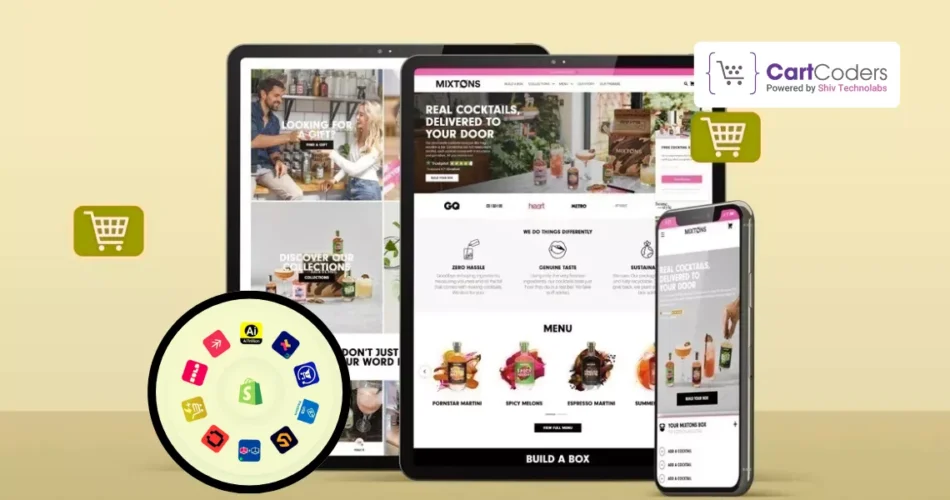
A Shopify sales channel app lets store owners sell products on more than just their online store. These apps connect Shopify with platforms like social networks, search platforms, and large selling platforms, all from one dashboard. Orders, products, and inventory stay linked, which helps avoid manual work and data gaps.
As buying habits change, customers no longer shop from a single place. Some prefer social apps, some search on Google, and others trust large platforms they already use. This is why sales channel apps have become an important part of running a Shopify store, especially for brands that want a wider reach without adding extra systems.
In this guide, you’ll find a hand-picked list of the top 12 best Shopify sales channel apps, updated for 2026. The list focuses on real use cases, clear features, and practical limits, so store owners can choose the right app based on where their customers prefer to buy.
Sell on More Platforms with Shopify
Connect your store to the right sales channels and manage everything from one place.
What Is a Shopify Sales Channel App?
A Shopify sales channel app allows store owners to sell products on different platforms while managing everything from the Shopify admin. Instead of handling each platform separately, the app connects product listings, inventory, and orders in one place.
How Shopify Sales Channel Apps Work?
Products from your Shopify store are shared with selected platforms
Inventory updates stay in sync across channels
Orders from each channel appear inside Shopify
Pricing, product details, and availability remain consistent
How to Add a Sales Channel in Shopify
Open Shopify Admin
Go to Settings → Apps and sales channels
Click Add sales channel
Choose the app from the Shopify App Store
Install and complete the setup steps
Sales channel apps are useful for stores that want to sell through social apps, search platforms, or large selling platforms without managing multiple systems.
How We Picked These 12 Shopify Sales Channel Apps?
This list is based on practical checks that matter to Shopify store owners. The goal was to focus on apps that work well in real store setups, not just popular names.
We reviewed each app using the points below:
Channel coverage: Apps that connect Shopify with social apps, search platforms, or large selling platforms.
Product and order sync: Products, inventory, and orders should appear correctly inside Shopify without delays.
Setup effort: Apps that can be added without complex steps or heavy technical work.
Control inside Shopify: Ability to manage listings, variants, pricing, and stock from the Shopify admin.
App updates and support: Apps that receive regular updates and provide basic help when issues arise.
User feedback: Ratings, reviews, and common issues mentioned by store owners on the Shopify App Store.
Each app in this list meets these checks and supports selling beyond a single Shopify storefront.
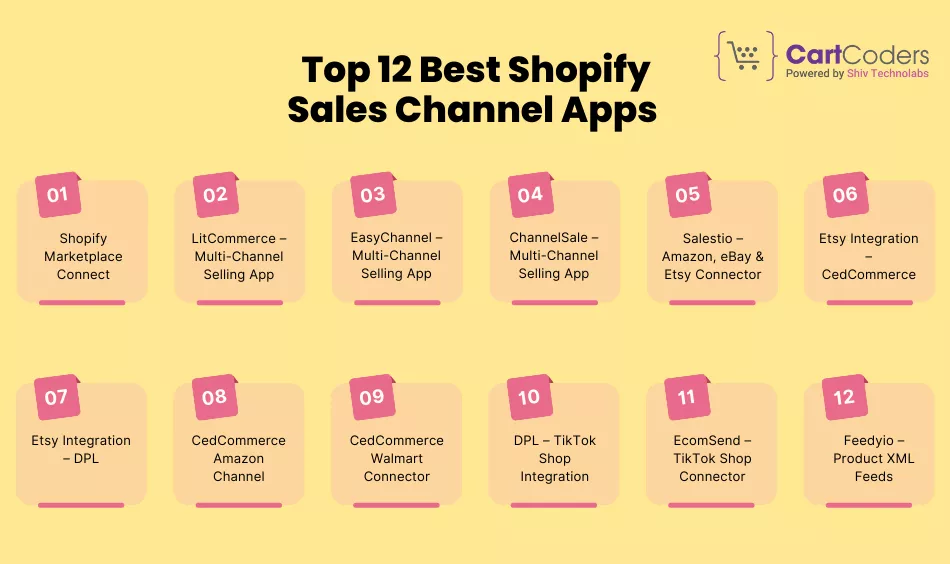
Top 12 Best Shopify Sales Channel Apps (Updated for 2026)
Important note: All apps listed below are Shopify App Store apps built to connect Shopify with external selling platforms. Each app works inside the Shopify admin and is installed like any other Shopify app.
1) Shopify Marketplace Connect
Best for:
Stores that want to sell on major selling platforms using one Shopify dashboard.
Connected platforms:
Amazon, Walmart, eBay, Target Plus
What this app does:
Shopify Marketplace Connect is an official Shopify app that helps store owners list products, manage inventory, and handle orders across large platforms directly from Shopify.
Key features:
Create and manage product listings for supported platforms
Keep inventory levels in sync with Shopify
Import marketplace orders into Shopify
Manage pricing and variants from one place
Central dashboard for multi-platform selling
Basic setup flow:
Install the app from the Shopify App Store
Connect seller accounts for each platform
Match or create product listings
Set stock and pricing rules
Test sync before publishing
Limits to know:
Seller approval is required on each platform
Product rules differ by category and platform
Listing reviews may take time
Some features depend on platform policies
Pricing note:
Paid app. Pricing depends on usage and connected platforms.
2) LitCommerce – Multi-Channel Selling App
Best for:
Stores that want to sell on several platforms using one Shopify app.
Connected platforms:
Amazon, eBay, Etsy, Walmart, TikTok Shop, and others
What this app does:
LitCommerce connects your Shopify store with multiple selling platforms so products, inventory, and orders can be handled from one place.
Key features:
Sync products from Shopify to supported platforms
Keep inventory levels updated across channels
Import orders into Shopify for fulfillment
Map categories, variants, and pricing per platform
Dashboard to track listing status and errors
Basic setup flow:
Install the app from the Shopify App Store
Connect seller accounts for each platform
Choose products to sync
Set pricing and stock rules
Publish listings and check sync status
Limits to know:
Each platform follows its own product rules
Some platforms need seller approval before listing
Sync speed may depend on the plan level
Advanced features vary by platform
Pricing note:
Paid app with tiered plans based on platform count and usage.
Turn Shopify into a Multi-Channel Store
Manage products, orders, and inventory across platforms without extra systems.
3) EasyChannel – Multi-Channel Selling App
Best for:
Stores that want a single system to manage listings and orders across several platforms.
Connected platforms:
Amazon, Etsy, Walmart, eBay, TikTok Shop, and others
What this app does:
EasyChannel connects Shopify with multiple selling platforms and helps manage products, inventory, and orders from one dashboard.
Key features:
Product listing and update support across platforms
Inventory sync to reduce stock mismatches
Order import into Shopify for fulfillment
Category and attribute mapping for each platform
Error and status tracking inside the app
Basic setup flow:
Install the app from the Shopify App Store
Connect your platform seller accounts
Map product categories and attributes
Select products and set rules
Run test sync before publishing
Limits to know:
Initial setup can take time for large catalogs
Platform rules differ by category
Some features depend on subscription plan
Platform-side approvals may delay listings
Pricing note:
Paid app. Pricing varies based on connected platforms and product volume.
4) ChannelSale – Multi-Channel Selling App
Best for:
Stores that want centralized control over listings and orders across major selling platforms.
Connected platforms:
Amazon, eBay, Walmart, and other supported platforms
What this app does:
ChannelSale connects your Shopify store with multiple selling platforms and helps manage product listings, inventory updates, and incoming orders from one place.
Key features:
Create and manage product listings across platforms
Sync inventory levels with Shopify
Import orders into Shopify for fulfillment
Support for variant and pricing rules per platform
Dashboard to track listing and order status
Basic setup flow:
Install the app from the Shopify App Store
Connect your seller accounts
Map product categories and attributes
Choose products to publish
Verify sync and go live
Limits to know:
Setup may feel complex for first-time users
Platform-specific rules apply to listings
Some features depend on the selected plan
Listing approval times vary by platform
Pricing note:
Paid app with plans based on usage and connected platforms.
5) Salestio – Amazon, eBay & Etsy Connector
Best for:
Stores that focus on Amazon, eBay, or Etsy and want direct control from Shopify.
Connected platforms:
Amazon, eBay, Etsy
What this app does:
Salestio links your Shopify store with selected selling platforms and allows product listings, inventory updates, and order handling from one place.
Key features:
Create and manage listings for supported platforms
Sync inventory levels with Shopify stock
Import orders into Shopify for fulfillment
Support for product variants and pricing rules
Order status updates inside Shopify
Basic setup flow:
Install the app from the Shopify App Store
Connect Amazon, eBay, or Etsy seller accounts
Map products and categories
Set pricing and inventory rules
Publish listings and test order flow
Limits to know:
Limited to three platforms only
Category and listing rules differ by platform
Some advanced controls require higher plans
Platform-side approval may be required
Pricing note:
Paid app with plans based on platform usage and order volume.
6) Etsy Integration – CedCommerce
Best for:
Stores that sell handmade, custom, or creative products on Etsy and want Shopify-based control.
Connected platforms:
Etsy
What this app does:
Etsy Integration by CedCommerce connects Shopify with Etsy, allowing store owners to manage Etsy listings, inventory, and orders directly from Shopify.
Key features:
Create and update Etsy listings from Shopify
Two-way inventory sync to avoid overselling
Import Etsy orders into Shopify
Variant and pricing support
Central order and product control
Basic setup flow:
Install the app from the Shopify App Store
Connect your Etsy seller account
Match or create product listings
Set inventory and pricing rules
Test sync and start selling
Limits to know:
Works only with Etsy
Etsy listing rules and category limits apply
Large catalogs may take time to sync
Some features are plan-based
Pricing note:
Paid app with tiered plans based on product count and order volume.
7) Etsy Integration – DPL
Best for:
Stores that want a simple Etsy connection without extra marketplace features.
Connected platforms:
Etsy
What this app does:
Etsy Integration by DPL connects your Shopify store with Etsy and allows product listings, inventory updates, and order handling from Shopify.
Key features:
Create and manage Etsy listings from Shopify
Inventory sync to reduce stock mismatch
Import Etsy orders into Shopify
Support for variants and pricing rules
Basic order and product dashboard
Basic setup flow:
Install the app from the Shopify App Store
Connect your Etsy seller account
Link or create product listings
Set inventory and price rules
Run a test sync before selling
Limits to know:
Works only with Etsy
The feature set is simpler than that of multi-platform apps
Etsy category and listing rules apply
Sync speed depends on the plan level
Pricing note:
Paid app with plans based on product and order limits.
8) CedCommerce Amazon Channel
Best for:
Stores that sell on Amazon and want a Shopify-based listing and order control.
Connected platforms:
Amazon
What this app does:
CedCommerce Amazon Channel connects your Shopify store with Amazon, allowing product listings, inventory updates, and order handling directly from Shopify.
Key features:
Create and manage Amazon listings from Shopify
Sync inventory levels to avoid overselling
Import Amazon orders into Shopify
Support for variants and pricing rules
Order status and fulfillment tracking
Basic setup flow:
Install the app from the Shopify App Store
Connect your Amazon seller account
Match or create product listings
Set pricing and stock rules
Test sync before going live
Limits to know:
Amazon seller approval is required
Category-specific rules apply
Some features depend on planthe level
Listing approval times vary
Pricing note:
Paid app with tiered plans based on usage and order volume.
9) CedCommerce Walmart Connector
Best for:
Stores that want to sell on Walmart while managing products and orders from Shopify.
Connected platforms:
Walmart
What this app does:
CedCommerce Walmart Connector links your Shopify store with Walmart and helps manage listings, inventory, and orders from within Shopify.
Key features:
Create and update Walmart product listings
Sync inventory levels with Shopify stock
Import Walmart orders into Shopify
Support for variant and pricing rules
Central view of listing and order status
Basic setup flow:
Install the app from the Shopify App Store
Connect your Walmart seller account
Map product categories and attributes
Choose products and set rules
Test sync and publish listings
Limits to know:
Walmart seller approval is required
Product and category rules are strict
Setup may take time for large catalogs
Some features depend on the selected plan
Pricing note:
Paid app with plans based on product count and order volume.
10) DPL – TikTok Shop Integration
Best for:
Stores that want to sell products through TikTok Shop using Shopify as the main control panel.
Connected platforms:
TikTok Shop
What this app does:
DPL TikTok Shop Integration connects Shopify with TikTok Shop and allows store owners to manage products, inventory, and orders from Shopify.
Key features:
Sync Shopify products to TikTok Shop
Keep inventory levels updated across both systems
Import TikTok Shop orders into Shopify
Support for pricing and variant mapping
Order status updates inside Shopify
Basic setup flow:
Install the app from the Shopify App Store
Connect your TikTok Shop seller account
Map products and categories
Set pricing and inventory rules
Test order flow and publish products
Limits to know:
TikTok Shop availability depends on the region
Category and product rules vary
Platform approval may be required
Sync speed may depend on the plan level
Pricing note:
Paid app with tiered plans based on product and order volume.
11) EcomSend – TikTok Shop Connector
Best for:
Stores that rely heavily on TikTok Shop and want smooth order and fulfillment handling from Shopify.
Connected platforms:
TikTok Shop
What this app does:
EcomSend connects your Shopify store with TikTok Shop and focuses on product listing, order sync, and fulfillment flow using Shopify as the base system.
Key features:
Sync Shopify products to TikTok Shop
Import TikTok Shop orders into Shopify
Inventory sync to reduce stock issues
Support for fulfillment status updates
Multi-store support for TikTok-focused sellers
Basic setup flow:
Install the app from the Shopify App Store
Connect your TikTok Shop account
Select products to sync
Set inventory and fulfillment rules
Test orders before full launch
Limits to know:
Works only with TikTok Shop
Region rules apply based on TikTok policies
Some features depend on subscription level
Platform approval may be required
Pricing note:
Paid app with plans based on order volume and features.
12) Feedyio – Product XML Feeds
Best for:
Stores that need product feeds for multiple platforms where direct order sync is not required.
Connected platforms:
Google Shopping, Facebook Catalog, Pinterest, and other feed-based platforms
What this app does:
Feedyio creates product data feeds from your Shopify store and sends them to platforms that rely on feeds rather than direct order connections.
Key features:
Create XML, CSV, or data feeds from Shopify products
Support for multiple platforms using one feed system
Auto-updates for price, stock, and product details
Feed filtering and product rule controls
Error reporting for feed issues
Basic setup flow:
Install the app from the Shopify App Store
Select the platform or feed type
Map product fields and attributes
Generate the feed URL
Submit the feed to the chosen platform
Limits to know:
No direct order sync into Shopify
Platform approval is handled outside Shopify
Feed rules differ by platform
Works best for catalog-based selling
Pricing note:
Paid app with plans based on feed count and product volume.
How to Choose the Right Shopify Sales Channel App?
Not every store needs all sales channel apps. The right choice depends on where your customers already buy and how much control you want inside Shopify.
If you sell on large platforms, pick apps made for Amazon, Walmart, or eBay. These handle strict listing rules and order flow better.
If Etsy is your main focus, Etsy-specific apps work best for handmade or custom products and follow Etsy’s product rules closely.
If you sell through TikTok Shop, TikTok-focused apps are better for handling product sync and order flow tied to short-video sales.
If you sell on many platforms, multi-channel apps reduce manual work by syncing products and orders from one place.
If you only need product visibility, feed-based apps work well when orders are completed outside of Shopify.
This approach helps avoid installing apps you don’t need and keeps store management simple.
Need Help with Shopify Sales Channel Apps?
Choosing the right sales channel app is only one part of the process. Many stores need custom logic, clean data flow, or app-level changes to make everything work smoothly with their business goals.
CartCoders helps brands plan, build, and improve Shopify apps that support real selling use cases. As a Shopify app development company in UK, the team works on custom app builds, third-party app changes, and sales channel workflows that fit store needs without breaking existing setups.
If your store needs more than a ready-made app, getting expert support early can save time, cost, and future rework.
Conclusion
Shopify sales channel apps help stores sell beyond a single storefront while keeping products and orders under control inside Shopify. The key is not to install every app available, but to choose the ones that match where your customers already buy.
Some stores do well with one focused app, while others need a multi-channel setup. Starting with the right sales channel app reduces manual work, avoids stock issues, and keeps daily operations simple as selling platforms change over time.
Choosing carefully and adding channels step by step is the safest way to grow sales across platforms in 2026 and beyond.
CartCoders builds custom Shopify apps and sales channel solutions – talk to Shopify experts to get it done right.
FAQs
What is a Shopify sales channel app?
A Shopify sales channel app is a Shopify App Store app that connects your store with an external selling platform, allowing products and orders to be managed from Shopify.
Are Shopify sales channel apps built for Shopify?
Yes. These apps are created for Shopify, installed from the Shopify App Store, and work inside the Shopify admin.
Can I use more than one sales channel app?
Yes. You can install and use multiple sales channel apps, as long as their settings do not conflict with inventory or pricing rules.
Do sales channel apps sync inventory automatically?
Most sales channel apps sync inventory between Shopify and connected platforms. Sync timing and accuracy depend on the app and platform rules.
Do these apps affect my Shopify store’s speed?
No. Sales channel apps mainly run in the background and do not impact storefront loading speed.
Are Shopify sales channel apps free?
Some apps offer free plans or trials, but many are paid. Pricing usually depends on product count, order volume, or connected platforms.
Can I remove a sales channel app later?
Yes. You can uninstall a sales channel app at any time from Shopify without affecting your main store products.
Which Shopify sales channel app is best?
The best app depends on where you sell. Etsy sellers should choose Etsy-focused apps, marketplace sellers should choose Amazon or Walmart connectors, and multi-platform sellers should choose multi-channel apps.
As the CTO at Shiv Technolabs & CartCoders, I am liable for instigating, planning, integrating, and implementing the organization's strategic orientation.
I gather the most significant tech news in addition to sharing the information I gained while serving as the CTO of Shiv Technolabs, a renowned web and mobile app development company. I am pleased to answer questions as a most valuable expert for Shiv Technolabs Private Limited and to share my experience. I offer a keen insider's perspective on technical advancements.
 eCommerce
Solution
eCommerce
Solution







 INDIA
INDIA


 USA
USA
 CANADA
 AUSTRALIA