Managing inventory across multiple locations can quickly become confusing without the right structure. Stock may sit in one warehouse while another location runs out, leading to delayed orders and unhappy customers. As businesses grow, manual tracking and separate systems stop working.
Multi-location inventory management helps businesses track stock across warehouses, stores, and fulfillment centers from one place. With clear strategies, practical habits, and the right tools, companies can reduce stock errors, ship orders faster, and keep inventory under control as operations expand.
Faster Delivery, Lower Shipping Costs.
Ship from the warehouse closest to your customer with our smart order routing solutions.
What Multi-Location Inventory Management Means and Why it Matters?
Multi-location inventory management refers to the process of tracking and controlling products stored in more than one physical location. These locations may include warehouses, retail stores, distribution centers, or third-party fulfillment partners.
Instead of managing stock separately for each location, businesses maintain one shared inventory view. This allows teams to check available stock, move items between locations, and fulfill orders from the most suitable place without confusion or manual checks.
This approach becomes necessary when order volume increases or when customers expect faster delivery from nearby locations.
Reduces order delays caused by manual stock checks
Controls overstock and storage costs at each location
Improves order fulfillment accuracy across locations
Makes stock transfers between locations easier to manage
Helps teams make faster daily inventory decisions
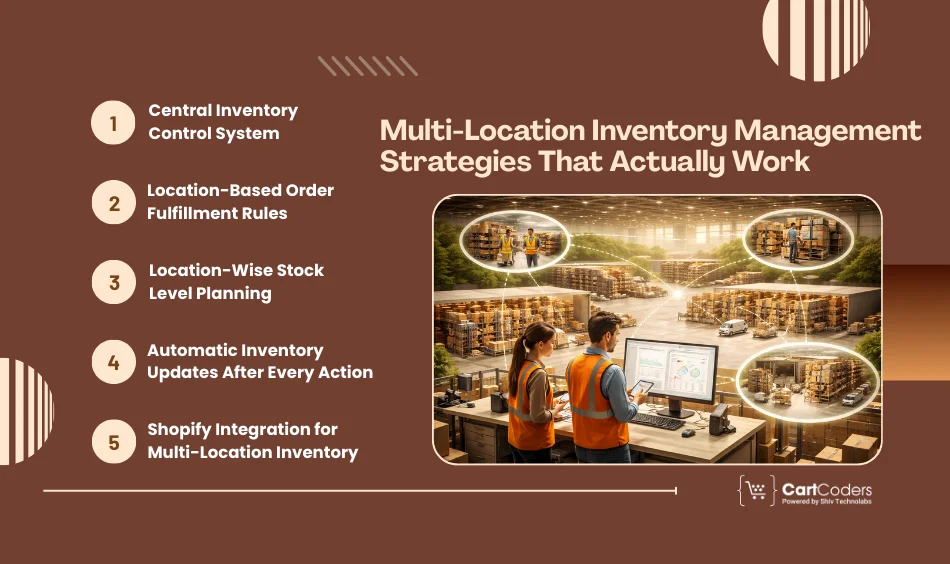
Multi-Location Inventory Management Strategies That Actually Work
When inventory sits across multiple locations, small gaps in planning can turn into daily issues. These strategies focus on clarity, control, and consistency so teams always know what stock is available and where it should move.
Central Inventory Control System
All locations should connect to one shared inventory system. This system acts as the single source of truth for stock data across warehouses, stores, and fulfillment centers.
When inventory is updated in one location, the change reflects everywhere. This removes confusion caused by separate tools or manual tracking and helps teams avoid selling items that are already out of stock.
Location-Based Order Fulfillment Rules
Orders should follow clear rules that decide which location will ship them. These rules may depend on customer location, stock availability, or delivery timelines.
By assigning orders to the right location, businesses reduce shipping delays and avoid unnecessary stock movement between locations.
Location-Wise Stock Level Planning
Each location should have its own stock limits based on demand patterns. High-demand locations need more inventory, while slower locations should hold less.
This approach keeps stock balanced and reduces both overstock costs and last-minute stock transfers.
Automatic Inventory Updates After Every Action
Inventory must update immediately after sales, returns, cancellations, or transfers. Delayed updates create incorrect stock numbers and lead to order errors.
Automatic updates reduce manual work and keep inventory data reliable across all sales channels.
Shopify Integration for Multi-Location Inventory
Shopify supports inventory tracking by location when connected with warehouses, ERPs, or third-party fulfillment systems. With the right setup, stock updates sync automatically across all connected locations.
Shopify integration services in the UK allow online stores to show correct stock availability, route orders accurately, and manage growing order volume without constant manual checks.
Never Run Out of Stock Again.
We set up automated reorder alerts for every location so your shelves stay full.
Best Practices for Multi-Location Inventory Management
Managing inventory across locations becomes easier when daily processes are clear and repeatable. These best practices focus on reducing confusion, keeping stock data reliable, and supporting smooth order handling.
Keep One Inventory Source for All Locations
When different teams rely on different systems, stock data quickly becomes unreliable. A single inventory system helps everyone work with the same numbers.
This approach works best when:
Sales, returns, and transfers update stock automatically
All locations report to the same dashboard
Manual overrides are limited to approved users
Record Stock Transfers Without Delay
Stock often moves between locations due to demand changes. If these transfers are not recorded on time, inventory numbers lose accuracy.
To avoid this:
Log transfers as soon as stock leaves a location
Confirm stock arrival at the receiving location
Keep transfer records tied to order or batch numbers
Maintain Clear Location Structure
Locations should be easy to identify for both staff and systems. Confusing names or frequent changes lead to wrong order routing.
A clear structure helps with:
Faster order assignment
Easier reporting
Fewer fulfillment mistakes
Review Inventory Patterns Regularly
Inventory data tells a story when reviewed consistently. Regular checks help spot demand differences between locations and highlight items that need repositioning.
This review often includes:
Comparing sales by location
Identifying slow-moving stock
Planning redistribution before shortages occur
Prepare Inventory Before High-Order Periods
Inventory planning should happen before order volume increases, not after issues start appearing. Moving stock early reduces pressure during busy periods.
This is especially important for:
Seasonal sales
Product launches
Region-specific demand changes
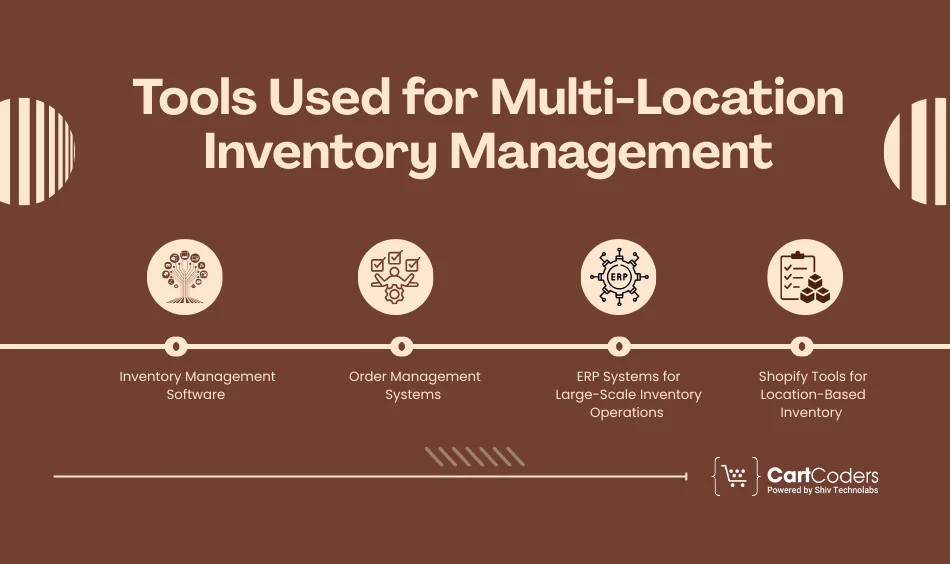
Tools Used for Multi-Location Inventory Management
As inventory operations expand across locations, the right tools help maintain accuracy and control. Each tool serves a specific purpose, from tracking stock to handling orders and syncing systems.
Inventory Management Software
Inventory management software tracks stock levels at each location and records every inventory action, such as sales, returns, and transfers.
OMS tools are especially useful when order volume is high or when sales happen across multiple channels.
ERP Systems for Large-Scale Inventory Operations
ERP systems manage inventory along with purchasing, accounting, and supplier data. They are designed for businesses with complex stock movement and reporting needs.
ERP systems are often chosen when inventory control needs to connect closely with finance and procurement.
Shopify Tools for Location-Based Inventory
Shopify includes built-in support for managing inventory by location. When set up properly, it allows businesses to assign stock to warehouses, retail stores, or fulfillment partners.
How CartCoders Helps with Multi-Location Inventory Management?
Managing inventory across multiple locations often fails due to incorrect setup, poor system connections, or a lack of clear inventory rules. This is where CartCoders fits into the picture.
CartCoders works with growing and high-volume ecommerce businesses to set up location-based inventory systems that actually work in daily operations. The focus is on connecting Shopify with warehouses, ERPs, and order systems so stock updates stay accurate across all locations.
CartCoders helps businesses by:
Setting up Shopify location-based inventory correctly
Fixing stock sync issues that cause overselling or order delays
Creating clear fulfillment rules for multi-location orders
Instead of managing inventory manually or fixing issues after orders fail, businesses get a structured setup that supports growth and reduces operational stress.
Conclusion
Managing inventory across multiple locations requires clear planning, reliable systems, and consistent daily practices. Without structure, stock mismatches and order delays become common as operations grow.
By following the right strategies, maintaining practical habits, and using tools that support location-based inventory, businesses can keep stock accurate and orders moving smoothly. When systems are set up correctly, multi-location inventory management becomes predictable and easier to control, even as order volume and locations increase.
Multi-location inventory management is the process of tracking and controlling stock stored in more than one warehouse, store, or fulfillment center using a single system. It helps businesses know where inventory is located and how much stock is available at each location.
Why is multi-location inventory management important for growing businesses?
As businesses add more locations, manual tracking leads to stock errors and delayed orders. A structured inventory approach reduces overselling, improves order accuracy, and supports faster fulfillment across regions.
How does Shopify handle inventory across multiple locations?
Shopify allows inventory to be assigned to different locations such as warehouses, retail stores, or fulfillment partners. When configured correctly, stock updates reflect by location and orders can be fulfilled based on availability rules.
What problems occur without proper multi-location inventory setup?
Common issues include selling out-of-stock items, delayed shipping, incorrect stock counts, and frequent manual corrections. These problems increase as order volume and locations grow.
Do businesses need an ERP for multi-location inventory management?
Not always. Small to mid-sized businesses can manage inventory using inventory software or Shopify-based tools. ERP systems are usually needed when inventory operations connect closely with purchasing, suppliers, and accounting.
How can businesses reduce stock imbalance between locations?
Stock imbalance can be reduced by setting location-wise stock limits, reviewing sales data regularly, and moving inventory before shortages occur. Automated updates also help maintain accurate stock levels.
Can third-party warehouses be included in multi-location inventory systems?
Yes. Third-party fulfillment centers can be connected through inventory tools, order systems, or ERP integrations. This allows businesses to track external stock and route orders correctly.
When should a business seek expert help for inventory management?
Expert help is useful when stock errors repeat frequently, order fulfillment slows down, or system connections fail. Proper setup at the right stage prevents long-term operational issues.
As the CTO at Shiv Technolabs & CartCoders, I am liable for instigating, planning, integrating, and implementing the organization's strategic orientation.
I gather the most significant tech news in addition to sharing the information I gained while serving as the CTO of Shiv Technolabs, a renowned web and mobile app development company. I am pleased to answer questions as a most valuable expert for Shiv Technolabs Private Limited and to share my experience. I offer a keen insider's perspective on technical advancements.
 eCommerce
Solution
eCommerce
Solution








 INDIA
INDIA


 USA
USA
 CANADA
 AUSTRALIA