
Choosing a game development website for kids looks simple at first. Most platforms promise fun learning, creativity, and easy game creation. Parents often focus on visuals and features but miss safety settings that matter more than anything else. A child does not just build games on these websites. They create profiles, share projects, interact with others, and sometimes communicate with strangers.
This makes safety checks a must before letting kids use any online game-making platform. In this guide, parents will learn how to judge whether a game development website truly fits a child’s age, privacy needs, and online safety expectations.
What “Safe” Really Means on a Game Development Website for Kids
Safety does not mean blocking creativity. It means giving kids space to build games without exposure to risks they cannot handle yet.
A safe game development website for kids should protect children in five key areas:
- Personal data protection
- Communication control
- Content moderation
- Purchase and ad limits
- Clear parent visibility
When these areas stay unchecked, kids may face issues such as public profile exposure, unwanted messages, or content they should never see.
Common Risks Parents Often Miss
Many parents assume a platform built for kids automatically stays safe. That assumption causes problems later.
Here are the most common risks found on game-making websites:
- Profiles visible to the public by default
- Chat or messaging turned on automatically
- Games shared openly with comments enabled
- Third-party ads tracking behavior
- In-game purchases without approval
- Weak reporting systems
These risks exist even on popular platforms if parents skip the setup phase.
Parent Safety Checklist Before Signup
Parents should review every game development website for kids using a clear checklist. This step takes less than 15 minutes and avoids long-term issues.
Parent Safety Checklist
| Safety Check | What to Look For | Why It Matters | How Parents Can Check |
| Age guidance | Clear age limits | Platforms treat kids and teens differently | Check homepage or terms |
| Privacy policy | Simple data explanation | Kids’ data should not go public | Read first 2 sections |
| Parental consent | Required for under 13 | Protects child identity | Signup process |
| Chat controls | On / off / restricted | Reduces stranger contact | Account settings |
| Content moderation | Filters + review system | Blocks unsafe projects | Community rules |
| Public sharing | Optional, not default | Limits exposure | Project settings |
| Ads & tracking | Minimal or none | Avoids profiling kids | Privacy section |
| Purchases | Locked by password | Prevents accidental spending | Payment settings |
| Reporting tools | Easy to access | Helps kids flag problems | Try test report |
| Account removal | Clear deletion steps | Gives parents control | Help or support page |
If a platform fails more than two of these checks, parents should reconsider.
Understanding COPPA and Kids’ Online Privacy
COPPA protects children under 13 when they use online services. Any game development website for kids targeting younger users must follow this rule.
COPPA requires platforms to:
- Ask for parental consent before collecting data
- Explain what data they collect and why
- Allow parents to delete child data
- Keep personal details secure
Parents should not search for legal terms. Instead, they should ask one question:
Does this platform explain data collection in plain language?
If the answer is no, that platform does not deserve trust.
Green Flags vs Red Flags Parents Should Notice
Green Flags
- Profiles stay private by default
- Chat remains off until parents allow it
- No real names or photos required
- Parent dashboard exists
- Clear help and support access
Red Flags
- Public profiles during signup
- Chat enabled without warning
- Hard-to-find privacy policy
- Ads based on activity
- No account deletion steps
Parents should trust patterns, not promises.
Why Safety Setup Comes Before Learning Tools
Many parents compare platforms based on game features, templates, or coding levels. That approach comes second.
A game development website for kids must first pass safety checks. Only then should parents evaluate game tools, creativity options, and learning depth.
Safe Game Development Website for Kids
A game development website for kids becomes safer only when parents set controls correctly. Many platforms offer safety options, but they do not apply them automatically. Parents must review, adjust, and revisit these settings as kids grow and start sharing projects more often.
This part explains which parental controls matter most, how age affects safety needs, and how parents can test any game-making website in minutes.
Parental Controls That Matter Most on Game-Making Platforms
Not all controls protect kids in the same way. Some settings look helpful but do little in real situations. Parents should focus on controls that reduce contact risks and limit public exposure.
Key Parental Controls Parents Should Look For
| Control Type | What It Does | Why It Matters for Kids |
| Communication controls | Turns chat on, off, or limited | Reduces contact with strangers |
| Content filters | Blocks unsafe words or projects | Keeps shared games appropriate |
| Sharing permissions | Controls who sees projects | Prevents public exposure |
| Friend requests | Requires approval | Stops unknown users |
| Time limits | Caps daily use | Helps manage screen habits |
| Purchase locks | Requires password | Avoids accidental spending |
| Activity logs | Shows recent actions | Gives parents visibility |
If a game development website for kids lacks communication controls, parents should treat it as high risk.
Chat and Community Safety: What Parents Must Check
Game-making platforms often include communities where users share projects, comment, or collaborate. These areas need close attention.
Parents should check:
- Is chat turned off by default?
- Can kids receive direct messages?
- Can strangers comment on games?
- Does reporting work in one click?
Safe platforms allow parents to block chat completely or restrict it to approved contacts. Kids should never manage these settings alone.
Safe Game Development Websites for Kids by Age Group
Age plays a major role in platform safety. A tool that works for a teenager may not suit a younger child.
Age-Based Safety Guidance Table
| Age Group | What Works Best | What Parents Should Avoid |
| 6–8 years | Visual builders, no chat, private sharing | Public profiles, comments |
| 9–12 years | Block-based tools, limited sharing | Open communities |
| 13+ years | Advanced tools with controls | No parent visibility |
Parents should match tools to maturity, not skill level. A child may code well but still need privacy limits.
Why “Public by Default” Creates Problems
Some platforms allow kids to share games publicly with one click. Public sharing invites comments, ratings, and messages.
Parents should check:
- Are projects public by default?
- Can comments stay off?
- Can parents approve sharing?
A game development website for kids should keep sharing private unless parents decide otherwise.
Quick Test: Check Platform Safety in 15 Minutes
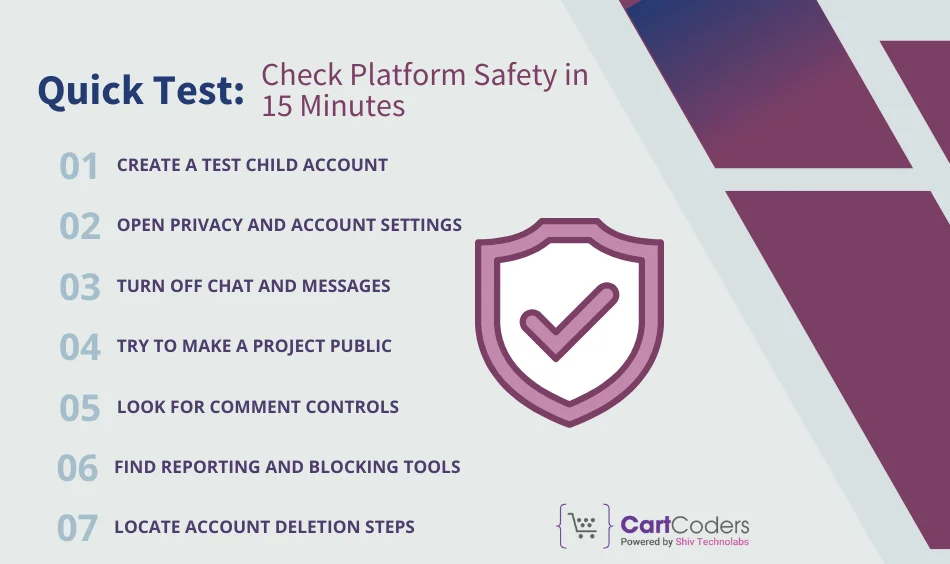
Parents do not need technical skills to test safety. This simple process works on any game-making website.
15-Minute Safety Test Steps
- Create a test child account
- Open privacy and account settings
- Turn off chat and messages
- Try to make a project public
- Look for comment controls
- Find reporting and blocking tools
- Locate account deletion steps
If parents struggle to find these options, the platform likely hides them.
Common Mistakes Parents Make With Game Development Websites
Even careful parents make small mistakes that reduce safety.
Mistakes to Avoid
- Leaving default settings unchanged
- Allowing real names or photos
- Ignoring project visibility settings
- Skipping purchase controls
- Never reviewing settings again
Safety settings need regular review as kids gain confidence and curiosity.
Why Safety Settings Need Ongoing Review
Kids change fast. A setting that works today may fail next year. New features, updates, and community tools appear often on game platforms.
Parents should:
- Review settings every month
- Talk with kids about sharing
- Watch how kids use the platform
A game development website for kids stays safe only when parents stay involved.
Safe Game Development Website for Kids
Parents often feel confident once they choose a game-making platform. Problems usually appear later, when kids start sharing more projects or interacting with others. A game development website for kids should stay safe not just on day one, but every time a child logs in.
This final part highlights warning signs parents should never ignore, offers a quick recap checklist, and answers common parent questions searched on Google.
Red Flags Parents Should Never Ignore
Some platforms look friendly on the surface but hide risky patterns underneath. Parents should step away immediately if they notice any of the following signs.
Major Red Flags on Game-Making Websites
- Public profiles forced during signup
- Chat turned on with no option to block
- Real names required for accounts
- Comments enabled by default
- Ads based on child activity
- No clear reporting option
- Support pages hard to find
- No way to delete child data
If a game development website for kids shows even two of these signs, parents should treat it as unsafe.
Why “Learning Value” Does Not Cancel Safety Risks
Many parents stay on unsafe platforms because kids enjoy the tools or show fast progress. Skill growth does not reduce online risks.
A child can:
- Build advanced games
- Understand logic well
- Still share too much personal info
Safety always comes first. Better tools exist on platforms that respect child privacy and parent control.
Final Parent Safety Checklist
Parents should return to this checklist anytime they review a platform or try a new one.
Quick Safety Recap Table
| Area | Parent Check |
| Profile | Private by default |
| Data | Clear data explanation |
| Consent | Parent approval for young users |
| Chat | Fully off or restricted |
| Sharing | Parent-controlled |
| Comments | Disabled or approved |
| Ads | Limited or none |
| Purchases | Locked |
| Reporting | Easy access |
| Removal | Simple deletion |
This checklist helps parents protect kids without blocking creativity.
How Parents Can Guide Kids Without Limiting Creativity
Kids use game-making websites to express ideas, not just to code. Parents should guide, not control.
Helpful actions include:
- Asking kids to explain what they built
- Reviewing projects together
- Talking about safe sharing
- Setting clear rules for public posts
- Encouraging private drafts before sharing
A game development website for kids works best when parents stay curious, not strict.
FAQs: Game Development Website for Kids (Safety & Privacy)
These questions match what parents search online and support answer-focused ranking.
A platform stays safe only when parents review privacy, chat, sharing, and data settings. No platform stays safe by default.
Parents should check profile visibility, chat settings, and whether projects stay private by default.
They can be safe if the platform asks for parent approval and explains how it handles child data.
Parents should turn chat off for younger kids and restrict it for older ones. Kids should not manage chat alone.
Kids can share games only when parents approve visibility and comments. Public sharing should never stay on by default.
Parents should review settings once a month or after platform updates.
If parents cannot find safety tools easily, they should switch platforms.
How CartCoders Helps Kids Learn Game Development Safely
Choosing the right game development website for kids takes time, research, and ongoing checks. Many parents struggle to balance creativity with safety, especially when platforms change settings or add new features.
CartCoders helps parents, schools, and learning programs choose kid-friendly game development platforms with safety in mind. Our team reviews tools based on age fit, privacy controls, sharing rules, and real-world use. We guide families on setting up accounts, adjusting controls, and creating safe learning paths for kids who want to build games online.
CartCoders also supports custom learning programs where kids can work on game projects in a guided, controlled environment. Parents stay informed, kids stay protected, and creativity grows without exposure to unnecessary risks.
If you want expert guidance before your child starts building games online, CartCoders can help you take the right first step.
Final Thoughts for Parents
A game development website for kids should help children build games without exposing them to risks they cannot handle yet. Parents do not need technical knowledge to keep kids safe. They need awareness, regular checks, and open conversations.
When safety settings stay clear and parents stay involved, kids can enjoy game creation with confidence.


