

Replatforming changes how your store runs. It affects your storefront, checkout, data, and every system that touches orders.
Teams often start with a new theme goal. Then they hit billing rules, inventory sync issues, or slow releases. A solid plan stops that spiral.

This guide walks you through the full process. You will set targets, map risks, and build a migration plan that protects revenue and SEO.
What is ecommerce replatforming?
Ecommerce replatforming means you move your store to a different commerce platform. You shift core commerce functions, not just design.
You change how products load, how checkout works, how promotions apply, and how integrations pass data. You also change how your team ships updates.
Replatforming vs migration vs rehosting
Replatforming: You move to a new platform and rebuild key parts of the store. You may also replace apps and integrations.
Migration: You move data or content from one system to another. A migration can happen with or without a platform change.
Rehosting: You keep the same platform but move hosting or infrastructure. You change where it runs, not what it is.
If your business needs new capabilities at the core level, you replatform. If you only move data, you run a migration project.
What changes during replatforming
Replatforming touches more than pages and products. It changes daily operations.
- Storefront structure: templates, collections, filters, search, merchandising rules
- Checkout: payments, taxes, shipping rates, fraud checks, and address rules
- Data: SKUs, variants, images, pricing, customer accounts, order history
- Integrations: ERP, CRM, OMS, PIM, email, reviews, loyalty, support desk
- Tracking: analytics events, ad pixels, conversion values, attribution rules
When should you replatform?
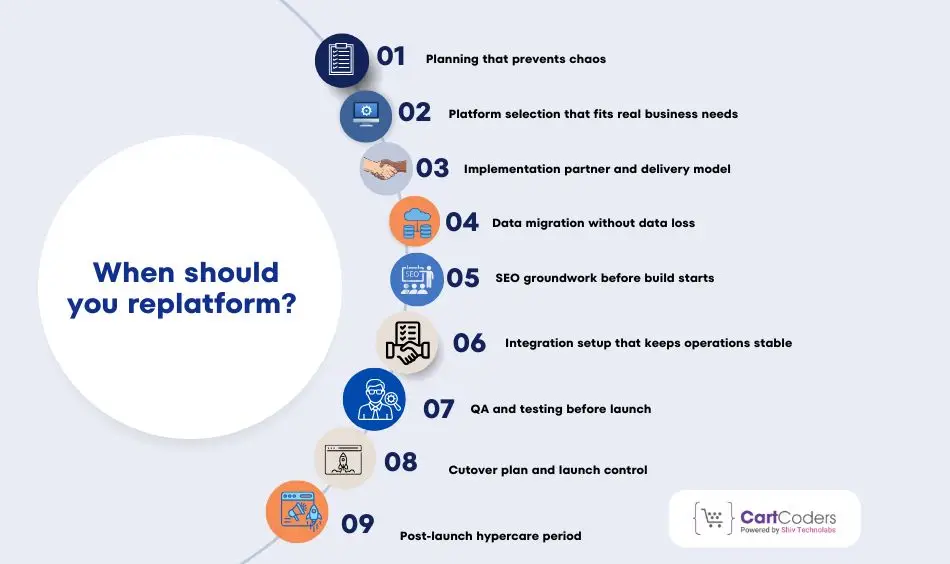
Replatforming costs time and focus. Do it when the current platform blocks growth or adds risk.
Use these signals to judge timing.
Clear signs your current platform holds you back
Speed and stability issues:- Pages load slowly, checkout fails, or uptime drops during campaigns. Your team spends time on fixes instead of progress.
Hard limits on catalog and content:- You struggle with large catalogs, complex variants, bundled products, or custom pricing. Your team uses workarounds for simple tasks.
Checkout limits:- You cannot support your payment methods, tax setup, shipping rules, or promo logic. Small changes take weeks.
Integration pain:- Your ERP, CRM, or OMS sync breaks. Inventory shows wrong counts. Orders get stuck. Support tickets spike.
High total cost of running the store:- You pay for many add-ons, custom patches, and agency fixes. The platform bill is only one part of the spend.
When a fix beats a full move
Sometimes you can avoid a platform change.
- You only need a new theme and better content structure
- You need app cleanup and tighter tracking
- You need better hosting, caching, or CDN setup
- You need process changes in merchandising and QA
If those fixes solve the root issue, hold the move. If core limits remain, plan a replatform.
Define success before you touch data
Teams fail when they start with tasks instead of outcomes. Set targets first, then plan work.
Pick KPIs by team
Marketing
- Organic sessions to top landing pages
- Conversion rate by channel
- Paid tracking accuracy and ROAS confidence
Merchandising
- Time to launch products and promos
- Search and filter usage
- Add-to-cart rate on key categories
Operations
- Inventory accuracy across locations
- Order routing success rate
- Refund and return cycle time
Customer support
- Checkout-related tickets
- “Where is my order” volume
- Account login success rate
Tech
- Release frequency
- Critical bug rate
- Site speed scores and error logs
Create a baseline
Pull numbers from the last 60–90 days. Use a stable period, not peak season only. You will compare post-launch results against this baseline. That keeps the project honest.
Phase 1: Planning that prevents chaos
Planning decides the result. It protects timelines, SEO, and customer trust.
Build the right team and roles
Assign owners early. Put names on tasks, not job titles.
- Business owner: goals, budget, scope decisions
- Tech lead: architecture, integrations, build quality
- Data lead: product and customer data mapping
- SEO lead: URL mapping, redirects, indexing checks
- Analytics lead: event plan, pixel setup, testing
- Ops lead: shipping, tax, fulfillment, returns
- CX lead: support flows, account access, templates
- QA lead: test plans and sign-off rules
Add a single decision owner. This person breaks ties and keeps scope under control.
Inventory everything that touches commerce
Create one spreadsheet and list every dependency. Keep it simple and complete.
Data
- Products, variants, SKUs, barcodes, images, media
- Categories/collections, tags, attributes, filters
- Price lists, discounts, bundles, subscriptions
- Customers, addresses, segments, consent flags
- Orders, refunds, returns, gift cards, store credit
Content
- Home, category pages, PDPs, blog, guides
- Landing pages from ads
- Policies, shipping, returns, FAQs
Integrations
- Payments, fraud, tax engine, shipping carriers
- ERP, CRM, OMS, WMS, PIM
- Email, SMS, loyalty, reviews, search, support
Tracking
- GA4, Google Ads, Meta, TikTok, server events (if used)
- Ecommerce events and revenue values
- Consent mode and cookie banner rules (if used)
This inventory shows scope. It also reveals what you can remove.
Choose a launch approach that fits the risk
Most teams pick “big bang” because it sounds fast. It also carries more risk.
Three common approaches:
Big bang launch:- You switch the entire store at once. Use this when scope stays tight and integrations stay simple.
Phased rollout:- You move one region, brand, or catalog section first. Use this when you run multiple storefronts or complex order routing.
Parallel run:- You keep old and new systems in place for a short time. Use this when you need validation on live order flows.
Pick the approach that matches your team capacity, not just your deadline.
Plan Your Ecommerce Migration With Skilled Specialists
CartCoders audits your current store before moving.


Start a risk register on day one
List risks in plain language. Add an owner and a mitigation step.
Common high-risk items:
- SEO traffic drop from URL changes
- Checkout payment failures
- Inventory mismatches after sync
- Tracking breaks that hide revenue
- Email flow issues (order confirmation, shipping updates)
- Customer login friction and password resets
This register becomes your launch checklist later.
Phase 2: Platform selection that fits real business needs
Platform choice shapes every future decision. A poor fit creates workarounds. A strong fit reduces daily friction.
Start with requirements, not brand names.
Define requirements in plain terms
Split requirements into three groups. Keep wording simple and testable.
Must-have
- Catalog size support and variant rules
- Checkout flow control
- Payment and tax support for your regions
- Inventory sync with your core system
- Basic SEO control (URLs, metadata, redirects)
Nice-to-have
- Built-in search and filters
- Content editing without dev help
- Promotion rules and bundles
- Multi-store or multi-currency support
Future needs
- New regions or brands
- B2B pricing and accounts
- Headless or API-first builds
- Advanced reporting
Write each item as a result, not a feature.
Example: “Merch team can schedule promos without code.”
Compare platforms using real scenarios
Avoid generic comparison charts. Use your own store cases.
Test these scenarios with each platform:
- Add a product with complex variants
- Run a site-wide discount with exclusions
- Handle partial refunds and exchanges
- Sync inventory across two locations
- Edit a landing page tied to ads
Ask vendors to show these flows live. Demos reveal limits fast.
Check ecosystem depth
Most stores depend on add-ons. The platform should support your stack.
Review:
- Payment gateways and fraud tools
- Tax and shipping providers
- ERP, CRM, OMS connectors
- Email and SMS tools
- Review and loyalty systems
Check update history and support quality. An add-on that breaks often becomes a hidden cost.
Decide build approach early
Your build style affects speed and cost.
Common approaches:
- Theme-based build with light custom work
- Custom storefront with platform APIs
- Hybrid setup with custom PDPs only
Match approach to team skills and roadmap. Avoid overbuilding on day one.
Phase 3: Implementation partner and delivery model
Many teams need outside help. Choose carefully.
When to bring an implementation partner
Use a partner if:
- You lack in-house platform experience
- You run complex integrations
- You face a fixed launch window
- You need parallel workstreams
If your team knows the platform well, keep work internal. Control stays higher that way.
How to evaluate partners
Look beyond case studies.
Ask about:
- Similar store size and region
- Data migration experience
- SEO-safe launch history
- Post-launch support model
- QA and testing process
Request references tied to replatforming, not just design.
Set clear delivery rules
Define how work moves from idea to live.
Agree on:
- Sprint length and demo cadence
- Change request process
- Bug severity levels
- Launch freeze window
- Ownership after go-live
Clarity here prevents late surprises.
Phase 4: Data migration without data loss
Data issues cause the most stress. Treat migration as a product, not a task.
Map data before moving anything
Create a mapping document.
For each data type, define:
- Source field
- Target field
- Format rules
- Required or optional
- Default values
Cover:
- Products and variants
- Images and media
- Categories and attributes
- Customers and addresses
- Orders, refunds, returns
Clean data at the source when possible. Bad data moved faster stays bad.
Decide what to migrate
You do not need everything.
Common choices:
- All products and active variants
- Customers from last 2–5 years
- Orders from last 1–3 years
- Archive older orders outside the store
Balance reporting needs with performance and cost.
Plan migration runs
Never migrate once.
Use three runs:
- Test run to validate mapping
- QA run to check counts and logic
- Final run close to launch
After each run, reconcile numbers.
Check:
- Product counts
- Variant counts
- Customer totals
- Order totals
- Inventory levels
Fix gaps before the next run.
Handle customer accounts with care
Passwords often cannot move between platforms.
Prepare a reset plan:
- Clear messaging
- Simple reset flow
- Support scripts for issues
This step affects trust. Plan it early.
Phase 5: SEO groundwork before build starts
SEO protection starts before design work.
Capture an SEO baseline
Export:
- Top pages by traffic
- Top queries and landing pages
- Backlinked URLs
- Index coverage status
Save this snapshot. You will compare after launch.
Create a URL mapping file
List every existing URL.
For each one:
- New URL destination
- Redirect type
- Status check
Aim for one-to-one mapping. Avoid chains and loops.
Flag risky changes
Mark pages with:
- High traffic
- Strong links
- Revenue impact
Protect these pages first. Design around them if needed.
Phase 6: Integration setup that keeps operations stable
Integrations move money, stock, and customer data. One break can stop orders.
Treat integrations as core features, not add-ons.
List all live data flows
Use a simple flow view. Start from order placement.
Track how data moves:
- Cart → checkout → payment
- Order → ERP or OMS
- Inventory → storefront
- Fulfillment → customer email
- Refund → payment gateway → accounting
This view shows hidden gaps early.
Payments and checkout flows
Checkout issues cause instant revenue loss. Test deeply.
Cover:
- All payment methods
- Authorization and capture rules
- Partial refunds and exchanges
- Failed payment retries
- Fraud checks and holds
Test with real cards in sandbox and live modes. Do not rely on happy-path tests only.
Tax and shipping logic
Tax errors create compliance risk. Shipping errors cause support load.
Validate:
- Tax rules by region
- Exemptions and overrides
- Shipping zones and rates
- Carrier label creation
- Tracking updates back to the store
Run test orders for every region you sell to.
ERP, CRM, and OMS sync
These systems drive fulfillment and reporting.
Confirm:
- Order push timing
- Inventory sync frequency
- Status updates and cancellations
- Returns and refunds flow
- Error handling and retries
Log failures clearly. Silent errors cause damage.
Phase 7: QA and testing before launch
Testing prevents chaos at launch. Plan it in layers.
Build a full test plan
Cover all roles.
Functional tests
- Browse, search, filter
- Add to cart and checkout
- Account creation and login
- Order confirmation emails
Regression tests
- Existing features after each change
- Core flows after app updates
Load tests
- Traffic spikes
- Concurrent checkouts
- Search response time
Security tests
- Admin access rules
- Payment handling
- Data exposure risks
Test analytics and tracking
Tracking issues hide problems.
Verify:
- Page view events
- Add-to-cart events
- Checkout steps
- Purchase and revenue values
- Ad platform signals
Match numbers with test orders. Fix gaps before launch.
Content and UX checks
Review every page type.
Check:
- Images and media
- Pricing display
- Filters and sorting
- Mobile layout
- Error messages
Use real devices. Desktop checks alone miss issues.
User acceptance sign-off
Define clear rules.
Each team signs off on:
- Their KPIs
- Their workflows
- Known gaps with acceptance
No sign-off means no launch.
Phase 8: Cutover plan and launch control
Launch day needs a script. Avoid last-minute decisions.
Prepare for cutover
Before launch:
- Freeze content and catalog changes
- Pause non-critical jobs
- Final data sync
- Lower DNS TTL
- Confirm certificates and CDN rules
Share a launch timeline with owners and times.
Execute launch steps
Follow the order.
Typical flow:
- Switch storefront traffic
- Run smoke tests
- Place real orders
- Confirm payment capture
- Check order sync and emails
Log every result. Do not assume success.
Keep a rollback plan ready
Know when to roll back.
Define:
- Failure triggers
- Rollback steps
- Decision owner
- Communication plan
A clear rollback plan reduces panic.
Phase 9: Post-launch hypercare period
The first weeks matter most.
Monitor daily signals
Track:
- Order volume
- Payment success rate
- Inventory accuracy
- Page speed
- Error logs
Review dashboards twice a day at first.
SEO checks after launch
Watch:
- Index coverage
- Redirect errors
- Traffic drops on key pages
- Ranking changes
Fix issues fast. Delays increase loss.
Support and bug triage
Set severity levels:
- Blocker
- High
- Medium
- Low
Fix blockers same day. Schedule others in short cycles.
Plan the next release window
List features you delayed on purpose.
Examples:
- Advanced promotions
- Personalization rules
- New payment options
This keeps momentum steady.
Common replatforming mistakes to avoid
Teams repeat the same errors.
- Skipping data cleanup
- Underestimating SEO work
- Testing only happy paths
- Launching without rollback plans
- Ignoring analytics validation
Avoiding these saves weeks.
Final checklist before calling the project done
Confirm:
- All orders flow end to end
- Inventory matches across systems
- Payments settle correctly
- Tracking reports real revenue
- Support team has scripts and access
When these hold steady, the store is ready.
Long-term results, costs, and decision clarity in ecommerce replatforming

Replatforming does not end at launch. The real outcome shows over the next months. This phase decides whether the move pays off or becomes technical debt.
Strong teams measure impact, control cost, and plan what comes next.
Realistic ecommerce replatforming timelines
Timelines vary based on complexity, not ambition. Stores fail when they copy timelines from smaller builds.
Timeline ranges by store size
- Small to mid stores (up to 5,000 SKUs):- These projects often finish in 10–14 weeks. They involve fewer integrations and simpler data.
- Growing catalogs (5,000–50,000 SKUs):- Expect 14–22 weeks. Data cleanup, ERP sync, and QA add time.
- Large or multi-region stores (50,000+ SKUs):- Projects run 24–36 weeks or more. Multiple warehouses, currencies, and teams slow delivery.
These ranges assume clear scope and weekly progress checks.
What increases timeline risk
Several factors stretch delivery fast.
- Late changes in requirements
- Poor product data quality
- Unclear ownership between teams
- Heavy third-party dependency
- Missing test coverage
Strong planning reduces all five.
Ecommerce replatforming cost: what teams often miss
Platform fees are only one line item. The real cost lives elsewhere.
Main cost drivers
- Build and integration work:- Custom checkout logic, ERP sync, and third-party tools add effort.
- Data preparation:- Cleaning SKUs, variants, and pricing takes time. Ignoring this causes repeat fixes later.
- SEO and tracking protection:- Redirect planning, audits, and post-launch monitoring require focus.
- QA and launch support:- Testing cycles and bug fixes extend beyond launch day.
- Post-launch stabilization:- Most stores need 30–60 days of fixes after go-live.
Teams that plan only for build costs overspend later.
How to protect revenue after launch
Launch success does not guarantee revenue stability. Early weeks matter most.
Monitor the right signals daily
Track these without delay:
- Checkout completion rate
- Payment failure rate
- Inventory sync accuracy
- Top landing page traffic
- Order confirmation email delivery
These signals reveal problems before revenue drops.
Control checkout changes
Avoid major checkout experiments in the first month. Stability comes first. Introduce new logic only after data confirms consistency.
Prepare support teams before launch
Support teams need answers on day one.
Provide:
- Password reset scripts
- Order issue handling steps
- Known limitations and workarounds
- Clear escalation paths
Prepared support teams protect brand trust.
B2B, wholesale, and complex store realities
Not all stores follow a simple DTC model.
B2B-specific risks
B2B stores often include:
- Account-based pricing
- Approval workflows
- Credit terms
- Purchase orders
- Manual invoicing steps
Test these flows with real users. Edge cases appear fast in B2B.
Multi-store and global setups
Global stores add more risk.
Validate:
- Currency rounding rules
- Region-based taxes
- Shipping logic per zone
- Language-specific content
Test region by region.
Never assume global parity.
Common mistakes that reduce replatforming value
Teams repeat the same errors across projects.
- Rushing launch without rollback plans
- Skipping redirect validation
- Ignoring analytics accuracy
- Moving bad data without cleanup
- Treating launch as the finish line
Avoiding these saves months of recovery.
When replatforming delivers strong ROI
Replatforming works best when goals stay clear.
It delivers value when:
- Teams ship changes faster
- Checkout errors drop
- SEO traffic stays stable
- Operations gain visibility
- Tech debt shrinks
If these do not improve, review execution, not the platform alone.
How CartCoders supports ecommerce replatforming projects
Replatforming requires more than development hours. It needs planning, execution, and control.
CartCoders helps brands move platforms without revenue loss or SEO damage.
Our teams handle:
- Platform selection guidance
- End-to-end data migration
- SEO-safe URL and redirect planning
- ERP, CRM, and OMS integrations
- QA-led launch control
- Post-launch stabilization support
We work with growing and high-volume stores that cannot afford downtime. CartCoders focuses on clean execution, not rushed delivery.
Final decision checklist before committing
Before you move, answer these questions:
- Does the current platform block growth?
- Does it slow daily operations?
- Does it increase risk during traffic spikes?
- Does it force constant workarounds?
If most answers are yes, replatforming makes sense. Plan it carefully. Execute it with discipline. Protect what already works. That is how ecommerce replatforming creates long-term value.


