
New York is home to artists, fashion labels, and small brands that rely on visibility. Many of them sell through pop-ups or Instagram. A Shopify multi-vendor marketplace NYC lets them sell together under one trusted store. It connects customers from Manhattan to Brooklyn in a single checkout.
Shoppers in New York expect fast delivery, pickup options, and quick product updates. Shopify helps you meet those demands through built-in local pickup, delivery rules, and reliable POS tools. A shared marketplace also cuts overhead for creators. Each vendor gets a store page, manages stock, and receives payouts without building a separate site.


The New York creator scene is competitive. Local artists, skincare founders, and apparel makers all fight for attention. A curated Shopify marketplace highlights them under one strong brand. It also simplifies how taxes and commissions are handled.
How to Build a Marketplace on Shopify in New York
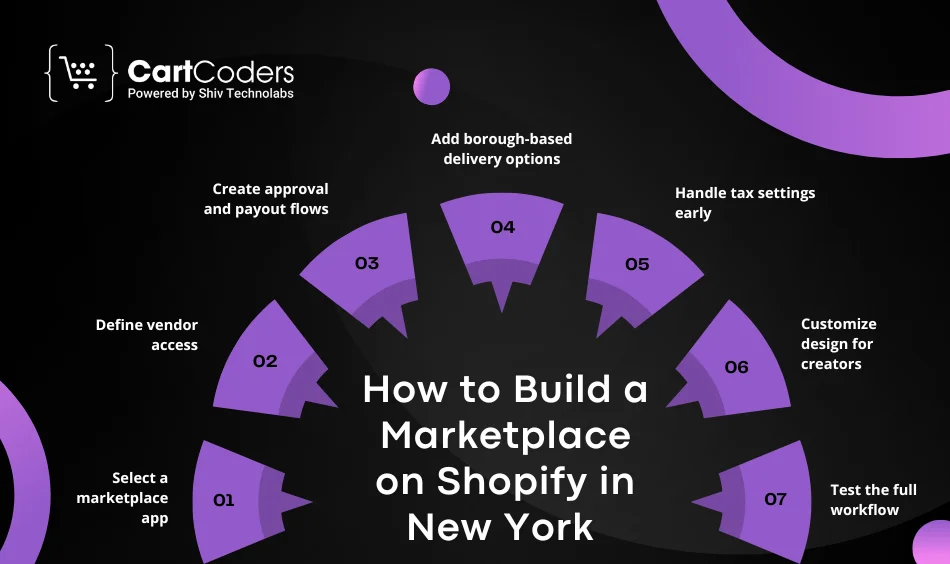
Before hiring any team, map your store idea. What products will vendors sell? Who handles delivery? How will you charge commissions? Once the plan is clear, use these steps to build a marketplace on Shopify in New York:
- Select a marketplace app
Use a trusted app such as Webkul Multi Vendor or MultiVendorX. These apps let vendors create accounts, upload items, and manage orders. Keep the setup light at first. Add new features as you grow. - Define vendor access
The Shopify vendor portal setup must give sellers safe access. They should manage listings, prices, and stock. You, as admin, keep control of approvals and taxes. - Create approval and payout flows
Vendors apply, upload proof of business, sign the contract, and get approved. Set clear payout timing. Use Stripe Connect or Shopify Payments for split transfers. - Add borough-based delivery options
In New York, delivery speed can decide a sale. Add “same-day” or “pickup in Brooklyn” choices at checkout. Shopify allows this with custom zones. - Handle tax settings early
NYC’s combined sales-tax rate can reach 8.875%. Add the right code under “Taxes → Marketplaces.” It saves trouble when filing later. - Customize design for creators
Choose a theme that supports vendor pages, search filters, and image galleries. Highlight vendors by location or category. - Test the full workflow
Place sample orders from both sides. Check that vendors get payout alerts, invoices, and dashboards. Fix issues before launch.
Building a marketplace this way keeps your process lean and predictable.
Vendor Onboarding Checklist for Shopify Marketplace
Once your structure is ready, focus on onboarding. A smooth start keeps vendors active. Follow this vendor onboarding checklist Shopify marketplace founders use:
- Collect vendor details: Ask for name, address, EIN, and W-9 forms.
- Verify business proof: Check if they have NYS sales tax certificate of authority.
- Send vendor contracts: Use a standard Shopify vendor contracts and terms template. Mention commission rate, payout cycle, return policy, and delivery rules.
- Provide training videos: Show how to add products, manage orders, and track sales.
- Set brand standards: Ask for clear product photos, short titles, and NYC delivery info.
- Explain tax and payout process: Vendors must know how Shopify Payouts work before they start selling.
- Share support channel: Give an email or Slack group for quick help.
Keep onboarding documents short and clear. New vendors often join from different boroughs; easy instructions help them start within a day.
Vendor Approval Workflow on Shopify
Each marketplace needs a control layer. A proper vendor approval workflow Shopify ensures consistency. Use this simple pattern:
- Vendor applies through a form.
- You review profile and catalog.
- Vendor signs contract and submits KYC.
- Admin activates portal access.
- Vendor uploads first five products for review.
- Admin publishes approved items.
You can automate some steps with app rules. For instance, Webkul Multi Vendor lets you auto-approve vendors with a minimum rating or verified tax ID.
A clear workflow saves you hours each week and keeps the marketplace professional.
Vendor Portal Setup in Shopify
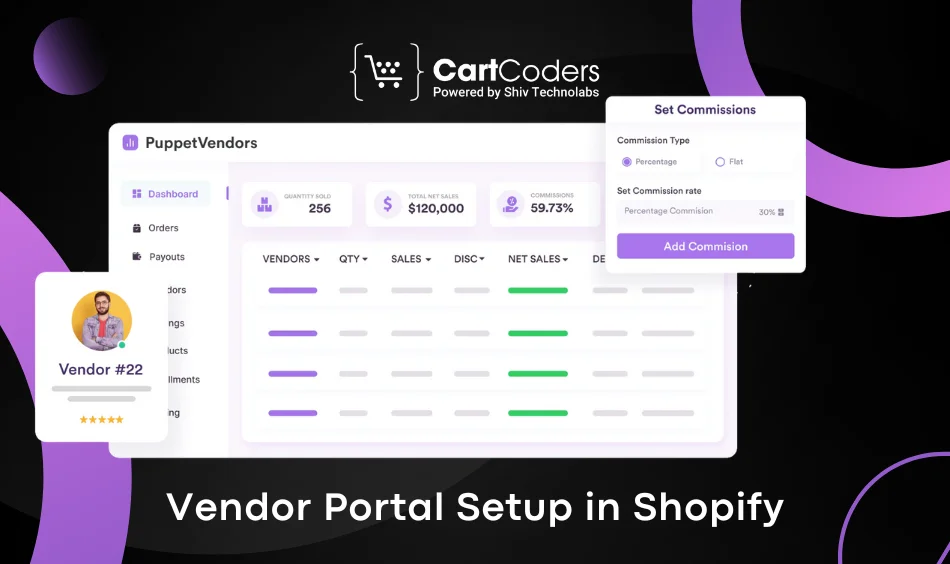
A strong Shopify vendor portal setup improves vendor retention. Each vendor gets their own dashboard to add products, view orders, and download sales reports.
Include these features:
- Order summary with filters by date and status
- Commission and payout section
- Messaging tool to contact admin
- Performance chart showing sales by region or category
Keep the portal clean and mobile friendly. Many NYC vendors work on phones while travelling between shows or pop-ups.
Common Issues to Avoid
- Skipping tax registration for vendors
- Unclear return policies
- Delayed payouts
- No data tracking for each vendor
- No contract signed before listing products
Handle these from day one to build trust and reduce support requests.
Turn Shopify Into a Vendor Marketplace Fast
We configure seller portals and workflows


Shopify Payouts – How They Work in a Multi-Vendor Marketplace
Every seller in your marketplace wants clear payment timelines. That’s where Shopify Payouts help. They track each sale, deduct platform commission, and transfer the rest to the vendor’s account.
Step-by-Step Flow
- Customer buys a product.
- Shopify collects the total amount.
- Admin keeps a fixed commission.
- Vendor receives the remaining balance.
If you use Stripe Connect or Shopify Payments, payouts are sent automatically. You can choose daily, weekly, or monthly transfers. Always keep vendors updated through email or dashboard alerts.
Add payout details inside the Shopify vendor portal setup page. Vendors must see how much they earned, what fees applied, and when the next transfer occurs. Transparency builds confidence.
Tax Rules for New York Vendors
New York’s tax system is strict. A Shopify multi vendor marketplace NYC must register for a state sales-tax certificate. Most items have a combined rate of about 8.875%. Clothing under $110 per item is exempt.
If you act as a marketplace provider, you collect and remit tax for all vendors. Mention this clearly in your vendor contract. Vendors must still keep their own tax records.
Add a short FAQ in your portal explaining the difference between vendor tax ID and your marketplace ID. This saves many support tickets later.
Handling Returns and Refunds
When buyers return a product, Shopify automatically adjusts payouts. The platform deducts the vendor share and refunds the buyer. Always confirm refund timing in the vendor agreement. A written rule keeps both sides safe.
Shopify Marketplace Setup Cost in NYC
Setting up a multi-vendor platform in New York needs planning. Below is a realistic view of Shopify marketplace setup cost NYC founders should know.
| Item | Approx. Range (USD) | Details |
| Shopify Plan & Marketplace App | 100 – 400 / month | Includes Webkul or MultiVendorX license |
| Vendor Portal Design | 1,000 – 2,500 | Dashboard, login, sales reports |
| Developer Setup | 3,000 – 6,000 | Custom flows, theme work, API integration |
| Tax & Compliance | 500 – 1,200 | NY rate mapping + Form ST-150 |
| Payment Gateway Integration | 300 – 800 | Stripe Connect or PayPal Payouts |
| Maintenance & Support | 100 – 300 / month | Bug fixes, security patches |
Key Notes
- Costs vary by product count and vendor number.
- A basic 10-vendor site can start near $5,000.
- Large marketplaces with custom dashboards may reach $12,000 or more.
- Keep 10–15% extra for testing, apps, and legal paperwork.
Mention these numbers on your pricing page or proposal. Clear cost data attracts real leads.
Shopify Multi Vendor Pricing New York
Vendors in NYC often prefer percentage commissions. A 10% to 15% fee works well for physical goods. Some admins use fixed monthly fees instead. Show both options on your onboarding page.
You can even offer free listing for the first 30 days to get sign-ups. Once traffic grows, shift to standard commissions.
Transparent Shopify multi vendor pricing New York helps vendors decide fast and builds trust from day one.
Hiring the Right Shopify Marketplace Developer in New York
Building a marketplace alone can slow you down. A skilled developer knows how to link apps, automate payouts, and adjust taxes for each borough.
What to Check Before You Hire
- Past multi-vendor projects using Shopify Plus or Webkul
- Understanding of NYC sales-tax rules
- Knowledge of Stripe Connect and PayPal Payouts
- Ability to handle vendor dashboards + order tracking
- Post-launch maintenance plan
When you hire Shopify marketplace developer New York, ask for timelines and communication tools. Many agencies use Slack or ClickUp for daily updates. Keep a clear SOW with all deliverables.
Why Local Experience Matters
A local Shopify marketplace development agency NYC knows the business rhythm. They design with borough logistics in mind – pickup points in Brooklyn, bike deliveries in Manhattan, and courier APIs that fit NY ZIP zones.
Local agencies also guide you through tax filings and security reviews faster than offshore teams. They understand local privacy norms and payment gateways allowed in the US.
Comparing Agencies vs Freelancers
| Option | Best For | Pros | Cons |
| Local Agency | Full project setup + support | Team coverage, faster delivery | Higher cost |
| Freelancer | Small custom tasks | Low budget start | Limited capacity |
If you run a serious multi-vendor plan, an agency gives more stability. Use the keyword phrase in your outreach – hire Shopify agency New York, USA – to reach verified partners.
Signs of a Reliable Partner
- Provides detailed proposal + pricing
- Offers 24/7 support after launch
- Delivers transparent milestones
- Uses real Shopify Partner dashboard for access
- Has client reviews from local NYC businesses
Avoid partners who quote without reviewing your scope. Always ask for a 30-minute discovery call before signing.
Your Trusted Shopify Marketplace Agency in New York
At CartCoders, we help NYC creators and retailers build, scale, and maintain their Shopify multi vendor marketplace.
Our team sets up everything – vendor onboarding, payout flows, tax logic, and mobile-friendly dashboards.
We know how New York businesses run. Our developers design vendor portals that match local rules and customer habits.
Whether you’re launching a fashion hub in SoHo or a food marketplace in Queens, we can get you online fast.
Ready to start? Book a free consultation with our Shopify experts in New York.
Conclusion
A Shopify marketplace unites New York creators under one digital roof. From onboarding to payouts, every step shapes your reputation.
Set clear rules, transparent pricing, and predictable payouts. Keep vendors informed and customers satisfied.
As your marketplace grows, add new features carefully—start simple, test, and expand.
With the right partner, building and scaling a multi-vendor ecosystem in NYC becomes smooth and profitable.
FAQs
Choose a marketplace app, set vendor permissions, configure taxes, and launch with local delivery zones.
Most builds range between $5,000 and $12,000, depending on vendor count and design scope.
Yes. As a marketplace provider, you must collect and remit tax through Shopify’s settings.
Webkul Multi Vendor Marketplace and MultiVendorX are top choices for Shopify users.
Yes. A written contract protects both parties and clarifies commissions and refunds.
Shopify processes payments, deducts commission, and sends vendor earnings automatically.
Yes. Developers can design a unique Shopify vendor portal setup to match your workflow.
A basic site takes 4–8 weeks, while advanced builds may need 10–12 weeks.
Yes. A dedicated expert handles updates, bug fixes, and payout logic.
We work with NYC clients daily and understand local market behavior and taxes.
Contact CartCoders through our site to schedule a quick consultation.
Yes. Shopify supports both, and vendors can set delivery or download options.


