

Your Shopify product page may receive hundreds of visitors, yet only a small number add products to their carts. The problem is not always traffic quality or pricing. Unclear product information, weak images, hidden delivery details, and difficult mobile interactions can also stop shoppers from buying.
A Shopify CRO audit helps identify these problems before you spend more money attracting visitors. According to Littledata’s November 2026 Shopify benchmarks, the median add-to-cart rate was 6.9% across 447 stores. This shows why examining the buying experience matters, although every store needs its own baseline.
By using free Shopify CRO audit tool that checks a public product page across nine categories. It provides up to 48 checks, a score out of 100, and a prioritized list of improvements. No sign-up or Shopify admin access is required.
Quick answer: A Shopify product page CRO audit reviews the elements that influence buying decisions, including product descriptions, images, prices, purchase buttons, shipping information, trust signals, mobile usability, cross-selling, and tracking. The goal is to identify potential buying friction and prioritize changes that can be tested against real conversion data.
The tool reviews publicly visible product-page elements and reports potential weaknesses. Its findings can help merchants decide what to investigate first, but they do not establish actual conversion performance.
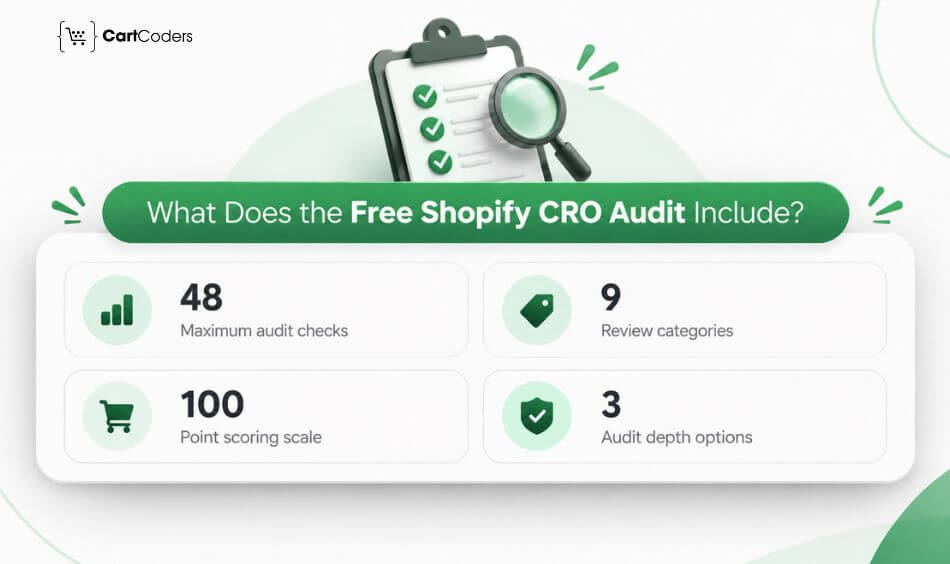
The audit covers product information, visual presentation, pricing, purchase actions, delivery policies, trust, mobile usability, related products, and tracking signals. The following checklist expands these categories into practical review questions.
Key points to remember:
- Mobile and desktop: Review how shoppers experience the page on different screens.
- Category scores: Identify areas that may require closer attention.
- Critical and Improve priorities: Separate urgent findings from other opportunities.
- Repeatable reviews: Compare page quality before and after meaningful changes.
- No private analytics access: Use Shopify and GA4 data separately to validate business impact.
What Is a Shopify Product Page CRO Audit?
A Shopify product page CRO audit is a structured review of the content, design, usability, and technical elements that affect purchasing decisions. It examines where shoppers may hesitate, become confused, or struggle to complete an action. A product page audit focuses on a specific product, while a full-store CRO audit examines the wider buying journey. Both can be valuable, but they answer different questions.
For example, a product page audit may identify a missing size guide. A full-store audit may reveal that customers abandon checkout because shipping costs appear too late.
Product Page Audit vs Full-Store CRO Audit
| Factor | Product Page Audit | Full-Store CRO Audit |
| Scope | Individual product page | Entire buying funnel |
| Areas reviewed | Product content, CTA, trust, mobile UX | Homepage, collections, products, cart, checkout |
| Data required | Public page for automated checks | Analytics, behavior, funnel data |
| Time | Minutes for automated review | Days or longer |
| Output | Page score and potential fixes | Detailed findings and testing plan |
| Best for | Identifying visible page issues | Investigating store-wide conversion problems |
An automated page review is a useful starting point, especially when a merchant needs a quick assessment. However, it cannot explain every reason customers abandon purchases. A more detailed Shopify CRO audit can examine actual customer behavior, checkout friction, analytics, and testing opportunities across the store.
Why Should You Audit Product Pages Before Other Store Pages?
Product pages sit closest to the buying decision, so issues here can affect revenue more directly than problems on lower-intent pages. Auditing them first helps merchants identify friction where shoppers are already considering a purchase.
1. Product Pages Carry the Highest Purchase Intent
Shoppers reaching a product page are usually evaluating whether the item meets their needs. They are checking price, availability, product details, reviews, delivery information, and size or variant options before deciding what to do next.
2. More Conversion Elements Are Packed Into One Page
A product page often includes images, videos, variants, reviews, trust signals, shipping details, subscriptions, bundles, recommendations, and the add-to-cart button. When several elements compete for attention or behave poorly, the buying journey can become harder.
3. Add-to-Cart Problems Appear Here First
If variant selectors are confusing, buttons are hard to find, required options are unclear, or cart actions fail, shoppers may leave without progressing. Reviewing these interactions early helps identify barriers before auditing less critical pages.
4. Mobile Friction Is Easier to Spot on Product Pages
Product pages can become crowded on smaller screens. Sticky elements, popups, long galleries, app widgets, and product options may overlap or push important buying information too far down the page.
5. Speed Issues Can Affect High-Intent Traffic
Large product images, videos, review widgets, recommendation tools, and third-party scripts can increase loading time. A slow product page can interrupt shoppers at the point where they are closest to adding an item to the cart.
6. Product Information Directly Affects Confidence
Missing specifications, unclear sizing, weak product descriptions, hidden shipping details, or inconsistent pricing can create hesitation. Auditing content quality alongside technical performance helps show whether shoppers have enough information to make a decision.
7. Apps Often Create Product-Page Conflicts
Reviews, upsells, bundles, subscriptions, fit tools, loyalty programs, and personalization apps often appear on product pages. Testing these together can reveal layout conflicts, duplicated elements, or loading problems that may not appear elsewhere.
8. Tracking Needs to Capture Product-Level Behavior
Product views, variant selections, add-to-cart actions, and other events help merchants understand where shoppers drop off. Incorrect or missing tracking can make a product-page problem harder to diagnose even when conversion performance starts falling.
9. Fixes Can Influence More Than One Conversion Metric
Improving product-page clarity can affect add-to-cart rate, cart progression, and overall purchase completion. Starting with these pages can therefore give merchants stronger insight into where broader CRO work should continue. A free Shopify CRO audit tool can help identify product-page issues across usability, mobile experience, content, performance, and buying interactions before moving deeper into the rest of the store.
Expert insight: Compare mobile and desktop performance before changing the design. A weak mobile add-to-cart rate with healthy desktop performance may indicate device-specific friction rather than a product or pricing problem.
How to Run a Free Shopify CRO Audit in 3 Steps
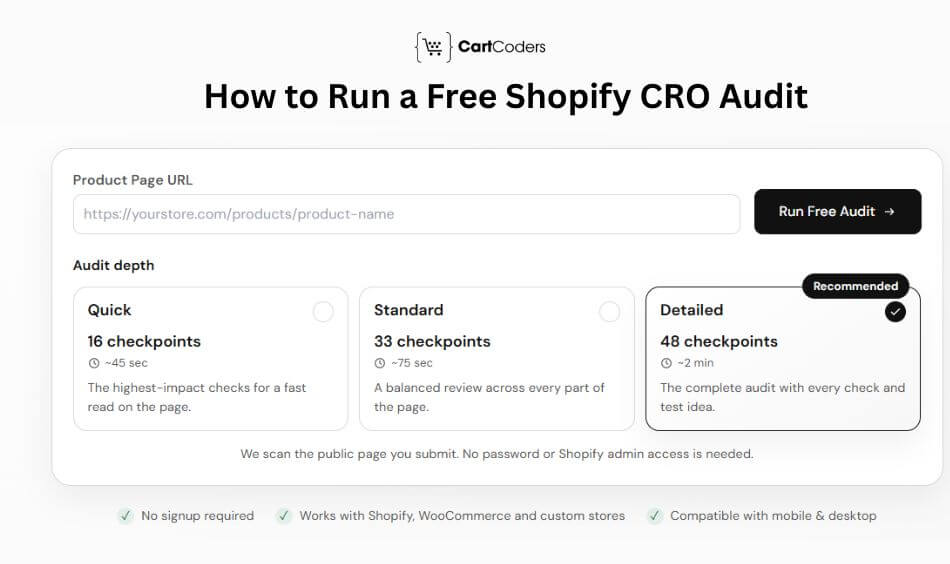
Running a product page audit does not require installing an app or sharing Shopify credentials. The CartCoders tool reads the public product page you submit and checks it against a selected set of rules. The process takes approximately 45 seconds to two minutes, depending on the audit depth. Start with an important product page that receives meaningful traffic or generates a large share of revenue.
Step 1: Paste a Live Product Page URL
Open the product page audit tool and enter a publicly accessible product URL. Choose a best-selling product, a heavily advertised product, or one with disappointing add-to-cart performance.
Step 2: Choose Your Audit Depth
Select Quick, Standard, or Detailed based on how much information you need. The Detailed option covers the maximum 48 checkpoints and is the strongest starting point for a full page review.
Step 3: Review Your Score and Priority Fixes
Examine the overall score, category breakdown, and recommended improvements. Verify important findings manually before changing your store, then use analytics to measure the results.
Which Audit Depth Should You Choose?
| Audit Type | Checks | Approximate Time | Best Use |
| Quick | 16 | 45 seconds | Fast initial review |
| Standard | 33 | 75 seconds | Balanced page assessment |
| Detailed | 48 | 2 minutes | Thorough product-page review |
The three audit depths are confirmed on the official tool page. The timings are estimates, so the experience may vary. For important product pages, a detailed audit gives merchants more areas to investigate. However, a larger number of checks does not automatically mean the page requires more changes.
The 48-Point Shopify Product Page CRO Audit Checklist
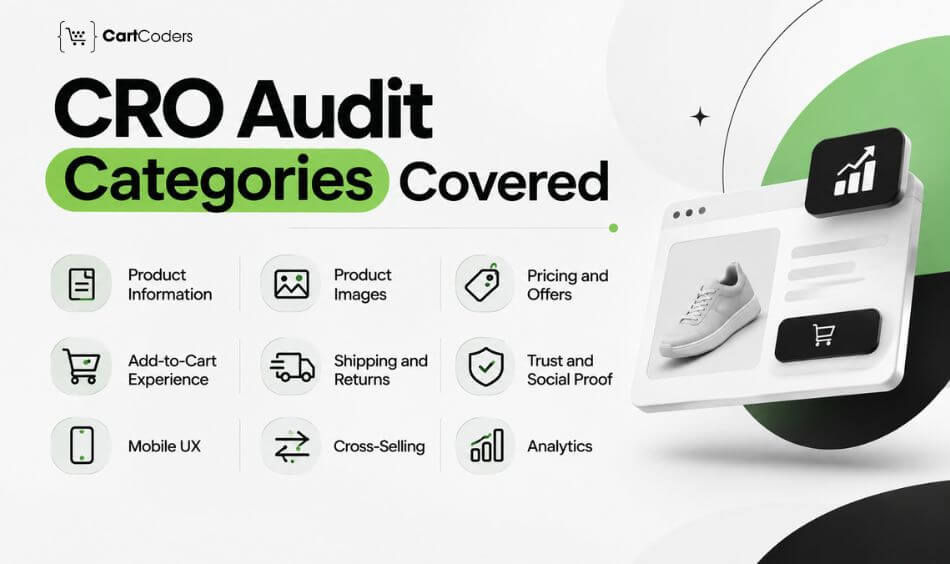
A useful Shopify CRO checklist should examine more than visual design. It should cover the questions customers ask, the actions they need to take, and the information that builds confidence before purchasing. The following 48-point checklist is organized into the same nine categories as the CartCoders tool. It is an expanded editorial checklist, not a verified reproduction of the tool’s exact internal rules or scoring weights. Each question includes a practical improvement to consider. Some items are conditional, so a missing feature should not automatically be treated as a problem for every product or store.
1. Product Information and Description: 6 Checks
Product descriptions help customers decide whether an item meets their needs. Clear information can reduce uncertainty, particularly when shoppers cannot physically inspect the product. A strong product page should explain the product’s purpose, important features, specifications, and available options without forcing visitors to read lengthy promotional copy.
| # | Audit Question | Recommended Improvement |
| 1 | Is the product title clear and specific? | Identify the product and its defining attributes |
| 2 | Does the opening description explain the main benefit? | Place the most useful information first |
| 3 | Can shoppers scan the description easily? | Use short paragraphs and relevant bullets |
| 4 | Are materials, dimensions, and specifications available? | Add a clear specification section |
| 5 | Does the page address common buying questions? | Include relevant product FAQs |
| 6 | Is the selected variant clearly identified? | Update images, prices, and availability correctly |
For example, a furniture product page should provide dimensions, materials, assembly requirements, and care instructions. A customer should not need to contact support for basic product details.
Expert insight: Write product descriptions around customer decisions rather than keyword frequency. A page that answers practical questions can be more useful than one filled with repeated product keywords.
2. Product Images and Visual Experience: 6 Checks
Images help customers assess product appearance, quality, scale, and important details. The right image selection depends on the product, so a fixed image count should not become the only measure of quality. For apparel, customers may need fit and fabric details. For electronics, they may need connection ports, dimensions, and views of the included accessories.
| # | Audit Question | Recommended Improvement |
| 7 | Are there enough useful product images? | Show multiple angles and relevant details |
| 8 | Can shoppers inspect images closely? | Provide suitable zoom functionality |
| 9 | Would video or a 360-degree view help? | Add demonstrations for complex products |
| 10 | Do images match the selected variant? | Connect variant selection with media |
| 11 | Is product size or scale clear? | Add measurements or scale references |
| 12 | Are images delivered efficiently? | Use appropriate dimensions and modern formats |
Image quality and performance should work together. Large, uncompressed files can slow loading, while aggressive compression may make important product details difficult to see. For technical guidance, Google’s image performance recommendations explain how image formats, sizing, and loading decisions affect web performance.
Expert insight: Prioritize images that answer buying questions. A useful size comparison or close-up can matter more than adding several nearly identical photographs.
3. Pricing, Discounts, and Offers: 5 Checks
Customers should be able to identify the current price and understand the conditions attached to an offer. Unclear discounts or unexpected costs can create doubt before checkout.
Pricing presentation should also remain accurate when shoppers change variants, quantities, or purchasing options. Merchants should avoid creating urgency through misleading savings claims.
| # | Audit Question | Recommended Improvement |
| 13 | Is the current price easy to find? | Position it near the product title or purchase area |
| 14 | Are discounts and savings accurate? | Display genuine compare-at prices clearly |
| 15 | Are eligible payment options explained? | Show available installment or accelerated payment methods |
| 16 | Is the free-shipping threshold clear? | Explain the minimum order value where applicable |
| 17 | Are bundles or quantity offers understandable? | Show conditions and pricing transparently |
For example, a bundle offer should explain what customers receive and how much they pay. Avoid presenting savings that depend on hidden conditions or unavailable product combinations.
Expert insight: Pricing clarity often deserves attention before adding new promotional elements. Shoppers should understand the total offer without interpreting several competing labels.
4. Add-to-Cart CTA and Purchase Experience: 6 Checks
The Add to Cart button connects product evaluation with purchase intent. Its placement, visibility, and behavior can affect how easily shoppers move to the next step. However, a larger or brighter button does not automatically increase conversions. The purchase area must also communicate the selected variant, availability, and required choices.
| # | Audit Question | Recommended Improvement |
| 18 | Is Add to Cart easy to reach on mobile? | Review placement and scrolling requirements |
| 19 | Does the button stand out clearly? | Use sufficient visual contrast |
| 20 | Would a sticky purchase action help? | Test a sticky CTA on long mobile pages |
| 21 | Are variant selectors easy to use? | Choose controls suited to the number of options |
| 22 | Would accelerated checkout help? | Test eligible express purchase options |
| 23 | Does adding an item provide clear feedback? | Show confirmation through a cart drawer or message |
A sticky Add to Cart button can help on long product pages, but it may also occupy valuable screen space. Its value should be tested against the existing mobile experience.
For stores with custom themes or complicated variant logic, improving purchase interactions may require changes to theme code. These changes are best reviewed alongside broader Shopify CRO audit services when the buying journey has multiple friction points.
Expert insight: A visible CTA cannot compensate for missing product information. Customers need enough confidence to act, so review the surrounding purchase area as a complete experience.
5. Shipping, Delivery, and Returns: 5 Checks
Shipping and return information can influence whether shoppers feel comfortable placing an order. Customers often want to know when a product will arrive and what happens if it does not meet expectations. Providing this information near the purchase area can reduce unnecessary searching. Delivery estimates should reflect actual fulfillment capabilities rather than unsupported promises.
| # | Audit Question | Recommended Improvement |
| 24 | Is a useful delivery estimate available? | Show an accurate estimate when possible |
| 25 | Are shipping costs explained before checkout? | Provide clear rates or calculation guidance |
| 26 | Is the return policy summarized? | Explain important return conditions |
| 27 | Can shoppers access full policies? | Link to shipping and return pages |
| 28 | Is product availability accurate? | Display reliable stock information |
For example, a customer buying a birthday gift may care more about delivery timing than a small discount. Clear delivery information helps that customer decide whether the product is suitable.
Expert insight: Shipping promises must match operational reality. An inaccurate delivery estimate may increase initial purchases but create cancellations, complaints, and additional support costs.
6. Trust Signals and Social Proof: 6 Checks
Trust signals help customers assess whether a store and its products are credible. Useful signals include genuine reviews, accessible support, clear policies, and accurate business information. The goal is not to fill the product page with badges. Trust elements should answer specific customer concerns and reflect verifiable information.
| # | Audit Question | Recommended Improvement |
| 29 | Are genuine ratings visible where available? | Position relevant ratings near product details |
| 30 | Can shoppers read useful customer reviews? | Display authentic written and photo reviews |
| 31 | Are payment and guarantee claims accurate? | Use truthful, relevant reassurance |
| 32 | Is customer support easy to find? | Provide clear support options |
| 33 | Are certifications or endorsements genuine? | Show only verifiable claims |
| 34 | Is urgency or scarcity truthful? | Avoid artificial countdowns and false stock warnings |
Reviews can help shoppers evaluate product quality, sizing, durability, and real-life use. However, review placement should not distract from essential product information. The Baymard Institute’s ecommerce usability research provides additional context for evaluating how product information and purchasing interfaces influence customer decisions.
Expert insight: Authentic trust signals are more useful than decorative security badges. A clear return policy or detailed customer review may answer a more important question than a row of generic icons.
7. Mobile UX and Usability: 6 Checks
Mobile product pages must work well on smaller screens and with touch-based interaction. A layout that looks attractive on desktop can become difficult to use when elements stack or overlap. During a mobile audit, check real interaction rather than relying only on a resized browser window. Different devices, browser settings, and accessibility needs can expose additional problems.
| # | Audit Question | Recommended Improvement |
| 35 | Is the layout free from unwanted horizontal scrolling? | Fix overflow and overlapping elements |
| 36 | Are tap targets large enough? | Provide comfortable target sizes and spacing |
| 37 | Is body text easy to read? | Use readable typography and contrast |
| 38 | Do popups avoid blocking purchase actions? | Reduce intrusive overlays |
| 39 | Does the page load efficiently? | Review Core Web Vitals and page resources |
| 40 | Are accordions and tabs easy to operate? | Test touch, keyboard, and accessible controls |
A 44-pixel touch target can be a useful design reference, but accessibility requirements vary by standard. WCAG 2.2 Level AA includes a 24-by-24 CSS pixel minimum target-size criterion with exceptions. Google recommends a Largest Contentful Paint of 2.5 seconds or less at the 75th percentile for a good experience. Its Core Web Vitals documentation explains how loading, responsiveness, and visual stability are measured.
Expert insight: Test the complete mobile purchase path, including variant changes, quantity adjustments, cart updates, and navigation. A page can look correct while still containing interaction problems.
8. Cross-Selling and Upselling: 4 Checks
Related products and bundles can help customers find useful additions to their purchase. However, irrelevant recommendations may distract shoppers from the product they originally wanted. A good cross-sell should make the purchase more useful or convenient.
Recommendations should be based on product relationships rather than simply displaying items with the highest margins.
| # | Audit Question | Recommended Improvement |
| 41 | Are useful bundles or complementary products available? | Suggest relevant combinations |
| 42 | Do related products match customer needs? | Review recommendation relevance |
| 43 | Do upsells avoid interrupting the main purchase? | Position them without blocking the CTA |
| 44 | Are accessories or matching items shown where useful? | Offer practical additions |
For example, a camera product page may benefit from showing compatible memory cards. A clothing page may display matching accessories, but only when the recommendations are relevant.
Expert insight: Track whether cross-sells improve average order value without reducing primary product purchases. A higher order value is not useful if unnecessary distractions reduce overall revenue.
9. Analytics and Conversion Tracking: 4 Checks
Reliable tracking helps merchants determine whether product-page changes affect customer behavior. Without trustworthy data, a store may mistake measurement problems for conversion problems. An automated public-page scan can inspect some visible tracking signals, but it cannot fully verify private analytics configuration or event accuracy. These checks need additional validation through appropriate debugging tools and reporting access.
| # | Audit Question | Recommended Improvement |
| 45 | Is GA4 configured correctly? | Validate collection and consent behavior |
| 46 | Are product-view and add-to-cart events accurate? | Test view_item and add_to_cart events |
| 47 | Are advertising pixels configured appropriately? | Check event duplication and consent |
| 48 | Is behavioral research available when needed? | Consider privacy-conscious heatmaps or recordings |
For example, a store may record product views correctly but miss add-to-cart events after a custom cart drawer update. This can make conversion analysis misleading. Google’s GA4 ecommerce measurement documentation explains the events used to measure product views, cart activity, checkout, and purchases.
Expert insight: Validate tracking before running conversion experiments. Otherwise, a change may appear successful or unsuccessful because of inaccurate event collection rather than actual customer behavior.
Summary of All Nine CRO Audit Categories
| Audit Category | Checklist Items | Main Focus |
| Product Information | 6 | Buying clarity |
| Product Images | 6 | Visual confidence |
| Pricing and Offers | 5 | Offer transparency |
| Add-to-Cart Experience | 6 | Purchase interaction |
| Shipping and Returns | 5 | Delivery confidence |
| Trust and Social Proof | 6 | Credibility |
| Mobile UX | 6 | Small-screen usability |
| Cross-Selling | 4 | Relevant additional purchases |
| Analytics | 4 | Measurement reliability |
| Total | 48 | Product-page review |
This checklist can serve as a repeatable review framework for merchants, designers, and developers. The value comes from verifying findings, prioritizing meaningful changes, and measuring what happens afterward.
How Does the Shopify CRO Audit Score Work?
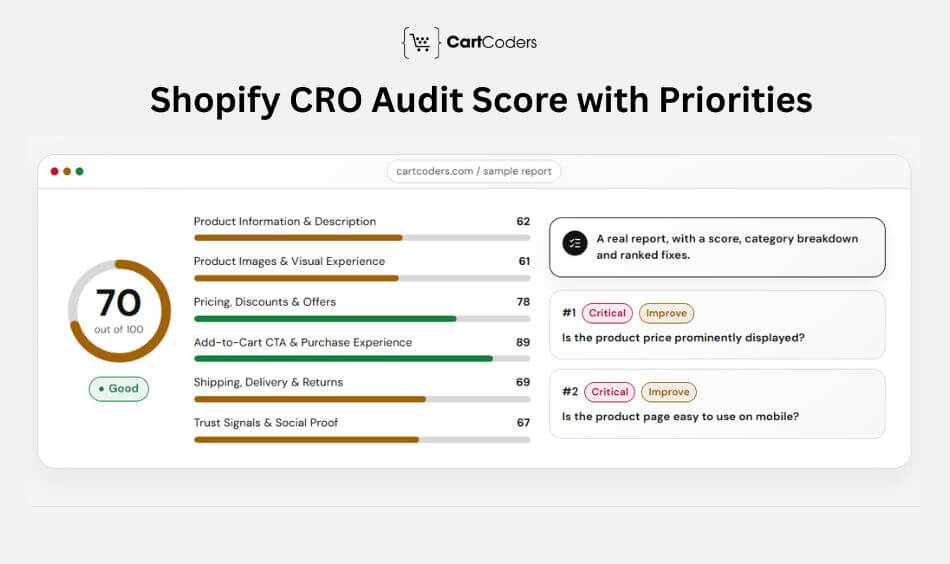
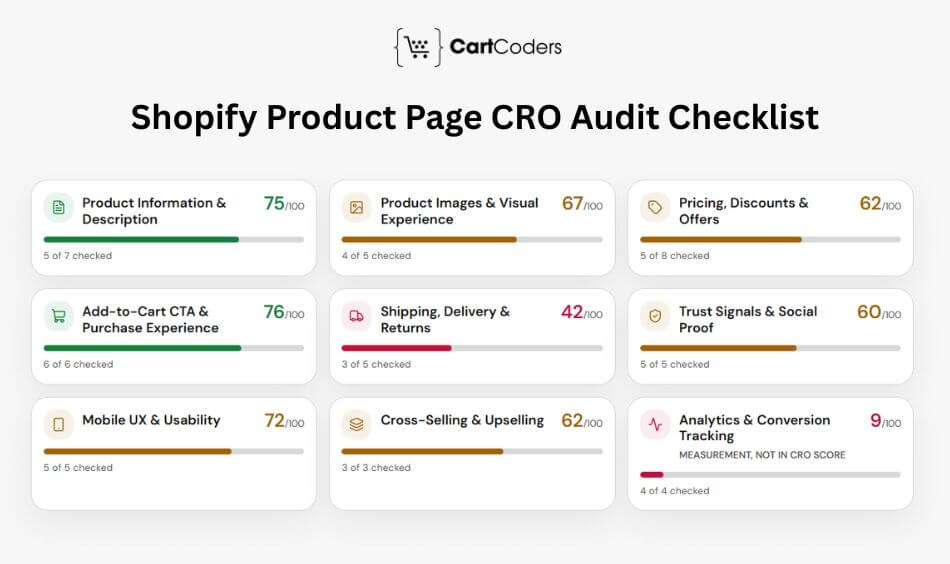
The CartCoders tool scores a product page out of 100 and provides a breakdown across nine categories. It also ranks potential improvements so merchants can identify which areas deserve attention. The score reflects rule-based checks of the public page. It does not represent the store’s conversion rate, revenue potential, or the percentage of visitors expected to purchase.
For example, a product page scoring 70 out of 100 does not mean it converts 70% of visitors. The sample report on the tool page labels a score of 70 as Good, but the full score-band thresholds have not been publicly confirmed.
What Does the Audit Report Show?
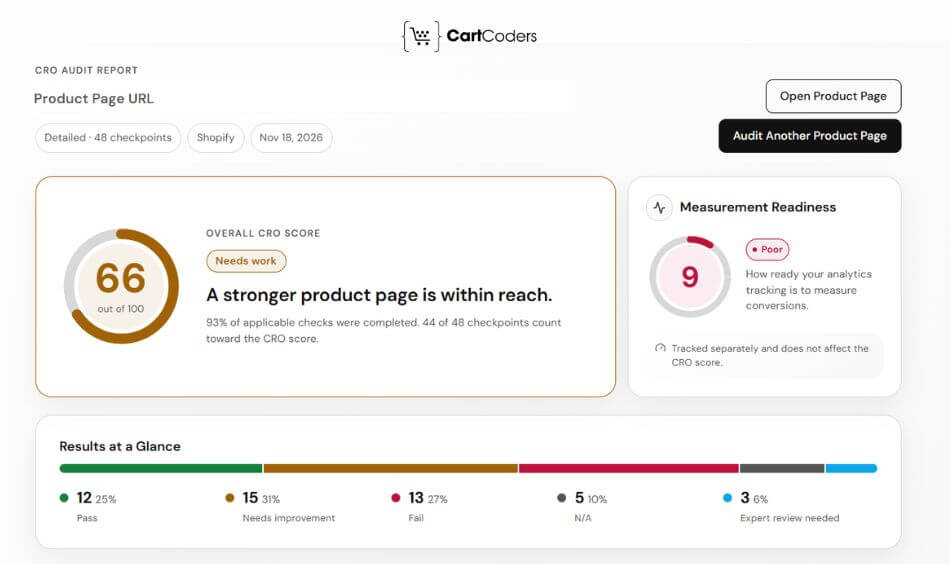
A typical report contains the following information:
- Overall score: A numerical assessment out of 100.
- Category breakdown: Scores for individual review areas.
- Priority findings: Potential problems marked Critical or Improve.
- Suggested fixes: Actions merchants can investigate.
- Repeatable results: A starting point for checking changes over time.
What Do Critical and Improve Mean?
Critical indicates a finding that the tool considers a higher-priority issue. Improve identifies another opportunity to review or refine the page.
These labels help organize work, but they are not guarantees of conversion impact. Merchants should consider traffic, customer behavior, technical effort, and business value before implementing a recommendation.
For example, an unavailable Add to Cart button requires immediate attention. Adding a product video may be useful, but its priority depends on the product and existing customer questions.
The free product page scoring tool provides these findings together, making it easier to identify which areas need further investigation.
Which Shopify CRO Issues Should You Fix First?
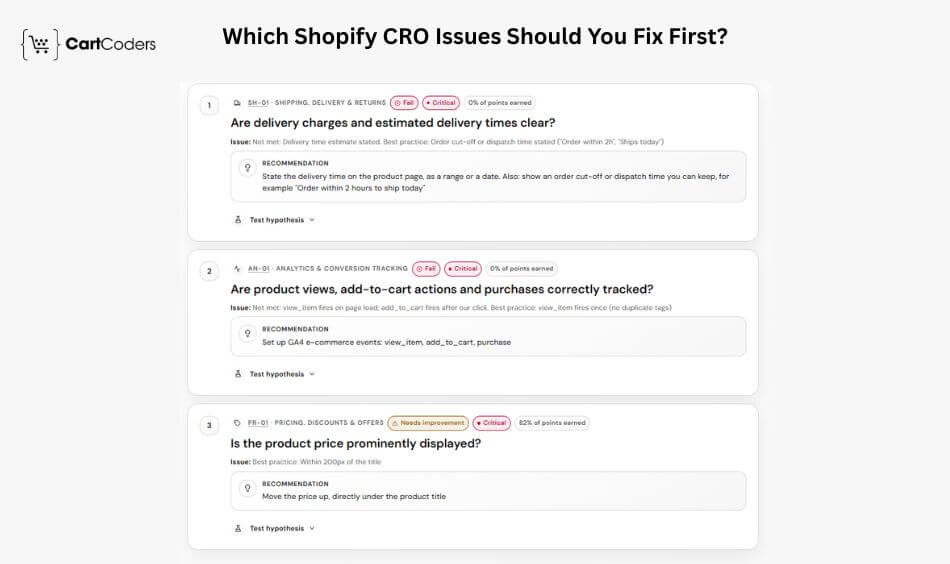
A CRO audit may identify several potential improvements, but changing everything simultaneously makes it difficult to measure results. A better approach is to prioritize issues according to their expected impact, the number of customers affected, and the effort required to correct them. Start with problems that prevent customers from completing purchases. Then address unclear product information, mobile usability, trust concerns, and opportunities for testing.
Some content and configuration changes can be completed quickly. Others require theme changes, app integrations, or testing across different devices. For complex technical issues, the right approach may involve a detailed Shopify conversion rate audit before developers begin making changes.
Expert insight: Prioritize problems based on actual customer impact rather than visual preference. A small fix affecting thousands of purchase attempts may matter more than a complete redesign of a rarely visited section.
Free Shopify CRO Audit Tool vs Full CRO Audit: Which Do You Need?
A free product page audit is useful when merchants want a quick review of visible page elements. A full CRO audit becomes more valuable when the business needs to identify why visitors abandon the buying journey.
The difference is primarily the depth of analysis. Automated tools assess observable page characteristics, while full audits combine analytics, customer behavior, technical investigation, and testing opportunities.
Comparison of CRO Audit Approaches
| Factor | Free CRO Audit Tool | DIY Checklist | Full CRO Audit |
| Scope | One public product page | Pages selected by merchant | Entire buying journey |
| Main method | Automated rule-based checks | Manual review | Analytics, UX, technical analysis |
| Data required | Public URL | Public page and optional store data | Store analytics and other authorized data |
| Time | Approximately 45 seconds to 2 minutes | Depends on reviewer | Several business days or longer |
| Cost | Free | Internal team time | Paid professional service |
| Output | Score and ranked findings | Manual checklist | Detailed findings and action plan |
| Best for | Initial page review | Routine internal checks | Complex conversion problems |
A free audit can identify possible issues, but it cannot determine whether a particular change will increase revenue. A full audit can examine funnel performance, checkout behavior, analytics accuracy, customer interactions, and opportunities for controlled experiments.
For stores experiencing persistent conversion problems, CartCoders describes its broader assessment process through its Shopify CRO audit services, including product pages, cart flow, checkout, and mobile behavior.

How Often Should You Run a Shopify CRO Audit?
Shopify product pages should be reviewed after meaningful changes and at regular intervals. The appropriate frequency depends on traffic, product turnover, promotional activity, and technical complexity. CartCoders recommends rerunning its tool after important page changes and at least once per quarter. It also recommends reviewing the top five product pages before major sales periods.
Recommended CRO Audit Schedule
| Situation | Recommended Action |
| New product page launch | Audit before promotion |
| Major theme update | Review affected product pages |
| New app installation | Check performance and interactions |
| Product variant changes | Test selection, pricing, and inventory |
| Quarterly review | Recheck important product pages |
| Before major sales | Review top five product pages |
| Falling add-to-cart rate | Investigate affected products and devices |
| Tracking changes | Validate ecommerce events |
For seasonal campaigns, review the product pages receiving the largest share of advertising traffic. This helps identify potential buying friction before promotional spending increases.
Expert insight: Repeated audits are most useful when merchants keep records of changes and results. Without a baseline, it becomes difficult to determine whether the page is improving.
Common Shopify Product Page CRO Audit Mistakes
Even a detailed checklist can produce weak results when findings are interpreted without context. A product page CRO audit should help merchants identify friction in the buying journey, not simply chase the highest possible score. Avoid making changes based only on assumptions or copying features from competitors. Every product, audience, traffic source, and purchasing journey can behave differently, so findings should be checked against real customer behavior and store data.
1. Auditing Only on Desktop
Desktop testing can miss problems that appear only on smaller screens. Mobile shoppers may face slow loading, cramped variant selectors, overlapping popups, difficult tap targets, or purchase buttons pushed too far down the page. Always review the complete mobile buying journey separately.
2. Copying Competitor Product Pages
A feature that works well for another Shopify store may not suit your products or customers. Adding the same sticky bars, upsells, badges, or layout without testing can create unnecessary clutter. Use competitor pages for ideas, not as a template for your own CRO decisions.
3. Changing Too Many Elements Together
Updating the headline, gallery, price placement, CTA, reviews, and layout at the same time makes results harder to interpret. If conversion behavior changes, you may not know which adjustment caused it. Prioritize the highest-impact issues and test important changes in a controlled way.
4. Ignoring Variant-Level Issues
Some problems appear only after a shopper chooses a particular size, color, or product option. Incorrect images, unavailable combinations, inconsistent prices, missing inventory messages, or broken add-to-cart behavior can affect only specific variants. Test several realistic product combinations during the audit.
5. Treating the Audit Score as Conversion Performance
An audit score highlights potential weaknesses, but it does not prove that a page will convert better after every recommended change. Review findings alongside analytics, add-to-cart rates, customer behavior, device data, and controlled testing. The score should guide investigation rather than become the final measure of success.
Frequently Asked Questions
A Shopify CRO audit reviews the factors that may prevent visitors from purchasing. It examines product information, images, pricing, purchase buttons, trust signals, mobile usability, and other elements. A full-store audit may also examine customer behavior, analytics, cart abandonment, and checkout performance.
Costs depend on the audit’s scope and depth. Automated product page tools may be free, while professional audits involve additional analysis and technical work. CartCoders offers a free product page tool and separate professional CRO audit services with pricing based on the engagement.
Yes. CartCoders states that its product page audit tool is free, with no signup, credit card, or paid tier required. Merchants can submit a public product page URL and select an audit depth to receive a score and prioritized findings.
No. The free CartCoders tool reviews publicly accessible product pages. It does not require Shopify admin credentials, app installation, or access to private store analytics. More detailed CRO investigations may require authorized analytics or store access.
Yes. CartCoders states that its tool supports public product pages from Shopify, Shopify Plus, WooCommerce, and custom or headless stores. However, the recommendations are primarily written for Shopify merchants, so implementation steps may differ on other platforms.
A free audit score reflects rule-based checks of publicly visible page elements. It can identify possible weaknesses, but it cannot measure actual conversion rates or predict revenue improvements. Merchants should verify important findings and use analytics to assess customer behavior.
There is no universal product-page conversion target. Littledata’s November 2026 data reported a 6.9% median storewide add-to-cart rate and a 1.3% median store conversion rate. These are different metrics, so merchants should compare like-for-like measures and consider their product category and traffic sources.
Some changes can affect customer behavior immediately, but reliable measurement depends on traffic volume and the size of the effect. High-traffic stores may collect useful evidence sooner than smaller stores. Controlled testing and consistent analytics provide stronger evidence than short-term fluctuations.
Conclusion
A Shopify product page CRO audit helps merchants identify potential barriers between product interest and purchase intent. Reviewing descriptions, images, pricing, purchase actions, trust signals, mobile usability, and tracking can reveal areas worth improving.
The 48-point checklist provides a practical framework, while the free scoring tool helps organize findings and prioritize potential fixes. Neither replaces actual customer data or controlled testing.
The strongest CRO process combines clear product information, reliable functionality, and measurable improvements. Start with important product pages, correct confirmed issues, and review results before making further changes.


