

Migrating an online store from one platform to another can feel like shifting a live shop during working hours. Products, customers, orders, images, URLs, discounts, and apps all need careful handling during the move.
Many store owners start with the migration of an online store and later find that the full store needs planning. A successful move from BigCommerce to Shopify includes data, design, SEO, checkout, integrations, and testing.
This guide explains the complete migration process in simple steps. You will see what to prepare, what to move, what to test, and what to monitor after launch.
Quick Answer
BigCommerce to Shopify migration means moving your store data, design, apps, SEO setup, domain, and key workflows from BigCommerce to Shopify. The process usually includes product export, customer data transfer, order migration, collection setup, theme planning, redirect mapping, app setup, testing, launch, and post-launch monitoring.
What Should You Check Before Starting a BigCommerce to Shopify Migration?
Before starting the migration, review your current BigCommerce store and make a clear plan. This step saves time because you can remove outdated data before moving everything into Shopify.
Start by checking your products, customer records, order history, URLs, apps, and custom features. Your goal is to decide what should move, what should change, and what can be removed.
Here are the main areas to review before migration:
| Area to Review | What to Check |
| Products | Titles, descriptions, images, SKUs, variants, pricing, inventory |
| Customers | Names, emails, addresses, tags, account status |
| Orders | Past orders, fulfillment status, payment details, and refunds |
| SEO | URLs, meta titles, descriptions, redirects, blog links |
| Apps | Marketing, reviews, shipping, subscriptions, loyalty tools |
| Design | Navigation, homepage sections, product pages, cart layout |
| Integrations | ERP, CRM, accounting, warehouse, email marketing tools |
A migration checklist helps your team avoid missed records and broken pages. It also helps developers estimate timelines, tools, and testing work more accurately.
How Do You Plan a BigCommerce to Shopify Migration?
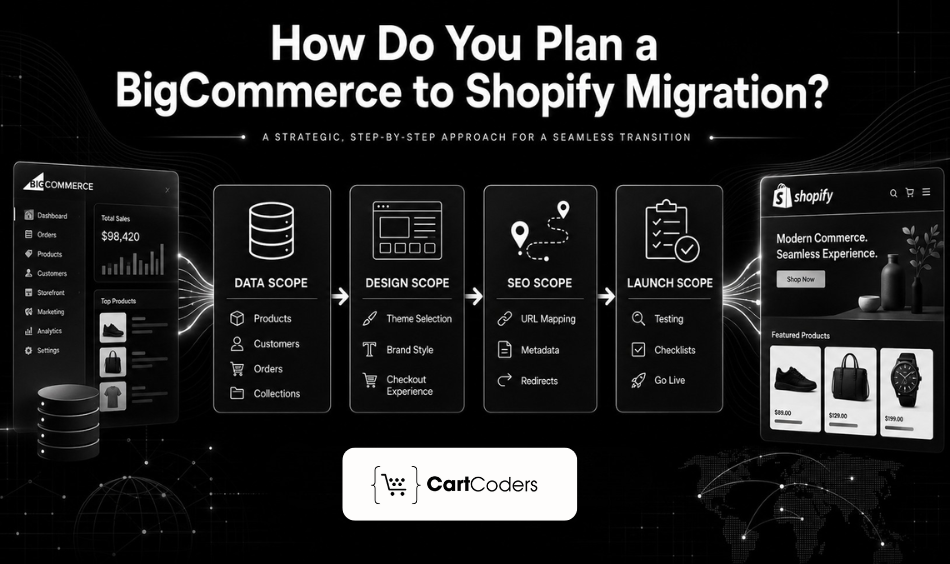
A proper plan gives your migration a clear path from export to launch. You should decide the scope before touching any store data. Some stores only need product, customer, and order migration. Other stores need a complete rebuild with a new design, app setup, ERP connection, and checkout changes.
Your migration plan should include:
Data scope
Decide which data should move from BigCommerce to Shopify before starting the work. Products, customers, orders, collections, coupons, pages, and blogs may need separate handling.
Clean your product catalog before export because old records can create confusion in Shopify. Remove duplicate SKUs, expired offers, unused categories, and outdated product images.
Design scope
Review whether your current design should stay similar or change during the move. Shopify uses a different theme structure, so your BigCommerce theme cannot move directly.
You can choose a Shopify theme, customize it, or build a custom storefront. The right choice depends on your catalog size, brand style, and checkout needs.
SEO scope
Migration can affect search traffic when URLs, metadata, and redirects get ignored. Create a URL map before launch, so important pages keep their search value.
Include product pages, category pages, blogs, CMS pages, and high-traffic landing pages. This step helps protect traffic after switching platforms.
Launch scope
Decide whether you want a soft launch, phased launch, or full launch. A soft launch works well when your team wants extra testing before marketing campaigns.
Keep one launch checklist for technical tasks and another one for store operations. This helps both developers and store teams stay aligned.
How Do You Export Products from BigCommerce?
BigCommerce lets store teams export product data through CSV files. This file usually includes product names, SKUs, descriptions, pricing, stock, images, categories, and variants.
Before exporting, check whether your product data follows a clean structure. Shopify reads product details differently, so a messy CSV can create import problems.
You should check these product fields before export:
- Product title
- Product description
- SKU
- Brand name
- Category
- Price
- Sale price
- Inventory count
- Weight
- Product images
- Product options
- Product variants
- Product URL
- Meta title
- Meta description
Product variants need extra care during export. Size, color, material, pack quantity, and custom options should map correctly inside Shopify.
Large catalogs may need staged migration instead of one large import. This approach helps your team test sample records before moving thousands of products.
How Do You Import BigCommerce Products into Shopify?
Shopify supports CSV imports for product data, but the file format must match Shopify fields. You may need to edit your BigCommerce CSV before importing it.
Product migration works best when you first import a small sample. A sample import helps you catch missing images, variant errors, pricing mismatches, or broken descriptions.
Here are common product data changes during import:
| BigCommerce Field | Shopify Field |
| Product Name | Title |
| Product Description | Body HTML |
| SKU | Variant SKU |
| Category | Product Type or Collection |
| Brand | Vendor |
| Product Options | Options and Variants |
| Product Images | Image Src |
| Sale Price | Variant Compare At Price |
| Inventory | Variant Inventory Qty |
Shopify collections work differently from BigCommerce categories. You can create manual collections or automated collections based on tags, vendors, product types, or prices.
For complex catalogs, use migration apps or custom scripts. This helps when products include many variants, custom fields, bundles, or large image sets.
How Should You Handle Product Variants and Options?
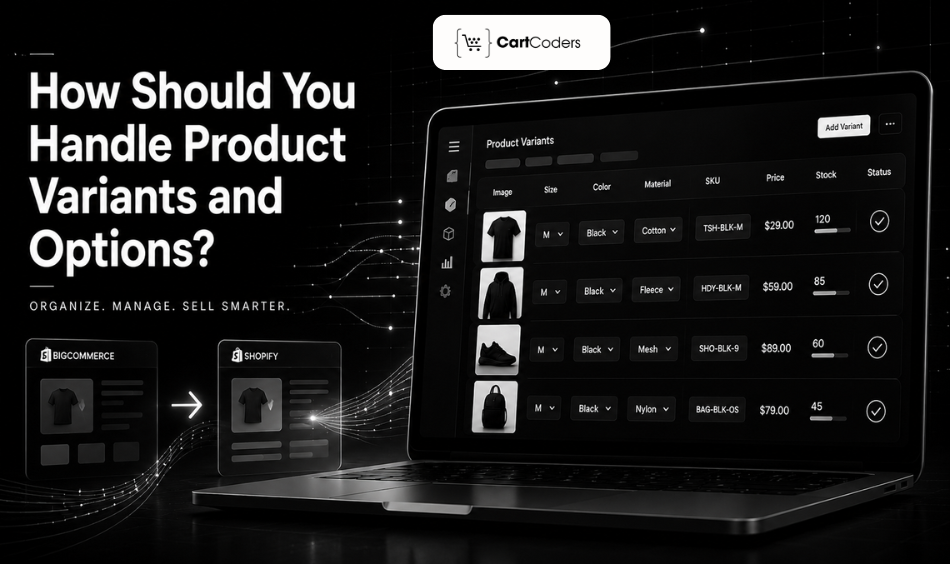
Product variants can become one of the hardest parts of migration. BigCommerce and Shopify both support variants, but they manage product options differently.
Shopify allows products to have options such as size, color, or material. Each variant can have its own SKU, price, image, inventory, and weight.
Check these points before importing variants:
- SKU matching: Every variant should have a unique SKU, especially for stores using inventory or warehouse tools. Duplicate SKUs can cause order, stock, and reporting problems after launch. If your BigCommerce store uses similar SKUs across variants, clean them before migration. Shopify depends on clear variant data for better product management.
- Image mapping: Variant images should connect with the correct option, such as color or style. This matters for fashion, beauty, furniture, eyewear, and custom product stores. During testing, open each product and change variants on the product page. Confirm that the right image changes with each selected option.
- Option order: Shopify displays product options in a set order, such as size first and color second. A confusing option order can affect the shopping flow. Keep your option structure simple and consistent across similar products. Customers should not see different option patterns for similar items.
Read More: BigCommerce vs Shopify
How Do You Move Customer Data from BigCommerce to Shopify?
Customer data migration helps shoppers keep their account details, contact information, and address records. Shopify can import customer data through CSV files.
Most migrations include customer names, email addresses, phone numbers, addresses, tags, and marketing preferences. Passwords usually cannot be moved directly because platforms store them securely.
You should prepare customers for account activation after the migration. Shopify may require customers to activate their accounts again through an email invite.
Customer data fields to check include:
| Customer Detail | Migration Note |
| Name | Move first and last names correctly |
| Check duplicates before import | |
| Phone | Match the right format |
| Address | Move billing and shipping addresses carefully |
| Tags | Use tags for segmentation |
| Marketing status | Match consent records carefully |
Customer records must stay clean because they affect email campaigns, loyalty programs, and support workflows. A small error can create confusion after launch.
How Do You Move Order Data from BigCommerce to Shopify?
Order migration helps store teams keep sales history, customer purchase records, and reporting data. This step matters when support teams need previous order details.
Order migration can include order numbers, customers, products, totals, tax, shipping, discounts, payment status, and fulfillment status. Some payment details may not move fully due to platform and security limits.
You should decide how much order history needs to move. Some stores move all orders, while others move only recent orders and keep older records archived.
Order migration helps with:
- Customer support
- Repeat purchase analysis
- Loyalty programs
- Refund reference
- Sales reporting
- Subscription history
- Warranty requests
Always test migrated orders inside Shopify before launch. Check customer matching, product matching, totals, taxes, and fulfillment details.
How Do You Move Categories into Shopify Collections?
BigCommerce categories do not move into Shopify in the same format. Shopify uses collections to group products across the store.
You can create manual collections when you want full control over product groups. You can also create automated collections using product tags, vendors, titles, prices, or product types.
For example, a BigCommerce category called “Men’s Running Shoes” can become a Shopify collection. You can assign products manually or use tags like “men” and “running-shoes.”
Plan your collections before importing products. This helps your navigation, filters, and product discovery work correctly after launch.
Your collection plan should include:
- Main menu categories
- Subcategories
- Seasonal collections
- Brand collections
- Sale collections
- Product type collections
- Landing page collections
A clean collection structure helps shoppers find products faster. It also gives search engines clearer internal linking signals.
What Happens to Store Design During Migration?
Your BigCommerce theme cannot move directly into Shopify because both platforms use different theme systems. You need to choose, customize, or build a Shopify theme.
Some brands recreate the same design inside Shopify. Others use migration as a chance to improve homepage layout, product pages, menus, filters, cart flow, and mobile experience.
Review these design areas during migration:
- Homepage sections
- Header and navigation
- Product page layout
- Collection page filters
- Cart page
- Checkout branding
- Footer links
- Blog layout
- Mobile menu
- Search experience
Shopify themes can support many selling features through sections and app blocks. Still, custom development may be needed for special product flows, custom pricing, or advanced filters.
Design testing matters because migration is not only about moving data. The store should feel familiar to existing customers and clear for new visitors.
How Do You Move Apps and Integrations?
BigCommerce apps cannot transfer directly into Shopify. You need to find Shopify alternatives or build custom Shopify integrations for key workflows.
Start by listing all active BigCommerce apps. Mark each app as required, optional, replaceable, or removable.
Your app review can include:
| App Type | What to Check |
| Reviews | Product reviews, ratings, photo reviews |
| Email marketing | Customer lists, segments, automation flows |
| Shipping | Rates, labels, carriers, fulfillment rules |
| Payments | Payment gateways, fraud settings, wallet options |
| Loyalty | Points, rewards, tiers, referrals |
| Subscriptions | Recurring products, billing rules, customer portal |
| ERP or CRM | Orders, inventory, customers, product sync |
Shopify app development solutions can replace BigCommerce apps with little setup. Other workflows may need custom Shopify development when store logic is complex.
Do not install too many apps during migration. Extra apps can affect speed, checkout flow, reporting, and maintenance.
How Do You Protect SEO During a BigCommerce to Shopify Migration?
SEO should be part of the migration plan from the first day. URL changes, missing redirects, duplicate content, and broken links can affect rankings after launch. Start by exporting your current URL list from BigCommerce.
Include product pages, category pages, blog posts, brand pages, and important landing pages. Then create a redirect map from old BigCommerce URLs to new Shopify URLs. Every important old URL should point to the closest matching Shopify page.
SEO items to migrate include:
- Page titles
- Meta descriptions
- Product URLs
- Collection URLs
- Blog URLs
- Image alt text
- Header tags
- Internal links
- Canonical tags
- Schema markup
- Redirects
Redirects are very important because Shopify URL structures differ from BigCommerce. Product URLs usually sit under /products/, while collections sit under /collections/.
After launch, check Google Search Console for crawl errors, missing pages, and indexing changes. Fix broken URLs quickly so search engines can process the migration better.
Explore Now: Shopify SEO Services
How Do You Set Up Domain and DNS for Shopify?
Your domain needs careful handling when moving from BigCommerce to Shopify. The store should stay accessible during the switch. Before changing DNS records, confirm that your Shopify store is fully tested. Do not point the domain until products, checkout, redirects, and tracking are ready.
Domain setup usually includes:
- Connecting the domain inside Shopify
- Updating DNS records at the domain provider
- Checking SSL certificate status
- Testing www and non-www versions
- Reviewing email hosting records
- Confirming redirect behavior
Keep email records separate from store records. Incorrect DNS changes can affect business email, so review MX records before making changes. Plan domain changes during a lower traffic period. This reduces pressure on your team if DNS changes take time to reflect.
What Should You Test Before Launch?
Testing helps you find small errors before customers see them. Your test plan should include data, design, checkout, SEO, speed, apps, and tracking. Start with product testing because product pages directly affect sales.
Check titles, images, variants, prices, stock, descriptions, and collection placement. Then place test orders using different products, payment methods, shipping zones, discount codes, and customer accounts. This helps confirm that the store can accept orders correctly.
Use this pre-launch checklist:
- Product pages open correctly
- Product variants work properly
- Images load on desktop and mobile
- Collections show the right products
- Search returns useful results
- Cart updates totals correctly
- Discounts apply correctly
- Shipping rates appear correctly
- Payment methods work correctly
- Order confirmation emails are sent correctly
- Customer accounts activate correctly
- Redirects send users to the right pages
- Analytics and pixels track events correctly
- Mobile layout works across key pages
Testing should involve developers, marketers, store managers, and support teams. Each team sees the store from a different angle.
How Long Does a BigCommerce to Shopify Migration Take?
The migration timeline depends on catalog size, design needs, integrations, and data complexity. A small store can move faster than a large store with custom workflows.
Here is a simple timeline estimate:
| Store Type | Typical Timeline |
| Small store with basic products | 2 to 4 weeks |
| Mid-size store with customers and orders | 4 to 8 weeks |
| Large catalog with apps and redirects | 8 to 12 weeks |
| Enterprise store with custom integrations | 12 weeks or more |
A faster timeline may work for simple stores with clean data. Complex stores need more time because testing, redirects, apps, and custom features require careful review.
Do not judge migration speed only by product import time. The full project includes planning, data cleanup, theme setup, app setup, SEO, QA, and launch support.
How Much Does a BigCommerce to Shopify Migration Cost?
Migration cost depends on the amount of data, store design, apps, SEO work, and custom development. A simple product migration costs less than a full store rebuild.
Here is a practical cost view:
| Migration Type | Best For | What It Usually Includes | Estimated Cost |
| Manual CSV migration | Small stores with clean product data | Product export, CSV cleanup, Shopify import, basic checks | $0 to $500 |
| App-assisted migration | Small to mid-size stores | Products, customers, orders, images, categories, basic mapping | $69 to $500+ |
| Basic expert-assisted migration | Stores needing safer setup | Data migration, basic Shopify setup, simple theme setup, limited redirects | $500 to $3,000 |
| Standard store migration | Growing stores with SEO needs | Products, customers, orders, collections, theme setup, apps, redirects, QA | $3,000 to $10,000 |
| Advanced migration | Large catalogs or custom workflows | Custom data mapping, app replacement, SEO migration, tracking, testing | $10,000 to $30,000 |
| Agency-led migration | Mid-market stores | Full planning, validation, custom theme work, integrations, SEO support | $15,000 to $75,000 |
| Shopify Plus migration | Enterprise or B2B stores | Shopify Plus setup, ERP/CRM integration, checkout changes, advanced QA | $80,000 to $200,000+ |
The best way to estimate cost is to review store data, app stack, URL structure, and custom features. A proper audit gives a more realistic price than a flat package.
What Should You Monitor After Launch?
The work does not end when the Shopify store goes live. Post-launch monitoring helps your team catch traffic, order, and data issues early.
Monitor the store daily for the first few weeks. Check orders, payments, redirects, traffic, tracking, search performance, and customer support queries.
Post-launch areas to review include:
- Failed payments
- Checkout drop-offs
- Broken redirects
- 404 pages
- Missing images
- Incorrect stock
- App conflicts
- Slow pages
- Search Console errors
- Analytics tracking gaps
- Customer account issues
- Order fulfillment problems
Keep your BigCommerce store data backed up for reference. Your team may need it for support, reporting, or missing data checks after launch.
How Can CartCoders Help with BigCommerce to Shopify Migration?
A platform move needs planning, data handling, Shopify setup, SEO care, and testing. CartCoders helps brands move from BigCommerce to Shopify with a clear migration process.
The team can help with product migration, customer data transfer, order migration, Shopify theme setup, app configuration, redirects, integrations, and launch testing. CartCoders can also help with Shopify development services when standard apps cannot handle your workflow.
If your current store has large catalogs, complex variants, custom fields, or ERP connections, expert support can reduce migration delays. A planned migration gives your new Shopify store a cleaner base for future growth.
Conclusion
BigCommerce to Shopify migration works best when you treat it as a full store move. Product migration is important, but it is only one part of the process.
You also need to move customers, orders, URLs, apps, content, design, domain settings, and tracking. Each part affects how your Shopify store performs after launch.
Plan your migration carefully, test every key flow, and monitor the store after going live. A structured approach helps your team move with more confidence and fewer surprises. Contact CartCoders today!
FAQs
Yes, you can migrate products manually using CSV files. This works for smaller catalogs, but larger stores may need apps or custom scripts for better accuracy.
Customer passwords usually do not move because platforms store them securely. Customers may need to activate their Shopify accounts through an email invitation.
Shopify uses its own URL structure, so exact URL matching may not always work. You can create redirects from old URLs to matching Shopify pages.
Create a redirect map, move metadata, fix broken links, check Search Console, and test important pages before launch. SEO planning should start early.
You can migrate all orders, recent orders, or keep older records archived. The right choice depends on reporting, support, loyalty, and compliance needs.
A simple store may move with CSV files and apps. A complex store with custom features, integrations, and SEO needs usually benefits from developer support.


