

A Shopify migration can look finished while the store is still far from launch-ready. The theme may be approved, and products may appear correctly, but one missed redirect, incorrect variant, broken payment rule, or disconnected ERP can affect traffic, orders, and daily operations from the first day.
The stakes are higher as eCommerce continues to grow. Shopify estimates global eCommerce sales will reach $6.88 trillion in 2026, representing about 21.1% of total retail sales. For an established eCommerce business, moving platforms therefore needs more than a successful data import. Every customer-facing and operational workflow needs to work after the switch.
A reliable Shopify migration checklist should cover data, SEO, redirects, checkout, payments, taxes, shipping, apps, integrations, analytics, and post-launch monitoring. Shopify’s own migration checklist includes data transfer, redirects, store configuration, test orders, domains, customer accounts, and SEO checks. Google also recommends mapping old URLs to their new destinations and monitoring traffic after a site move.
If you are moving an established Magento, WooCommerce, BigCommerce, or custom eCommerce store, you can get Shopify migration services that cover data transfer, URL mapping, SEO protection, integrations, testing, launch, and post-migration monitoring. This guide explains what your team should verify before launch and what needs attention during the first 30 days.
Quick Answer: A Shopify migration is ready for launch when product, customer, and order data are accurate, old URLs have valid redirects, checkout works across payment and shipping scenarios, integrations are connected, analytics records purchases correctly, and the team has a post-launch monitoring plan.
Shopify Migration Checklist at a Glance
A practical way to manage the migration is to divide checks into three stages. This prevents teams from treating launch day as the end of the project.
| Stage | Key checks |
| Before launch | Data, URL mapping, redirects, SEO, checkout, apps, integrations, analytics |
| Launch day | DNS, redirects, domain, live test orders, tracking, sitemap |
| After launch | 404s, indexing, rankings, orders, integrations, support issues |
Quick Suggestion: Keep the old store, migration exports, URL map, configuration records, and backups available until the new Shopify store has passed post-launch validation.
What Should You Check Before a Shopify Migration Launch?
A migration should be reviewed as an end-to-end eCommerce operation, not simply a new website. The final check needs to confirm that customers can find products, complete checkout, receive the correct communication, and have their orders passed to the right business systems.
| Migration area | What to check |
| Data | Products, variants, SKUs, customers, orders, inventory, metafields |
| SEO | URLs, 301 redirects, metadata, canonicals, sitemap, internal links |
| Checkout | Payments, taxes, discounts, shipping rates, test orders |
| Apps | Reviews, subscriptions, loyalty, email, search, custom functionality |
| Integrations | ERP, CRM, POS, 3PL, accounting, inventory and analytics |
| Launch | DNS, domain, redirects, backups, test orders, rollback plan |
| Post-launch | 404s, indexing, rankings, traffic, orders, and support issues |
Product, Customer, and Order Data
Compare migrated data against the source store rather than checking only whether records exist in Shopify. Product variants, SKUs, prices, images, inventory, customer details, order status, tags, and metafields should match their original records.
Shopify recommends verifying and organizing products after import because product information may not migrate exactly as expected between platforms.
URL Mapping and Redirects
Every important old URL should have a planned destination before launch. Prioritize pages with organic traffic, backlinks, revenue, rankings, or strong customer usage.
Google recommends creating an old-to-new URL map and using permanent server-side redirects such as 301 or 308 where URLs permanently change. It also advises against sending many unrelated URLs to one destination such as the homepage.
Checkout, Payments, Taxes, and Shipping
Run more than one test order. Test different products, variants, customer locations, payment methods, discount conditions, tax scenarios, shipping rates, cancellations, and refunds. Shopify specifically recommends testing successful and failed transactions as well as cancellations, refunds, and fulfillment before opening a migrated store.
Apps, Integrations, and Automations
An installed app is not necessarily a working app. Review email flows, subscriptions, reviews, loyalty programs, search, ERP connections, CRM data, accounting, 3PL routing, POS synchronization, and Shopify Flow automations. Check both directions when data is synchronized. An ERP integration, for example, may successfully send inventory to Shopify while failing to receive new orders.
SEO, Analytics, and Tracking
SEO checks should cover metadata, headings, canonical URLs, internal links, structured data, robots rules, and the XML sitemap. Analytics testing should confirm that product views, add-to-cart activity, checkout, and purchases are recorded correctly. Google notes that ranking fluctuations can occur during significant site moves while pages are recrawled and reindexed. It recommends using Search Console to monitor indexing, sitemaps, traffic, and crawl issues during the transition.
Post-Launch Monitoring Plan
Launch is the beginning of the validation period. Assign responsibility for monitoring 404 errors, Search Console indexing, organic landing pages, orders, payment failures, inventory updates, fulfilment, integrations, analytics, and customer support issues. For a medium-sized site, Google says it can take a few weeks for most moved pages to transition in its index, while larger sites may take longer. That makes the first 7 to 30 days especially important. You can also check Shopify migration checklist guide for comprehensive guidance on data preparation, URL mapping, redirects, and SEO migration.

Why Does Shopify Migration Planning Matter Before Launch?
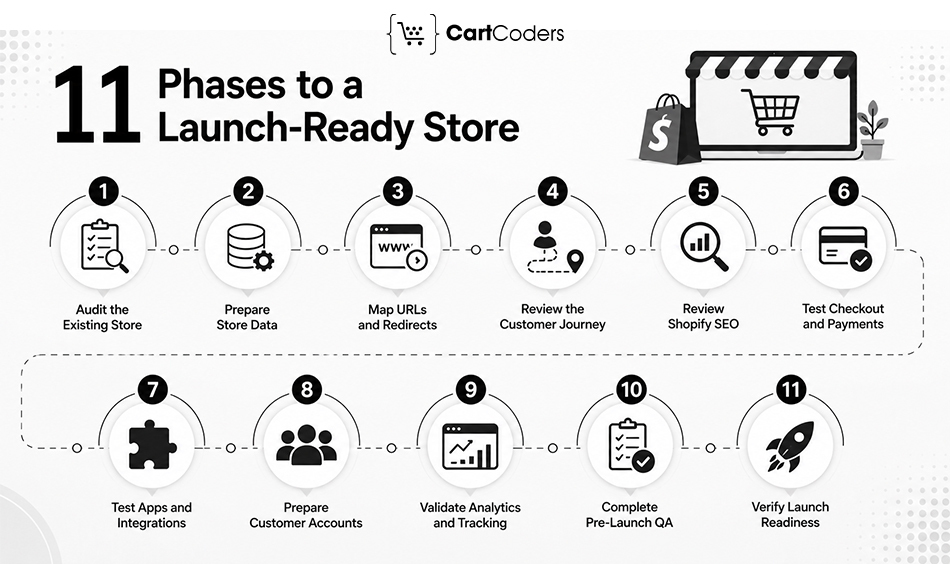
A Shopify migration affects more than the storefront design. It changes how search engines find pages, how customers move through checkout, how data reaches business systems, and how teams manage orders after launch. Google recommends preparing and testing the new site, mapping old URLs, implementing redirects, and monitoring traffic during a site move.
Design Completion Does Not Mean Launch Readiness
A finished theme confirms that the storefront looks ready. It does not confirm that redirects, inventory, payments, taxes, shipping, analytics, customer accounts, or third-party integrations work correctly. Launch approval should come only after the complete buying and operational journey has been tested.
Migration Issues Can Affect Traffic and Sales
Incorrect redirects can send valuable landing pages to irrelevant destinations, while missing product data can affect customer decisions. Checkout or integration errors can create a more immediate problem by stopping orders or sending incorrect information to fulfillment systems. Google specifically recommends mapping old URLs to relevant new destinations rather than redirecting many pages to an unrelated location such as the homepage.
SEO, Data, Checkout, and Integrations Need Separate Checks
Treat these as separate workstreams with clear owners. The SEO team may validate URLs and indexing while operations checks product data, QA tests checkout, and developers confirm ERP, CRM, POS, and 3PL connections.
A Checklist Reduces Launch-Day Risk
A checklist makes ownership visible before the DNS switch. It also gives the team clear acceptance criteria instead of relying on a general “the store looks ready” decision.
Expert Insight: Treat launch readiness as a business-system test, not a design approval. A Shopify store is ready when customer-facing and operational workflows work together.
Phase 1: Audit the Current Store Before Migration
Before migration, document the current store so you have a reliable baseline. This audit should cover URLs, data, functionality, checkout rules, integrations, and performance.
Crawl the Existing Website
Crawl the site and record indexable URLs, status codes, canonicals, metadata, headings, internal links, images, and redirects. Save the crawl for comparison after launch.
Export Important URLs and Landing Pages
Build the URL inventory using your crawl, sitemap, Google Search Console, analytics, backlinks, and CMS. Prioritize pages generating organic traffic, revenue, rankings, or backlinks. Google recommends using sitemaps, analytics, server logs, and Search Console when identifying URLs for a site move.
Review Store Data
Document products, variants, SKUs, inventory, customers, orders, and custom fields. Identify data that needs restructuring because Shopify may store it differently from the existing platform.
List Apps and Custom Features
Record subscriptions, reviews, loyalty, search, filters, automations, integrations, and custom functionality. Decide whether each feature will use Shopify functionality, an app, or custom development.
Document Checkout Rules
Record payment methods, shipping zones, tax settings, discounts, gift cards, and international rules. Turn these into test cases for the Shopify store.
Save SEO and Analytics Benchmarks
Record organic traffic, rankings, conversions, revenue, indexed pages, and top landing pages. These figures give you a baseline for measuring migration performance.
| Audit Finding | Migration Decision It Should Trigger |
| High-value URL | Give it priority during redirect QA |
| Unsupported feature | Replace, rebuild, or remove before launch |
| Custom data structure | Define Shopify metafields or custom solution |
| Complex checkout rule | Add dedicated checkout test case |
| High-performing landing page | Preserve content and search intent |
| Old or unused functionality | Decide whether migration is necessary |
Quick Suggestion: Keep your crawl, URL map, exports, app inventory, and analytics benchmarks in one migration folder for launch and post-launch checks.
Phase 2: Prepare Product, Customer, and Order Data
A successful Shopify data migration depends on accuracy rather than record count. Map important source fields to Shopify before the final import and validate representative records afterward.
Products and Variants
Check titles, descriptions, images, prices, variants, SKUs, barcodes, weights, and inventory. Pay close attention when Shopify uses a different variant structure from the source platform.
Collections and Categories
Map old categories to Shopify collections and taxonomy. Keep valuable category relationships while removing structures that no longer serve customers or SEO.
Customers and Historical Orders
Verify customer contact details, addresses, tags, and required custom information. Decide how much historical order data customer service, finance, loyalty, and reporting teams need.
Metafields and Custom Data
Specifications, compatibility details, ERP IDs, merchandising fields, and other custom information may require Shopify metafields.
CartCoders’ Shopify development services can support custom data structures when standard Shopify fields are insufficient.
| Migration Situation | Recommended Validation Method |
| Large product catalog | Sample records across categories and variants |
| Complex variants | Compare source and Shopify SKU combinations |
| Multiple warehouses | Reconcile inventory by location |
| Historical orders | Compare totals, dates and fulfilment status |
| Custom product fields | Test metafield values on live templates |
| Customer migration | Test several existing customer records |
Direct Answer: Do not validate data migration using record counts alone. Check whether the values inside those records remain correct.
Phase 3: Build a URL Mapping and 301 Redirect Plan
URLs commonly change when moving to Shopify. Map important old pages to their closest new destinations so customers, backlinks, and search engines reach relevant content. Google recommends mapping old URLs to new URLs and using permanent redirects when locations change.
Build the URL Map
Combine URLs from the crawl, sitemap, Search Console, analytics, backlink tools, and CMS. Prioritize pages with traffic, revenue, rankings, and backlinks.
Match URLs by Relevance
Send products to matching products, categories to relevant collections, and articles to equivalent content. A discontinued product can point to a close replacement or collection when that destination genuinely helps the visitor. Avoid sending unrelated URLs to the homepage. Google warns that irrelevant redirects can be treated as soft 404s.
Remove Chains and Test Redirects
Where possible, use:
Old URL → Final Shopify URL
Rather than routing users through several redirects. Test the redirect map before launch and crawl it again once Shopify is live.
| Redirect Situation | Action | Priority |
| URL has traffic and backlinks | Map manually to closest equivalent | Critical |
| Product URL changed | Redirect to matching product | High |
| Product discontinued | Use relevant replacement when available | High |
| Category renamed | Redirect to equivalent collection | High |
| Content consolidated | Redirect to stronger combined page | Medium |
| No relevant replacement exists | Allow a proper 404 | Low |
Quick Answer: A good redirect plan preserves relevance. The destination should satisfy the purpose of the old page rather than simply avoid a 404.
Phase 4: Review Theme, Navigation, and the Customer Journey
Migration QA should follow complete customer journeys instead of checking pages individually. A good-looking Shopify theme can still contain broken filters, links, forms, or mobile interactions.
Review Key Storefront Areas
Test homepage CTAs, navigation, product pages, collections, filters, search, account links, policies, and forms. Remove staging URLs and links pointing to the previous platform.
Test Product Discovery and Buying Pages
Confirm that customers can find products through menus, collections, search, and filters. Product pages should display correct prices, variants, stock, images, delivery details, reviews, and other buying information.
Test Mobile Behaviour
Check menus, filters, galleries, forms, pop-ups, sticky buttons, cart interactions, and page performance across common mobile screen sizes.
CartCoders’ Shopify development services can support storefront changes, responsive testing, and migration QA.
| Customer Journey | Failure Signal to Watch For |
| Homepage → Collection | Broken CTA or wrong collection |
| Collection → Product | Incorrect filter or unavailable product |
| Search → Product | Relevant product missing from results |
| Product → Cart | Wrong variant, price, or inventory |
| Mobile → Checkout | Layout or interaction problem |
| Footer → Policy | Missing or outdated policy page |
Phase 5: Check Shopify SEO Settings Before Launch
A Shopify SEO migration goes beyond redirects. Review metadata, canonicals, internal links, structured data, sitemaps, headings, and indexability before search engines crawl the new store. Shopify provides several built-in SEO features, but storefront settings still require review.
Preserve Valuable SEO Elements
Keep titles, descriptions, content, and page intent when they already perform well. Avoid combining a platform migration with unnecessary large-scale SEO changes.
Check Canonicals and Internal Links
Canonical tags should identify preferred Shopify URLs. Internal links should point directly to final destinations instead of passing through redirects.
Verify Sitemap, Robots, and Schema
Shopify automatically generates sitemap.xml. Also check that robots.txt rules or noindex settings do not block important pages. Shopify explains its default robots setup in its robots.txt documentation.
| SEO Issue Found | Potential Migration Impact | Priority |
| Important URL missing redirect | Lost organic landing page | Critical |
| Accidental noindex | Page may disappear from search | Critical |
| Wrong canonical | Incorrect URL may be selected | High |
| Internal links use old URLs | Extra redirects and weaker structure | High |
| Missing metadata | Reduced search-result relevance | Medium |
| Schema mismatch | Incorrect rich-result information | Medium |
Expert Insight: A migration is not the best time to rewrite every high-performing page. Preserve what already works and change only what the Shopify structure requires.
Phase 6: Test Checkout, Payments, Taxes, and Shipping
A Shopify store is not launch-ready until multiple buying scenarios work from cart through payment, fulfillment, cancellation, and refund.
Shopify recommends placing test orders to verify checkout and order processing.
Test Real Buying Scenarios
Test different products, variants, locations, shipping methods, discounts, and payment outcomes. Include both successful and failed transactions.
Shopify supports test orders through Shopify Payments test mode and other supported testing methods.
Verify Taxes, Shipping, and Promotions
Check regional taxes, shipping zones, free-shipping thresholds, product weights, carrier rates, discounts, gift cards, bundles, and subscription pricing.
Test What Happens After Payment
Check inventory reduction, confirmation emails, fulfilment, cancellation, refunds, and connected operational systems.
| Order Type | Extra Check Beyond Checkout |
| Standard domestic order | Inventory and fulfilment update |
| International order | Currency, duties and regional restrictions |
| Discounted order | Reporting records correct net value |
| Failed payment | No false fulfilment or inventory change |
| Cancelled order | Stock and connected systems update |
| Refunded order | Payment, accounting and customer records match |
Quick Suggestion: Run a final test after production payment, shipping, and tax settings are active.
Phase 7: Validate Apps, Integrations, and Automations
Apps and integrations should be tested against actual business workflows, not simply checked as “connected.”
Test Business-Critical Connections
Verify ERP, CRM, POS, warehouse, 3PL, accounting, email, loyalty, reviews, subscriptions, and other critical systems. Check data in both directions where applicable.
By getting Shopify integration services from experts, you can get support for ERP, CRM, inventory, shipping, accounting, and third-party connections.
Validate Custom Apps and APIs
Check authentication, API scopes, webhooks, data mapping, error handling, and failed synchronization. Custom requirements can be handled through Shopify app development services.
Test Shopify Flow
Flows that depend on tags, metafields, customer segments, or order properties should be retested using migrated data. Review Shopify’s Shopify Flow documentation for details on available triggers, conditions, and actions when rebuilding or validating your workflows.
| Failure Type | What Your Team Should Have Ready |
| Inventory sync fails | Retry and discrepancy alert |
| ERP rejects order | Error log and manual recovery process |
| 3PL does not receive order | Escalation and fulfilment fallback |
| Webhook fails | Logging and retry mechanism |
| CRM creates duplicates | Matching and deduplication rule |
| Automation misfires | Workflow owner and rollback process |
Expert Insight: “Connected” is not a valid acceptance test. Confirm that the expected business result occurs and that failures can be detected.
Phase 8: Prepare Customer Accounts and Launch Communication
Customer data can migrate while the account experience still changes. Test login behaviour, order history, loyalty, subscriptions, and customer support processes before launch.
Plan Customer Account Access
Imported customer passwords generally do not transfer directly. Account migration should include a clear plan for preserving customer access and minimizing login friction.
Shopify’s newer customer accounts use one-time verification codes instead of traditional passwords, allowing customers to access their accounts without creating or remembering a password. Shopify’s customer accounts documentation explains how this account model supports the post-migration customer experience.
Check Customer History and Benefits
Test historical orders, loyalty points, subscriptions, memberships, returns, and other customer-specific data with representative accounts.
Prepare Customer Communication
Tell customers clearly if they need to reactivate an account, use a different login process, or take another action after migration.
| Customer Situation | Communication Needed | Support Preparation |
| Login method changes | Explain new sign-in process | Login troubleshooting |
| Password cannot migrate | Give activation instructions | Reset support |
| Order history differs | Explain what remains available | Order lookup process |
| Loyalty data moves | Confirm balance availability | Balance verification |
| Subscription moves | Explain management process | Subscription support |
Phase 9: Verify Analytics, Tracking, and Reporting
Tracking should be checked against real Shopify activity. Seeing traffic in an analytics dashboard does not prove eCommerce events or revenue are correct.
Validate GA4 and Search Console
Check product views, add-to-cart, checkout, purchases, transaction IDs, revenue, and currencies. Shopify provides a supported GA4 setup process.
Keep Search Console access and submit the Shopify sitemap after launch.
Check Merchant Center and Advertising Pixels
Verify product IDs, prices, inventory, URLs, variants, and images in Merchant Center. Google provides guidance for Merchant Center and GA4 connections.
Also test Meta and other advertising events. Shopify explains its current setup through pixels and customer events.
Compare Reporting Systems
Shopify, GA4, advertising platforms, and ERP systems can provide report different totals because attribution methods differ. Investigate large or unexplained gaps rather than expecting exact matches.
| Tracking Problem | How to Detect It |
| Duplicate purchases | Same transaction recorded multiple times |
| Missing revenue | Shopify orders exceed analytics purchases |
| Broken UTM tracking | Campaign traffic appears under wrong source |
| Feed mismatch | Merchant Center differs from Shopify |
| Pixel failure | Checkout or purchase event missing |
| Wrong currency | Analytics revenue differs materially from orders |
Direct Answer: Tracking is ready when a test order can be followed from acquisition through checkout and appears correctly in the required reporting systems.
Phase 10: Run Final Pre-Launch QA Before the DNS Switch
Final QA should combine storefront, technical, operational, and SEO testing. Shopify’s official migration checklist includes orders, refunds, fulfilment, customer accounts, redirects, and domain settings.
Test the Full Customer Journey
Move through homepage, search, collection, product, cart, checkout, payment, and confirmation on desktop and mobile.
Check Forms, Emails, and Redirects
Submit important forms and review order, shipping, cancellation, and refund emails. Run a final crawl for broken links, incorrect redirects, missing pages, and canonical problems. Google recommends testing redirects during a site move.
Prepare an Escalation Plan
Assign owners for checkout, DNS, integration, analytics, and SEO failures before launch.
| Launch Blocker | Who Should Own the Decision |
| Checkout failure | Ecommerce/development lead |
| Payment failure | Finance and development |
| Major data mismatch | Migration/data lead |
| ERP or 3PL failure | Operations/integration lead |
| Redirect failure | SEO/development lead |
| Tracking failure | Analytics/marketing lead |
| DNS issue | Technical lead |
Phase 11: What Should You Check on Shopify Migration Launch Day?
Launch day should follow a controlled sequence with clear owners. The goal is to confirm that the production store works under real conditions.
Confirm Domain, DNS, and SSL
Point the domain to Shopify and confirm HTTPS across important pages. Shopify explains TLS provisioning in its secure connections guidance.
Test Redirects and Search Access
Test high-value old URLs immediately. Confirm that important pages are indexable and staging noindex settings are gone.
Shopify automatically generates sitemap.xml; submit it after launch using the process described in Shopify’s sitemap documentation.
Place a Live Order
Use the production payment gateway for a small real order. Follow it through payment, inventory, confirmation, ERP or 3PL, fulfilment, and analytics.
Check Live Integrations
Verify ERP, CRM, accounting, warehouse, email, POS, and 3PL connections with production data. CartCoders’ Shopify integration services can support complex migration integrations.
| Launch Checkpoint | Pass Condition | If It Fails |
| Domain | Correct Shopify store loads | Check DNS configuration |
| SSL | HTTPS works without warnings | Review certificate status |
| Redirects | High-value URLs reach correct pages | Fix redirect map |
| Live order | Payment completes successfully | Escalate before the promotion |
| Inventory | Stock changes correctly | Check inventory integration |
| Fulfilment | Order reaches required system | Check ERP/3PL connection |
| Analytics | Purchase is recorded | Review tracking configuration |
Launch Rule: Do not increase advertising, email, or campaign traffic until the live order journey and business-critical integrations have passed production checks.
What Should You Monitor During the First 30 Days After Shopify Migration?
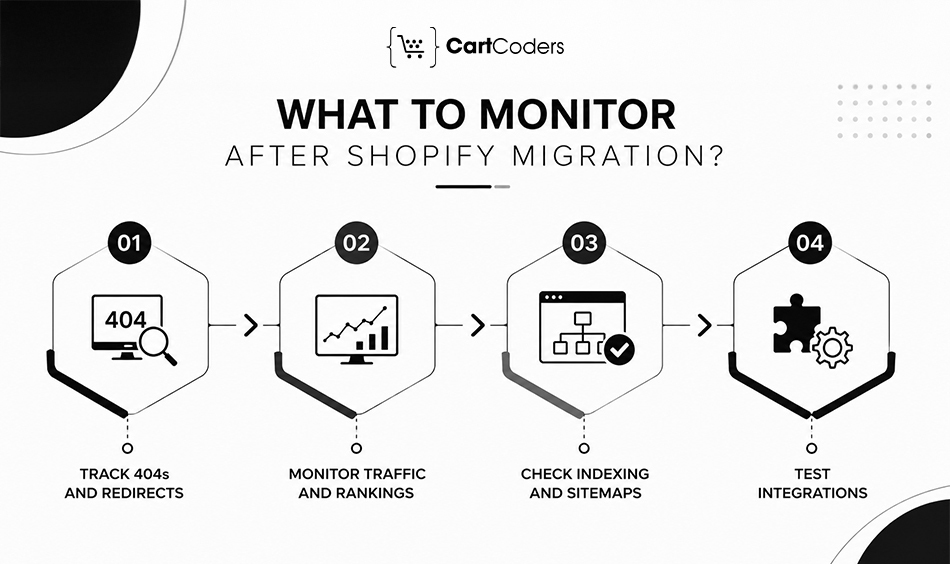
Post-launch monitoring is part of the migration itself. Search engines need time to process URL changes, while customers and internal teams often uncover issues that controlled QA did not reproduce.
Google recommends monitoring both the old and new website after a move and notes that crawling and indexing can take several weeks for medium-sized websites.
First 24 Hours: Check Revenue-Critical Functions
Focus first on anything that could stop or corrupt an order. Review payments, checkout errors, inventory, fulfilment, discounts, transactional emails, and major integrations. Compare actual Shopify orders with payment, ERP, warehouse, and analytics records.
First 7 Days: Review SEO and Customer Behaviour
Monitor Google Search Console for indexing changes, crawl errors, 404s, and important landing pages. Also review conversion rate, search terms, zero-result searches, checkout behaviour, customer support tickets, mobile issues, and unexpected product problems.
Days 8–30: Compare Performance With Your Baseline
Use the pre-migration benchmark to compare organic traffic, rankings, revenue, conversion rate, indexed pages, and top landing pages. Some search fluctuation is normal during a site move. Focus on patterns rather than reacting to every daily ranking change.
| Period | Priority checks |
| First 24 hours | Orders, payments, inventory, integrations, tracking |
| Days 2–7 | 404s, indexing, redirects, customer issues, checkout |
| Days 8–14 | Organic landing pages, rankings, feeds, conversion |
| Days 15–30 | Traffic trends, revenue, SEO recovery, integration stability |
Watch 404 Errors and Redirect Performance
New 404s often reveal URLs missed during mapping. Review them regularly and add redirects when a relevant replacement exists. Do not redirect every 404 automatically. Pages without a suitable replacement can correctly return a 404.
Monitor Organic Traffic and Rankings
Compare performance at page and query level instead of looking only at total organic traffic. Pay particular attention to high-value products, collections, and informational pages that generated meaningful traffic before migration.
Check Indexing and Sitemap Processing
Use Google Search Console to confirm that important Shopify URLs are being discovered and indexed. Investigate unexpected exclusions, canonical conflicts, blocked pages, and old URLs that remain indexed longer than expected.
Keep Testing Integrations
ERP, CRM, 3PL, inventory, and accounting problems may appear only under normal order volume. Monitor failed jobs, delayed webhooks, inventory differences, duplicate records, fulfilment errors, and API failures throughout the first month.
Expert Insight: A successful migration is not defined by a clean launch day. It is defined by stable orders, accurate data, working integrations, and recovering search visibility during the weeks that follow.
How Can CartCoders Help With a Shopify Migration?
A Shopify migration needs coordination across data, SEO, storefront development, checkout, apps, and business systems. CartCoders supports migrations from planning through post-launch checks, helping merchants move without treating migration as a simple data import.
Our Shopify migration services cover platform migration, data transfer, URL mapping, theme setup, integrations, testing, and launch support.
Migration Planning and Data Mapping
Before development starts, we review the existing store structure, products, customers, orders, URLs, apps, and custom functionality. This helps define what should move, what needs restructuring, and what can be removed.
For stores with large catalogs or custom data, the migration plan can also cover variants, metafields, collections, historical records, and platform-specific data relationships.
SEO Migration and 301 Redirects
Organic visibility needs its own migration plan. We map important URLs, prepare redirects, review metadata, internal links, canonicals, structured data, and sitemap setup.
Google recommends keeping redirects in place for at least one year after a site move so its systems have enough time to transfer signals to the new URLs.
Shopify Theme and Store Development
A migration is also an opportunity to review how customers browse and buy. CartCoders can handle theme implementation, responsive layouts, collection structures, product templates, navigation, and custom storefront requirements through our Shopify development services.
The focus should remain on preserving useful functionality while adapting it correctly to Shopify rather than copying the old platform page by page.
ERP, CRM, 3PL, and API Integrations
Operational systems need to continue working after the storefront changes. We can connect Shopify with ERP, CRM, warehouse, accounting, POS, inventory, and fulfilment platforms through Shopify integration services.
Integration testing should verify real business outcomes, including order transfer, inventory updates, fulfilment status, refunds, and failed synchronization.
Launch and Post-Migration Support
Support should continue after DNS changes. The first weeks are important for checking redirects, indexing, checkout, integrations, analytics, and customer-reported problems.
Contact us for a Shopify migration assessment if you are planning to move from Magento, WooCommerce, BigCommerce, or another ecommerce platform.
We can also handle theme and storefront requirements through our Shopify development services, along with ERP, CRM, inventory, warehouse, and 3PL connections through Shopify integration services.
Conclusion
A successful Shopify migration protects more than products and customer records. It preserves the paths customers use to find the store, the checkout rules that convert them, and the business systems that process each order after purchase.
The safest approach is to work through the migration in stages: audit the existing store, validate data, map URLs, review SEO, test checkout, verify integrations, check analytics, and run complete pre-launch QA. After launch, monitor orders and technical performance alongside organic visibility for at least the first 30 days.
Most migration problems are easier to correct before the DNS switch than after customers and search engines reach the new store. Use the checklist as a launch gate rather than a task list that simply needs to be marked complete.
For businesses planning a complex replatform, CartCoders provides Shopify migration services covering data, development, integrations, SEO migration, testing, and post-launch support.
Frequently Asked Questions
A small store may move within a few weeks, while a large or highly customized ecommerce business can require several months. Catalog size, historical data, design work, integrations, custom functionality, SEO requirements, and testing have the biggest effect on the timeline.
Products, variants, customers, inventory, collections, orders, images, and selected custom data can usually be migrated. The exact fields depend on the source platform and Shopify’s data structure.
Generally, existing passwords cannot simply be imported into Shopify. The customer account approach should be planned before launch so existing customers receive clear instructions for accessing their accounts.
Temporary ranking movement can happen while Google crawls and processes changed URLs. Accurate redirects, preserved content, internal links, canonicals, crawlability, and post-launch monitoring can reduce avoidable SEO losses.
Google recommends keeping redirects in place for at least one year after a site move. Keeping useful redirects longer can also help customers and external links that still use old URLs.
Not by default. Each old URL should point to the closest relevant new page. Google warns that redirecting many unrelated URLs to one destination can be treated as a soft 404.
Only content that still has business, customer, SEO, legal, or operational value needs a new destination. Outdated pages can be consolidated, redirected where appropriate, or removed.
Test products, variants, navigation, mobile layouts, forms, customer accounts, discounts, shipping, taxes, payments, refunds, apps, integrations, redirects, and analytics. Shopify also recommends placing test orders before launch.
Submit the live Shopify sitemap in Google Search Console after the domain is connected and the new store is accessible to search engines. Shopify automatically generates the sitemap at /sitemap.xml.
Monitor 404 errors, redirects, indexing, organic landing pages, rankings, checkout errors, payments, inventory, fulfillment, integrations, analytics, and customer support issues. Compare these results with the baseline recorded before migration.


