

Your website may have well-written content, accurate product information, and strong organic rankings, but can AI search platforms access that information? Many businesses review their robots.txt file, find no obvious restrictions, and assume that ChatGPT, Claude, and Perplexity can retrieve their website content without difficulty.
However, AI crawler access depends on more than robots.txt directives. Firewall settings, bot protection, server responses, authentication requirements, and incorrect crawler rules can prevent automated systems from accessing important pages. Blocking all AI bots without understanding their individual purposes may also restrict certain AI search discovery opportunities.
An AI crawler audit helps businesses identify these technical barriers while maintaining control over how automated systems access their content. This guide explains how to check AI crawler permissions, verify genuine bot requests, identify access issues, and establish suitable crawling policies for your website or Shopify store.
Quick Answer: To perform an AI crawler audit, review your robots.txt file, check firewall and CDN settings, examine server access logs, verify crawler identities, and test important website URLs. Separate AI search crawlers from training crawlers to maintain appropriate content access policies. Allowing AI crawlers supports content discovery but does not guarantee citations or recommendations in AI-generated answers.
What Is an AI Crawler Audit, and Why Does It Matter?
An AI crawler audit is a technical assessment that identifies which AI bots can access a website, what content they are permitted to request, and whether their requests receive successful responses. It examines both declared crawling permissions and the technical infrastructure responsible for delivering website content.
Unlike a general SEO audit, which primarily focuses on traditional search engine crawling, indexing, and website performance, an AI crawler access audit also considers model-training crawlers, AI search discovery systems, and user-requested content retrieval.
Why Should Businesses Audit AI Crawler Access?
AI platforms can use different systems to discover, retrieve, and process online information. Understanding these systems helps businesses make informed decisions about content accessibility, data collection, and search visibility without unnecessarily restricting legitimate automated traffic.
An AI crawler audit helps businesses:
- Identify unintended crawler restrictions.
- Separate AI search and training permissions.
- Detect firewall and bot protection issues.
- Verify genuine AI crawler requests.
- Review product and content accessibility.
- Identify server errors affecting crawlers.
- Maintain documented content access policies.
For Shopify merchants, crawler accessibility is also an important part of preparing product information for AI-assisted shopping and search experiences. Product, collection, and policy pages that AI systems cannot retrieve are less likely to inform the answers those systems give to shoppers.
Which AI Crawlers Should You Check During an Audit?
Before reviewing your website’s crawler settings, identify the purpose of each AI bot. Some crawlers collect content that may be used for model training, while others discover information for AI-powered search results or retrieve web pages in response to individual user requests. Treating all AI crawlers as a single category can lead to incorrect access policies. Businesses that want to restrict training-related data collection while supporting AI search discovery need to manage these permissions independently.
AI Crawler User-Agent List and Their Purposes
| AI Crawler / User-Agent | Operator | Primary Purpose | Audit Priority |
| GPTBot | OpenAI | AI model training | Training preferences |
| OAI-SearchBot | OpenAI | ChatGPT Search discovery | Search accessibility |
| ChatGPT-User | OpenAI | User-requested retrieval | Content retrieval |
| ClaudeBot | Anthropic | AI model training | Training preferences |
| Claude-SearchBot | Anthropic | Claude search discovery | Search accessibility |
| Claude-User | Anthropic | User-requested retrieval | Content retrieval |
| PerplexityBot | Perplexity | Search discovery | Search accessibility |
| Perplexity-User | Perplexity | User-requested retrieval | Content retrieval |
| Google-Extended | Certain Gemini training and grounding uses | AI content usage preferences | |
| Googlebot | Google Search crawling | Organic and AI search visibility | |
| Bingbot | Microsoft | Bing Search crawling | Bing-based discovery |
| CCBot | Common Crawl | Public web dataset collection | Dataset collection preferences |
OpenAI and Anthropic provide separate controls for training, search discovery, and user-requested retrieval. Website owners should review the latest OpenAI crawler documentation and Anthropic crawler documentation before modifying their access policies.
Technical note: Google-Extended is not a separate web crawler. It is a robots.txt control token that manages certain downstream AI uses of content collected by Google’s crawling infrastructure. Blocking Google-Extended does not directly affect Google Search rankings.
How Do You Perform an AI Crawler Audit Step by Step?
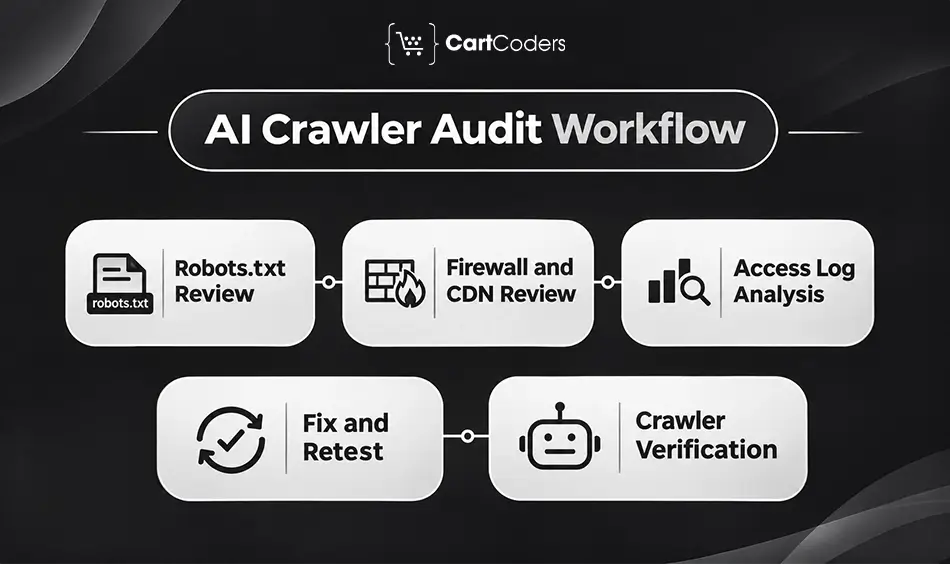
A reliable AI crawler audit examines both crawler permissions and successful content retrieval. A website may explicitly allow a bot in robots.txt while another system prevents the same bot from retrieving product pages or blog content. The following five-step process helps website owners identify where restrictions occur, determine whether they are intentional, and establish the appropriate corrective actions.
Step 1: Review Your Website’s Robots.txt File
Start by opening the live robots.txt file using your website’s primary domain. Search for AI-specific user-agent directives and determine whether each relevant bot is allowed to crawl public website content. Review general crawler rules as well, since they may apply to agents without individually defined directives.
Example:
https://example.com/robots.txt
Check the following elements:
- AI-specific user-agent groups
- Allow and Disallow directives
- General wildcard rules
- Restricted URL paths
- Conflicting crawler directives
- Sitemap declarations
Step 2: Check Firewall, CDN, and Bot Protection Settings
Review the security infrastructure responsible for handling incoming website requests. Content delivery networks (CDNs), web application firewalls (WAFs), rate-limiting policies, and automated bot protection systems may restrict requests independently of robots.txt. Examine security events to identify whether relevant AI crawlers receive blocked responses, browser challenges, or rate-limit errors. Before changing security policies, confirm that the affected requests belong to genuine crawlers.
Step 3: Analyze Server and CDN Access Logs
Access logs provide evidence of which bots have requested website content and how the infrastructure responded. Review request timestamps, source IP addresses, user-agent strings, requested URLs, and HTTP status codes to understand crawler behavior.
Pay particular attention to repeated access failures involving public product pages, collection pages, and informational content. Comparing successful requests with failed requests can help identify whether the problem affects the entire website or only specific URL patterns.
Step 4: Verify Genuine AI Crawler Requests
A user-agent string can be modified to imitate a legitimate AI crawler. Website owners should verify the source of suspected bot requests using official IP ranges or provider-supported verification methods before creating firewall exceptions. For providers that publish crawler IP addresses, compare the recorded source IP against the relevant published ranges. Where supported, use verified reverse DNS or trusted bot-management classifications to establish additional identity evidence.
Step 5: Fix Access Issues and Retest Important Pages
After identifying the source of a restriction, update the relevant robots.txt directive, security rule, or application setting. Avoid removing existing security controls without understanding their purpose, particularly when the website contains customer information or restricted product data. Retest important public URLs and monitor subsequent verified crawler requests. Record the original issue, corrective action, response status, and remaining limitations so the development team can identify recurring problems.
Example of an AI Crawler Audit Finding
| Audit Element | Illustrative Finding |
| Tested URL | example.com/products/running-shoes |
| Crawler | OAI-SearchBot |
| Robots.txt permission | Allowed |
| Crawler identity | Verified against provider IP ranges |
| HTTP response | 403 Forbidden |
| Firewall result | Request blocked by bot protection |
| Corrective action | Review the applicable verified-bot policy |
| Expected result | Successful delivery of public product content |
This is a hypothetical audit example, not data from a live client project.
Expert insight: A crawler audit should not stop when robots.txt reports that access is allowed. The strongest evidence comes from verified requests receiving successful responses that contain the intended website content.
How Do You Check AI Crawler Access in Robots.txt?
The robots.txt file communicates crawling preferences to automated systems. It contains user-agent groups and rules that specify which website paths a crawler may or may not request. Understanding how these directives work is essential when establishing separate policies for AI search and model training.
Understand User-Agent, Allow, and Disallow Directives
Each robots.txt directive serves a specific purpose. Incorrect syntax, misplaced rules, or overly broad restrictions may cause crawlers to interpret access permissions differently from what the website owner intended. The table below summarizes the directives you will review most often during an audit.
| Directive | Purpose | Example |
| User-agent | Identifies the crawler | User-agent: GPTBot |
| Allow | Permits crawling of matching paths | Allow: /products/ |
| Disallow | Requests that matching paths not be crawled | Disallow: /account |
| User-agent: * | Fallback group for unmatched crawlers | User-agent: * |
| Sitemap | Identifies a sitemap location | Sitemap: https://example.com/sitemap.xml |
Under the Robots Exclusion Protocol, crawler-specific groups and matching URL paths determine applicable permissions. When a crawler has its own matching group, it does not automatically inherit the general wildcard group’s restrictions.
Example Robots.txt Configuration for AI Crawlers
A business that wants to support AI search discovery while opting out of selected AI training crawlers could consider the following policy.
# Selected AI search crawlers
User-agent: OAI-SearchBot
Allow: /
User-agent: Claude-SearchBot
Allow: /
User-agent: PerplexityBot
Allow: /
# Selected AI training crawlers
User-agent: GPTBot
Disallow: /
User-agent: ClaudeBot
Disallow: /
This example illustrates how search and training crawlers can receive different permissions. It is not a complete robots.txt configuration and should not replace existing website rules. For Shopify stores, additional directives must preserve relevant restrictions for account pages, cart URLs, checkout pages, and duplicate content paths. Adding an unrestricted crawler-specific group without considering these existing rules may unintentionally expand crawl permissions.
Consider: Robots.txt is not a security mechanism. Use authentication, authorization, and appropriate application-level access controls to protect confidential information.
Does Blocking GPTBot or ClaudeBot Remove Your Website From AI Search?
No. Blocking GPTBot does not automatically prevent your website from appearing in ChatGPT Search. Similarly, blocking ClaudeBot does not automatically prevent Claude Search from discovering your content. Both OpenAI and Anthropic use separate user-agent controls for model training and search discovery.
Website owners should understand these differences before making changes to their robots.txt file. A blanket restriction on AI crawlers could prevent search-oriented bots from retrieving valuable public content, even when the original intention was only to restrict model-training data collection.
Training Crawlers vs. AI Search Crawlers
| Comparison | Training Crawlers | AI Search Crawlers |
| Primary purpose | Collect content for model development | Discover content for search responses |
| Examples | GPTBot, ClaudeBot | OAI-SearchBot, Claude-SearchBot, PerplexityBot |
| Reason to allow | Permit collection for supported training purposes | Support AI search discovery |
| Reason to block | Content usage and intellectual property preferences | Restrict a particular search discovery route |
| Access controls | Crawler-specific policies | Crawler-specific policies |
Why Blocking All AI Bots Can Affect Discoverability
When businesses block training and search crawlers together, they may unintentionally restrict access to product descriptions, service information, educational articles, and other public content. These restrictions can reduce the information available through particular AI search discovery routes.
However, allowing search crawlers is only one part of AI search readiness. Product information, structured data, content quality, and supported shopping channels also influence how products are discovered. These factors are particularly important for merchants preparing their Shopify products for ChatGPT, Gemini, and Copilot recommendations.
Expert insight: Define your business objective before changing crawler permissions. Restricting AI training, supporting search discovery, and preventing automated data extraction are three different objectives that require different technical controls.
Which AI Crawlers Should You Allow or Block for Your Store?
Businesses should establish AI crawler policies based on their content ownership preferences, search visibility objectives, security requirements, and data-sharing practices. There is no universal robots.txt configuration suitable for every website because different businesses have different requirements concerning how their content is collected and processed. For an eCommerce store, allowing legitimate search crawlers may support public product discovery. A subscription-based publisher, however, may require more restrictive policies to protect premium content.
Allow Relevant AI Search Crawlers
If AI search discoverability is a business priority, consider allowing OAI-SearchBot, Claude-SearchBot, and PerplexityBot to access relevant public pages. These crawlers help their respective platforms discover information for search-related purposes, although successful crawling does not guarantee inclusion in AI-generated responses.
Review Training Crawler Permissions
Decisions about GPTBot, ClaudeBot, and Common Crawl should reflect the organization’s content usage and data collection policies. Businesses may choose to restrict these crawlers while maintaining access for search-oriented systems. Blocking future crawling does not automatically remove information collected previously or prevent discovery through other sources.
Manage User-Requested Retrieval Separately
ChatGPT-User, Claude-User, and Perplexity-User support retrieval initiated by individual users rather than conventional automated search crawling. Their behavior differs by provider, so website owners should not assume that all three follow identical robots.txt rules. For example, the Perplexity crawler documentation states that Perplexity-User generally disregards robots.txt when completing user-requested retrieval.
Recommended AI Crawler Policy by Business Objective
| Crawler or Control | Suggested Policy | Business Objective |
| OAI-SearchBot | Consider allowing | ChatGPT Search discovery |
| Claude-SearchBot | Consider allowing | Claude search discovery |
| PerplexityBot | Consider allowing | Perplexity search discovery |
| GPTBot | Based on training policy | Model-training preferences |
| ClaudeBot | Based on training policy | Model-training preferences |
| CCBot | Based on dataset policy | Public dataset collection |
| ChatGPT-User | Review separately | User-requested retrieval |
| Claude-User | Review separately | User-requested retrieval |
| Perplexity-User | Review separately | User-requested retrieval |
| Googlebot | Allow relevant public pages | Google Search visibility |
| Bingbot | Allow relevant public pages | Bing Search visibility |
| Google-Extended | Based on AI usage policy | Certain Gemini-related uses |
These recommendations assume the business wants to maintain organic and AI search discoverability while retaining control over training-related content collection.
Does Google-Extended Affect AI Overview Visibility?
Blocking Google-Extended does not directly prevent pages from appearing in Google AI Overviews. Google-Extended manages certain AI training and non-Search grounding uses, while Google’s Search experiences follow separate controls. Businesses should maintain appropriate Googlebot access, review page indexing, and check the relevant generative AI visibility controls in Google Search Console. Google’s official guide to generative AI features in Search also emphasizes original content, technical accessibility, and established SEO practices.
How Do You Verify a Genuine AI Crawler in Server Logs?
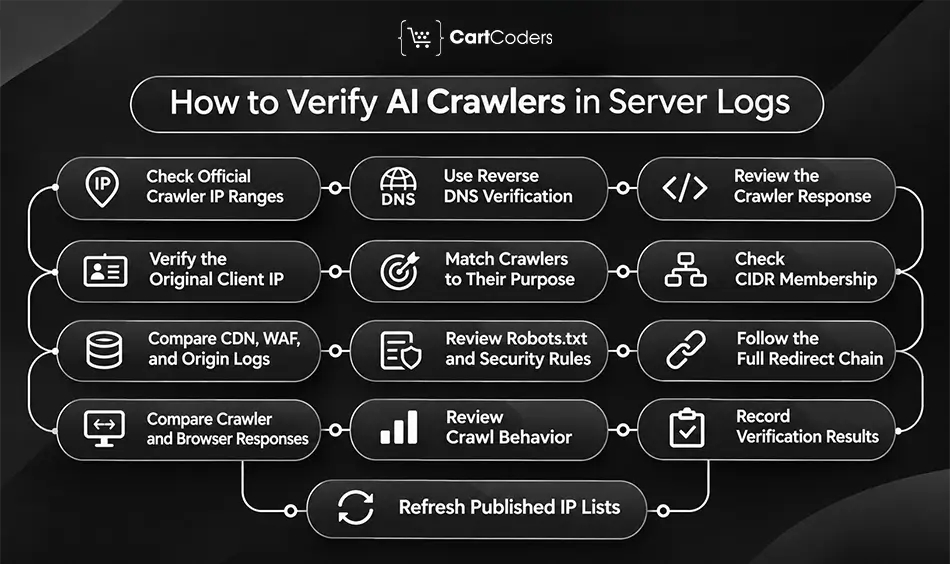
Verifying AI crawler identities helps businesses distinguish legitimate automated requests from traffic claiming to belong to a recognized AI provider. Anyone can change an HTTP user-agent string to include names such as GPTBot or PerplexityBot, so the crawler name alone is insufficient evidence of authenticity. A proper verification process examines the request’s network origin, provider-specific verification methods, and infrastructure response before any security exceptions are approved.
Check Official Crawler IP Ranges
Some AI providers publish IP address ranges associated with their crawlers. Comparing the source IP recorded in access logs against these ranges helps establish whether the request originates from documented provider infrastructure. Use the appropriate IP list for each agent because different crawlers may use different network ranges.
| Crawler | Official IP Address Resource |
| GPTBot | GPTBot IP ranges |
| OAI-SearchBot | OAI-SearchBot IP ranges |
| ChatGPT-User | ChatGPT-User IP ranges |
| PerplexityBot | PerplexityBot IP ranges |
| Perplexity-User | Perplexity-User IP ranges |
Always retrieve the latest published IP ranges rather than relying on previously downloaded lists.
Use Reverse DNS Verification Where Supported
Reverse DNS verification helps identify the hostname associated with an IP address. When a crawler provider documents this method, verify that the reverse lookup returns an expected hostname and that a forward DNS lookup resolves back to the original IP address. Not every AI crawler supports this verification method, so follow the instructions provided by the relevant operator.
Read the Actual Crawler Response
Once the crawler identity has been assessed, review the requested URL and HTTP response. A genuine crawler receiving a successful response provides stronger evidence of accessibility than a simulated request. However, the response body should also be reviewed because some security challenges or error pages may return an HTTP 200 status.
Confirm the Original Client IP Behind a CDN
Websites using Cloudflare, another CDN, or a reverse proxy may record the proxy IP instead of the crawler’s original address. Verify that the server logs use a trusted client IP field, such as CF-Connecting-IP, rather than accepting an untrusted X-Forwarded-For value.
Cloudflare recommends using CF-Connecting-IP or True-Client-IP at the origin because forwarded headers can be spoofed when the proxy chain is not configured correctly. Review the Cloudflare client IP guidance before comparing log addresses with provider IP ranges. Cloudflare Fundamentals docs
Match the Crawler to Its Stated Purpose
A provider may operate separate agents for training, search indexing, and user-requested page visits. For example, OpenAI identifies GPTBot, OAI-SearchBot, and ChatGPT-User as different agents with separate purposes and published IP resources.
Verify the exact crawler rather than treating every OpenAI request as the same type of traffic. OpenAI’s crawler documentation explains how each agent relates to search, training, or user actions. developers.openai.com
| Crawler | Main purpose | What to verify |
| GPTBot | Model training | User agent and GPTBot IP range |
| OAI-SearchBot | Search discovery | User agent and SearchBot IP range |
| ChatGPT-User | User-requested page access | User agent and ChatGPT-User IP range |
| PerplexityBot | Search indexing | User agent and PerplexityBot IP range |
| Perplexity-User | User-requested access | User agent and Perplexity-User IP range |
Check CIDR Membership Correctly
Published crawler resources usually contain CIDR ranges rather than a simple list of individual addresses. The verification process must test whether the logged IPv4 or IPv6 address falls within one of those ranges.
A text comparison will not work when the provider publishes a network prefix such as 192.0.2.0/24. Use a CIDR-aware script, firewall tool, security platform, or IP address library and test both IPv4 and IPv6 where the provider publishes them.
Compare CDN, WAF, and Origin Logs
A crawler request may pass through the CDN but never reach the origin server. Compare CDN logs, firewall events, load-balancer records, and origin access logs using the request time, URL, IP address, and request identifier.
This comparison shows where the request was blocked or changed. It can also reveal whether a managed bot rule, rate limit, geographic restriction, or security challenge caused the failure.
Review Robots.txt and Security Rules Separately
A crawler may be allowed in robots.txt but blocked by a firewall, CDN rule, authentication layer, or rate limit. The opposite can also happen: the server may return the page even though the crawler has been asked not to access it through robots.txt.
Check both controls independently. Robots.txt communicates crawling preferences, while the CDN and server decide whether the request can technically reach the content.
Follow the Full Redirect Chain
Testing only the first URL can miss problems that appear after a redirect. A crawler may receive a 301 or 302 response and then reach a blocked regional URL, login page, cookie challenge, or incorrect canonical destination.
Review every response until the final page loads. Confirm that the final URL returns the intended status, content type, page content, and canonical tag rather than an error page with an HTTP 200 response.
Compare the Response Body With a Normal Visit
A successful status code does not prove that the crawler received the correct page. Some security services return a challenge, consent page, empty template, or access-denied message with a 200 OK status.
Compare the crawler response with a normal browser response. Check the title, main content, structured data, canonical URL, and content length to confirm that the crawler received the public page rather than a security response.
Use Crawl Behavior Only as Supporting Evidence
Request patterns can support an investigation but should not be used as the main identity check. A legitimate crawler may request robots.txt first, revisit important pages, follow internal links, and use a consistent request rate, but a spoofed bot can copy some of this behavior.
Treat unusual speed, repeated errors, ignored restrictions, or unrelated URL requests as warning signs. Identity should still be based on provider-approved IP or DNS verification methods.
Record the Verification Result
Keep a short record of each verification, including the crawler name, source IP, matched network range, requested page, HTTP response, firewall action, and verification time. This helps security, infrastructure, and SEO teams review the same evidence.
A practical verification record could include:
- Crawler token
- Source IP
- Trusted IP header
- Matched CIDR range
- Requested URL
- Response status
- WAF action
- Final destination
- Verification date
- Decision taken
Refresh Published IP Lists Automatically
Provider IP ranges may change, so a permanent allowlist created from an old file can reject genuine requests or retain addresses that are no longer valid. Retrieve the provider’s current list on a set schedule and record when it was last updated.
The update process should validate the downloaded JSON before changing firewall rules. If the file cannot be retrieved or parsed, retain the last verified list and create an alert instead of replacing it with an empty configuration.
Expert insight: No single signal should approve a crawler. A stronger verification process combines the claimed user agent, trusted client IP, provider-published ranges or supported DNS checks, security logs, and the final page response.
Sample AI Crawler Access Log
2026-11-25T10:15:32Z
IP: 192.0.2.25
User-Agent: OAI-SearchBot
Request: GET /products/running-shoes
Status: 403
WAF Action: Block
This is an illustrative log entry using a reserved example IP address. It does not represent a genuine OpenAI crawler request.
The example shows a request claiming to be OAI-SearchBot that received an HTTP 403 response. The next step would be to verify its identity and investigate the firewall action rather than automatically allowing the requester.
Why Are AI Crawlers Blocked Even When Robots.txt Allows Them?
Robots.txt permissions do not override firewall policies, authentication requirements, rate limits, or application-level restrictions. A website can allow an AI crawler in its published directives while its infrastructure continues to reject requests from that crawler.
Cloudflare and Other Firewall Restrictions
Cloudflare and other security providers can restrict automated requests based on IP reputation, bot classifications, geographic restrictions, and custom security policies. These controls may affect legitimate crawler traffic when their configurations do not account for individual crawler identities. Review security events and provider-specific verification requirements before creating narrowly scoped exceptions for relevant public content.
CAPTCHA and Automated Bot Challenges
Some websites require visitors to complete a CAPTCHA or browser-based security challenge before accessing content. Automated crawlers may be unable to complete these challenges, preventing them from retrieving the intended website information. A successful HTTP response alone may not reveal this problem. Review the returned page content and security event logs to determine whether the crawler received the intended page or a challenge screen.
Server Errors and Rate Limits
High request volumes, infrastructure problems, and restrictive rate-limiting configurations may prevent crawlers from retrieving pages. Repeated errors can interrupt content discovery and delay future crawling attempts. Developers should investigate recurring response failures and determine whether the issue affects specific crawlers, URL patterns, or the entire website.
Authentication and Password Protection
Password-protected storefronts, customer accounts, private product catalogs, and restricted landing pages require appropriate access credentials. Robots.txt directives cannot provide crawlers with these credentials. Businesses should maintain these restrictions and distinguish intentionally private resources from public content that should remain accessible.
AI Crawler Access Troubleshooting Checklist
| Problem | Possible Cause | Recommended Action |
| Robots.txt allows the bot, but access fails | Firewall restriction | Review security event logs |
| HTTP 401 Unauthorized | Authentication required | Check whether the page should be public |
| HTTP 403 Forbidden | Access denied | Investigate applicable security rules |
| HTTP 429 Too Many Requests | Rate limiting | Review request limits |
| HTTP 5xx errors | Server or application failure | Investigate infrastructure issues |
| CAPTCHA or challenge page | Automated bot protection | Review verified-bot policies |
| HTTP 200 with incorrect content | Challenge or soft error page | Examine the response body |
| Only certain URLs fail | Path-specific restrictions | Review affected templates and routes |
| Unknown crawler identity | Spoofed user-agent | Verify the source IP and provider identity |
Expert insight: Do not disable website security simply to improve AI crawler accessibility. Identify the specific rule causing the problem and make controlled changes that preserve protection for sensitive resources.
How Do You Audit AI Crawler Access on Shopify?
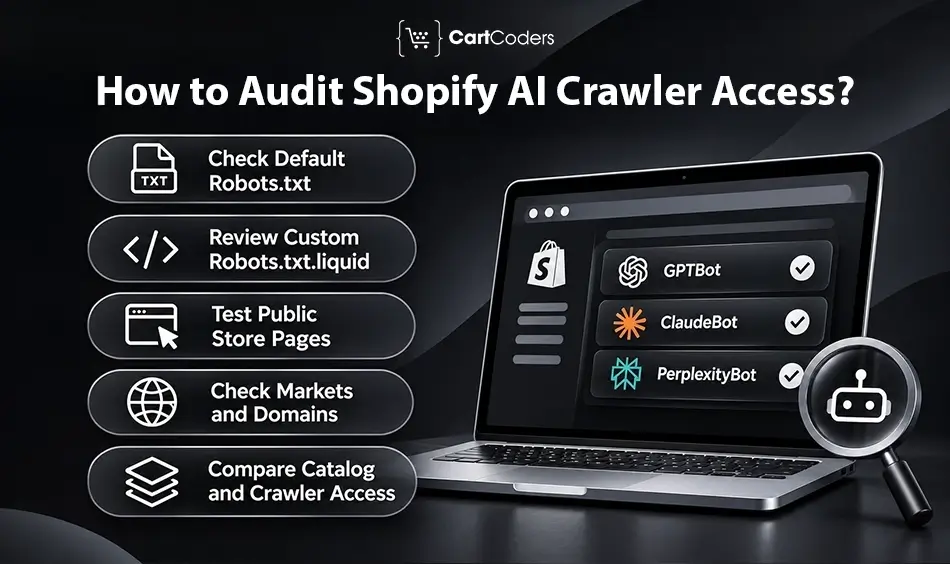
A Shopify AI crawler audit requires reviewing storefront permissions, theme-level robots.txt customizations, product accessibility, and integration-related restrictions. Shopify provides a default robots.txt configuration, but developers and store owners can customize specific directives through the robots.txt.liquid template. Incorrect customizations can affect both traditional search engines and AI crawlers. Merchants should therefore review existing configurations before introducing new crawler-specific rules.
Review Shopify’s Default Robots.txt
Open the live robots.txt file on your store’s primary domain and examine the existing restrictions. Shopify’s default configuration manages crawling for public storefront content while restricting various administrative, transactional, and duplicate URL paths. Replacing the entire file with a generic AI crawler template can remove important platform-specific rules. Shopify recommends preserving its default rule structure when making customizations, as explained in its robots.txt customization documentation.
Check Custom Robots.txt.liquid Directives
If your Shopify store uses a custom robots.txt template, review the published theme to identify recently added AI crawler rules. Changes should preserve existing crawl restrictions and sitemap declarations while introducing only the directives required by the business.
To locate the template:
- Log in to Shopify Admin.
- Go to Online Store and select Themes.
- Open the published theme’s code editor.
- Locate robots.txt.liquid in the Templates folder, if previously created.
- Review existing crawler directives.
- Check the rendered /robots.txt after any approved changes.
Save a backup of the existing configuration before editing and compare the published output with the intended policy. If a change causes problems, Shopify’s help center also explains how to delete robots.txt.liquid customizations and restore the default file.
Test Public Product, Collection, and Blog Pages
A Shopify store may allow general crawling while individual resources remain inaccessible because of application restrictions, broken URLs, market-specific settings, or storefront customizations. Testing representative URLs across different page types helps identify problems that a homepage-only audit may miss.
The following resources should be included in a Shopify AI crawler audit.
| Shopify Resource | What to Review |
| Homepage | Public accessibility and response status |
| Product pages | Product information and crawler permissions |
| Collection pages | Crawl accessibility and internal links |
| Blog articles | Content accessibility and indexing |
| Product variants | Canonical URLs and product attributes |
| Policy pages | Availability of relevant public information |
| Cart and checkout | Appropriate crawl restrictions |
| Customer accounts | Authentication and access controls |
| Shopify Markets domains | Domain-specific crawling policies |
| Custom applications | Application-level access restrictions |
| XML sitemap | Discovery of relevant public URLs |
Review Shopify Markets and International Domains
Stores selling internationally may use multiple domains, subdomains, or language-specific URL directories. Each hostname can have its own robots.txt configuration, while localized page paths may have different access or indexing behavior. Check representative regional product URLs, redirects, canonical declarations, and public availability to identify differences across storefront versions.
Understand Shopify Catalog vs. AI Crawler Access
AI crawler access and Shopify Catalog product sharing are separate discovery mechanisms. According to Shopify’s official guidance on AI crawler controls, activated agentic storefronts can receive product information through Shopify Catalog independently of open-web crawling and robots.txt settings.
Merchants should therefore review both direct storefront crawling and their agentic storefront configurations when managing how products are shared with AI shopping platforms. Blocking a web crawler does not automatically stop product data sharing through an activated sales channel.
Consider: A successful AI crawler audit confirms technical accessibility. Product titles, descriptions, attributes, pricing information, availability, and structured data must still be accurate and consistent to support meaningful product discovery.
How Can Businesses Fix AI Crawler Access Issues and Maintain Their Policies?
AI crawler identities, published IP ranges, and provider policies can change over time. A configuration that works correctly during an initial audit may become outdated following infrastructure changes, platform updates, or the introduction of new crawler controls. Businesses should assign responsibility for reviewing crawler policies and maintaining documented access decisions instead of treating the audit as a one-time activity.
Follow an Ongoing AI Crawler Audit Checklist
AI crawler audit checklist
0 of 10 completed
Review crawler identities
Confirm current user-agent names and purposes.
Check robots.txt permissions
Verify search and training policies separately.
Review firewall rules
Identify unintended restrictions and outdated exceptions.
Analyze access logs
Monitor genuine crawler requests and response errors.
Update crawler IP ranges
Use current provider-published network information.
Test public URLs
Check product, collection, service, and blog pages.
Protect restricted resources
Maintain authentication and authorization controls.
Review AI shopping channels
Check separate product-sharing configurations.
Document configuration changes
Record the reason, owner, and date of each change.
Schedule the next audit
Review policies after major website or infrastructure updates.
Copy audit checklist
Consider reviewing crawler logs monthly and performing an additional audit after a website migration, theme redesign, domain change, firewall update, or major application installation. Websites with frequently changing product catalogs or complex infrastructure may require more frequent checks.
How CartCoders Helps Shopify Merchants Audit AI Crawler Access
Preparing a Shopify store for AI search requires more than adding new user-agent directives to robots.txt. Store owners must understand how storefront configurations, theme customizations, security controls, and product information influence technical accessibility.
CartCoders helps merchants investigate storefront configuration and technical issues through its Shopify technical audit services. Businesses planning AI integrations and new shopping experiences can also assess their technical requirements alongside Shopify AI development services.
Depending on the agreed audit scope, key areas to review include:
- AI crawler permissions
- Robots.txt configuration
- Crawler access errors
- Firewall restrictions
- Product page accessibility
- Structured data
- Storefront integrations
- Technical fix priorities

Conclusion
An AI crawler audit helps businesses understand how automated systems discover and retrieve website content. Reviewing robots.txt is an essential starting point, but genuine crawler verification, firewall analysis, HTTP response testing, and application-level checks provide a more complete understanding of technical accessibility.
Businesses should manage training crawlers, search crawlers, and user-requested retrieval systems according to their individual purposes. For Shopify merchants, maintaining appropriate storefront permissions and accurate product information can support AI search and shopping discovery without compromising necessary security controls. Regular audits help businesses maintain consistent content access policies and identify technical problems before they affect important discovery routes.
Frequently Asked Questions
Open your website’s robots.txt file and review crawler-specific directives. Check server and CDN access logs to identify requests from relevant AI bots. Verify crawler identities using provider-supported methods and examine HTTP responses to confirm whether content retrieval succeeds.
Blocking GPTBot does not directly block ChatGPT Search because GPTBot and OAI-SearchBot have separate purposes. GPTBot collects content for potential model training, while OAI-SearchBot supports search discovery. Businesses can manage these crawler permissions independently.
GPTBot collects web content that may be used for AI model training. OAI-SearchBot discovers content for ChatGPT’s search features. Website owners can restrict GPTBot while allowing OAI-SearchBot to access relevant public website pages.
No. ClaudeBot and Claude-SearchBot serve different purposes. ClaudeBot supports model-development data collection, while Claude-SearchBot supports search discovery. Blocking ClaudeBot does not automatically restrict Claude-SearchBot when its own crawling permissions allow access.
Consider allowing PerplexityBot if your business wants its public content to be discoverable through Perplexity Search. According to Perplexity, this crawler supports search rather than foundation model training. Firewall settings and website content accessibility should also be reviewed.
No. Robots.txt communicates crawling preferences rather than enforcing security restrictions. Some automated systems may disregard these directives, and certain user-requested retrieval agents behave differently from conventional crawlers. Sensitive information should be protected through authentication and authorization controls.
Review the source IP address, claimed user-agent, and official provider verification documentation. Where supported, compare the source IP against published crawler IP ranges or use verified DNS methods. A user-agent string alone cannot establish crawler authenticity.
Yes. Cloudflare can restrict crawler requests through firewall rules, bot-management settings, security challenges, and rate limits independently of robots.txt. Website administrators should review security events and verify crawler identities before changing the relevant security configurations.
Google-Extended is a robots.txt product control token for certain Google AI training and grounding uses. It is not an independent web crawler. Whether to block it depends on your organization’s AI content usage preferences rather than traditional Google Search ranking objectives.
Review your Shopify store’s live robots.txt, inspect custom robots.txt.liquid directives, and test public product, collection, and blog pages. Check available security and access logs, preserve necessary transactional restrictions, and review separate Shopify Catalog product-sharing settings.
Allowing relevant crawlers can support content accessibility, but allowing GPTBot, ClaudeBot, or PerplexityBot does not directly improve Google AI Overview rankings. Google relies on its own Search infrastructure, indexing requirements, content quality systems, and applicable generative AI visibility controls.
Robots.txt can communicate restrictions to compliant crawlers, but it cannot reliably prevent automated price extraction. Merchants should review publicly accessible product pages, data endpoints, application permissions, and appropriate security controls when managing access to product information.
A monthly review is a practical starting point for many businesses. Additional audits should follow major website migrations, domain changes, firewall updates, theme redesigns, or changes to crawler provider policies. The appropriate frequency depends on website complexity and business requirements.


