

Black Friday 2026 is approaching, and Shopify merchants are preparing discounts, landing pages, advertising campaigns, and promotional emails. But even a strong offer can struggle when the shopping experience has hidden problems.
Imagine spending more on ads and attracting thousands of visitors, only to discover that your discount code fails at checkout. Or customers reach a product page, but the mobile Add to Cart button stops responding. These problems can interrupt purchases, no matter how attractive the promotion is. A Shopify BFCM Readiness Audit can help you spot these issues before they affect peak-season sales.
Shopify BFCM conversion mistakes often involve slow mobile pages, conflicting discounts, unclear product information, unexpected shipping costs, broken cart interactions, and checkout problems. A conversion-focused store audit helps identify these issues before they affect more customers.
With Black Friday on November 27, 2026, and Cyber Monday on November 30, merchants should prioritize purchasing problems before increasing campaign spending. This article examines ten common mistakes, what an audit can reveal, and which fixes deserve attention first.
What Does a Shopify BFCM Store Audit Check First?
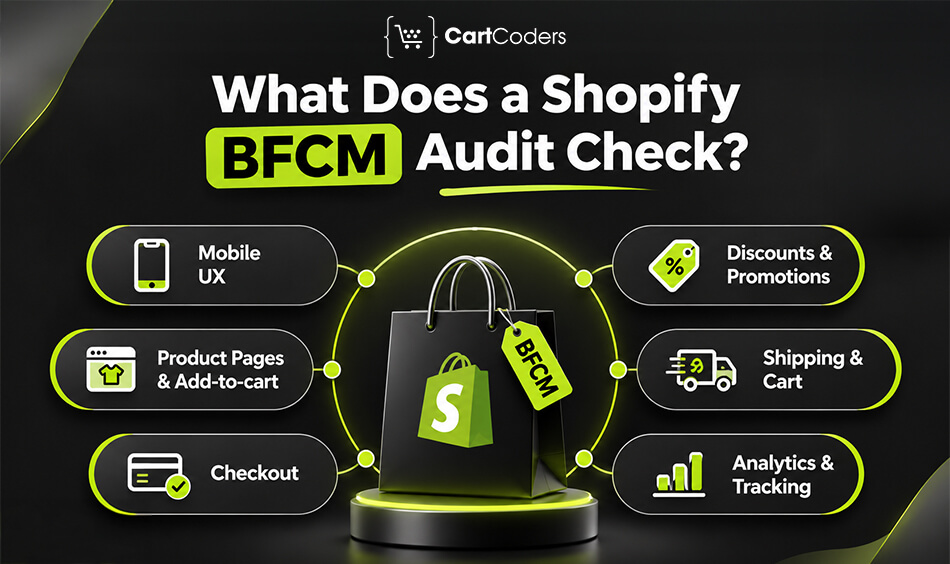
A Shopify BFCM readiness audit should begin with the complete customer purchasing journey. Visual design matters, but it should not take priority over a checkout failure, broken discount, or product that customers cannot add to their cart.
The audit should follow the same steps a shopper takes after clicking an advertisement or promotional email. That means opening the landing page, selecting a product, choosing variants, reviewing the cart, applying an offer, and attempting checkout.
A useful audit also examines the mobile experience, shipping rules, inventory availability, and conversion tracking. The findings should identify which problems affect purchases, which pages are involved, and what needs to be corrected.
Mobile Shopping Experience
Mobile shoppers need to move from a promotional page to checkout without struggling with menus, buttons, or slow-loading content. An audit should test real mobile layouts, product selectors, sticky buttons, and promotional popups.
The review should also consider loading performance and responsiveness. A page may appear visually complete while scripts continue running and delay customer interactions. These issues are particularly important on product pages receiving paid traffic.
Discount and Promotional Pricing Accuracy
Discounts should work according to the advertised terms. An audit checks automatic discounts, promotional codes, product exclusions, customer eligibility, and combinations with other offers.
For example, a store may advertise 25% off selected products, but the discount may fail when a customer also qualifies for free shipping. The audit should identify whether the combination is allowed and whether the final price matches the campaign message.
Product Page and Add-to-Cart Functionality
Product pages should communicate essential buying information and allow customers to select available variants without errors. An audit checks descriptions, size information, product images, availability messages, and Add to Cart functionality.
For products with multiple sizes, colors, or configurations, the review should confirm that selecting a variant updates the correct price, inventory status, and cart item. Problems here can stop a purchase before checkout begins.
Shipping, Cart, and Checkout Experience
A conversion-focused audit checks whether the cart displays accurate prices, discounts, quantities, and shipping expectations. It should also confirm that customers can continue to checkout without unnecessary interruptions.
Testing must cover relevant customer locations, available payment methods, and promotional conditions. A checkout that works for one address or payment option may still fail for another customer segment.
Analytics and Conversion Tracking
Accurate reporting helps merchants identify where customers leave the purchasing journey. The audit should review important events such as product views, add-to-cart actions, checkout progression, and completed purchases.
Tracking problems may not prevent customers from buying, but they can lead to poor campaign decisions. Missing or duplicated purchase events can distort reported revenue and make successful promotions appear weaker or stronger than they are.
| Audit Area | What to Investigate | Possible Business Impact |
| Mobile UX | Slow pages, blocked buttons, layout issues | Interrupted shopping |
| Discounts | Invalid codes, incorrect combinations | Abandoned purchases |
| Product pages | Missing details, variant errors | Reduced buying confidence |
| Cart | Incorrect totals, broken interactions | Incomplete purchases |
| Shipping | Unexpected charges, unclear conditions | Checkout abandonment |
| Checkout | Payment or address errors | Failed transactions |
| Tracking | Missing or duplicate events | Unreliable campaign reporting |
Expert insight: Begin with the problems that prevent a customer from placing an order. A minor design inconsistency can wait, but a broken Add to Cart button or incorrect checkout total needs immediate attention.
What Are the 10 Most Common Shopify Mistakes That Affect BFCM Conversions?
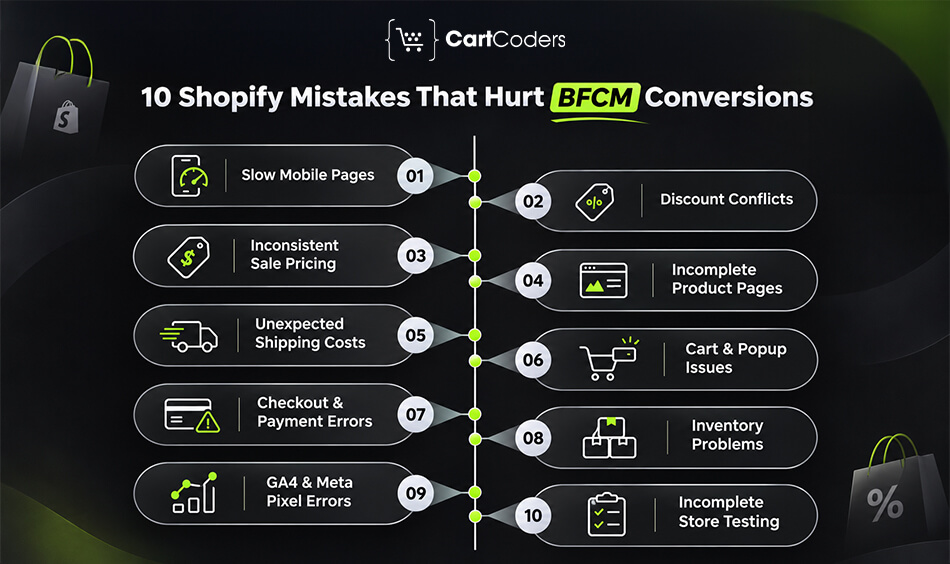
The following mistakes can affect customer confidence, purchasing decisions, and checkout completion. Each one requires a different audit method because the visible symptom may not reveal the underlying cause. A reliable audit should connect every finding to a customer-facing problem and a specific corrective action. This prevents teams from spending valuable time on changes that have little effect on the purchasing journey.
1. Slow Mobile Pages and Heavy Promotional Scripts
Black Friday campaigns often add countdown timers, promotional banners, popup apps, and additional tracking scripts. These features may support marketing, but they can also increase the amount of work required to display and interact with a page.
A customer might reach a product page quickly but wait before the variant selector or Add to Cart button responds. Large hero images and unnecessary JavaScript can contribute to these delays, especially on slower mobile connections.
What a store audit identifies: The review measures Core Web Vitals, checks oversized images, examines third-party scripts, and tests important mobile interactions. Particular attention should go to Largest Contentful Paint (LCP), Interaction to Next Paint (INP), and Cumulative Layout Shift (CLS).
Recommended fix: Prioritize the largest loading and interaction problems on high-traffic pages. Reduce unnecessary scripts, serve appropriately sized images, and avoid disruptive promotional elements. Shopify’s theme performance best practices provide technical recommendations for developers.
Theme code, image sizes, third-party scripts, and Core Web Vitals are among the key areas to review when assessing Shopify store speed and performance.
2. Incorrect Discount Rules and Conflicting Promotional Offers
Discount conflicts can turn an attractive Black Friday offer into a frustrating checkout experience. Problems often appear when stores combine automatic discounts, discount codes, free shipping, and product-specific promotions.
For example, a customer may qualify for a bundle offer but receive an error when entering a promotional code. Another customer may receive an unintended combination that reduces the order value beyond the planned discount.
What a store audit identifies: The audit tests eligible and ineligible products, minimum purchase amounts, customer conditions, offer exclusions, and discount combinations. It also checks whether the final checkout amount matches the intended promotion.
Recommended fix: Create test carts for each major offer and verify expected results. Shopify provides specific rules for discount combinations, which merchants should review before launching overlapping campaigns.
Consider this: Test discounts using realistic customer scenarios, not only a single product. A promotion may work correctly in isolation but fail when several eligible products or shipping conditions appear in the same cart.
3. Inconsistent Sale Pricing and Confusing BFCM Messaging
Customers expect the advertised offer to match the price they pay. When banners, collection pages, product pages, and cart totals show conflicting information, the shopping experience becomes confusing.
A homepage may advertise 30% off while a product page shows a different discount. An outdated announcement bar may display an expired offer, or the cart may not clearly explain why a product is excluded.
What a store audit identifies: The review compares promotional messages across the homepage, collection pages, product pages, cart, and checkout. It checks compare-at prices, sale labels, discount eligibility, and offer expiration details.
Recommended fix: Maintain one approved source of promotional terms and apply it consistently across the storefront. Review Shopify’s discount methods when configuring promotional offers.
For seasonal campaigns, also confirm that scheduled content changes happen at the intended time. A correct discount with outdated messaging can still create unnecessary customer support requests.
4. Product Pages Missing Important Buying Information
A discount may attract attention, but customers still need enough information to make a purchasing decision. Incomplete product descriptions, missing measurements, poor images, and unclear delivery details can create hesitation.
This is especially important for clothing, footwear, electronics, and products with several variations. Customers may abandon a purchase when they cannot confirm the right size, compatibility, or product specifications.
What a store audit identifies: The audit reviews promoted products for missing specifications, unclear variant information, weak image presentation, and important details hidden below excessive promotional content.
Recommended fix: Start with products featured in Black Friday ads and email campaigns. Improve descriptions, add accurate sizing or compatibility information, and make availability and delivery expectations easy to locate.
Expert insight: Prioritize product information based on customer questions and support history. If customers frequently ask about sizing, shipping, or compatibility, those answers should be visible before checkout.
5. Unexpected Shipping Costs and Unclear Delivery Expectations
Customers may be willing to pay for shipping, but unexpected charges can change their purchasing decision. This becomes more frustrating when a Black Friday banner promises free shipping without clearly explaining the conditions.
A store might advertise free shipping above a minimum order value, but discounts reduce the qualifying amount. Regional shipping rules may also create different charges for customers in different locations.
What a store audit identifies: The review tests shipping thresholds, customer locations, delivery methods, and how discounts affect shipping eligibility. It also checks whether estimated delivery information matches the available shipping services.
Recommended fix: Display shipping conditions before checkout wherever practical. Test orders just below and above free-shipping thresholds, including orders with promotional discounts.
The Baymard Institute’s cart abandonment research identifies additional costs as a significant reason shoppers abandon purchases. The findings support the value of communicating charges clearly before customers reach the final payment stage.
6. Cart Drawers, Popups, and Upsells That Interrupt Purchases
Cart drawers and promotional widgets can help customers review products or consider related items. However, excessive interruptions can make the buying process harder, especially on smaller screens.
A popup may cover the checkout button, a cart drawer may fail to update quantities, or an upsell widget may delay navigation. Conflicting apps can also produce duplicate messages or unexpected cart behavior.
What a store audit identifies: The audit checks cart opening and closing behavior, quantity updates, product removal, promotional widgets, and mobile popup controls. It also reviews console errors and script conflicts where necessary.
Recommended fix: Keep useful features that support purchasing, but remove or correct elements that interfere with essential actions. Test cart interactions after every relevant app or theme change.
Consider this: Do not judge a cart feature only by its appearance. Test whether customers can close it, change quantities, review totals, and continue to checkout without confusion.
7. Untested Checkout and Payment Options
A customer who reaches checkout has already shown strong purchase intent. Payment errors, confusing address validation, or unsupported payment options can prevent the order from being completed.
Checkout issues may affect only certain devices, customer locations, or payment methods. This makes them difficult to identify through a quick internal review.
What a store audit identifies: The audit tests the checkout journey with relevant shipping addresses, available payment options, promotional discounts, and mobile devices. It also checks whether customer-facing errors are clear and whether order totals remain accurate.
Recommended fix: Use Shopify’s supported testing methods to complete representative test orders. Verify available express payment options, payment configuration, and order confirmation behavior.
For larger stores with complex customer requirements, Shopify Plus development may involve additional planning around integrations and checkout-related functionality. Any changes should respect Shopify’s supported checkout customization methods.
The Baymard Institute’s checkout usability research provides further context on checkout friction and customer behavior.
8. Inventory Errors and Unavailable Promotional Products
Promoting an unavailable product wastes customer attention and can weaken confidence in the store. Inventory problems are particularly disruptive when shoppers are responding to limited-time Black Friday offers.
The product may appear available on a collection page but show an unavailable variant after selection. Inventory synchronization delays can also create incorrect availability across sales channels or locations.
What a store audit identifies: The review checks inventory for advertised products, variant availability, fulfillment locations, stock synchronization, and overselling settings. It should also identify promotional links pointing to unavailable products.
Recommended fix: Confirm stock for campaign products before publishing advertisements. Review how inventory updates move between Shopify and connected systems, and prepare suitable messaging for products that sell out.
Expert insight: Audit inventory at the variant level. A product may have stock overall while its most advertised size or color is unavailable, creating a poor experience for customers arriving through specific promotional links.
9. Broken or Duplicate GA4 and Meta Pixel Events
Conversion tracking errors may not stop a purchase, but they can distort campaign performance. During BFCM, this can affect decisions about advertising budgets, audiences, and promotional effectiveness.
Common problems include missing purchase events, duplicate transactions, incorrect revenue values, and inconsistent event parameters. Changes to Shopify apps or tracking implementations can introduce these issues without obvious visual symptoms.
What a store audit identifies: The audit reviews important Shopify customer events and their mapping to analytics platforms. It tests product views, add-to-cart events, checkout activity, and purchases using appropriate debugging tools.
Recommended fix: Compare tracked test orders against Shopify order records. Verify transaction IDs, values, currency, and event deduplication where applicable. Also account for consent settings and expected differences between platforms.
For implementation details, review Shopify’s Customer Events documentation and Google’s GA4 ecommerce measurement guidance.
10. No Final Store Testing Before BFCM Campaign Launch
One of the most avoidable mistakes is assuming that a store is ready because the homepage looks correct. Black Friday campaigns involve multiple landing pages, products, discounts, customer locations, and checkout conditions.
A store may perform well during normal shopping but fail when promotional combinations are introduced. Last-minute theme changes and app updates can also affect previously working features.
What a store audit identifies: The audit checks whether important shopping scenarios have been tested and documented. It looks for unresolved errors, untested campaign links, incomplete discount validation, and missing recovery arrangements.
Recommended fix: Complete an end-to-end test plan before major campaign launches. Assign owners to critical issues, record results, and avoid unnecessary releases during the final days before BFCM.
A documented testing process helps the team distinguish between a confirmed working feature and one that has simply not been checked.
Which Shopify BFCM Conversion Issues Should You Fix First?
When Black Friday is approaching, development time becomes limited. Merchants should not treat every audit finding as equally urgent. A small design issue and a broken payment option can both appear in an audit, but their potential effect on purchases is very different. A practical prioritization method considers purchase impact, affected traffic, frequency, and release risk. The objective is to correct problems that interrupt orders before spending time on lower-impact improvements.
Fix Purchase-Blocking Problems Immediately
Checkout failures, broken Add to Cart buttons, invalid discounts, and incorrect order totals deserve immediate investigation. These problems can directly prevent customers from completing purchases.
Confirm the cause, apply a controlled fix, and repeat the original failing test. Do not mark an issue as resolved until the complete purchase scenario works.
Prioritize High-Traffic Product and Landing Pages
Not every page receives the same number of visitors during BFCM. Focus first on pages linked from paid advertisements, promotional emails, and major homepage campaigns.
A mobile issue affecting the main Black Friday landing page may deserve higher priority than a similar issue on a rarely visited page.
Address Problems With High Revenue Exposure
Review how many customers may encounter each issue and whether it affects high-value products or important customer segments.
For example, an incorrect shipping rule affecting all international orders may have greater business impact than a minor layout problem affecting one product.
Avoid Risky Changes Close to Black Friday
A major theme replacement or extensive app migration can introduce new problems if testing time is limited.
Prefer targeted corrections with clear rollback arrangements. Schedule broader improvements after the promotional period unless the current issue is serious enough to justify the risk.
| Audit Issue | Suggested Priority | Recommended Action |
| Checkout or payment failure | Critical | Correct and retest immediately |
| Discount not applying | Critical | Fix conditions and verify totals |
| Broken Add to Cart | Critical | Repair affected interactions |
| Incorrect shipping charges | High | Review shipping configuration |
| Slow mobile product page | High | Address measured performance issues |
| Missing purchase tracking | High | Repair event configuration |
| Incomplete product details | Medium | Update promoted products |
| Minor visual inconsistency | Low | Address when safe |
Expert insight: Use these priorities as a starting point, not a fixed rule. Actual urgency depends on the customers affected, the severity of the problem, and the risk involved in releasing the correction.
How Does a Shopify Store Audit Identify Hidden Conversion Problems?
A Shopify store audit becomes useful when it connects technical findings to real customer behavior. A performance score or a list of installed apps cannot explain every lost purchase. The review needs to identify where the customer journey breaks and what evidence supports the finding.
A structured audit combines analytics, manual shopping tests, mobile checks, and configuration reviews. Shopify Technical Audit Services cover theme code, apps, performance, checkout, tracking, and integrations.
Review Shopify Analytics and Conversion Funnels
Begin with Shopify Analytics and available GA4 reports. Compare product views, add-to-cart activity, checkout progression, and completed orders to identify unusual drop-offs. Review these patterns by device, traffic source, and important landing page.
A drop-off is a signal for investigation, not proof that a particular feature is broken. For example, lower mobile conversion rates may reflect page friction, traffic quality, or differences in purchasing behavior. Use the data to select the scenarios that need manual testing.
Test Mobile Product Pages and Cart Interactions
Open priority products on real mobile devices where possible. Test navigation, variant selection, image galleries, Add to Cart buttons, cart drawers, and promotional popups. Include products advertised through email and paid campaigns.
Record the device, browser, page URL, and exact steps needed to reproduce a problem. A finding such as “mobile cart broken” is less useful than identifying the affected product, selected variant, and interaction that fails.
Validate Promotional Discounts and Shipping Rules
Build test carts for major BFCM promotions. Include eligible products, excluded products, minimum order thresholds, and relevant discount combinations. Then compare the expected amount against the cart and checkout totals.
Shipping tests should include relevant customer regions and orders near free-shipping thresholds. Check whether discounts change eligibility and whether customers receive accurate delivery information before payment.
Check Checkout and Payment Functionality
Use Shopify-supported test methods to verify the purchase journey. Review payment availability, address validation, discount application, shipping charges, and order confirmation.
Include mobile checkout and important customer regions. Where checkout customizations or third-party integrations are involved, test those specific conditions rather than assuming that one successful order validates every checkout scenario.
Identify App Conflicts and Tracking Problems
Review apps that affect product pages, carts, discounts, tracking, and checkout-related experiences. Check whether scripts create visible errors, duplicate events, or unexpected interactions.
For analytics issues, compare recorded events with actual test orders. CartCoders’ Shopify GA4 Tracking Audit provides further technical context for stores using checkout extensibility.
Prepare a Prioritized Audit Report
The final report should explain the issue, affected pages, supporting evidence, severity, recommended correction, and retesting requirements. It should also identify the responsible team and expected implementation effort.
For example, the following are illustrative audit findings, not results from an actual client assessment:
| Example Finding | Supporting Evidence | Recommended Correction |
| Discount fails for eligible products | Test cart and checkout results | Correct discount conditions |
| Mobile Add to Cart does not respond | Device test and browser errors | Repair variant or cart interaction |
| Purchase event fires twice | Analytics debugging results | Correct duplicate event implementation |
| Free shipping does not apply | Test address and cart configuration | Review shipping eligibility |
Expert insight: A useful audit report should be actionable without requiring developers to repeat the entire investigation. Include screenshots, reproducible steps, affected URLs, and expected behavior for every critical issue.
What Should Shopify Merchants Check Before Black Friday 2026?
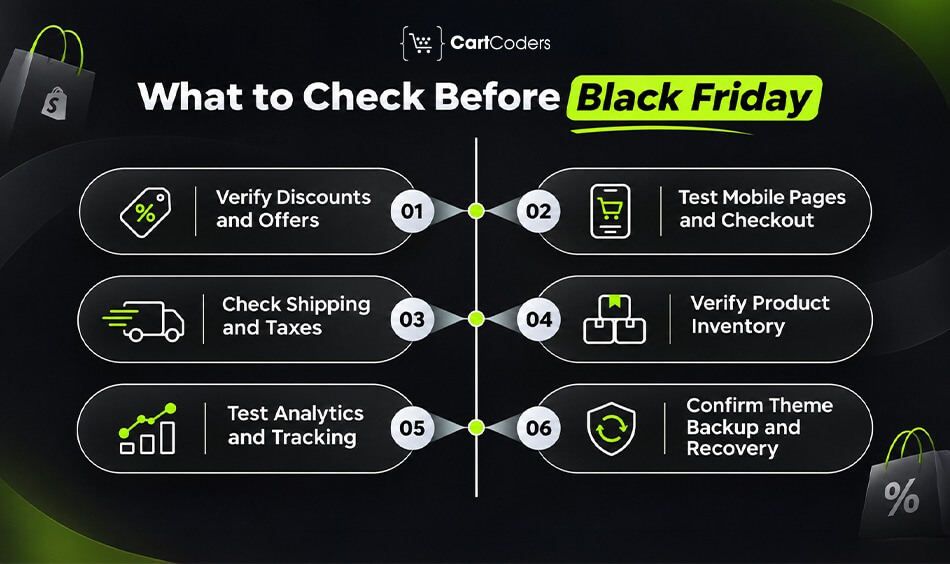
With Black Friday on November 27, merchants should complete essential shopping tests before major promotional traffic arrives. The final review should concentrate on approved offers, customer-facing functionality, inventory, and the ability to recover from a failed release.
Avoid introducing large, untested changes during the final 48 hours. Instead, use the remaining time to confirm that previously corrected issues remain resolved and that responsible team members are available during the campaign.
Confirm Active Discounts and Promotional Offers
Verify that discount codes, automatic offers, bundles, and free-shipping promotions work under the intended conditions. Review start and end times, eligible products, exclusions, and combination rules.
Test Mobile Product Pages and Checkout
Open campaign landing pages on mobile devices and complete representative purchases. Confirm that product variants, Add to Cart buttons, cart totals, and available payment methods work correctly.
Verify Shipping, Taxes, and Delivery Information
Test relevant shipping destinations and confirm that charges match the store’s published policies. Review tax settings, delivery estimates, and promotional shipping thresholds.
Check Inventory for Promoted Products
Confirm availability for advertised products and their important variants. Review stock synchronization, fulfillment locations, and how the storefront handles products that sell out.
Validate Analytics and Conversion Events
Run controlled tests for add-to-cart, checkout, and purchase events. Compare recorded transaction values and identifiers with Shopify order records while accounting for consent settings.
Confirm Theme Backup and Recovery Arrangements
Keep a known working theme version and document the recovery process. Assign owners for technical support, promotional changes, and urgent issue resolution.
Final BFCM Readiness Checklist
- Promotional landing pages and links work correctly.
- Discounts apply to eligible orders.
- Product variants and Add to Cart buttons work on mobile.
- Cart totals, shipping charges, and checkout are accurate.
- Promoted products have confirmed inventory.
- Critical apps and integrations work correctly.
- GA4 and Meta Pixel events have been tested.
- A recovery plan and responsible team members are confirmed.
How CartCoders Helps Fix Shopify BFCM Conversion Problems
A Shopify store may look ready for Black Friday while hidden issues affect customer purchases. At CartCoders, we help merchants identify and fix these problems before promotional traffic increases. Our team offers a free Shopify BFCM readiness audit covering store speed, mobile usability, discount accuracy, checkout functionality, app conflicts, accessibility, and conversion tracking. We prioritize findings based on their potential impact on sales and the shopping experience.
Our team reviews important storefront pages, product navigation, variant selection, and Add to Cart functionality to identify issues affecting mobile shoppers. We also test promotional discounts, cart interactions, shipping rules, and checkout processes to identify pricing errors and purchasing barriers. These checks help merchants address critical problems before launching major BFCM campaigns.
We also assess third-party apps, unnecessary scripts, and performance issues that may slow down the store or interrupt customer interactions. Our team reviews GA4 and other conversion tracking events to identify reporting gaps that could affect campaign decisions. Based on the audit findings, we recommend practical fixes and help merchants test important changes before Black Friday.

Final Verdict: Fix Shopify Conversion Barriers Before Increasing Ad Spend
More traffic cannot compensate for a purchasing journey that fails at critical steps. Broken discounts, incorrect shipping charges, difficult mobile interactions, and checkout errors can prevent customers from completing orders even when the promotion is attractive.
A focused Shopify BFCM audit helps merchants identify these problems and decide which corrections matter most. Start with purchase-blocking issues, address high-impact mobile and usability problems, and complete testing before increasing campaign spending.
The goal is not to make every page perfect. It is to make the buying journey reliable when customers are ready to purchase.
Frequently Asked Questions
Common mistakes include slow mobile pages, incorrect discounts, unclear pricing, missing product details, unexpected shipping charges, broken carts, payment problems, inventory errors, inaccurate tracking, and insufficient testing.
A BFCM audit reviews mobile usability, product pages, promotional pricing, cart functionality, checkout, shipping, inventory, apps, and conversion tracking. It should identify critical problems and recommend corrections.
Conversions may decline when shoppers encounter technical errors, unclear offers, unexpected costs, or difficult purchasing steps. Traffic quality and product demand also matter, so findings require evidence.
Yes. A discount that fails or produces an unexpected total can interrupt checkout. Merchants should test automatic discounts, promotional codes, exclusions, and combinations before campaigns begin.
Unexpected shipping charges can discourage purchases, especially when customers expected free or discounted delivery. Display conditions clearly and test shipping calculations for relevant customer locations.
Use Shopify-supported testing methods to complete representative orders. Check payment options, shipping addresses, discounts, order totals, mobile behavior, and confirmation events.
Prioritize checkout failures, broken Add to Cart buttons, invalid discounts, and incorrect totals. Then address major mobile usability, shipping, performance, and tracking problems according to their impact.
Complete the audit early enough to correct and retest critical issues before promotional campaigns begin. Avoid leaving major technical changes until the final days before Black Friday.


