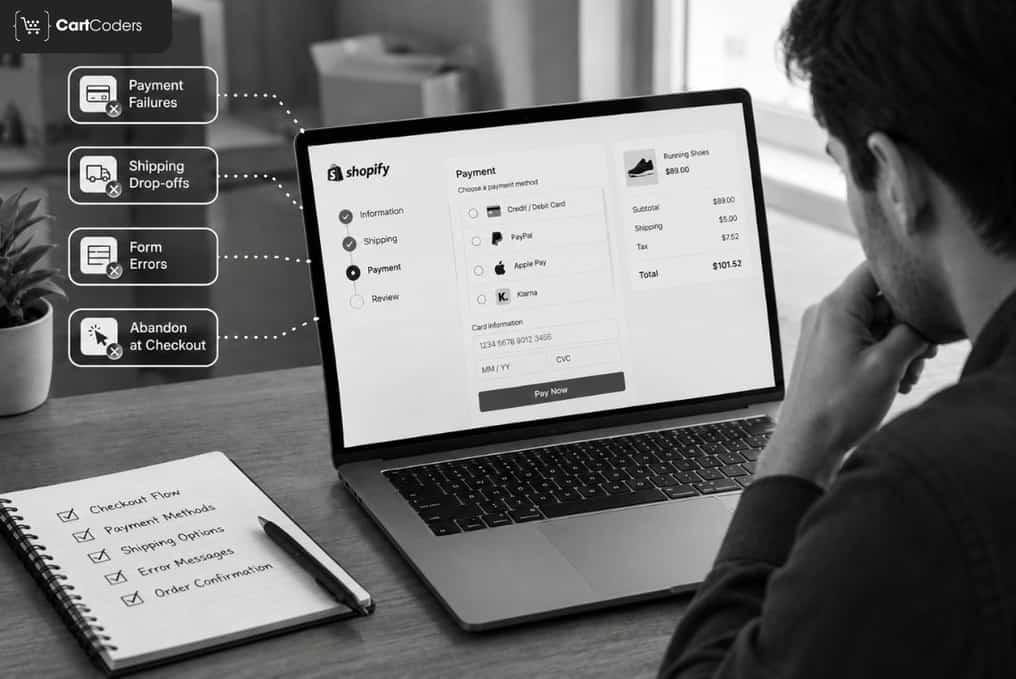

A Shopify store can attract qualified traffic, generate product interest, and still lose orders before payment. The issue is often not one broken checkout page. Revenue can leak at several points between the cart, shipping selection, discount entry, payment, and abandoned checkout recovery.
A Shopify checkout audit helps identify these loss points using funnel data, buyer behavior, checkout testing, payment records, and mobile reviews. A broader Shopify CRO audit can also connect checkout problems with issues earlier in the buying journey.
The key is to trace the complete purchase path rather than assume every abandoned order has the same cause. A customer who leaves after seeing shipping costs needs a different fix from someone whose card payment fails.
This guide shows where Shopify orders are commonly lost, what signals to review, and which checks deserve attention first.
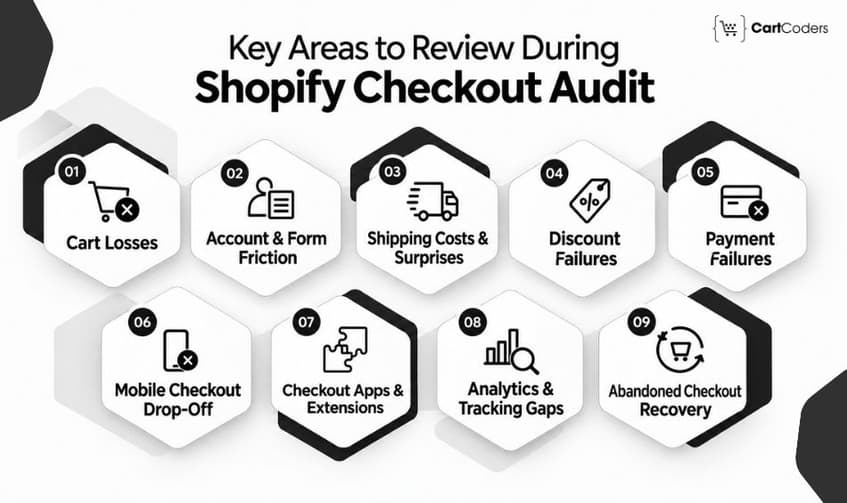
Quick Answer: A Shopify checkout audit should review cart friction, checkout-start drop-off, shipping costs, discount failures, payment issues, mobile usability, checkout extensions, trust signals, and abandoned checkout recovery. Use Shopify Analytics and GA4 funnel data to identify the stage losing buyers before changing the checkout.
Where Do Shopify Stores Actually Lose Orders?
Shopify checkout drop-off can happen before checkout opens, during shipping or payment, after technical customizations fail, or after an order completes but tracking misses it. A useful audit separates these loss points before recommending changes.
| Order Loss Point | What Usually Goes Wrong | What to Check |
| Cart | Buyer hesitates before checkout | CTA, totals, shipping context |
| Checkout start | Form creates too much work | Guest flow, autofill, validation |
| Shipping | Final cost or timing disappoints | Rates, delivery estimates |
| Discounts | Code fails or rules conflict | Eligibility, stacking, messaging |
| Payment | Preferred payment fails or disappears | Wallets, gateway, declines |
| Mobile | Checkout becomes harder to complete | Fields, speed, touch controls |
| Recovery | Follow-up misses the real objection | Timing, segmentation |
| Extensions and scripts | Old logic stops working | Scripts, extensions, custom code |
| Measurement | Sale happens but analytics misses it | Shopify orders versus GA4 purchases |
This is why a Shopify checkout conversion audit should start with evidence rather than interface opinions. GA4’s Checkout Journey report can show how users progress from checkout initiation through subsequent checkout stages. This gives teams a useful starting point before diagnosing the reason behind each drop-off.
Expert Insight: Separate “buyer did not purchase” from “analytics did not record the purchase.” They look similar in reporting but require completely different fixes. Also, don’t start by changing checkout design. Begin by identifying the stage with unusual loss, then test the most likely cause.
Why the 70% Cart Abandonment Number Can Send an Audit in the Wrong Direction
Not every abandoned cart represents recoverable revenue. Some shoppers are researching, comparing prices, saving products, or simply browsing. Treating every abandonment as a checkout failure can lead teams to fix the wrong problem.
| Usually Fixable Inside Checkout | Often Requires Work Before Checkout |
| Unexpected fees | Low purchase intent |
| Forced account creation | Product uncertainty |
| Complicated forms | Price comparison |
| Payment-method gaps | Weak product proposition |
| Trust concerns | Browsing behavior |
| Checkout errors | Traffic-quality problems |
The latest Baymard Institute cart abandonment research reports an average documented cart abandonment rate of 70.22% across 50 studies. Its latest research also reports that 42% of US shoppers abandoned because they were browsing or were not ready to buy.
Among more actionable reasons, Baymard reports 40% citing extra costs, 20% slow delivery, 19% payment trust concerns, 18% account creation, and 17% a checkout that felt too long or complicated.
Baymard further estimates that large eCommerce sites could see an average 35.26% conversion-rate increase by addressing documented checkout-design problems. That figure is a research estimate, not a guaranteed result for an individual Shopify store.
Consider: Do not ask, “Why is our abandonment rate 70%?” Ask, “Which portion of our abandonment shows clear buying intent and preventable friction?”
Stage 1: Where the Cart Loses Orders Before Checkout Opens
A Shopify checkout audit should start with the cart because customers can abandon before Shopify records a checkout start. Unclear totals, hidden CTAs, missing shipping information, and distracting upsells can weaken purchase momentum.
For example, a retailer may see strong add-to-cart numbers but weak initiated checkouts. If removing one large recommendation block improves progression, the main leak was the cart decision point.
| Cart Friction | Why It Can Lose Orders |
| Weak checkout button | Next action is unclear |
| Shipping is unknown | Buyer expects extra cost |
| Excessive recommendations | Purchase gets delayed |
| Slow cart drawer | Confidence drops |
| Unclear total | Buyer questions final cost |
Checkout CTA Clarity
The primary checkout action should be easy to locate. Review whether subscriptions, recommendations, discount widgets, delivery messages, or secondary buttons compete with the checkout CTA.
Missing Shipping Estimates in the Cart
Shipping uncertainty can stop customers before they enter checkout. Where possible, communicate free-shipping thresholds, likely costs, delivery expectations, or calculation rules before the customer reaches the shipping step.
Shipping Information Before Checkout
Shipping uncertainty can create hesitation before the buyer even reaches checkout. Where practical, clarify delivery expectations, shipping thresholds, or relevant cost information before payment becomes the customer’s next concern.
Upsells That Delay the Purchase Decision
Cart upsells can increase order value, but they can also introduce another decision. If add-to-cart volume looks healthy while initiated checkout falls behind, temporarily testing a simpler cart can reveal whether upsells are interrupting progress.
Clear Cart Totals
Buyers should understand what they are paying before moving forward. Unexpected differences between the cart and later checkout totals can weaken confidence.
Consider: A high cart abandonment rate and a high checkout abandonment rate are not the same problem. Check cart-to-checkout progression before blaming Shopify Checkout.

Stage 2: Account, Form, and Address Friction When Starting Checkout
Checkout-start abandonment usually means the buyer has shown clear purchase intent but encounters too much effort. Account requirements, unnecessary fields, poor autofill, and confusing validation deserve close review.
| Checkout Entry Issue | What to Audit |
| Account requirement | Guest-purchase path |
| Long form | Necessary versus optional fields |
| Address error | Error clarity |
| Autofill problem | Browser and mobile behavior |
| Returning buyer issue | Login and saved information |
Guest Checkout and Account Creation
Forcing an account before purchase adds another commitment. Where the business model allows it, buyers should be able to complete the order without treating account creation as a prerequisite.
Contact and Address Fields
Every required field creates work. Review whether fields are necessary, clearly labelled, correctly formatted, and easy to complete on mobile.
Address Validation Errors
Errors need to identify the exact field and the correction required. A technically accurate message can still be poor if customers cannot immediately tell what to change.
Autofill Behavior on Mobile
Autofill can remove substantial typing. Test contact details, billing information, shipping addresses, postal codes, and phone numbers on common browsers and real devices. Baymard reports that the average US eCommerce checkout displays 23.48 form elements by default. Its usability testing indicates many sites can reduce displayed form elements by 20% to 60%.
Returning Customer Access
Returning buyers may expect stored information or familiar account behavior. Test login, saved address, and accelerated checkout paths to identify unnecessary barriers.
Consider: Checkout-start drop-off often comes from forced account creation, excessive form effort, poor autofill, address errors, or returning-customer friction. Test these journeys separately on desktop and mobile.
Stage 3: Shipping Costs and Delivery Surprises
Shipping becomes a major checkout loss point when the price or delivery expectation changes after the customer has mentally accepted the purchase. The audit should compare what buyers expect before checkout with what they see when selecting shipping.
| Shipping Issue | Audit Question |
| High shipping cost | Was it communicated earlier? |
| Unknown delivery timing | Can customers estimate arrival? |
| Free-shipping confusion | Is the threshold visible? |
| Local pickup hidden | Is pickup easy to select? |
| Duties unclear | Are international charges explained? |
Shipping Rates That Appear Too Late
Customers should not need to reach a late checkout stage to find an important cost. If exact pricing cannot appear earlier, provide enough context to prevent a large surprise.
Free Shipping Threshold Visibility
A free-shipping offer has little value when customers cannot tell whether they qualify. Test messaging across product pages, cart drawers, full carts, and checkout.
Delivery Expectations
Cost is only part of the shipping decision. Customers may also hesitate when they cannot tell when the order is likely to arrive.
Local Pickup Options
Retail brands using local pickup or click-and-collect should test whether eligible customers can find and select the option easily.
International Duties and Cost Shock
For international orders, check how taxes, duties, currency, and shipping interact. A customer should be able to understand the expected charge without reconstructing it across several pages.
Expert Insight: When buyers leave after the shipping step, test three hypotheses separately: price, delivery speed, and cost surprise. Lowering a rate will not solve an expectation problem.
Stage 4: How Failed Discounts Lose Ready Buyers
Discount-code problems happen close to purchase, which makes them especially valuable to investigate. The buyer has already selected products, reached checkout, and is actively testing an offer.
| Discount Issue | What to Check |
| Code fails | Eligibility and expiration |
| Vague error | Customer-facing explanation |
| Discounts conflict | Combination rules |
| Gift card issue | Balances and split payments |
| Coupon-search exit | Promotion messaging |
Codes That Fail Without Explanation
Test eligibility, expiry dates, customer conditions, minimum values, product exclusions, subscription rules, and region restrictions. The error should tell eligible buyers enough to understand why the offer failed.
Automatic and Manual Discount Conflicts
Automatic discounts and entered codes can interact differently depending on configuration. Test realistic combinations instead of checking each promotion in isolation.
Gift Card Use
Gift cards should be tested for partial balances, full redemption, remaining balances, and mixed payment scenarios.
Coupon Search Behavior
Visible discount fields can sometimes encourage shoppers to leave checkout and search externally for a code. Audit the whole promotional experience, not only whether the field works.
Buyers Leaving to Search for Codes
A visible discount field can prompt shoppers to search elsewhere for an offer. Compare exits around discount interaction and review whether public promotional messaging creates expectations the checkout cannot meet.
A major 2026 audit point is Shopify Scripts. Shopify confirms that all scripts stopped executing on June 30, 2026. Stores relying on former line items, shipping, or payment scripts needed replacements based on Shopify functions or supported apps.
Consider: A discount that worked before June 30, 2026 deserves another test if its logic originally came from Shopify Scripts.
Stage 5: Shopify Payment Failures and Missing Payment Options
Payment-stage loss is not always ordinary abandonment. Some customers actively try to buy but cannot complete the transaction. A Shopify payment-failure audit should therefore separate hesitation from failed payment attempts.
| Payment Loss Reason | Audit Focus |
| Missing wallet | Payment availability |
| Gateway failure | Provider configuration |
| Card decline | Retry path |
| Currency issue | Shopify Markets configuration |
| Fraud block | False-positive patterns |
| Failed recovery | Alternative payment route |
Missing Wallets and Preferred Payment Methods
Review the payment choices customers expect in your main regions. Depending on eligibility and configuration, that may include Shop Pay, Shopify Payments, Apple Pay, Google Pay, PayPal, and relevant external gateways.
Card Declines and Fraud False Positives
Card declines need a clear next step. Check whether customers can retry, select another method, or reach support without beginning checkout again. Fraud controls also deserve review when legitimate orders appear to fail repeatedly.
Accelerated Wallet Visibility
Wallets can reduce form effort for eligible buyers. Test how accelerated payment options appear across browsers, devices, and customer states.
Currency and Regional Setup
International stores should test payment flow across important currencies and regions. Pricing, currency presentation, payment availability, taxes, and shipping rules should work together.
Trust Answers Missing at the Final Step
Payment is where unresolved doubts become expensive. Customers may still need reassurance about delivery, returns, product guarantees, or how to contact support.
| Final Buyer Concern | Information That Can Help |
| Can I return it? | Clear returns access |
| When will it arrive? | Delivery expectation |
| Can I get help? | Visible support option |
| Is payment secure? | Familiar payment experience |
Expert Insight: Compare payment attempts, authorization failures, and completed orders where your data permits. A customer who attempted payment should not be grouped with someone who never reached payment.
Stage 6: Mobile Shopify Checkout Drop-Off
Mobile checkout should be tested independently because touch controls, keyboard behavior, network conditions, autofill, and screen size create problems that desktop testing cannot reproduce.
| Mobile Issue | What to Test |
| Excessive typing | Field requirements |
| Autofill failure | Contact and address completion |
| Small controls | Touch accuracy |
| Missing wallet | Device and browser support |
| Slow response | Real mobile connection |
| Hidden errors | Error visibility |
Mobile Typing Effort and Field Layout
Review every field customers need to enter manually. Pay particular attention to email, telephone, postal codes, addresses, discount entry, and error correction.
Autofill on Mobile Devices
Test browser autofill rather than assuming it behaves consistently. Incorrectly populated fields can create errors that are difficult to notice on a small screen.
Touch Interaction
Buttons, links, and controls should be easy to tap accurately. Pay special attention to competing controls around shipping, discounts, payment selection, and error correction.
Wallet Placement and Availability
Accelerated payment methods can reduce manual entry for eligible users. Test wallet availability across supported phones, browsers, returning buyers, and new buyers.
Checkout Speed on Real Devices
Do not test mobile performance only by shrinking a desktop browser. Use real devices and realistic connections, especially if the checkout includes several extensions or network-dependent features. A wider Shopify Core Web Vitals audit can help identify performance problems across the storefront before the buyer reaches checkout.
Consider: Audit mobile Shopify checkout using real devices. Check field effort, autofill, touch controls, wallet payments, validation messages, loading behavior, and extension performance.
Stage 7: Checkout Apps and UI Extension Problems
A Shopify Plus checkout audit in 2026 must include deprecated scripts, old order-status script tags, checkout extensibility, and active checkout extensions. A visually correct checkout can still contain business logic that stopped running after a platform change.
| Platform Check | Relevant Date | Audit Action |
| Shopify Scripts | June 30, 2026 | Retest every former Script rule |
| Plus order-status script tags | Aug. 28, 2025 | Confirm replacement |
| Non-Plus order-status script tags | Aug. 26, 2026 | Confirm tracking and UI migration |
| checkout.liquid | Legacy checkout | Remove unsupported dependencies |
| Checkout UI extensions | Current | Test performance and conflicts |
| Shopify Functions | Current | Validate discount, shipping, payment logic |
Shopify Scripts Stopped Running on June 30, 2026
Shopify states that all Shopify Scripts ceased executing on June 30, 2026. Discounts, shipping logic, and payment customizations previously handled by scripts needed supported replacements, commonly Shopify functions. Audit each historical script use case rather than simply confirming that functions are installed. Place test orders for every important tiered discount, volume rule, shipping adjustment, and payment condition.
Order-Status Script Tags Reached Their Final Sunset
Shopify’s developer documentation for checkout deprecations states that script tags stopped working on Order status pages for Plus stores on August 28, 2025. They stopped for the remaining stores on August 26, 2026.
Shopify also says checkout.liquid and additional scripts are no longer supported for relevant legacy checkout surfaces. That matters for analytics, marketing scripts, custom messages, and older integrations.
Shopify Spring ’26 Changed the Checkout Platform
Shopify released its Spring ’26 Edition in June 2026, alongside major changes across checkout and agentic commerce. After a major platform update, retest custom checkout behavior rather than assuming existing logic still behaves identically.
Checkout Extensions and App Conflicts
Multiple extensions can operate around checkout. Review what each extension does, which surface it uses, whether it makes network requests, and whether another app overlaps with the same business rule.
For custom functionality, you can get Shopify checkout extension development. Stores with older custom architecture can also have a Shopify technical audit to identify wider technical dependencies.
Expert Insight: After every Shopify platform migration, test the business outcome, not simply the presence of replacement code. A function can exist while reproducing an old discount incorrectly.
Stage 8: The Orders You Won but Analytics Never Counted

Some apparent checkout losses are measurement gaps. Shopify can contain a completed order while GA4, an advertising platform, or another analytics tool never records the purchase event. This distinction matters because CRO changes cannot repair a tracking defect.
| Measurement Check | What to Compare |
| Shopify orders | Actual completed orders |
| GA4 purchases | Recorded purchase events |
| Transaction IDs | Missing or duplicate events |
| Customer Events | Pixel execution |
| Marketing platforms | Attributed conversions |
| Agentic surfaces | Orders outside standard funnel |
Shopify Orders Versus GA4 Purchase Events
Export completed Shopify orders for a defined period. Compare them with GA4 purchase events using transaction IDs where possible. Investigate duplicate purchases, missing events, refunded orders, internal traffic, consent behavior, and inconsistent time zones before interpreting the gap.
Tracking That Relied on Retired Checkout Scripts
Tracking implemented through legacy additional scripts or order-status script tags may have stopped functioning after Shopify’s checkout changes. Review Shopify Customer Events, web pixels, Google Tag Manager, GA4, Meta Pixel, and other conversion integrations.
Purchases That Begin Outside the Traditional Storefront Funnel
Shopify’s Spring ’26 materials describe commerce experiences built through the Universal Commerce Protocol, including purchases occurring on external conversational surfaces. That makes source and attribution design more important as commerce extends beyond the traditional product-page-to-checkout journey.
Consider: If Shopify orders do not match GA4 purchases, reconcile transaction IDs first. Then check consent, purchase-event setup, retired scripts, web pixels, duplicate events, time zones, and purchases occurring outside the standard storefront path. Do not automatically label every mismatch a tracking error.
Stage 9: Abandoned Checkout Recovery Gaps
Abandoned checkout recovery works better when the message reflects the likely reason for leaving. Payment failure, shipping uncertainty, product hesitation, and simple distraction should not automatically receive identical treatment.
Shopify supports abandoned-checkout workflows, including triggers when an eligible customer abandons checkout. Shopify’s documentation also notes that suspected card testing or bot activity does not create these abandoned-checkout workflow events.
For example, a retailer sends the same recovery email to every abandoned checkout. Analysis shows high-value buyers often abandon after payment attempts, while low-value carts leave earlier. Splitting those journeys creates more relevant follow-up.
| Recovery Gap | Better Audit Check |
| Same message for everyone | Segment by reason or value |
| Poor timing | Compare recovery windows |
| Weak CTA | Test direct checkout return |
| No SMS consent | Review opt-in setup |
| Payment failure ignored | Create retry path |
| No revenue measurement | Track recovered orders |
Timing and Segmentation by Cart Value
Review how quickly recovery starts and whether timing suits the purchase cycle. A considered $1,500 purchase may need different follow-up from a routine $40 order.
Message Relevance
A generic “you left something behind” message cannot address every cause of abandonment. Shipping uncertainty, payment failure, product questions, and purchase hesitation represent different problems.
Customer Segmentation
High-value carts, repeat customers, first-time buyers, and different product groups may deserve different recovery treatment. Segment only where the data and business case justify the added complexity.
Payment Failures Need Their Own Recovery Path
Someone whose card failed already demonstrated strong purchase intent. Give that buyer a direct way to retry, choose another method, or reach support.
Measure Recovered Revenue, Not Emails Sent
Email sends and opens are activity metrics. The useful commercial measures are recovered checkouts, recovered revenue, time to recovery, and customer segment.
Consider: Shopify abandoned checkout recovery should be measured by recovered orders and revenue. Review timing, customer segments, payment failures, message relevance, and the return-to-checkout path.
What Are the Causes of Shopify Checkout Losses?
The fastest checkout audit starts with what your analytics already show. Match the visible symptom with likely causes, then test those causes before changing checkout design.
| What You See in Data | Likely Cause | First Audit Step |
| High cart abandonment | Cart confidence or CTA | Review cart drawer |
| Low checkout starts | Pre-checkout friction | Test cart-to-checkout path |
| Early checkout loss | Forms or account rules | Test entry flow |
| Shipping-stage loss | Cost or delivery issue | Review shipping options |
| Payment-stage loss | Gateway or payment choice | Test payments |
| High mobile loss | Mobile UX or speed | Test real devices |
| Low recovery revenue | Weak recovery flow | Review segments and timing |
| Discounts weaken after July | Legacy Scripts logic | Test every discount type |
| Shopify orders exceed GA4 | Measurement gap | Reconcile transactions |
For stores using GA4, checkout reporting can help show the percentage of users progressing through checkout stages. If you notice changes in checkout metrics after technical updates, reviewing Shopify GA4 tracking after checkout extensibility may help identify tracking-related issues.
Expert Insight: Start with the largest unexplained revenue gap. Do not start with the checkout component your team finds easiest to change.
Which Shopify Checkout Fixes Should You Ship First?
Prioritize checkout work by expected revenue impact, evidence strength, implementation effort, and technical risk. A small fix supported by clear data may deserve priority over a large redesign based mainly on opinion.
| Potential Fix | Typical Effort | Priority When |
| Correct broken discount rule | 1–3 days | Promotion is losing ready buyers |
| Repair purchase tracking | 1–3 days | Decisions rely on inaccurate data |
| Improve shipping messaging | 1–4 days | Loss rises at shipping |
| Remove unnecessary extension | 1–3 days | Performance or conflict is proven |
| Add payment option | 2–5+ days | Customers need that method |
| Rebuild custom checkout logic | Several days or weeks | Legacy logic is business-critical |
These are planning ranges, not guaranteed delivery estimates. App dependencies, Shopify plan limits, integration complexity, and QA can change the work required.
A broader Shopify development services review may be useful when checkout fixes depend on custom applications or connected systems.
Consider: Fix measurement before experimentation when tracking quality is questionable. Otherwise, you may be unable to tell whether later checkout changes worked.
Shopify Checkout Audit Checklist for Conversion Optimization
A complete Shopify checkout audit follows the buyer from the cart through payment and then checks whether completed and abandoned orders are measured correctly. For implementation ideas after the audit, you can check Shopify Plus checkout customization ideas.
| Audit Area | What to Confirm |
| Cart | CTA, subtotal, shipping context |
| Checkout start | Guest path, autofill, validation |
| Shipping | Rates, timing, thresholds, pickup |
| Discounts | Codes, combinations, Shopify Functions |
| Gift cards | Redemption and split payments |
| Payment | Wallets, gateways, declines |
| Mobile | Forms, touch controls, loading |
| Extensions | Purpose, conflicts, network calls |
| Trust | Delivery, returns, support |
| Measurement | Shopify versus GA4 purchases |
| Recovery | Timing, segmentation, recovered revenue |
Consider: A Shopify checkout audit should check cart-to-checkout progression, forms, shipping, discounts, payment failures, mobile usability, checkout extensions, deprecated code, purchase tracking, and abandoned checkout recovery.
How CartCoders Finds and Fixes Shopify Checkout Loss
CartCoders reviews checkout loss as a complete revenue journey rather than treating checkout as one page. Our team can examine funnel behavior, tracking, cart-to-checkout progression, shipping, discounts, payment scenarios, mobile behavior, and checkout customizations.
For Shopify Plus stores, our Shopify Plus development services can support checkout extensibility work, Shopify Functions, Checkout Blocks, custom applications, and connected retail logic where the audit identifies a technical requirement.
We can then separate measurement problems from conversion problems and build a prioritized fix roadmap. That helps teams address proven revenue leaks before spending development time on lower-impact changes.
Contact us to discuss Shopify checkout abandonment, payment failures, tracking gaps, checkout extensions, or a wider conversion review.
Final Thoughts
A Shopify checkout audit should answer one question before anything gets changed: Where are orders actually being lost?
Some disappear before checkout starts. Others leave after shipping costs appear, fail at payment, encounter outdated customization logic, or abandon on mobile. Some orders are not lost at all. They complete successfully but disappear from analytics.
Following the complete journey makes checkout work easier to prioritize. Start with Shopify and GA4 data, identify the stage showing abnormal loss, reproduce the buyer scenario, confirm the cause, and then make the smallest meaningful correction.
That approach turns Shopify checkout abandonment from a broad CRO metric into a set of specific revenue problems your team can test and address.
Frequently Asked Questions
A checkout audit is useful after major store changes, app installations, checkout customizations, payment updates, or noticeable changes in conversion rates. A periodic review can also help catch issues before they significantly affect sales.
Yes. Changes to checkout settings, payment methods, shipping rules, extensions, or customer account requirements can alter the buying experience and influence conversion performance.
Look for patterns in analytics and session behavior. A sudden drop after a technical change may indicate an implementation issue, while gradual or inconsistent drop-offs may require closer analysis of customer behavior and usability.
Test the complete purchase journey, including different devices, browsers, customer types, payment methods, shipping locations, discount scenarios, and successful and failed payment flows.
Yes. Apps and custom checkout components can introduce additional logic or interactions that affect the checkout experience. Reviewing unnecessary or conflicting extensions can help reduce potential friction.
Monitor checkout completion rate, abandonment by stage, payment success, average order value, recovered checkouts, and the consistency of purchase tracking across analytics platforms.
Start with issues that affect completed transactions directly, occur frequently, or impact a large portion of customers. Prioritize based on potential revenue impact rather than simply fixing the easiest issue first.
Yes. Testing scenarios such as new versus returning customers, mobile versus desktop users, different locations, discount users, and different payment methods can reveal problems that a standard test order may miss.


