

Black Friday 2026 falls on November 27, with Cyber Monday on November 30. During BFCM 2025, Shopify merchants recorded $14.6 billion in sales, a 27% increase from the previous year. More than 81 million shoppers bought from Shopify-powered brands.
That surge brings added pressure to every part of a store. Shopify sales peaked at $5.1 million per minute at 12:01 PM EST on Black Friday 2025. Slow pages, failed discounts, or unavailable bestsellers can turn high demand into missed sales.
Use this 10-step checklist to prepare your Shopify store for the holiday rush. A free Shopify BFCM readiness audit can help identify issues with speed, checkout, discounts, and apps before the sale.
Key Takeaways
- Dates: Black Friday is November 27, 2026. Cyber Monday is November 30.
- Checkout first: Shopify Scripts stopped running on June 30, 2026. Every BFCM discount must run on Shopify Functions or a Functions-based app.
- AI search matters: Adobe forecasts AI traffic to US retail sites will grow 130% this holiday season, so product data needs to be clean and complete.
- Speed: Freeze theme and app changes at least 7 days before Black Friday.
- Start window: 6 to 8 weeks ahead is ideal, but 3 to 4 weeks is enough if you focus on speed, checkout, and stock.
What Is a Black Friday Checklist?
A Black Friday checklist is a step-by-step plan that gets an online store ready for the Black Friday Cyber Monday (BFCM) sales weekend. For a Shopify store, it covers last year’s data, inventory, site speed, checkout and discount testing, offers, AI search visibility, marketing, fulfillment, customer support, and post-sale retention.
How Do You Prepare a Shopify Store for Black Friday?
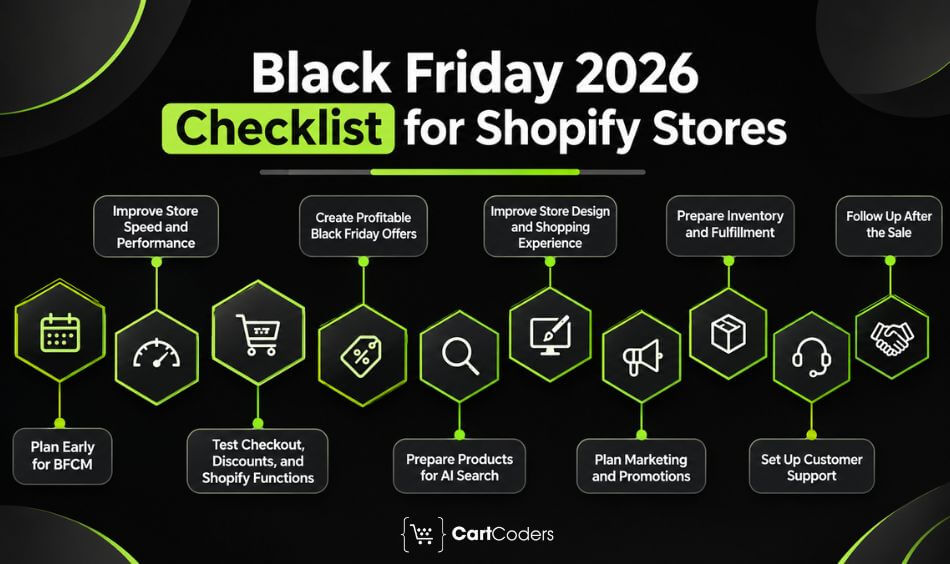
Prepare a Shopify store for Black Friday in 10 steps:
- Plan early with last year’s data and clear revenue, AOV, and margin goals.
- Speed up your store and freeze code 7 days before the sale.
- Test checkout, discounts, and Shopify Functions with real orders.
- Build offers that protect your margin.
- Make products visible in AI search and AI shopping assistants.
- Improve store design with a dedicated Black Friday collection.
- Launch email, SMS, ads, and creator campaigns.
- Prepare inventory and fulfillment for higher order volume.
- Set up fast customer support and clear return policies.
- Follow up after the sale to turn new buyers into repeat customers.
Black Friday and Cyber Monday 2026 Important Dates
| Event | Date | What to Do |
|---|---|---|
| Thanksgiving (US) | Thursday, November 26, 2026 | Open early access for VIPs and email subscribers |
| Black Friday | Friday, November 27, 2026 | Main sale launch, highest traffic of the weekend |
| Small Business Saturday | Saturday, November 28, 2026 | Flash deals and social pushes |
| Cyber Monday | Monday, November 30, 2026 | Last-chance offers, forecast as the biggest online day |
| Cyber Week ends | Thursday, December 3, 2026 | Extended deals, then switch to holiday gifting |
| Green Monday | Monday, December 14, 2026 | Last shipping-friendly push before Christmas |
Black Friday vs Cyber Monday 2026: Which Day Is Bigger?
Short answer: Cyber Monday is still the biggest online shopping day, but Black Friday is growing faster. Treat all four days as one event.
| Day | Adobe 2026 US Online Forecast | Growth vs 2025 |
|---|---|---|
| Thanksgiving | $6.9 billion | +8.5% |
| Black Friday | $12.9 billion | +9.2% |
| Cyber Monday | $15.1 billion | +6.2% |
| Cyber Week (Thanksgiving to Cyber Monday) | $47.5 billion | +7.4% |
Source: Adobe Digital Insights 2026 Holiday Forecast, via Digital Commerce 360.
Key Statistics of BFCM 2025
| Metric | Figure | What It Means for Your Store |
|---|---|---|
| Shopify merchant sales | $14.6 billion, up 27% YoY | Plan stock and staffing above last year’s levels |
| Peak sales on Shopify | $5.1 million per minute | Test your store at peak load |
| Average cart value | $114.70 | Set bundles and free-shipping thresholds above this |
| Orders placed with Shop Pay | 32%, with Shop Pay sales up 39% | Accelerated checkout is now expected |
| Cross-border orders | 16% of all orders | Check currency, duties and international rates |
| Top categories | Cosmetics, clothing, activewear, fitness and nutrition | Expect heavier competition and ad costs in these niches |
Source: Shopify BFCM 2025 results.
BFCM 2026: What’s Changed and What Retailers Need to Know
Short answer: Five changes since last year affect how a Shopify store should prepare for Black Friday.
| Change | Date | What to Do Before Black Friday |
|---|---|---|
| Shopify Scripts stopped running | June 30, 2026 | Confirm every discount, shipping, and payment rule now runs on Shopify Functions or an app |
| Script tags deprecated on storefronts | No new tags since Oct 1, 2026. Tags stop loading March 1, 2027. | List apps that still use script tags and plan the move to app embeds or Web Pixels |
| Agentic Storefronts admin page | May 2026 | Check which AI channels are on and fix the product data issues it flags |
| AI traffic to retail sites | Forecast +130% this season | Clean product titles, variants, GTINs and reviews |
| Buy now, pay later growth | $807M forecast on Black Friday | Show Shop Pay Installments or other BNPL options on product pages |
Short on Time? Your Last-Minute Black Friday Countdown
Short answer: With about 3 weeks left, focus on speed, checkout, stock, and email. Skip redesigns.
| When | Focus | Key Tasks |
|---|---|---|
| Nov 2 to 8 | Audit and fix | Speed test, app cleanup, test every discount at checkout, confirm stock with suppliers |
| Nov 9 to 15 | Build | Publish the Black Friday landing page, set up email and SMS flows, update product data and feeds |
| Nov 16 to 20 | Warm up | Teaser emails, retargeting ads, VIP early-access list |
| Nov 21 to 26 | Freeze and test | Code freeze, full order test on mobile and desktop, support team briefing |
| Nov 27 to 30 | Monitor | Watch speed, stock, and checkout errors hourly, send last-chance messages |
| Dec 1 onward | Retain | Thank-you emails, cross-sell, review requests, results review |
Not sure where to start? Our free Shopify store audit flags your top fixes before the rush.
Step 1: Start With Early Planning for BFCM
Short answer: Review last year’s numbers, set revenue, AOV, and margin goals, and lock in stock before you touch the storefront.
Successful sales depend on planning, not just discounts or ads. Late preparation leads to mistakes, stockouts, and stress.
Analyze Last Year’s Performance
Review your revenue by product, traffic sources such as Google Ads, social, and email, your cart abandonment rate, and customer feedback on shipping and checkout. If abandonment was high, look at better checkout design or cart-recovery emails.
Also check referral traffic from AI tools such as ChatGPT, Perplexity, and Gemini in GA4, and the queries that brought shoppers in through Google Search Console. Both show which products people actually looked for.
Forecast Demand and Set Clear Goals
Use past holiday sales, category trends, and competitor promotions to estimate demand. Set measurable targets, such as a 20% revenue increase or a 15% drop in abandoned carts.
Add an average order value (AOV) target and a margin floor. A sale that hits revenue but loses money on every order is not a win.
Finalize Inventory and Suppliers in Advance
Stockouts push shoppers away, especially during deep-discount sales. Confirm supplier orders weeks ahead, set low-stock alerts in Shopify, and line up backup suppliers. Check packaging supplies and delivery timelines too.
Step 2: Optimize Your Shopify Store for Speed and Performance
Short answer: Hit Google’s Core Web Vitals targets on mobile, remove unused apps, and freeze code 7 days before Black Friday.
Slow load times during peak traffic cost sales because shoppers have plenty of other options. Mobile matters most: phones drove 61.6% of Thanksgiving Day online sales in 2025, and Adobe expects that share to rise to 63% this year.
Test Loading Speed and Mobile Responsiveness
Use Google PageSpeed Insights and Shopify’s built-in reports to check homepage load time, image impact, and mobile navigation. Compress images, reduce redirects, and test checkout across devices.
Aim for Google’s Core Web Vitals “good” thresholds on mobile: Largest Contentful Paint under 2.5 seconds, Interaction to Next Paint under 200 milliseconds, and Cumulative Layout Shift under 0.1. Test your homepage, top collection, top product page, and cart first. Our guide on how to make a Shopify store faster covers the fixes in detail.
Remove Unnecessary Apps or Scripts
Every app can add code that slows your store. Audit all installed apps, remove the ones you no longer use, and check for overlapping tools, such as two upsell apps. Use lightweight or Shopify-native options where you can.
Also check for apps that still load through script tags. Shopify stopped accepting new script tags on October 1, 2026, and will stop loading them on storefronts on March 1, 2027. Tracking code should move to Web Pixels, and other scripts to app embed blocks.
Check Hosting and Shopify Plan Readiness
Shopify scales automatically, but plan limits still apply. Basic plans may lack advanced reporting and international pricing, while Shopify Plus supports higher order volumes and checkout customization. If you’re unsure, speak with Shopify support to confirm you’re ready for a traffic spike.
Set a Code Freeze Date
Stop all theme and app changes at least 7 days before Black Friday. Last-minute theme edits and new app installs are a common cause of BFCM bugs, because there is no time left to test them properly.
Expert Tip: Duplicate your live theme before the freeze and keep the copy unpublished. If something breaks during the sale, you can roll back in one click instead of debugging under pressure.
Step 3: Test Your Checkout, Discounts and Shopify Functions
Short answer: Shopify Scripts no longer run, so confirm every BFCM promotion works on Shopify Functions and place a real test order for each offer.
Your checkout is where Black Friday revenue is won or lost, and it changed a lot this year. Test it end to end before you launch a single ad.
Confirm Your Shopify Scripts Have Been Replaced
Shopify Scripts stopped running entirely on June 30, 2026. Any tiered discount, free gift, shipping rule, or payment rule that ran on Scripts no longer works unless it was rebuilt with Shopify Functions or a Functions-powered app. Use our Shopify Scripts migration checklist to check every promotion, not just the ones you remember.
Stores still running on the old checkout code should also read what breaks after the checkout.liquid sunset.
Test Every Discount Before Launch
Place real test orders for each offer. Check how discounts stack, whether free shipping triggers at the right threshold, and whether discount codes work alongside automatic discounts. A broken promo found on Black Friday morning means refunds, angry emails, and wasted ad spend.
Simplify the Navigation and Checkout Process
A complicated checkout is a major cause of cart abandonment. Test checkout on desktop and mobile, reduce form fields, enable guest checkout, and offer several payment options, including digital wallets and buy now, pay later.
Turn on Shop Pay, Apple Pay, and Google Pay. Shop Pay handled 32% of Shopify orders during BFCM 2025. Adobe also forecasts $807 million in buy now, pay later spending on Black Friday 2026, so show Shop Pay Installments or another BNPL option on product pages, not only at checkout.
If your conversion rate dropped last season, a Shopify CRO audit shows where shoppers leave.
Step 4: Create Irresistible Black Friday Offers
Short answer: Pick offers you can afford at volume. Bundles, tiered discounts, and free-shipping thresholds usually protect margin better than deep sitewide cuts.
Shoppers expect deals, so your offers need to stand out to both new and returning customers. Plan discounts on purpose rather than cutting prices at random.
Discount Structures That Work
Use percentage discounts (sitewide or on selected items), buy-one-get-one deals, and tiered discounts that grow with spend. Tiered offers suit Black Friday because shoppers are already in a buying mood.
Before you pick a discount, work out the margin on each product after ad costs, shipping, and payment fees.
Limited-Time Deals and Flash Sales
Urgency drives action. Flash sales at set hours, early-bird deals for the first 100 buyers, hourly product drops, and short windows such as three hours can build excitement. Countdown timers on product pages or banners make that urgency visible.
Gift Cards and Free Shipping Offers
Gift cards let undecided shoppers spend later while you lock in revenue now. Free shipping above a minimum order value can raise AOV, because high shipping costs are a common reason for cart abandonment. Set the threshold a little above your average order value. Shopify’s BFCM 2025 average cart was $114.70, which gives you a useful benchmark.
Step 5: Make Your Products Visible in AI Search and AI Shopping Assistants
Short answer: Turn on the AI channels in Shopify’s Agentic Storefronts, fix the product data gaps it flags, and publish your Black Friday page early so AI tools can find and quote it.
More shoppers now ask ChatGPT, Gemini, Copilot, or Google AI Mode for gift ideas and deals before they search. AI traffic to US retail sites rose 693% during the 2025 holiday season (Adobe), and those visits converted 31% better than other traffic (Adobe AI Traffic Report). For 2026, Adobe forecasts another 130% increase.
Check Your Shopify Agentic Storefronts Settings
Agentic Storefronts lists your products in AI channels such as ChatGPT, Google AI Mode and Gemini, and Microsoft Copilot, using your Shopify catalog. Since May 2026, it has its own page in the Shopify admin, where you can see AI channel performance, the queries your products appear for, and recommendations to improve product data. Check which channels are on and place a test purchase from each.
Our guide to Shopify Agentic Storefronts setup and catalog mapping walks through each setting.
Clean Up Your Product Data
AI assistants recommend products they can understand. Before Black Friday, check that each bestseller has:
- A clear title with brand, product type, and key attribute (for example, “Organic Cotton Crew Neck T-Shirt, Unisex”)
- Complete variants, GTINs or barcodes, and accurate stock levels
- Product metafields for size, material, compatibility, and other details shoppers ask about
- Product structured data with price, sale price, and availability that match the page
- Recent reviews, which AI answers often use as proof
Publish Your Black Friday Page Early
Google and AI engines need time to find and trust new pages. Publish your Black Friday landing page now, and reuse the same URL every year (for example, /collections/black-friday) so it keeps its rankings and links. Add a short FAQ covering dates, shipping cutoffs, and return rules. AI tools often quote these answers directly.
Expert Insights: Write the first two sentences of your Black Friday page as a plain answer: what the sale is, the dates, and the main offer. That is the text AI Overviews and ChatGPT are most likely to lift.
Step 6: Improve Your Store Design and User Experience
Short answer: Make the sale obvious on every page, keep banners light on mobile, and put all deals in one collection.
Shoppers are in a hurry, and confusing design can undo even a great discount.
Use Black Friday Banners and Countdown Timers
Homepage and product-page banners announce the sale, and countdown timers remind shoppers that it ends soon. Keep banners light: a large image or video banner that slows mobile load time costs more sales than it brings in. Our Shopify image size guide lists the right dimensions.
Create a Dedicated Black Friday Collection
Group discounted products into one clear category, such as a Black Friday Deals section. Link it from the main menu, homepage, and announcement bar so shoppers reach it in one tap.
Highlight Best-Selling and Seasonal Products
Best-selling items build trust, and seasonal items or bundles attract impulse buyers. Badges such as “Bestseller” or “Hot Deal” on product images guide attention.
Step 7: Strengthen Marketing and Promotions
Short answer: Segment email, use SMS for urgency, retarget with ads, and lock in creators early. Check email authentication first so messages reach the inbox.
Great deals don’t help if shoppers never hear about them. Your marketing should build excitement before the sale and keep customers engaged during it.
Email Campaigns and Customer Segmentation
Email is still one of the strongest sales drivers. Segment your list instead of sending one message to everyone:
- Early access for repeat buyers
- Cart reminders with a discount code for abandoners
- Exclusive welcome deals for new subscribers
- Teaser emails about a week before the sale
- Last-chance reminders as the sale closes
Check your sending setup before volume spikes. Google’s sender guidelines require bulk senders (5,000 or more emails a day) to use SPF, DKIM, and DMARC and offer one-click unsubscribe. Yahoo and Microsoft Outlook apply similar rules. Missing any of these can send Black Friday emails straight to spam.
SMS and Push Notifications for Urgency
Shoppers often ignore email but check their phones all day. SMS and push notifications grab immediate attention. Keep messages short, clear, and time-bound, for example: “50% off ends at 3 PM” or “2 hours left to save on your wishlist.”
Paid Ads on Google, Meta and TikTok
Paid ads can drive large traffic volumes if you plan them well. Promote your best deals and retarget visitors who abandoned carts. Use Google Shopping ads for product searches, Meta ads for visual promotions, and TikTok ads to reach younger buyers. Budget for higher costs, since competition for ad space rises during Black Friday.
Show discounts directly in Google Shopping with sale price annotations. The discount must be more than 5% and less than 90%, and both prices must show on your product page. Setting a compare-at price in Shopify and turning on product sync in the Google & YouTube app passes the sale price to Merchant Center.
Social Proof and Influencer Collaborations
Shoppers trust other people’s experiences. Show reviews, ratings, and user-generated content on product pages. Influencers who share discount codes or flash-sale alerts can work well, and short Instagram stories or TikTok posts create urgency. Adobe expects affiliates and partners (up 12%) and social media (up 17%) to win a bigger share of holiday revenue in 2026, so lock in creator partners now.
Step 8: Prepare for Higher Traffic and Orders
Short answer: Sync stock across every channel, automate order updates, and confirm carrier cutoffs before the sale starts.
Black Friday can overwhelm your operations, so put systems for stock and delivery in place first.
Check Inventory Management and Stock Alerts
Customers get frustrated when an item they ordered turns out to be out of stock. Use Shopify’s inventory tracking to watch stock in real time, set low-stock alerts for fast sellers, and sync inventory across every sales channel, including Amazon, eBay, and social. Shopify Flow can automate low-stock alerts and hide sold-out products. AI channels count too, since Agentic Storefronts pull live stock from Shopify.
Stores running an ERP or marketplace connectors can use Shopify integration services to keep stock in sync at peak volume.
Automate Order Confirmations and Tracking
Manual tracking breaks down when hundreds of orders arrive. Send order confirmation emails, tracking links, and delivery updates automatically. This cuts support requests and reassures buyers.
Coordinate With Fulfillment Partners
Whether you ship from your own warehouse or use a 3PL, confirm order cut-off times in advance, make sure your team can cover extended hours, and keep backup packaging and labels ready. Publish carrier holiday shipping deadlines on your site. With 16% of BFCM 2025 orders crossing borders, also confirm international rates, duties, and delivery times in Shopify Markets.
Step 9: Build a Strong Customer Support System
Short answer: Answer common questions before shoppers ask, train your chatbot on this year’s offers, and make returns simple.
Black Friday shoppers expect quick answers, easy returns, and clear communication. Good support builds trust and repeat business.
Use Shopify Chatbot or Live Chat
Shoppers ask about products, shipping, and discounts all weekend. Live chat through Shopify Inbox or an AI-powered chatbot gives instant answers and reduces abandonment caused by hesitation. Train your chatbot on this year’s offers, shipping cutoffs, and return rules before launch, and set a clear handoff to a human for order problems.
Prepare FAQ Pages for Quick Help
Some customers prefer not to wait for a chat reply. A well-organized FAQ page covering shipping timelines, return and exchange policies, and how to apply discount codes lets them find answers right away. Keep it current and link it from the homepage and checkout.
Offer Flexible Return and Exchange Policies
Holiday shopping often means gifts, so returns are common. A buyer-friendly policy helps shoppers buy with confidence. Consider extending return deadlines past the holidays, allow exchanges for size or color, and keep return instructions simple.
Step 10: Plan Your Post-Black Friday Strategy
Short answer: Follow up with first-time buyers within a week, reward repeat purchases, and record what worked while the data is fresh.
The rush doesn’t end when the sale does. Follow-up is where one-time shoppers become long-term customers.
Upsell and Cross-Sell to New Customers
Black Friday brings many first-time buyers. Send them targeted emails with matching accessories, premium upgrades, and bundle discounts to raise lifetime value. See our upsell and cross-sell strategies for Shopify Plus checkout.
Nurture Repeat Purchases With Loyalty Programs
Rewarded customers come back. Simple options include points per dollar spent, referral discounts, and early access to future sales.
Analyze Data to Improve for Cyber Monday and Next Year
Review results while the details are fresh. Find which discounts performed best, what caused the most cart abandonment, and which channels drove the most revenue. Save a short report with your top 5 lessons and your peak-hour traffic so next year’s plan starts from real numbers.
Black Friday Checklist 2026 at a Glance
Use this table as your working Black Friday checklist. Tick off each task as your team completes it.
| Task | Finish By | Owner |
|---|---|---|
| Review 2025 BFCM results and set revenue, AOV, and margin goals | 6 to 8 weeks out | Founder or marketing lead |
| Confirm inventory, suppliers, and backup stock | 6 weeks out | Operations |
| Speed test and app cleanup | 4 weeks out | Developer |
| Confirm Scripts are replaced and test all discounts | 4 weeks out | Developer |
| Update product data, structured data, and Agentic Storefronts settings | 3 weeks out | Developer and merchandising |
| Publish Black Friday landing page and FAQs | 3 weeks out | Marketing |
| Check email authentication, set up email, SMS, and ads | 2 weeks out | Marketing |
| Brief support team and update chatbot | 1 week out | Support |
| Code freeze, theme backup and full order test | 7 days out | Developer |
| Monitor speed, stock, and checkout during BFCM | Nov 27 to 30 | Whole team |
| Send follow-up, loyalty and review emails | Dec 1 onward | Marketing |
Common Black Friday Mistakes to Avoid
Avoid last-minute changes, checkout failures, and costly oversights that can hamper your Shopify store’s sales during BFCM 2026.
1. Changing the Theme During BFCM Week
Avoid major theme edits during the final week before Black Friday. Even small code changes can affect page layouts, app integrations, tracking, or checkout journeys. Freeze theme and code updates at least seven days before the sale, and focus only on critical fixes.
2. Launching Discounts Without Test Orders
A discount may look correct on your product page but fail at checkout. Test every offer with real checkout scenarios before publishing it. Check discount codes, automatic discounts, minimum order values, shipping rules, cart combinations, and final order totals.
3. Relying on Old Shopify Scripts
Shopify Scripts stopped running on June 30, 2026. Stores still relying on legacy Script-based discount logic may face problems with promotional offers. Move eligible discount logic to Shopify Functions and test every pricing rule before BFCM begins.
4. Publishing the Black Friday Page at the Last Minute
Publishing your Black Friday landing page a day before the sale leaves little time for search engines to crawl and index it. AI search platforms also need accessible, relevant content to understand your offers. Publish the page early, add relevant internal links, submit the URL for indexing, and keep offer details updated.
5. Offering Discounts Without a Margin Floor
Higher sales do not always mean higher profits. Deep discounts, shipping costs, payment fees, and product costs can quickly reduce your margins. Set a minimum profit margin for every product and promotional offer before launching BFCM campaigns.
6. Ignoring Mobile Shopping Experience
A slow or difficult mobile experience can cost you sales during peak shopping periods. Check page loading speed, product images, navigation, buttons, cart functionality, and checkout on real mobile devices. Make sure shoppers can complete their purchases without unnecessary steps.
How We Built This Checklist
This checklist draws on CartCoders’ hands-on experience with Shopify and Shopify Plus development, store performance reviews, and ecommerce optimization projects. It also uses official industry data, research, and seasonal shopping insights from trusted sources, including Shopify, Adobe Digital Insights, and Google.
Each recommendation focuses on practical steps Shopify merchants can take before Black Friday and Cyber Monday, from improving website speed and checkout performance to preparing discounts, mobile shopping experiences, marketing campaigns, and customer support.
We review and update this checklist every year ahead of BFCM to reflect platform changes, emerging shopping trends, and new ecommerce requirements. We also revisit the data in December after final holiday shopping results become available.
Conclusion
Black Friday is the biggest chance of the year to grow your Shopify store, but results depend on preparation. Use this Black Friday checklist to plan early, test your checkout and discounts, make your products easy for AI assistants to find, and keep your store fast when traffic peaks.
Shoppers want fast, simple, and exciting experiences. Deliver that, follow up well, and new Black Friday buyers turn into customers who come back all year.
Not sure your store is ready? Get a free BFCM store audit from CartCoders. No login needed. We review your speed, checkout, discounts, and apps and send you the top 5 fixes within 48 hours. Need hands-on help? Hire Shopify developers for BFCM fixes, or talk to our Shopify Plus development team.
FAQs About the Black Friday Checklist
A Black Friday checklist is a step-by-step plan that prepares an online store for the BFCM sales weekend. It covers planning, inventory, site speed, checkout testing, offers, marketing, fulfillment, and customer support, so nothing breaks when traffic peaks.
Black Friday 2026 is on Friday, November 27, 2026. Cyber Monday follows on Monday, November 30, and many stores run deals through Cyber Week, which ends on Thursday, December 3.
Start 6 to 8 weeks before Black Friday, which means early October for 2026. That leaves time for inventory orders, speed fixes, checkout testing, and campaign setup. If you start later, follow the last-minute countdown and focus on speed, checkout, and stock first.
No. Three to four weeks is enough for the tasks that protect revenue most: a speed check, app cleanup, discount and checkout testing, stock confirmation, and a simple email and SMS plan. Skip big redesigns and focus on fixes.
Preparation stops stockouts, slow pages, and broken discounts at the busiest hour of the year. Shopify sales peaked at $5.1 million per minute on Black Friday 2025, so small problems become expensive fast.
Yes. A checklist keeps smaller stores organized and helps them set priorities. Small teams can’t fix everything, so a checklist shows which tasks (speed, checkout, stock) protect the most revenue.
No. Shopify Scripts stopped running on June 30, 2026. Discounts, shipping rules, and payment rules that used Scripts must be rebuilt with Shopify Functions or a Functions-based app. Test every promotion with real orders before Black Friday.
Keep product data complete and accurate: clear titles, variants, GTINs, prices, stock, and reviews. Add Product structured data, publish your Black Friday page early with a short FAQ, and turn on the AI channels in Shopify’s Agentic Storefronts so your catalog reaches ChatGPT, Gemini, and Copilot.
Yes, online. Adobe forecasts $15.1 billion in US online sales on Cyber Monday 2026 against $12.9 billion on Black Friday. Black Friday is growing faster, though, so plan one offer that runs across the whole weekend.
Discount only as much as your margin allows after ad, shipping, and payment costs. Many stores protect margin with bundles, tiered offers, or gift-with-purchase deals instead of deep sitewide cuts.
A good plan covers past sales analysis, inventory, site speed, checkout and discount testing, offers, AI search visibility, ad and email campaigns, fulfillment, support staffing, and a post-sale follow-up plan.
Choose your discount strategy early, such as flat percentages, bundles, or free shipping. Then test every offer with real orders on mobile and desktop before the sale to avoid broken codes and confused customers.


