

Every Shopify store begins with a solid setup. You get a simple dashboard, product listings, payment options, and a ready checkout flow. These features work well in the early stage. But when your store grows, your needs become more specific. You need tools that match your workflows, not generic apps that only solve part of the problem.
That is where Shopify app development adds real value. A custom Shopify app gives your store the exact features your business needs. You can automate order processing, create a custom loyalty program, add advanced product rules, or connect your store with an external ERP. A purpose-built app handles these tasks with better control.
This guide covers everything you need to know about Shopify app development, including app types, the development process, realistic costs, timelines, and how to choose the right team for your project.
QUICK ANSWER
Shopify app development is the process of building custom software that runs inside or alongside a Shopify store to extend its default capabilities. Merchants commission Shopify app developers to solve specific operational problems, automate workflows, or add features the Shopify platform does not natively support. Apps can be public, private, or custom, depending on the business need.
What Is Shopify App Development and How Does It Work?
Shopify operates on a modular architecture. The core platform handles payments, product management, and storefront rendering. Apps plug into this architecture through Shopify’s API layer to add new features, modify existing behaviors, or connect external systems.
A Shopify app communicates with the store through the Admin API, Storefront API, or Webhooks. Shopify developers use these interfaces to read and write store data, trigger events, and surface custom UI elements inside the Shopify admin or on the storefront itself.
How Shopify’s App Framework Works
Shopify provides a structured development environment through the Shopify CLI, combined with app templates and the Polaris design system. Developers use these tools to build apps that match Shopify’s UX standards and pass the app review process for public listings.
Most modern Shopify apps are embedded apps, meaning they run inside the Shopify admin interface rather than opening in a separate window. This gives merchants a consistent experience without switching between tools.
Role of The Shopify API
The Admin API (available in both REST and GraphQL versions) lets developers access products, orders, customers, inventory, and more. The Storefront API allows apps to modify what shoppers see on the front end without touching the theme directly. Webhooks let apps react in real time when events occur, such as a new order being placed or inventory reaching a threshold.
Choosing the right API combination for your use case is one of the first technical decisions in any Shopify app development project.
What Types of Shopify Apps Can You Build?
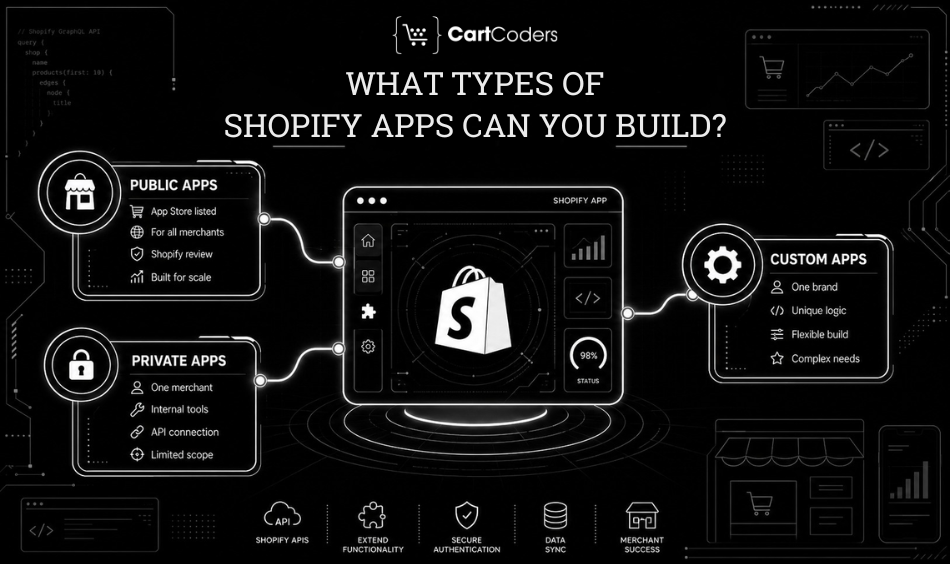
Not all Shopify apps serve the same purpose or reach the same audience. Shopify organizes apps into three main categories based on how they are distributed and who can access them.
Public Apps
Public apps are listed on the Shopify App Store, making them available to all Shopify merchants globally. Developers submit them through the Shopify Partners program, and Shopify reviews them before approval. Public apps use Shopify’s built-in billing API to manage subscription pricing.
Building a Shopify public app is a longer investment. It requires careful planning around scalability, multi-store support, and ongoing maintenance. The reward is access to millions of merchants actively searching the App Store for solutions to common problems.
Private Apps
Private apps are built for a single merchant and are not listed publicly. They were historically used to connect Shopify with internal tools or third-party systems through API keys. Shopify has shifted away from the legacy private app model, moving merchants toward the custom app framework instead.
This approach still fits tightly scoped, single-store integrations where public distribution is not needed.
Custom Apps
Custom apps are purpose-built for one specific merchant and are not distributed through the App Store. This removes the need to meet App Store review standards, which gives developers more flexibility in design and functionality.
A merchant might commission a custom Shopify app for a complex wholesale pricing engine, a multi-warehouse inventory flow, or a proprietary rewards system. Custom Shopify app development is the most common request for established brands with specific needs that App Store apps cannot handle.
What Are the Core Benefits of Custom Shopify App Development?
Many merchants start with ready-made apps from the App Store. Over time, they hit limitations: missing features, bloated interfaces, or poor integration with existing tools. Custom Shopify app development addresses those problems directly.
Exact Fit For Your Workflows
A custom app is built around how your business actually operates, not a generalized version of it. If your returns process involves three approval stages, your app reflects that precisely. No workarounds, no paying for features you will never use, and no forcing your team to adapt to someone else’s workflow.
Full Ownership Of the Code
When you commission a custom app, you own the intellectual property. You are not tied to a third-party vendor maintaining their subscription or deciding to sunset the product. This matters for long-term operational stability, particularly for high-volume Shopify stores where downtime has a direct revenue cost.
Cleaner ERP and Third-party Integrations
Off-the-shelf apps rarely connect cleanly with legacy ERPs, custom warehousing systems, or niche logistics providers. A custom-built Shopify app speaks directly to your specific systems using the data structures and authentication methods those systems expect, rather than relying on a generic connector that requires constant manual intervention.
Better Storefront Performance
Generic apps often load JavaScript bundles that slow down page speed even when their features are not actively in use. A lean custom app installs only what is necessary, keeping your store’s Core Web Vitals scores healthy and reducing the risk of page speed penalties during high-traffic periods.
Dedicated Support and Maintenance
When a third-party app breaks, you wait in the vendor’s support queue. With a custom app built by a dedicated development partner, you get direct access to the team that knows your codebase, your store configuration, and the context behind every design decision.
What Does the Shopify App Development Process Look Like?
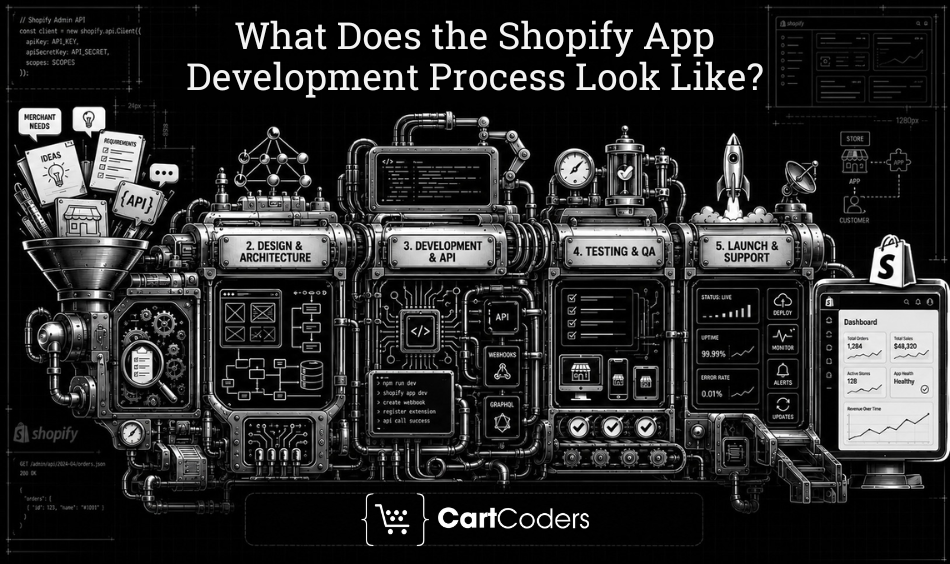
Building a Shopify app follows a structured path from discovery through deployment and ongoing maintenance. Skipping any phase creates technical debt or a product that misses what the merchant actually needed.
Discovery and Scoping
The process starts with a discovery session where the development team maps out what the app needs to do, which APIs it will use, how it connects to other systems, and what the admin interface should look like. Clear scoping prevents scope creep and sets accurate expectations for both timeline and budget.
Design and Architecture
Before a single line of code is written, the team designs the app’s architecture. This includes the data model, API call structure, authentication flow, and UI components. Using Shopify’s Polaris design system ensures the app looks and feels native inside the Shopify admin.
Development and API Integration
Developers build the app in phases, typically using Node.js with the Shopify CLI or Ruby on Rails for backend logic. Each feature is built, tested against the Shopify sandbox environment, and reviewed before moving to the next. API rate limits, webhook reliability, and error handling are built in from the start.
Testing and QA
Apps go through functional testing across multiple Shopify plan types, merchant configurations, and device environments. QA also covers performance and security to confirm the app handles customer data responsibly and meets Shopify’s compliance requirements.
Launch and Post-launch Support
After launch, the development team monitors the app for errors and unexpected behaviors. For public apps, the team also manages Shopify’s review process and any feedback from the review team. Ongoing maintenance ensures the app stays compatible as Shopify updates its platform and APIs.
Dig Deeper: How to Build a Shopify App Successfully – Steps & Cost
How Much Does Shopify App Development Cost?
Cost depends on the complexity of the app, the features required, and the team’s location and experience. Below are realistic cost ranges based on current global development rates.
| App Type | Estimated Cost Range | Typical Timeline |
| Simple private / custom app | $3,000 – $8,000 | 4 – 8 weeks |
| Mid-complexity custom app | $8,000 – $25,000 | 2 – 4 months |
| Full public App Store app | $20,000 – $60,000+ | 4 – 8 months |
| Enterprise integration app | $50,000+ | 6 – 12 months |
These ranges cover design, development, testing, and initial deployment. Ongoing maintenance, hosting, and feature additions add to the total cost over time. Teams in South Asia and Eastern Europe typically charge lower day rates than US or UK agencies, with comparable output quality for most project types.
Timeline and cost also depend on whether you are building for a single store or for public distribution. Public apps require additional work around multi-tenant architecture, Shopify billing integration, and the review submission process.
How Do You Choose the Right Shopify App Development Company?
The team you choose determines whether the project delivers on time, on budget, and actually works as expected in a live store environment. Here are the factors that separate strong development partners from risky ones.
Shopify Partner Status and App Experience
Look for agencies listed in the Shopify Partner directory with a track record of building and maintaining apps, not just themes or storefronts. Ask for app-specific case studies. A team that has built and launched at least a few apps understands the review process, API edge cases, and the common failure points that only appear after launch.
Technical Stack and Tooling
Check whether the agency works with current Shopify tools: the Shopify CLI, Remix or Next.js for app frontends, GraphQL for data queries, and webhooks for event handling. Teams still relying heavily on outdated REST-only patterns or skipping modern app scaffolding tools create maintenance problems that show up six months after the project closes.
Communication and Project Transparency
App development requires regular back-and-forth between the merchant and the technical team. The best partners structure work in sprints, provide demo calls at each milestone, and maintain clear documentation. You should always know what was completed last week and what is being built next.
Post-launch Support Terms
Confirm what happens after the app launches. Does the agency offer a bug warranty period? How quickly do they respond to production issues? What does ongoing retainer support look like? Post-launch support terms matter more than launch day itself.
Why Shopify Merchants Choose CartCoders?
CartCoders has built custom Shopify apps for merchants across retail, wholesale, fashion, and B2B eCommerce. As a certified Shopify development company with over 7 years of experience and 250+ delivered projects, we build apps that solve real operational problems – from custom pricing engines and ERP connections to loyalty systems and multi-location inventory management. Our team handles the full cycle: scoping, design, development, QA, launch, and ongoing support. We know where Shopify’s native tools end and where custom development begins.
Ready to build a Shopify app that fits your store’s exact needs? Talk to the CartCoders team and get a clear project scope and cost estimate within 48 hours.
Frequently Asked Questions
These questions cover the most common things merchants ask before starting a Shopify app development project.
Public apps are listed on the Shopify App Store and available to all merchants. Custom apps are built for one specific store and are not publicly distributed.
No. You define what the app should do, and the development agency handles all the technical work including building, testing, and deploying it.
A simple custom app typically takes 4 to 8 weeks. Mid-complexity projects run 2 to 4 months. Full-featured public apps can take 4 to 8 months depending on scope.
Yes. Custom Shopify apps are commonly built to integrate with ERPs, CRMs, logistics platforms, and other third-party systems using APIs and webhooks.
Most Shopify apps are built with JavaScript (Node.js) or Ruby on Rails. App frontends typically use React with Shopify’s Polaris component library.
For stores with specific workflows that App Store apps cannot handle, a custom app pays for itself through saved time, fewer manual errors, and cleaner system integration.
Yes. Custom apps can be updated at any time to add features, fix issues, or adapt to changes in Shopify’s APIs and platform requirements.
Apps submitted to the Shopify App Store go through a review that checks security, functionality, and compliance with Shopify’s Partner program requirements before they are approved for listing.


