

Cart abandonment at checkout is one of the most expensive problems a Shopify store owner faces. In many cases, the reason for cart abandonment is not the price but a bad user experience. A generic, rigid checkout page makes buyers hesitant.
But there are several practical ways to customize Shopify checkout. You can match it to your brand, add fields your customers actually want, and give buyers the confidence to complete their purchase.
This guide breaks down the most effective Shopify checkout customization methods, ideal use cases, and clear steps to get started.
Quick Answer
The main ways to customize Shopify checkout include branding the checkout page, adding custom fields, showing trust badges, adding upsell blocks, setting up custom shipping options, and editing the thank you page. Shopify Plus merchants get advanced control through checkout UI extensions and Shopify Functions.
Why Does Your Shopify Checkout Need Customization?
Most Shopify stores launch with the default checkout. It works, but it does not sell. A default checkout treats every customer the same way, ignores your brand identity, and misses several chances to build trust and increase average order value.
Cart Abandonment Costs Real Revenue
According to the Baymard Institute, which aggregated data across 50 cart abandonment studies, the average checkout abandonment rate sits at 70.22%. Every buyer who leaves your checkout is a sale you already earned but did not close.
Customizing your checkout removes that friction. It gives buyers the right information, in the right format, at the moment they need it most.
Brand Consistency Builds Trust
When a customer clicks from your branded storefront to a generic Shopify checkout, the visual disconnect creates doubt. A checkout page that matches your store’s colors, fonts, and logo tells the buyer they are in safe hands.
Trust signals at checkout, like payment icons, security badges, and money-back guarantee reminders, encourage buyers to make the purchase.
Checkout is Your Last Upsell Opportunity
The moment a customer is ready to pay is also the moment they are most willing to add one more item. A customized checkout lets you show relevant product suggestions, bundle deals, or subscription upgrades right on the checkout page.
This single change can lift your average order value without changing anything else in your store.
What Are the Main Ways to Customize Shopify Checkout?
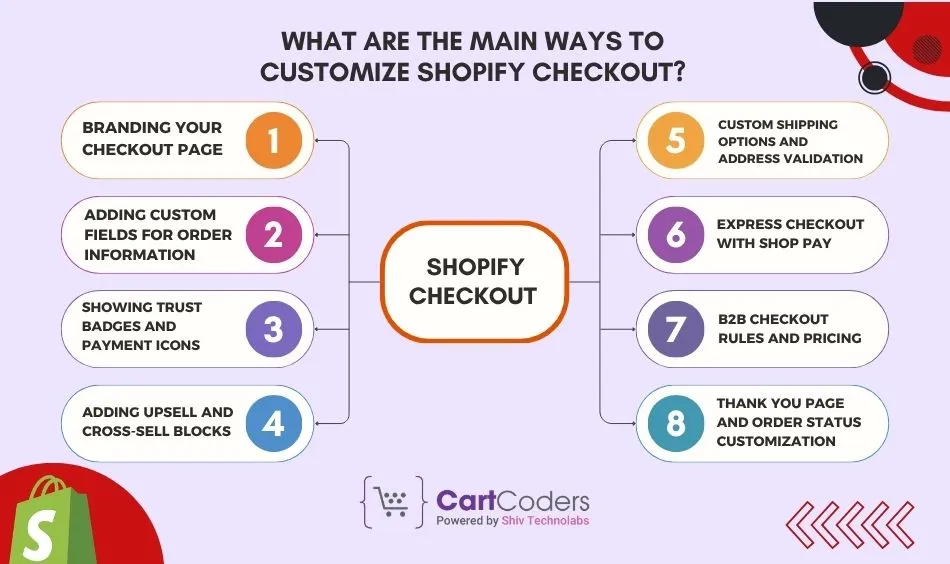
Shopify gives store owners several tools to change how the checkout page looks, what information it collects, and what offers it shows. The methods below work across different store types and goals. You can use one or combine several.
1. Branding Your Checkout Page
Shopify lets all merchants add a logo, set a background color or image, and adjust button colors on the checkout page. These settings are inside your Shopify admin under Settings and then Checkout.
For stores on Shopify Plus, branding control goes further. You can set custom fonts, adjust the layout, and apply consistent design across every step of the checkout flow. This is done through the Checkout Editor, a visual drag-and-drop tool built directly into Shopify.
A well-branded checkout reduces the visual gap between your storefront and the payment page. It keeps buyers focused and reassured throughout.
2. Adding Custom Fields for Order Information
Sometimes you need more than a shipping address. Gift message boxes, delivery date pickers, personalization notes, or special instructions are all common needs that the default checkout does not include.
You can add these fields using checkout UI extensions, which are app-based additions to the checkout page. Apps from the Shopify App Store make this possible without any coding for most use cases.
For example, a gift shop can add a gift note field. A florist can add a preferred delivery time. A B2B store can add a purchase order number field. Each of these small additions makes the checkout feel tailored to the buyer.
3. Showing Trust Badges and Payment Icons
Shoppers want to know their payment is safe. Displaying trust badges (SSL, secure checkout, money-back guarantee) and accepted payment icons (Visa, Mastercard, PayPal, Shop Pay) at checkout reduces second-guessing.
With Shopify Plus and checkout UI extensions, you can add these visual elements to specific positions on the checkout page. You can also add short reassurance text, like free returns or 24-hour dispatch notices close to the payment button.
These additions cost nothing in terms of development complexity but have a measurable impact on completed purchases.
4. Adding Upsell and Cross-sell Blocks
Checkout upsells are one of the highest-converting features available to Shopify merchants. A customer who is already committed to buying is far more likely to add a related item than a first-time visitor browsing your homepage.
Using checkout UI extensions (available to all Shopify plans through compatible apps), you can display product recommendations, bundle offers, or complementary items directly on the checkout page.
For example, a skincare brand can offer a travel-size version of a product. A supplement store can offer a discounted bundle. These suggestions appear natively in the checkout without disrupting the purchase flow.
5. Custom Shipping Options and Address Validation
Shopify Functions give Shopify Plus merchants the ability to build custom shipping logic. You can show or hide shipping methods based on cart contents, customer location, or order value. You can also rename shipping options to match your brand’s language.
Address validation extensions reduce failed deliveries by flagging incorrect addresses before the order is placed. This is especially useful for stores with a high volume of international orders or physical product deliveries to new customers.
These changes reduce support tickets, chargebacks, and re-shipment costs over time.
6. Express Checkout With Shop Pay
Shop Pay is Shopify’s accelerated checkout option. It stores customer payment and shipping details so returning buyers can complete a purchase in seconds. Enabling Shop Pay on your store adds the Shop Pay button as a prominent option at checkout.
For mobile shoppers, a faster checkout means fewer drop-offs. Shop Pay also supports installment payments in eligible markets, which can increase conversions on higher-priced items.
Enabling Shop Pay requires no development work. You can activate it inside your Shopify Payments settings.
7. B2B Checkout Rules and Pricing (Shopify Plus)
Shopify Plus merchants who sell to other businesses can set B2B-specific checkout rules. These include showing or hiding tax fields, applying company-specific pricing, requiring a purchase order number, or setting net payment terms.
This level of control is built into Shopify Plus’s B2B features and can be extended further using custom checkout extensions. It makes the checkout experience feel purpose-built for wholesale or business buyers instead of a consumer storefront.
8. Thank You Page and Order Status Customization
The order confirmation page is one of the most-viewed pages in your store, yet most merchants leave it completely untouched. You can add custom messages, discount codes for the next purchase, referral program links, or social sharing prompts on this page.
Using checkout UI extensions and post-purchase extensions, you can turn the thank you page into a retention and referral tool. A simple offer like 15% off your next order placed here can bring buyers back without any ad spend.
Who Can Customize Shopify Checkout, and How Much Control Do They Get?
Checkout customization access in Shopify depends on your plan. The table below gives a clear picture of what each plan allows.
| Feature | Standard Shopify | Shopify Plus |
| Logo and color branding | Yes | Yes |
| Checkout UI extensions (apps) | Yes | Yes |
| Checkout Editor (visual) | Limited | Full access |
| Custom fonts and layouts | No | Yes |
| Shopify Functions (logic) | No | Yes |
| Custom shipping logic | No | Yes |
| B2B checkout rules | No | Yes |
| Script-level customization | No | Yes |
If you are on a standard Shopify plan and need deeper customization, upgrading to Shopify Plus can give you access to the full range of checkout tools.
What Tools and Apps Help With Shopify Checkout Customization?
Shopify gives store owners two distinct categories to work with: built-in developer tools that power the customization framework, and third-party apps that let you apply changes without writing code. Both serve different purposes, and knowing which one to use saves time and money.
Built-in Shopify tools
These are the core tools Shopify provides. They form the foundation of any checkout customization, whether you build it yourself or hire a developer.
- Checkout Extensibility: This is Shopify’s current tool for building safe, app-based checkout customizations. It replaces direct code editing of checkout.liquid and lets merchants add custom fields, content blocks, and logic through verified extensions. All extensions built on this framework are upgrade-safe and Shop Pay compatible.
- Shopify Functions: Available to Shopify Plus merchants, Shopify Functions let you write custom server-side logic for checkout. You can create rules that control discounts, payment methods, shipping options, and cart validation. For example, you can hide cash on delivery for international orders or apply a loyalty discount when a cart total crosses a set amount.
- Checkout UI extensions: These are the building blocks for adding visual components to your checkout page. Developers write them in JavaScript using Shopify’s API. They power most of the no-code apps available in the App Store, which means the apps you install are running on top of this tool.
- Post-purchase extensions: These add content to the order status and thank you pages after a purchase completes. They are built the same way as checkout UI extensions and are ideal for upsell offers, referral prompts, and review requests.
Third-party apps for checkout customization
These apps use Shopify’s extension framework in the background and give store owners a no-code or low-code interface to apply changes. They are a good starting point if you want results without custom development.
- Checkout Blocks: Lets you add custom content, fields, upsell blocks, and trust badges to your checkout page through a drag-and-drop editor. Works on all Shopify plans.
- ReConvert: Focused on post-purchase upsells and thank you page customization. Lets you add product offers, surveys, discount codes, and countdown timers after the order is placed.
- Rebuy: Offers AI-powered product recommendations at checkout and on the thank you page. Works well for stores with large catalogs where personalized suggestions matter.
- Shopify Checkout Extensibility apps (via App Store): Several agencies and developers publish specialized apps for specific use cases, such as gift note fields, delivery date pickers, B2B purchase order fields, and address validation. These can be found by searching the Shopify App Store under checkout customization.
Need a Custom Shopify Checkout Built for Your Store?
CartCoders is a Shopify development agency with deep experience in checkout customization, UI extensions, and Shopify Plus builds. Whether you need a simple branding update or a fully custom checkout flow with upsells, custom fields, and B2B logic, our team builds it to your exact requirements.
We handle Shopify Plus checkout customizations and checkout extension development for stores across the US, UK, Canada, and Australia. All builds are upgrade-safe and Shop Pay compatible.

Final thoughts
The checkout page is the last thing standing between a browser and a buyer. Small, deliberate customizations, from branding and trust badges to upsells and custom fields, make a real difference in whether customers complete their purchase.
Start with what your plan allows. Add branding, install a checkout extension app, and test one upsell offer. If you want to go further, a Shopify Plus upgrade or a custom-built checkout extension gives you full control.
CartCoders helps Shopify store owners build checkout experiences that convert. Reach out to our team for a free consultation.
Frequently Asked Questions
Here are the most common questions Shopify store owners ask about checkout customization.
Yes, to a degree. All Shopify plans let you add your logo, set brand colors, and install apps that use checkout UI extensions. For deeper changes like custom fonts, checkout layout control, or logic-based rules, you need Shopify Plus.
It is Shopify’s framework for building safe, app-based checkout customizations. It replaces direct code editing of checkout.liquid and lets merchants add custom fields, content blocks, and logic through verified extensions. It is upgrade-safe and compatible with Shop Pay.
You can add custom fields using a checkout UI extension. Apps like Checkout Blocks let you do this without coding. For more control, a developer can build a custom extension using Shopify’s API that adds the exact field your store needs.
Yes. Using checkout UI extensions, you can display product recommendations or offers directly on the checkout page. Apps like ReConvert or Rebuy make this possible without custom development. This is one of the fastest ways to increase average order value.
Shopify’s Checkout Extensibility framework operates within Shopify’s PCI-compliant infrastructure. Customizations built through approved extensions do not compromise your store’s security or compliance status.
Costs vary based on what you need. App-based customizations through tools like Checkout Blocks start from free or low monthly fees. Custom-built checkout extensions from a development agency typically range from $500 to $3,000, depending on complexity. A full custom checkout flow with logic and integrations can range from $3,000 to $8,000 or more.
Shopify Functions replaced Shopify Scripts for handling checkout logic. Functions let Shopify Plus merchants write custom rules for discounts, shipping methods, payment options, and cart validation. They run server-side and are more powerful and stable than the older Scripts approach.


