

Imagine launching your biggest weekend sale, then watching your discounts fail at checkout. That nightmare is close for every store still running discount, shipping, or payment logic on Shopify Scripts.
The risk is real, and the clock is almost out. The Shopify Scripts deadline 2026 lands soon, so this blog gives you a clear migration checklist before your discounts, shipping rules, or payment rules break.
What Is the Shopify Scripts Deadline in 2026?
Shopify Scripts powered custom checkout logic for years. Merchants used them to control discounts, shipping rates, and payment options at checkout.
The Shopify Scripts deadline 2026 is June 30, 2026. After this date, Shopify Scripts will stop executing, so merchants must migrate discount, shipping, and payment logic to Shopify Functions or compatible apps.
Shopify also locked Script editing and publishing on April 15, 2026, so existing Scripts still run until June 30 but you can no longer edit them. Read Shopify’s official Scripts migration documentation for the full technical path.
That guide maps each Script type to its matching Function API for discounts, delivery, and payment customizations. It also walks through a safe four-step migration: preview your current script, test new Functions with tagged customers, deploy to production, then retire the old Script. The page closes with best practices and troubleshooting tips so your checkout stays stable through the switch.
Why Shopify Is Retiring Scripts
Shopify Scripts ran in an isolated Ruby environment, separate from the rest of the platform. That setup offered no version history, no rollback, and no safe testing space for changes. Scripts also slowed down at peak traffic, which hurt stores during flash sales and big launches.
Shopify built Shopify Functions as the modern replacement. Functions run as fast WebAssembly modules on Shopify infrastructure, with better speed, security, and scale.
Which Shopify Stores Are Affected?
Shopify Scripts work only on Shopify Plus stores, so the deadline hits Plus merchants directly. Stores that use the Script Editor for discounts, shipping, or payment rules face the most risk. Brands with custom promotions, wholesale pricing, or B2B logic should treat this as urgent.
Stores that already moved to Shopify Functions or apps sit in a safer spot. A quick check still helps you confirm that nothing slipped through.
What Happens If You Do Nothing?
After June 30, 2026, your Scripts stop running and your checkout falls back to default behavior. Shopify offers no rollback once that happens, so broken rules stay broken during live sales. Your team then faces emergency fixes at the worst possible moment, often mid promotion.
Early action turns this into a calm, planned project instead of a crisis. The merchants who migrate now protect revenue and avoid last minute panic.
| Key takeaway: After the deadline, here is what can break in your checkout: • Scripts stop executing on June 30, 2026 • Discounts may stop applying, including BOGO, tiered, and wholesale rules • Shipping rules may fail, such as free shipping thresholds and rate logic • Payment customizations may disappear, like hidden or restricted methods • Checkout experiences may break, hurting conversion during live sales |
Why Does This Deadline Matter for Checkout and CRO?
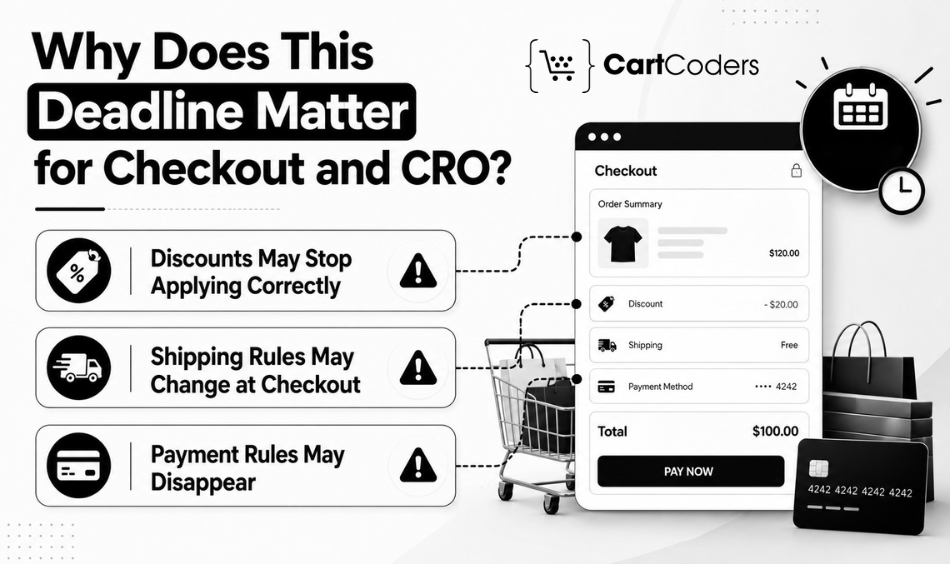
Checkout logic shapes your conversion rate more than most merchants expect. Every discount, shipping rule, and payment option affects how buyers complete an order.
Here is how that risk shows up in three key areas.
Discounts May Stop Applying Correctly
Many stores run discounts through Scripts, including BOGO offers, tiered pricing, wholesale rules, customer tag offers, and bundle logic. After the deadline, these rules can vanish, and a customer who expects 20% off may suddenly pay full price.
Shipping Rules May Change at Checkout
Shipping Scripts handle rules that buyers care about most, such as free shipping thresholds, location based rates, and product specific restrictions. Stores with complex delivery rules often need expert support for Shopify Plus development before the deadline.
Payment Rules May Disappear
Payment Scripts often control which methods appear at checkout, such as hiding cash on delivery or showing options based on cart value. After June 30, those rules stop firing, and a high value cart might show a method you wanted to keep hidden.
Which Shopify Scripts Should You Audit First?
Start your audit with the Scripts that touch revenue directly. Some Scripts protect core sales logic, while others handle nice to have features.
The table below maps each Script area to its risk and migration priority. Use it as your first audit pass before any development work begins.
| Script Area | What to Check | Business Risk | Migration Priority |
| Discount Scripts | BOGO, tiered, percentage, code based rules | High | Critical |
| Shipping Scripts | Free shipping thresholds and rate rules | High | Critical |
| Payment Scripts | Hidden or restricted payment methods | Medium | High |
| Line Item Scripts | Cart edits, gifts, item level changes | Medium | High |
| Bundle or Gift Scripts | Auto added items and bundle pricing | Medium | Medium |
| Wholesale or B2B Scripts | Customer specific pricing tiers | High | High |
| Customer Tag Based Scripts | Offers tied to tags or segments | Medium | Medium |
What Should Be in Your Shopify Scripts Migration Checklist?
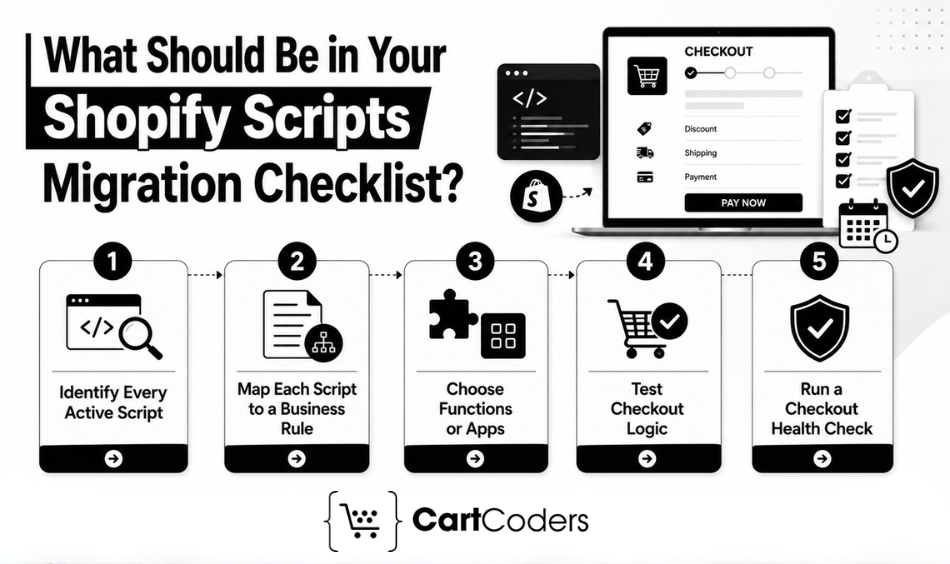
Your goal here is simple. Protect every piece of live checkout logic before the deadline arrives.
Solid Shopify store development practices keep this work organized. Follow these five steps in order.
Step 1: Identify Every Active Script
Open your Script Editor inside the Shopify admin first. Then review the Shopify Scripts customizations report, which groups your Scripts and suggests Functions or apps as replacements.
Step 2: Map Each Script to a Business Rule
Translate each Script into plain business language before development starts, such as “10% off for wholesale customers over $500.” This makes the logic clear for everyone and reveals duplicate or outdated rules.
Step 3: Decide Between Shopify Functions and Public Apps
Shopify Functions suit custom or complex logic that needs precise control, while a public app may handle simple rules like flat discounts. Stores with unique checkout rules often need custom Shopify app development to match old Script behavior.
Step 4: Test Discounts, Shipping, and Payment Logic
Test every rule across real conditions: different cart values, customer groups, product types, countries, and discount combinations. A discount that works alone can break when stacked with another offer.
Step 5: Run a Checkout Health Check Before Launch
A checkout health check reviews your full checkout for risks before you go live. It tests broken rules, app conflicts, conversion drops, and edge cases, and it pairs well with ongoing Shopify store maintenance.
What Mistakes Break Checkout During Shopify Functions Migration?
Migration goes smoothly with planning, yet late projects hit common challenges. Knowing these issues early helps you avoid them.
Review this list during your build and testing phases, because each item below can quietly break checkout.
- Missed Scripts in old logic: A full audit using the customizations report helps you find every one.
- Discount stacking conflicts: Two discounts may combine unexpectedly, so test combinations across customer groups.
- App conflicts after migration: A new app may clash with existing apps, so check how each touches checkout.
- Untested customer tag rules: Tag based offers need real account testing with the right tags before launch.
- Shipping rate mismatch: New Functions may calculate rates differently, so compare old and new rates side by side.
- Payment visibility issues: Confirm visibility rules across cart values so a hidden method stays hidden.
- Poor testing before launch: Rushed testing causes most failures, so plan time for full checkout testing.
How Can Store Owners Prioritize Migration With Limited Time?
Time pressure is real, so focus on what protects sales first. Some rules carry far more revenue weight than others.
The table below ranks migration items by business impact. Teams short on time often hire a Shopify developer to handle the rebuild and testing.
| Priority | Migration Item | Why It Matters |
| 1 | Live discount logic | Active discounts affect revenue every single day |
| 2 | High value promotion rules | Big campaigns drive a large share of sales |
| 3 | Shipping rules | Shipping costs influence cart completion directly |
| 4 | Payment visibility rules | Payment control protects margins and reduces risk |
| 5 | Wholesale and B2B logic | B2B pricing supports your highest value accounts |
| 6 | Customer tag based offers | Segment offers reward loyal and targeted buyers |
| 7 | Nice to have customizations | These add polish but rarely affect core revenue |
When Should You Ask for a Shopify Checkout Health Check?
Ask for expert help when your checkout logic feels hard to track. Complex promotions and custom rules raise the risk of a missed Script.
Watch for these warning signs in your store:
- Your store uses Shopify Plus Scripts for checkout logic.
- Your team is unsure which rules depend on Scripts.
- You run custom discounts or wholesale pricing tiers.
- Your checkout uses payment or shipping logic.
- Your promotion calendar depends on automated rules.
- You cannot test every cart condition internally.
Each sign points to hidden risk inside your checkout. Stores planning a bigger platform move may also explore Shopify migration services at the same time.
CartCoders helps Shopify Plus merchants protect checkout revenue before the deadline arrives. Our team runs a focused Checkout Health Check, audits every active Script, and plans your Shopify Scripts migration to Functions or apps. CartCoders also tests discounts, shipping, and payment logic across real cart conditions. Contact us to review your checkout before your next big sale.
Final Checklist Before the Shopify Scripts Deadline 2026
Use this summary as your final pass before the Shopify Scripts deadline 2026. Work through it with your team and confirm each item.
- Review all active Scripts in the Script Editor
- Export or document the business logic behind each Script
- Identify discount, shipping, and payment rules
- Map Scripts to Shopify Functions or compatible apps
- Test every major cart scenario and combination
- Check for app conflicts after migration
- Review checkout analytics for early issues
- Run a final Checkout Health Check before launch
How CartCoders Helps Shopify Plus Brands Migrate From Scripts
CartCoders supports Shopify Plus brands through every stage of the move off Scripts. Our team protects your checkout revenue while we rebuild your logic on Shopify Functions. Here is how we help you reach the deadline with confidence.
- Shopify Scripts Audit: We review every active Script and the customizations report, then flag the rules that drive the most revenue.
- Shopify Functions Migration: We rebuild your discount, shipping, and payment logic on Shopify Functions for faster, more stable checkout.
- Checkout Extensibility Setup: We move your customizations into the modern checkout framework, so your store stays upgrade safe.
- Compatibility Review: We check your apps and integrations for conflicts before launch, so nothing clashes after migration.
- End-to-End Testing: We test discounts, shipping, and payment rules across real cart conditions, customer groups, and edge cases.
Want a clear plan before June 30? Talk to our team about a Checkout Health Check and a full Scripts migration roadmap.
Conclusion
June 30, 2026 is a fixed deadline, and Shopify has confirmed it will not move again. Your discounts, shipping rules, and payment logic depend on action now. Start your audit early so nothing breaks during a live sale, and treat this migration like any major campaign: plan it, test it, and monitor it closely.
Frequently Asked Questions
The Shopify Scripts deadline 2026 falls on June 30, 2026, when all existing Scripts stop executing. Shopify locked Script editing earlier, on April 15, 2026, so you should plan your migration to Shopify Functions or compatible apps soon.
Yes, any discount built on Scripts stops applying after June 30, 2026. You should rebuild that logic in Shopify Functions or a compatible app, then test every discount rule before your next live promotion runs.
Shopify Functions replace Scripts for discount, shipping, and payment logic, and they run on Shopify infrastructure with faster, more reliable performance. Simple rules may also move to native Shopify features or to trusted public apps from the App Store.
Simple rules often fit native Shopify tools or App Store apps, so not every Script needs a custom Function. Complex or unique logic usually needs custom Functions to reach full feature parity and reliable checkout behavior.
Open the Script Editor in your Shopify admin and review the Scripts customizations report, which lists every active Script and suggests replacements. A focused checkout audit then confirms which rules still depend on Scripts today.
A Checkout Health Check finds broken rules, app conflicts, and conversion risks before launch by testing your full checkout across real cart conditions. This final review protects revenue and gives you confidence at go live.


