

Shopify checkout customization has entered a new phase. For years, Shopify Plus merchants used Shopify Scripts to control discounts, shipping rates, payment methods, and line-item behavior. Shopify stopped new script editing and publishing on April 15, 2026. All remaining Shopify scripts stopped executing on June 30, 2026.
Stores that depended on scripts must therefore run their checkout logic through Shopify Functions, compatible public apps, or other supported Shopify features.
This guide explains how Shopify Functions replace scripts across discounts, shipping, and payments. It also covers function APIs, B2B use cases, checkout extensibility, migration risks, expected costs, and the choice between existing apps and custom development.
Quick answer
Shopify Functions customize Shopify’s backend commerce logic for discounts, delivery options, payment methods, cart validation, and related checkout rules. They replace many capabilities previously handled through Shopify Scripts.
Shopify’s migration guidance maps line-item scripts to discount and cart transform APIs, shipping scripts to delivery customization and discount APIs, and payment Scripts to the payment customization API.
What Are Shopify Functions?
Shopify Functions are custom backend code that runs inside Shopify’s own infrastructure. It allow developers to change how Shopify handles selected cart, checkout, discount, delivery, payment, validation, and order-routing decisions. Shopify reports that the WebAssembly platform running functions executes code in under 5 milliseconds, which lets them support large flash sales without a performance drop.
The model is simple in three parts. Your function receives an input, runs logic, and returns operations that Shopify applies.
- Input: a JSON object built from a GraphQL input query you define.
- Logic: compiled WebAssembly, written in Rust or JavaScript.
- Output: operations Shopify executes, such as applying a discount or hiding a shipping rate.
What Do Shopify Functions Replace From Shopify Scripts?
Shopify Scripts provided three main Script types:
- Line-item Scripts changed product prices and cart-line behavior.
- Shipping Scripts changed the shipping rates displayed during checkout.
- Payment Scripts controlled available payment methods.
Shopify Functions replace these use cases through dedicated APIs rather than one general Script environment.
| Previous Shopify Script | Current Shopify Function Path | Common Uses |
| Line-item Script | Discount Function API | Product, order, quantity, bundle, and customer-specific discounts |
| Line-item Script | Cart Transform Function API | Bundle presentation, line expansion, merging, and cart-line changes |
| Shipping Script | Delivery Customization Function API | Hide, rename, or reorder delivery options |
| Shipping Script | Discount Function API | Apply shipping discounts |
| Payment Script | Payment Customization Function API | Hide, rename, or reorder payment methods |
| Custom cart checks | Cart and Checkout Validation Function API | Minimum orders, product restrictions, or checkout conditions |
Shopify’s current Delivery Customization API supports renaming, sorting, and hiding available delivery options. The Payment Customization API supports hiding, renaming, and reordering payment methods while also supporting payment terms and review requirements under applicable conditions.
Functions work within defined APIs. A developer cannot use one function to make unlimited changes throughout Shopify. The selected API determines the available inputs, outputs, operations, and platform limits. Shopify’s official migration guide recommends auditing each script and mapping its behavior to the appropriate function API or supported app.
Who Needs Shopify Functions Most?
Shopify Functions are particularly useful for stores with checkout rules that standard Shopify settings or existing apps cannot fully support. A small store with standard promotions may not need custom functions. Shopify’s native discount tools or an existing app may provide everything required.
Custom development becomes more relevant when the logic depends on several conditions, proprietary pricing rules, customer data, company locations, cart contents, or interactions between multiple checkout rules.
Why Do Shopify Functions Matter in 2026?
Shopify Functions matter in 2026 because Shopify Scripts are no longer an active checkout customization method. Merchants cannot treat migration as a future maintenance task. Merchants should verify every script rule before removing the script editor app.
Audit Before Migration
A complete audit should identify active and inactive scripts, document their business rules, determine affected products, customers, and regions, map each rule to a supported function API or native feature, and define testing scenarios before deployment.
Modern Checkout Uses Multiple Extensions
Shopify checkout now combines multiple extension technologies, including Shopify Functions, Checkout UI Extensions, Web Pixel Extensions, Payment Extensions, and Shopify apps. Together, they provide upgrade-compatible checkout customizations.
Rebuild Critical Checkout Logic
Scripts commonly controlled discount, shipping, and payment rules. During migration, these should be audited, mapped to supported Function APIs, rebuilt, tested with real checkout scenarios, and rolled out gradually. Shopify’s migration guidance specifically recommends testing functions with tagged customers before making them available to everyone. This gives merchants a practical way to confirm outcomes with selected scenarios before full activation.
Brands with several stores, B2B requirements, or complex checkout architecture may need broader Shopify Plus development support rather than treating each function as an isolated task.
Shopify Scripts vs Shopify Functions: What Changed?
Shopify Scripts provided a Ruby-based environment for editing selected checkout behavior. Shopify Functions use dedicated APIs that define what each customization can read and change. This creates a more organized model, but it also means legacy logic must be separated and mapped carefully.
| Area | Shopify Scripts | Shopify Functions |
| Platform status | Stopped executing on June 30, 2026 | Current supported framework |
| Development model | Ruby Scripts in Script Editor | App-based Functions using dedicated APIs |
| Logic structure | Line-item, shipping, and payment Scripts | Separate APIs for discounts, delivery, payments, validation, cart transforms, and more |
| Execution | Ran within Shopify’s Script environment | Runs within Shopify’s Functions infrastructure |
| Distribution | Store-level Script configuration | Delivered and activated through compatible Shopify apps |
| Testing approach | Script and checkout scenario testing | Function testing, development environments, configuration testing, and controlled activation |
| Checkout UI | Did not provide general UI extension capability | Works alongside Checkout UI extensions when interface changes are required |
| Maintenance | Legacy model with an ended lifecycle | Requires API-version, app, code, and configuration governance |
Shopify Scripts Used Ruby-Based Checkout Customizations
Scripts let Shopify Plus merchants use Ruby to customize discounts, shipping, and payment methods. Over time, multiple business rules were often combined into a single Script, making them difficult to audit. Migration should start by understanding the existing logic, not just rewriting the code.
Shopify Functions Use Dedicated APIs
Shopify Functions split checkout logic into dedicated APIs, making customizations easier to manage. A single Script may now require multiple Functions, app settings, metafields, or Checkout UI Extensions, depending on the desired outcome.
Functions Use Structured Extension Points
Functions operate within Shopify’s supported APIs, using defined inputs and outputs. They are typically built into Shopify apps, allowing merchants to manage business rules through an admin interface instead of changing code.
Functions Support More Commerce Features
Shopify Functions now support discounts, delivery and payment customization, cart validation, cart transformations, and order routing. Instead of recreating old Scripts, merchants should rebuild business logic using the most suitable supported Function API.
Shopify Functions Control Checkout Logic
Functions run behind the scenes to apply business rules like wholesale pricing, shipping restrictions, payment customization, bundle pricing, and cart validation. Customers only see the outcome, not the Function itself.
Checkout UI Extensions Improve Customer Experience
Checkout UI Extensions add approved interface elements such as promotional banners, delivery notices, loyalty information, gift messages, and pickup instructions. They cannot change pricing or shipping calculations.
- How They Work Together
Many Shopify Plus stores use both technologies. For example, a Function applies a wholesale discount or hides payment methods, while a Checkout UI Extension displays pricing details, payment terms, or shipping notices. - When Should You Use Each?
Use Shopify Functions when you need to control checkout behavior, such as discounts, shipping, payment rules, or B2B workflows. Use Checkout UI Extensions when you want to improve the checkout experience with helpful information and interface components. - Can One Replace the Other?
No. Functions change how checkout works, while Checkout UI Extensions change how it looks. Most advanced Shopify checkouts use both together to deliver a seamless experience.
How Shopify Functions Manage Discounts, Shipping, and Payment Customization
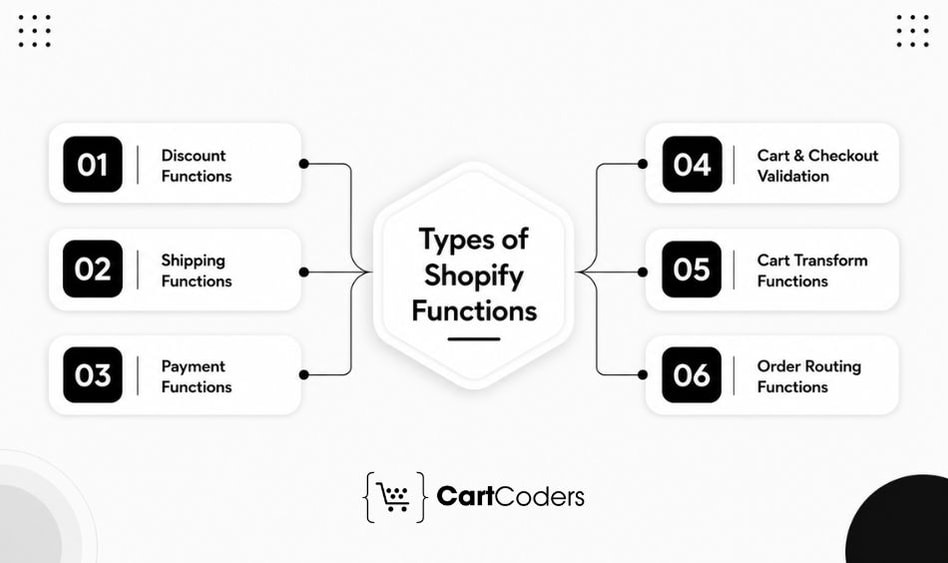
Shopify Functions use separate APIs for discounts, shipping, payments, cart validation, bundles, and order routing. Each API accepts specific inputs and returns defined outputs. Choosing the right Shopify Function API early helps reduce rework and supports a smoother Shopify Scripts migration.
Shopify Functions for Discounts
The Discount Function API applies custom product, order, and shipping discounts. It supports tiered pricing, BOGO offers, bundles, wholesale pricing, customer-specific discounts, cart-value promotions, and volume discounts.
Discount combinations require careful testing. Shopify controls which discounts can apply together, and multiple product discounts may not automatically apply to the same cart line. Complex promotions may need clear combination settings or one consolidated Function.
Shopify Functions for Shipping
The Delivery Customization Function API controls how delivery methods appear at checkout. It can hide, rename, or reorder shipping options based on cart contents, customer data, product details, or location.
Common uses include hiding express shipping for oversized items, showing local delivery for selected postal codes, renaming carrier rates, and placing preferred shipping options first. Shipping discounts remain part of the Discount Function API.
Shopify Functions for Payments
The Payment Customization Function API controls which payment methods appear during checkout. It can hide, rename, or reorder payment options based on order value, customer type, country, or company data.
Merchants often use it to restrict cash on delivery, offer bank transfers to wholesalers, manage B2B payment terms, control installment options, and prioritize preferred payment gateways.
Shopify Functions for Cart and Checkout Validation
The Cart and Checkout Validation Function API checks whether an order meets defined business rules before checkout completes.
It can enforce minimum order quantities, wholesale order values, restricted-product rules, customer eligibility, maximum quantities, and required product combinations. Shopify displays a validation message when the cart does not meet the conditions.
Shopify Functions for Cart Transformations
The Cart Transform Function API changes how cart lines appear and behave. It supports product bundles, line merging, component expansion, configurable products, add-ons, and bundle pricing.
Bundle-focused stores may use Cart Transform Functions to structure cart items and Discount Functions to apply related savings.
Shopify Functions for Order Routing
The Order Routing Location Rule Function API helps multi-location stores prioritize fulfillment locations.
It supports preferred warehouses, regional fulfillment, local inventory priority, inventory balancing, and location-based order routing. This helps merchants manage fulfillment rules without changing the customer-facing checkout.
Shopify Function API Mapping
The following table helps merchants understand which Function replaces which Script behavior.
| Previous Shopify Script | Shopify Function API | Typical Example |
| Line Item Discount | Discount Function | Quantity pricing |
| Cart Discount | Discount Function | Order value discount |
| Shipping Script | Delivery Customization | Hide shipping methods |
| Shipping Discount | Discount Function | Free shipping |
| Payment Script | Payment Customization | Hide COD |
| Bundle Logic | Cart Transform | Bundle pricing |
| Checkout Restrictions | Validation Function | Minimum order |
| Warehouse Rules | Order Routing Function | Fulfillment priority |
Do All Shopify Stores Have Access to Shopify Functions?
Stores on any Shopify plan can use eligible public apps from the Shopify App Store that contain functions. Only Shopify Plus stores can use custom apps containing Shopify Function APIs. Some individual function capabilities also remain limited to Shopify Plus. (Shopify)
This distinction affects the choice between a public app and a custom Function app.
| Store Requirement | Likely Route |
| Common discount or delivery rule | Existing public app |
| Custom logic through a public SaaS app | Public app containing Functions |
| Store-specific custom Function app | Shopify Plus |
| Advanced Plus checkout or B2B logic | Custom Plus app and Functions |
| Merchant needs complete ownership of unique logic | Custom app on Shopify Plus |
A merchant on a standard Shopify plan may still use Functions through a compatible App Store app. However, a private store-specific Function app generally requires Shopify Plus.
For complex commerce needs, Shopify Plus development services leverage Shopify Functions to customize pricing, checkout, integrations, and business workflows.
What Should Merchants Test Before Launching Shopify Functions?
Before launching Shopify Functions, merchants should test business rules, checkout behavior, app settings, and interactions between multiple Functions. Shopify also recommends testing with selected customers before rolling changes out to everyone.
Discount Testing
Verify eligible products, customer groups, discount combinations, quantity limits, subscriptions, and multi-currency scenarios to ensure discounts work as expected.
Shipping Testing
Test delivery regions, postal codes, shipping methods, free shipping rules, local pickup, mixed carts, and incomplete addresses to avoid incorrect shipping options.
Payment Testing
Validate payment methods for guest and logged-in customers, B2B buyers, high-value orders, restricted products, accelerated checkout, and payment terms.
Technical Testing
Check Function inputs, metafields, API compatibility, app activation, error handling, execution logs, rule priority, and rollback procedures. Merchant-facing settings should be tested alongside the code to prevent issues after launch.
What Performance Limits Apply to Shopify Functions?
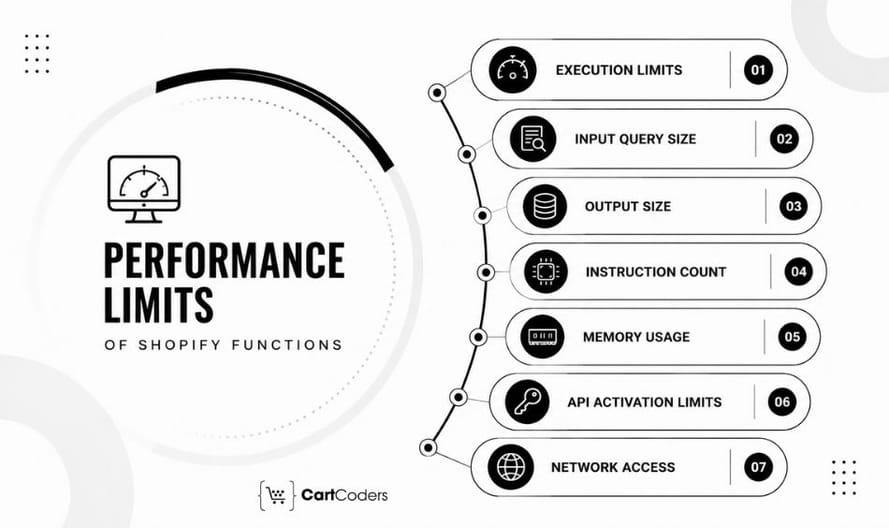
Shopify Functions run within controlled execution limits. These limits help protect checkout speed and platform reliability.
Developers need to account for input size, output size, instruction count, memory use, and API-specific limits. Shopify’s production error documentation lists errors for instruction-count limits, stack memory, linear memory, oversized inputs, oversized outputs, invalid output, and runtime failures.
Function Execution Limits
A Function should complete its work using efficient logic and only the data it needs.
Common performance problems include:
- Requesting unnecessary fields in the input query.
- Looping through cart lines several times.
- Performing repeated string operations.
- Loading large metafield values.
- Returning excessive operations.
- Creating complex rules with overlapping conditions.
- Using inefficient JavaScript logic for large carts.
Developers should test realistic and high-volume carts, not only carts with one or two products.
Input Query Size
Each Function asks Shopify for data through an input query. A wider query creates a larger input. The Function should request only fields required for its decision.
For example, a payment Function that only checks cart value and customer type may not need product descriptions, several metafields, or unrelated delivery data. Smaller inputs can improve clarity and reduce the risk of size-related errors.
Output Size
Functions return structured operations to Shopify. A Function that returns a separate operation for every product, method, or cart condition may produce unnecessarily large output. Developers should group logic where supported and return only valid operations required for the current checkout.
Instruction Count
Shopify can stop a Function when it exceeds the maximum instruction count. The exact workload depends on the Function’s language, input, loops, data handling, and rule complexity.
Shopify supports languages that compile to WebAssembly, including Rust, Zig, and TinyGo. Its JavaScript guidance states that JavaScript is suitable for prototyping but can reach instruction limits earlier than equivalent logic written in a language that compiles directly to WebAssembly, such as Rust. Shopify strongly recommends Rust for Functions.
This does not mean every project must use Rust. The choice should consider complexity, developer experience, maintenance, and performance testing.
Memory Limits
Functions also operate within stack and linear-memory limits. Large data structures, repeated object creation, unnecessary copies, and complex parsing can increase memory use. Developers should keep Function logic focused. Functions are designed for commerce decisions, not for running large application workflows.
API-Specific Activation Limits
Some Function APIs limit how many Functions a merchant can activate.
For example:
- Shopify currently allows up to 25 active Payment Customization Functions per store.
- Shopify currently allows up to 25 active Cart and Checkout Validation Functions per store.
These limits should encourage structured configuration rather than one Function for every small rule. A well-designed app may combine related rules within one manageable Function while keeping merchant settings separate.
Network Access Considerations
Some Shopify Functions support controlled network access under specific conditions. Shopify handles the network operation and provides guidance for performance and resilience. Network access should not become the default answer for every rule.
External dependencies can introduce:
- Timeout concerns
- Availability dependencies
- Data freshness questions
- Fallback requirements
- Security responsibilities
- Additional monitoring needs
Where possible, business rules should use data already available through supported Function inputs or Shopify metafields.
How Much Does Shopify Functions Migration Cost?
The cost depends on the number of Scripts, rule complexity, app architecture, Shopify plan, test coverage, and checkout integrations.
The following ranges are practical planning estimates rather than fixed Shopify fees.
| Migration Type | Typical Scope | Estimated Cost | Estimated Timeline |
| Simple discount Function | One product, order, or quantity rule | $1,500–$3,500 | 1–2 weeks |
| Advanced discount Function | Tiered, BOGO, customer, or bundle logic | $3,000–$7,500 | 2–4 weeks |
| Delivery customization | Hide, rename, or reorder shipping methods | $2,000–$5,000 | 1–3 weeks |
| Payment customization | Hide, rename, reorder, or B2B payment rules | $2,000–$5,500 | 1–3 weeks |
| Multi-Script migration | Discounts, shipping, and payment logic | $6,000–$15,000 | 4–8 weeks |
| Complex Shopify Plus migration | B2B, bundles, validation, integrations, and UI extensions | $12,000–$30,000+ | 8–16 weeks |
| Ongoing maintenance | Monitoring, API updates, QA, and rule changes | $500–$2,500+ monthly | Ongoing |
These estimates can increase when the store has several markets, custom apps, subscriptions, ERP integrations, multiple fulfilment locations, or extensive B2B rules.
How Can Merchants Control Shopify Functions Migration Cost?
Merchants can keep the project focused through careful planning.
- Audit Scripts before requesting development estimates.
- Remove inactive rules.
- Rank rules by revenue and operational impact.
- Use native Shopify features where they fit.
- Check existing public apps before building custom logic.
- Group related rules within clear Function architecture.
- Prepare test accounts, products, and expected results early.
- Use configurable values for frequently changing thresholds.
- Migrate high-priority logic in phases.
- Document each rule for future maintenance.
The lowest development quote does not always produce the lowest long-term cost. Missing documentation, weak testing, and hard-coded rules can create repeated change requests after launch.
The article outline correctly positions migration mistakes, performance limits, governance, cost, and timeline as connected topics because each one affects whether the replacement remains reliable after launch.
Shopify Functions vs Third-Party Apps: Which One Should You Choose?
Not every checkout customization requires custom Shopify Functions. Shopify’s App Store includes many apps that already use Shopify Functions behind the scenes, making them a practical choice for common business requirements.
The decision depends on how unique your checkout logic is. If your business follows standard pricing, shipping, or payment rules, an existing app may be enough. If your workflows involve multiple conditions, B2B agreements, ERP integrations, or proprietary pricing models, custom Shopify Functions usually provide greater flexibility.
Rather than asking, “Should we build a function?” merchants should ask, “Can an existing supported solution meet our long-term business requirements?”
When Is a Third-Party Shopify App Enough?
Many checkout customizations no longer require custom development.
Several Shopify apps already support:
- Volume discounts
- Bundle discounts
- Loyalty pricing
- Shipping rules
- Payment restrictions
- Wholesale pricing
- Subscription discounts
- Product bundles
If an app already delivers the required functionality, custom development may not provide additional value.
Before planning a custom migration, merchants should evaluate whether a trusted Shopify app already solves the problem while remaining compatible with Shopify Functions.
Questions to Ask Before Choosing
Before deciding between an existing app and custom development, merchants should answer several questions.
Is the checkout logic unique?
If the rules follow common eCommerce promotions, an app may already provide the necessary functionality. If the business operates through negotiated contracts, regional pricing, or industry-specific workflows, custom development usually offers greater flexibility.
Will the business change frequently?
Businesses that regularly introduce:
- New pricing models
- Regional expansion
- Wholesale programs
- Product bundles
- ERP integrations
often benefit from a configurable custom solution.
Who Will Maintain the Solution?
Long-term maintenance should be considered before development begins.
Questions include:
- Who updates Function APIs?
- Who tests new Shopify releases?
- Who manages documentation?
- Who updates pricing rules?
- Who approves production changes?
Planning ownership early reduces operational challenges later.
Hybrid Approach: Apps Plus Custom Functions
Many successful Shopify Plus stores use both approaches.
For example:
| Requirement | Solution |
| Loyalty rewards | Existing app |
| Product reviews | Existing app |
| Email marketing | Existing app |
| Company pricing | Custom Discount Function |
| Wholesale payment rules | Custom Payment Function |
| Regional shipping rules | Custom Delivery Function |
| ERP integration | Custom development |
This combination allows merchants to use proven apps where appropriate while reserving custom development for unique checkout logic.
How to Choose the Right Shopify Functions Migration Partner

Migrating from Shopify Scripts involves more than writing new code. The migration partner should understand checkout architecture, business workflows, testing strategies, Shopify APIs, and long-term maintenance. A structured migration reduces business risk while helping merchants rebuild checkout logic using Shopify’s supported technologies.
Experience With Shopify Plus Checkout
Shopify Plus stores often have:
- Complex discounts
- Wholesale pricing
- Company accounts
- Multiple markets
- Advanced shipping rules
- ERP integrations
- Custom payment workflows
A migration partner should understand how these requirements interact rather than treating each Function independently. Experience with Shopify Plus projects also helps identify opportunities to simplify outdated Scripts during migration.
Knowledge of Shopify Functions and Checkout Extensibility
Functions rarely operate alone.
A migration partner should understand:
- Shopify Functions
- Checkout UI Extensions
- Shopify APIs
- Metafields
- Shopify CLI
- App architecture
- API version management
- Testing workflows
This broader understanding supports a more maintainable checkout solution.
Structured Script Audit Process
Before writing code, every existing Script should be reviewed.
A structured audit normally identifies:
- Current Script behavior
- Business purpose
- Rule priority
- Eligible customers
- Product conditions
- Shipping logic
- Payment logic
- Replacement Function API
- Test scenarios
Without this documentation, important checkout behavior can easily be missed.
Business Rule Mapping
Migration should map business rules rather than simply translate code.
For example:
| Existing Script Rule | Recommended Function |
| Volume pricing | Discount Function |
| Hide Express Shipping | Delivery Customization |
| Hide COD | Payment Customization |
| Wholesale minimum order | Validation Function |
| Bundle presentation | Cart Transform Function |
Business-first mapping usually produces a cleaner checkout than language-first migration.
Testing and Rollout Planning
A reliable migration should include:
- Development testing
- Merchant review
- Tagged customer testing
- Production rollout
- Rollback planning
- Monitoring
Revenue-critical checkout logic should never move directly into production without validation.
How CartCoders Helps With Shopify Functions Migration
At CartCoders, our skilled Shopify developers help merchants replace legacy Shopify Scripts with modern Shopify Functions while preserving the checkout experiences that matter most.
We begin by reviewing existing Scripts, identifying the business rules behind each customization, and mapping those rules to the appropriate Shopify Function APIs. Instead of recreating outdated logic, we focus on building maintainable checkout solutions that match your current business processes.
Our Shopify Functions services include:
- Shopify Scripts audit
- Shopify Functions development
- Discount Function implementation
- Delivery Customization Functions
- Payment Customization Functions
- Cart Validation Functions
- Cart Transform Functions
- Checkout UI Extensions
- Shopify API integration
- B2B checkout customization
- Shopify Plus migration
- QA and rollout support
- Ongoing maintenance
Whether your store needs a simple discount migration or a complete Shopify Plus checkout transformation, our skilled Shopify developers help you build a scalable solution that supports future Shopify updates.
Final Verdict: Shopify Functions Are the New Standard for Checkout Logic
Shopify Functions have become the supported foundation for checkout customization across discounts, shipping, payments, validation, cart transformations, and B2B workflows.
The migration from Shopify Scripts is not simply a technical upgrade. It is an opportunity to review existing checkout logic, remove outdated rules, improve maintainability, and build a solution that aligns with Shopify’s current platform architecture.
Merchants should begin by auditing every Script, identifying revenue-critical business rules, selecting the correct Function APIs, and testing each scenario before launch. Stores with more advanced requirements should also consider how Shopify Functions work alongside Checkout UI Extensions, integrations, and merchant-controlled configuration.
A structured migration reduces future maintenance, improves checkout consistency, and helps prepare the store for ongoing Shopify platform updates.
Frequently Asked Questions
Shopify Functions are backend customization components that allow developers to modify discounts, shipping methods, payment methods, cart validation, and other commerce logic using Shopify’s supported Function APIs.
Yes. Shopify Functions are the supported replacement for many checkout customizations previously handled through Shopify Scripts. Shopify Scripts stopped executing on June 30, 2026.
Yes. The Discount Function API supports product discounts, order discounts, shipping discounts, volume pricing, customer-specific pricing, BOGO offers, and other promotional rules.
Yes. Delivery Customization Functions can hide, rename, and reorder delivery options based on supported cart, customer, and delivery conditions.
Yes. Payment Customization Functions can hide, rename, reorder, and manage payment methods according to supported business rules and B2B payment requirements.
Shopify Functions manage backend commerce logic, while Checkout UI Extensions customize the checkout interface by displaying approved customer-facing components such as banners, messages, and forms.
Public Shopify apps that use Functions are available across eligible Shopify plans. However, custom apps containing Shopify Functions generally require Shopify Plus.
Simple migrations often take one to three weeks. Larger Shopify Plus projects involv ing multiple Functions, B2B workflows, and integrations can take several months depending on complexity.
A simple migration may start around $1,500, while enterprise Shopify Plus migrations involving several Function APIs, integrations, and testing can exceed $30,000, depending on project scope.
If an existing app fully supports your checkout requirements, it may be the most practical choice. Businesses with unique pricing models, wholesale workflows, ERP integrations, or advanced checkout logic generally benefit from custom Shopify Functions.


