
Moving an established BigCommerce store to Shopify is not simply a product import. Products may appear correctly while customer groups, modifiers, redirects, checkout rules, ERP connections, tracking, or historical orders still need work.
A successful BigCommerce to Shopify migration protects what already works while rebuilding the parts Shopify handles differently. Shopify’s own migration checklist recommends reviewing redirects, customer accounts, store configuration, transactions, refunds, fulfillment, and final launch settings.
For stores with large catalogs, custom workflows, B2B pricing, or important organic traffic, planning these dependencies before development can reduce launch-day surprises. You can get Shopify migration services that support data migration, storefront rebuilding, URL mapping, integrations, testing, and post-launch checks.
Quick Answer: A BigCommerce-to-Shopify migration usually moves products, customers, images, basic content, and selected order history. Product modifiers, customer groups, URLs, redirects, checkout configuration, apps, custom functionality, analytics, and integrations often need mapping, rebuilding, reconnecting, or testing inside Shopify.
What Should You Migrate, Rebuild, and Test?
The easiest way to scope the project is to separate the migration into three categories: data that can move, functionality that needs rebuilding, and systems that need testing.
| Area | What Usually Moves | What Needs Rebuilding or Testing |
| Products | Titles, images, SKUs, prices | Variants, modifiers, collections, metafields |
| Customers | Names, emails, addresses | Passwords, groups, segments, account access |
| Orders | Selected history | Statuses, refunds, subscriptions, loyalty data |
| SEO | Existing copy and metadata | URLs, redirects, canonicals, sitemap, internal links |
| Store design | Logos and brand assets | Shopify theme, templates, navigation |
| Checkout | Product and customer information | Payments, taxes, shipping, discounts |
| Apps | Exportable data in some cases | Shopify app stack and custom features |
| Integrations | Existing business systems | ERP, CRM, POS, 3PL, accounting, analytics |
Data That Usually Moves
Core catalog and customer information normally have a clear Shopify destination. Products, SKUs, pricing, images, addresses, and selected historical records can be migrated using CSV files, apps, APIs, or custom migration scripts. The challenge is preserving relationships between those records, not simply matching record counts.
Store Areas That Need Rebuilding
BigCommerce themes, page layouts, checkout configuration, navigation, filters, and app functionality do not simply become Shopify equivalents. These areas need Shopify-native implementation using themes, sections, templates, Shopify apps, Shopify Functions, or custom development.
SEO Items That Need Manual Mapping
Metadata can often be retained, but URL structures may change. Product, category, brand, blog, and CMS URLs need mapping to suitable Shopify destinations. Redirects, canonicals, internal links, sitemap setup, and indexing should therefore be treated as a separate migration workstream.
Checkout and Integrations That Need Testing
Payments, taxes, shipping, fulfillment, ERP, CRM, POS, accounting, and analytics must be validated using real migration scenarios. A connection showing “active” does not prove that orders and data are flowing correctly.
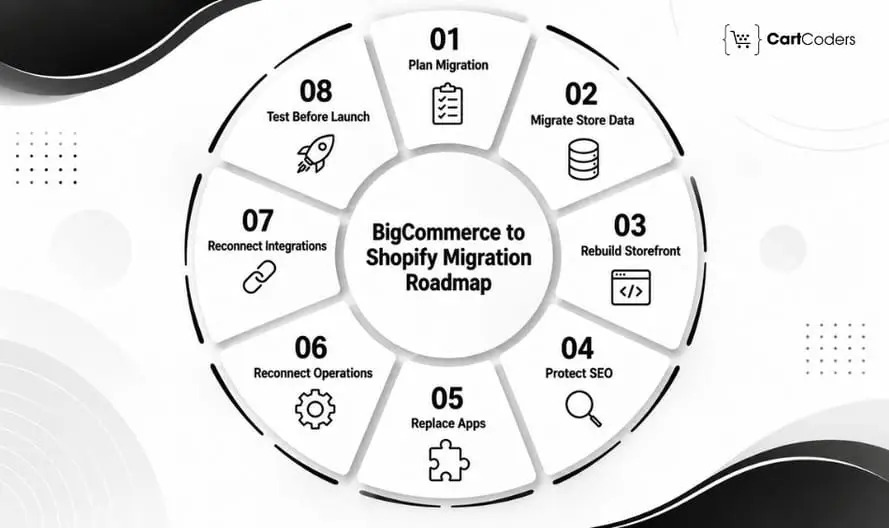
Phase 1: Plan the BigCommerce to Shopify Migration Before Moving Data
The strongest migrations begin with a documented scope. Planning reveals data dependencies, high-value URLs, custom features, app gaps, and business systems before those issues become launch blockers.
Audit the Existing BigCommerce Store
Record products, variants, modifiers, customers, orders, categories, brands, content pages, apps, and integrations. Also note which features are critical to revenue, customer service, fulfilment, and reporting.
List Products, Categories, Customers, Orders, and URLs
Export a complete data and URL inventory rather than relying only on the BigCommerce sitemap. Include top organic landing pages, product URLs, category URLs, brand pages, blogs, CMS pages, and campaign URLs.
Review Apps, Custom Features, and Integrations
Document what every BigCommerce app or custom feature does. For each one, decide whether Shopify provides a native feature, third-party app, Shopify Plus capability, or custom-development route to meet BigCommerce customers requirements.
Identify SEO Pages That Cannot Lose Traffic
Use Google Search Console, GA4, backlink data, and revenue reports to identify pages with search and commercial value. High-ranking or high-revenue pages should receive priority during URL mapping and post-launch QA.
Decide the Migration Method and Launch Timeline
The method depends on catalog size, custom data, historical orders, integrations, and feature complexity. Small stores may use CSV-based migration. Complex stores often need migration apps, APIs, or custom scripts.
| Planning Item | Why It Matters |
| Product audit | Finds option, modifier, and SKU complexity |
| URL inventory | Creates the redirect baseline |
| Customer review | Reveals group and segment requirements |
| Order history review | Defines how much history needs moving |
| App audit | Shows which functions need replacement |
| Integration audit | Prevents business-system breaks |
Quick Suggestion: Do not begin with “How quickly can we migrate?” Start with “Which current store functions cannot fail after launch?”
Phase 2: Move Product, Customer, and Order Data Correctly
A BigCommerce to Shopify data migration is successful when the information remains usable after import. Products appearing in Shopify is only the first validation step.
Product Titles, Images, SKUs, and Prices
Check product names, descriptions, images, SKUs, barcodes, prices, status, weights, and inventory. Preserve useful product content where possible instead of rewriting everything during the same migration.
Product Options, Variants, and Modifiers
This area deserves extra attention because BigCommerce options and modifiers do not always map directly to Shopify variants. A size or color choice may become a Shopify variant, while custom text fields, engraving options, add-ons, or special selections may require metafields, line-item properties, apps, or custom development.
Categories, Brands, and Shopify Collections
BigCommerce categories usually need mapping into Shopify collections. Brand pages may become vendor-based collections, dedicated pages, or custom collection structures depending on SEO and merchandising needs.
Customer Records, Groups, and Segments
Names, emails, phone numbers, addresses, and selected customer data can move, but customer groups need separate planning. They may translate into Shopify tags, customer segments, B2B company structures, apps, or custom logic depending on how pricing and access work.
Order History, Refunds, and Statuses
Historical orders are more complex because payment, fulfillment, refund, tax, and customer relationships are involved. Decide whether full order history is genuinely required inside Shopify or whether part of it can remain available through an external reporting or support system.
Data Cleanup and Import Testing
Do not import poor-quality data simply because it exists in BigCommerce. Remove obsolete products, duplicate customers, unnecessary categories, unused fields, and invalid records before the final migration.
| BigCommerce Data | Likely Shopify Mapping |
| Product name | Product title |
| Category | Collection |
| Product option | Variant |
| Modifier | Metafield, line-item property, app, or custom setup |
| Customer group | Tag, segment, B2B structure, or app |
| Custom field | Metafield |
| Order status | Shopify order/fulfilment status |
Expert insight: Validate migration by checking actual field values and relationships, not only total record counts. A product can migrate successfully while still carrying the wrong variant, modifier, price, inventory, or metafield value.
Phase 3: Rebuild the Shopify Storefront Experience
BigCommerce design does not transfer directly into Shopify. Brand assets can move, but the actual storefront needs Shopify themes, templates, sections, menus, app blocks, and collection structures.
Choose the Right Shopify Theme
Choose a theme based on catalog size, merchandising requirements, performance, filtering, mobile behavior, and required app compatibility. Do not choose only by demo-store appearance.
Rebuild the Homepage and Navigation
The homepage should reflect the new Shopify structure rather than copying BigCommerce section by section. Navigation also needs updating so collections, brands, content, account links, and policy pages point directly to final Shopify URLs.
Rebuild Product Page Templates
Product templates should support migrated variants, media, metafields, reviews, subscriptions, recommendations, delivery information, and other buying details. Complex product logic may require custom sections or app blocks.
Rebuild Collection Pages and Filters
BigCommerce categories and filters may behave differently from Shopify collections and Search & Discovery. Test filters by price, availability, size, vendor, product type, and important metafields.
Set Up Cart, Trust Signals, and Policies
Review the cart drawer or cart page, shipping information, returns, guarantees, payment messaging, contact details, and policy links. These elements affect the buying experience even though they are not part of the data import.
Review Mobile Experience and Page Speed
Check menus, collection filters, product media, variant selectors, pop-ups, sticky CTAs, forms, and cart behavior on mobile. For a custom storefront, Shopify development services can support theme implementation, templates, responsive layouts, and migration-specific functionality.
| Storefront Area | Shopify Rebuild Requirement |
| Homepage | Theme sections and content blocks |
| Product pages | Shopify product templates |
| Category pages | Shopify collections |
| Navigation | Shopify menus |
| Cart | Cart drawer or cart-page configuration |
| Filters | Search & Discovery or another solution |
| Policies | Shopify policy pages |
Phase 4: Protect SEO With URL Mapping and Redirects
SEO protection should begin before launch because BigCommerce and Shopify can use different URL structures. Google recommends preparing an old-to-new URL map, using permanent server-side redirects, updating internal links, and monitoring the migration in Search Console.
Export BigCommerce URLs
Combine the sitemap, crawler data, Search Console, GA4, backlink reports, CMS exports, and campaign URLs. This reduces the chance of missing pages that no longer appear in navigation but still receive search traffic or backlinks.
Map Product, Category, Brand, Blog, and CMS URLs
Every important old URL should have a deliberate destination. The destination should match the search intent of the previous page rather than simply avoid a 404.
Create One-to-One 301 Redirects
Use permanent redirects for URLs that have permanently moved. Shopify allows merchants to create or import redirects, and its migration guidance specifically recommends reviewing important pages and confirming that redirects work after launch.
Avoid Homepage Redirects, Chains, and Loops
Do not redirect dozens of unrelated pages to the homepage. Google warns that irrelevant mass redirects may be treated as soft 404s. It also recommends sending users directly to final destinations where possible.
Check Metadata, Canonicals, and Internal Links
Retain valuable titles, descriptions, content, and headings where they still fit the new page. Update internal links so navigation, blogs, product copy, breadcrumbs, and footer links point directly to Shopify URLs rather than relying on redirects.
Submit the Sitemap and Track Search Console
Shopify generates a sitemap for indexable store content. Submit the live sitemap in Google Search Console and monitor indexed URLs, exclusions, 404s, canonicals, clicks, and impressions.
| BigCommerce URL | Shopify Target |
| Product page | Matching product |
| Category page | Matching collection |
| Brand page | Relevant collection or brand landing page |
| Blog post | Matching Shopify article |
| CMS page | Matching Shopify page |
| Removed product | Relevant replacement or appropriate 404 |
Expert Insight: Protect SEO during a BigCommerce to Shopify migration by mapping valuable old URLs to equivalent Shopify pages, adding permanent redirects, preserving useful content and metadata, updating internal links, validating canonicals, submitting the new sitemap, and monitoring indexing after launch.
Google recommends keeping site-move redirects active for at least one year so search signals have enough time to transfer.
Phase 5: Replace BigCommerce Apps and Custom Features
BigCommerce apps cannot simply be installed inside Shopify. Every business-critical feature needs a Shopify replacement strategy.
Reviews, Loyalty, and Subscriptions
Check whether historical reviews, points, memberships, subscriptions, and customer relationships can migrate to the selected Shopify apps. Feature availability alone is not enough; historical data continuity also matters.
Filters, Search, and Product Recommendations
Review how BigCommerce search and filtering currently use categories, brands, custom fields, and attributes. Shopify may need Search & Discovery, third-party search, metafields, or custom logic to reproduce the experience.
B2B Pricing and Customer Groups
BigCommerce customer groups often power wholesale pricing or restricted experiences. On Shopify, the replacement may involve customer tags, segments, Shopify B2B, Shopify Plus, or a third-party pricing solution. For more complex wholesale requirements, you can get expert Shopify Plus development that can support B2B architecture and enterprise workflows.
Discounts, Cart Rules, and Shopify Functions
Complex promotions and cart logic may need rebuilding using Shopify Functions, discounts, apps, or custom code. Test the exact business rules rather than only creating similarly named promotions.
Forms, Quotes, and Custom Workflows
Quote forms, product configurators, approval processes, and custom admin workflows often require separate implementation. Do not leave these until the final week before launch.
Custom Apps and API-Based Features
When no standard Shopify app matches the existing feature, custom development may be the better route. Shopify app development services can support store-specific applications, API integrations, and custom workflows.
| BigCommerce Feature | Shopify Route |
| Reviews | Compatible review app |
| Subscription | Shopify subscription solution |
| Loyalty | Loyalty platform |
| Filters | Search & Discovery or app |
| Customer groups | Segments, tags, B2B, or app |
| Cart rules | Shopify Functions or app |
| Quote workflow | App or custom solution |
| Custom workflow | Custom Shopify app |
Phase 6: Reconnect Checkout, Payments, Shipping, and Taxes
Checkout settings do not migrate as a single configuration package. Payments, taxes, shipping, discounts, gift cards, and notification flows need Shopify-specific setup.
Shopify Checkout Settings
Review guest checkout, customer accounts, contact fields, address requirements, consent settings, and checkout behavior. For Shopify Plus stores, also check any enterprise checkout requirements separately.
Payment Gateways and Test Transactions
Connect the final production payment provider and test successful and failed payments. Shopify’s migration checklist recommends testing successful and failed transactions, refunds, cancellations, and fulfillment before launch.
Tax Regions and Market Settings
Check where the store sells and how Shopify should calculate and display taxes in those regions. Tax configuration should follow the merchant’s actual registrations and professional tax advice where required.
Shipping Profiles, Zones, and Rates
Review shipping zones, product weights, carrier rates, free-shipping thresholds, pickup, local delivery, and fulfillment locations. Products requiring special delivery rules should receive dedicated test orders.
Discounts, Gift Cards, and Promotions
Recreate automatic discounts, codes, customer restrictions, date rules, bundles, and campaign promotions. Historical gift-card balances may require a separate migration plan depending on the store setup.
Order Notifications and Refund Flow
Check confirmation emails, shipping updates, cancellation notices, refunds, and fulfillment communications.
| Setup Area | What to Verify |
| Checkout | Guest and customer flows |
| Payments | Success, failure, capture and refund |
| Taxes | Region rules and display |
| Shipping | Profiles, rates and thresholds |
| Discounts | Codes and automatic logic |
| Notifications | Order, shipment and refund messages |
Quick Suggestion: Place at least one test order that continues through payment, fulfillment, cancellation, and refund. Testing only the confirmation page leaves several business-critical steps unchecked.
Phase 7: Reconnect Integrations and Business Systems
BigCommerce may already be connected with the systems that operate the business behind the storefront. Those connections need Shopify-specific configuration.
ERP and Inventory Systems
Test product, inventory, order, refund, and fulfillment synchronization. Pay attention to multi-location inventory and SKU mapping because one incorrect identifier can create repeated discrepancies.
CRM and Customer Support Tools
Confirm that customer profiles, tags, lifecycle information, support context, and lead data reach the right records.
POS and Retail Systems
Stores selling online and in physical locations should test shared inventory, customer records, returns, and retail sales flows.
3PL, Shipping, and Fulfilment Tools
Place real migration test orders and confirm that the 3PL receives the correct SKU, quantity, shipping service, address, and order metadata. Tracking and fulfillment statuses should also return to Shopify correctly.
Accounting and Tax Tools
Check invoices, taxes, payment values, fees, refunds, and settlement information.
GA4, Pixels, Search Console, and Merchant Center
Rebuild analytics and advertising tracking around Shopify’s production URLs and checkout behavior.
Confirm product views, add-to-cart, checkout, purchases, transaction IDs, revenue, and Merchant Center feed data. You can also get Shopify integration services to get support for ERP, CRM, POS, fulfillment, accounting, inventory, and other business-system connections.
| System | Critical Test |
| ERP | Products, orders and inventory |
| CRM | Customers and segments |
| POS | Retail sales and stock |
| 3PL | Routing, fulfilment and tracking |
| Accounting | Taxes, payments and refunds |
| GA4 | Ecommerce events and revenue |
| Merchant Center | Product URLs, price and availability |
Expert Insight: Test integrations by business outcome rather than status. “Connected” is not the same as “orders, inventory, and refunds are synchronizing correctly.”
Phase 8: Test the Shopify Store Before Launch
The final QA should validate the Shopify store as both a customer-facing website and an operating eCommerce system. Shopify’s current migration checklist recommends testing transactions, refunds, cancellations, fulfilment, store configuration, customer access, and the live storefront before opening the store.
| QA Area | What to Test |
| Product data | Variants, modifiers, prices, images, inventory |
| Navigation | Menus, collections, filters and search |
| Checkout | Payments, taxes, shipping and discounts |
| SEO | Redirects, metadata, canonicals and sitemap |
| Apps | Reviews, loyalty, subscriptions and email |
| Integrations | ERP, CRM, POS, 3PL and accounting |
| Tracking | GA4, pixels, Search Console and Merchant Center |
| Mobile | Layout, forms, cart and performance |
Product Data QA
Compare representative products against BigCommerce. Test simple products, high-variant products, special modifiers, sale items, out-of-stock products, and products using custom fields.
Collection and Navigation QA
Check category-to-collection mapping, menus, filters, breadcrumbs, search, internal links, and empty states.
Checkout and Payment QA
Test domestic, international, discounted, failed-payment, refund, and different shipping scenarios.
SEO Redirect QA
Run the old BigCommerce URL list through the new production-ready setup and confirm redirect destinations.
App and Integration QA
Test each business-critical app using real customer and order scenarios.
Analytics and Event Tracking QA
Confirm that a test order appears correctly in Shopify, GA4, advertising platforms, and connected reporting systems.
Mobile and Speed QA
Test representative devices and templates after production apps and analytics scripts are installed.
Launch Gate: The store should not launch because the import finished. It should launch because products, checkout, redirects, integrations, tracking, and real customer journeys have passed QA.
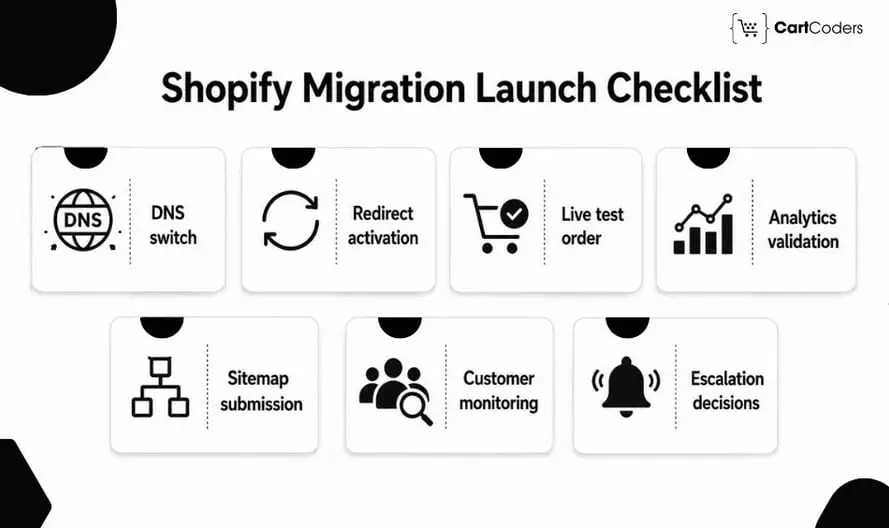
Launch Day: What to Check When You Go Live
Launch should follow a controlled sequence with clear ownership. This makes failures easier to identify and escalate.
DNS and Domain Settings
Point the live domain to Shopify and verify HTTPS, primary-domain settings, and important subdomains.
Redirect Upload and Testing
Activate the final redirect map and immediately test the highest-value organic URLs.
Test Orders After Launch
Place a small real order through the production payment gateway.
Follow it through inventory, confirmation email, ERP or 3PL, fulfillment, analytics, and any relevant CRM or accounting system.
Sitemap Submission
Submit the live Shopify sitemap through Google Search Console. Google recommends sitemap submission as part of helping its systems discover new URLs during a site move.
Analytics and Pixel Validation
Check live purchase events and revenue values rather than relying only on pre-launch tests.
Customer Support Monitoring
Watch for login, discount, product, payment, order-history, and delivery issues reported by early customers.
Rollback and Issue Escalation
Define which failures require an immediate fix, temporary workaround, paused campaigns, or wider rollback.
Post-Launch Monitoring After BigCommerce to Shopify Migration
A migration is not complete when the domain points to Shopify. The first 7 to 30 days provide critical evidence about SEO, orders, integrations, and customer behavior. Google notes that rankings can fluctuate temporarily while changed URLs are recrawled and reindexed. For medium-sized sites, processing can take a few weeks, while larger sites may take longer.
Check 404 Errors and Redirect Accuracy
Look for legacy URLs that were missed or mapped incorrectly. Add redirects only when a relevant destination exists.
Monitor Organic Traffic and Rankings
Compare important product, collection, blog, and landing-page performance against the pre-migration benchmark. Look at page-level changes rather than only total organic traffic.
Review Orders, Payments, and Fulfilment
Watch for failed payments, incorrect shipping rates, inventory differences, missing fulfillment updates, and refund problems.
Watch Customer Support Tickets
Support questions can reveal issues technical QA missed. Repeated login, discount, product, delivery, or order-history questions deserve investigation.
Check Integration Logs
Review failed jobs, webhooks, API errors, inventory discrepancies, duplicate records, and delayed order transfers.
Review Conversion Rate and Revenue
Compare cart activity, checkout completion, average order value, revenue, and conversion rate with the old store.
| Post-Launch Area | What to Monitor |
| Redirects | Correct destinations |
| 404s | Missing legacy URLs |
| Rankings | Important keywords and landing pages |
| Orders | Payment, shipping and fulfilment |
| Support | Login, order and discount issues |
| Integrations | Sync failures and missing data |
| Conversion | Cart, checkout, revenue and drop-offs |
Quick Answer: During the first month after migration, monitor redirects, 404s, indexing, organic traffic, rankings, checkout, payments, inventory, fulfillment, integrations, support tickets, and conversion data.
BigCommerce to Shopify Migration Cost and Timeline
There is no useful fixed migration price without understanding the existing BigCommerce store. Two stores with the same number of products can require very different work if one uses basic variants while the other depends on modifiers, B2B pricing, subscriptions, ERP integrations, and thousands of SEO redirects.
| Migration Factor | Basic Store | Mid-Size Store | Complex / Enterprise Store |
| Estimated cost | $1,500 to $5,000 | $5,000 to $15,000 | $15,000 to $50,000+ |
| Estimated timeline | 2 to 4 weeks | 4 to 8 weeks | 8 to 16+ weeks |
| Product catalog size | Small catalog with simple products | Medium catalog with variants, categories, images | Large catalog with complex options, modifiers, bundles, or custom fields |
| Data migration work | Products and basic customer data | Products, customers, categories, orders, images | Products, customers, orders, customer groups, custom fields, metafields |
| SEO migration | Basic URL mapping and redirects | Full redirect map for products, categories, blogs, CMS pages | Large URL audit, backlink page mapping, redirect QA, post-launch crawl checks |
| Theme and design work | Ready Shopify theme with minor changes | Custom theme sections and product page changes | Full custom Shopify theme, advanced UX, custom templates |
| Apps and features | Few standard Shopify apps | Reviews, loyalty, filters, email, subscriptions | Custom apps, Shopify Functions, B2B, wholesale, advanced workflows |
| Integrations | Basic analytics and payment setup | CRM, email, accounting, shipping, GA4, pixels | ERP, POS, 3PL, CRM, accounting, APIs, custom automation |
| Checkout setup | Standard checkout, basic payment and shipping | Multiple shipping rules, discounts, taxes, regions | Complex checkout rules, Shopify Plus, B2B pricing, custom logic |
| Testing and QA | Basic product and checkout testing | Data, SEO, apps, checkout, mobile, analytics testing | Full QA across data, integrations, redirects, checkout, reports, workflows |
How CartCoders Helps With BigCommerce to Shopify Migration
A BigCommerce replatform touches data, storefront design, SEO, apps, checkout, integrations, and analytics. Handling these areas separately can create gaps when no one owns the full migration journey.
Our BigCommerce to Shopify migration services can cover:
- BigCommerce audit and migration planning
- Product, customer, and order migration
- Shopify theme and UX rebuild
- URL mapping and 301 redirect implementation
- App replacement and custom functionality
- ERP, CRM, POS, and 3PL integration
- Checkout, payment, and launch QA
- Post-launch monitoring and technical support
Businesses needing additional development capacity can also hire Shopify developers for migration-specific customization and launch work. The goal is not simply to reproduce BigCommerce inside Shopify. It is to move the useful data and customer journeys while rebuilding platform-specific functionality properly.
Contact us to discuss your BigCommerce store migration plans, catalog complexity, SEO requirements, integrations, and preferred Shopify launch timeline.
Final Verdict: Move Data Carefully, Rebuild Where Necessary, Then Monitor Everything
A successful BigCommerce to Shopify migration is a replatforming project, not a CSV exercise. Products, customers, images, and selected orders can move, but variants, modifiers, customer groups, design, apps, checkout, redirects, integrations, and tracking need deliberate Shopify setup.
A practical process is:
Plan → Move → Rebuild → Protect SEO → Reconnect → Test → Launch → Monitor
When each phase has clear acceptance criteria, the migration is far less likely to create unexpected ranking, checkout, inventory, or operational problems after launch.
Frequently Asked Questions
Start with a complete audit, map BigCommerce data to Shopify structures, plan redirects and feature replacements. You can then test a sample migration, rebuild Shopify-specific functionality, and complete final QA before launch.
Products, customers, images, SKUs, prices, addresses, content, and selected historical orders can generally be migrated. Complex modifiers, customer groups, refunds, subscriptions, and app-specific data need additional planning.
Export old URLs, identify high-value pages, map each important URL to its closest Shopify equivalent, create permanent redirects, preserve useful content, update internal links, and monitor Search Console after launch.
No. BigCommerce apps need Shopify replacements using native features, Shopify apps, Shopify Functions, Shopify Plus features, or custom development.
The timeline depends on catalog complexity, historical data, theme rebuild, SEO redirects, apps, integrations, and testing. Complex enterprise migrations typically require more planning than simple catalog moves.
Cost depends on products, variants, modifiers, customer groups, orders, theme work, redirects, integrations, and custom functionality. An audit-based estimate is more accurate than a fixed catalog-size price.
A migration tool can work for straightforward data. Stores with significant SEO traffic, custom functionality, B2B logic, or ERP/3PL integrations usually benefit from specialist planning and testing.
Monitor 404 errors, redirects, indexing, rankings, orders, payments, inventory, fulfilment, integrations, analytics, customer tickets, and conversion performance for at least the first few weeks.


