
Shopify Canvas lets merchants describe a store design to Sidekick and see changes take shape without manually editing every section. That raises a reasonable question: why invest in custom theme development if AI can build a storefront faster? The answer depends on what the store needs beyond its appearance.
A small brand launching its first product collection may need a clean design and a quick starting point. A growing Shopify business may need custom product logic, subscription apps, regional storefronts, ERP connections, and a reliable way to maintain code. Shopify Canvas is useful for faster design work, while custom theme development gives businesses deeper technical control. Neither option is automatically better for every store.
According to Shopify’s official Canvas announcement, Canvas lets merchants work with Sidekick inside a visual design environment that renders the actual store code rather than a static mockup.
This comparison explains where Canvas works well, where custom development remains important, and how merchants can use both without creating unnecessary maintenance problems.
Quick Overview of Canvas and Custom Development
Shopify Canvas and custom theme development both help businesses create Shopify storefronts. The difference is how the work gets done and how much technical control the team needs.
What Shopify Canvas Does
Shopify Canvas is an AI-assisted design workspace powered by Sidekick. Merchants can describe design changes, review storefront templates, and refine layouts through conversation. It is especially useful for early store concepts and visual changes that do not require extensive custom functionality.
What Custom Theme Development Does
Custom theme development involves working directly with Shopify’s theme architecture, including Liquid, JSON templates, sections, snippets, metafields, and supporting assets. Developers can create tailored functionality and connect the storefront to other systems.
The Core Difference Is AI Editing vs Owned Code
Canvas makes theme changes through an AI-assisted workflow. Custom development gives teams direct access to code and a structured way to manage changes. The distinction is less about who technically owns a Shopify theme and more about how easily the business can access, maintain, version, and extend its code.
Why This Choice Matters for Growing Stores
A store that needs only visual adjustments has different requirements from one processing complex orders across several regions. Choosing the wrong development approach may create extra work when the business adds apps, integrations, or new customer experiences.
| Option | What It Means | Best First Use |
| Shopify Canvas | AI-assisted design with Sidekick | Fast drafts and visual changes |
| Custom theme development | Direct developer control over theme code | Complex storefront requirements |
| Hybrid approach | Canvas concepts with developer implementation | Fast design with technical review |
Why Code Ownership Matters in Software Development
Code ownership is one of the most important considerations in the Shopify Canvas vs custom development decision. For growing businesses, it is not enough to create a storefront that looks right. Teams also need to understand how changes will be maintained, reviewed, and updated.
Canvas Edits the Theme Through AI
Canvas allows merchants to request changes without manually editing every theme file. That makes the design process more approachable, but it does not provide the same working experience as a conventional development environment built around direct file access and Git.
Custom Development Gives Direct Code Control
Developers can work with Liquid templates, JSON configuration, custom sections, snippets, JavaScript, and CSS. This gives teams more control over how features are built and how they interact with existing storefront functionality.
Version Control Matters for Growing Stores
Git allows developers to track changes, review contributions, and return to earlier code versions when necessary. For businesses with multiple developers or frequent releases, this provides a clearer record of what changed and why.
Maintenance Gets Harder Without a Clear Code Workflow
A store may need new product features, app updates, accessibility fixes, or performance improvements after launch. Without documentation and a defined development process, even small changes can become difficult to manage.
Theme Updates Should Be Planned Before Launch
Shopify’s Canvas requirements documentation states that themes edited in Canvas do not receive theme updates. Businesses should consider this limitation before making Canvas central to a long-term storefront maintenance plan.
| Code Factor | Shopify Canvas | Custom Theme Development |
| Code access | AI-assisted theme editing | Direct theme-file access |
| Version control | Not a conventional Git-led workflow | Git and code reviews can be used |
| Code management | Depends on Canvas capabilities | Files can be organized and documented |
| Theme updates | Canvas-edited themes do not receive updates | Updates can be managed through a development process |
| Team collaboration | Useful for visual changes | Better suited to formal development workflows |
| Maintenance | Requires careful planning | Can follow documented release procedures |
Shopify Canvas vs Custom Theme Development: Side-by-Side Comparison
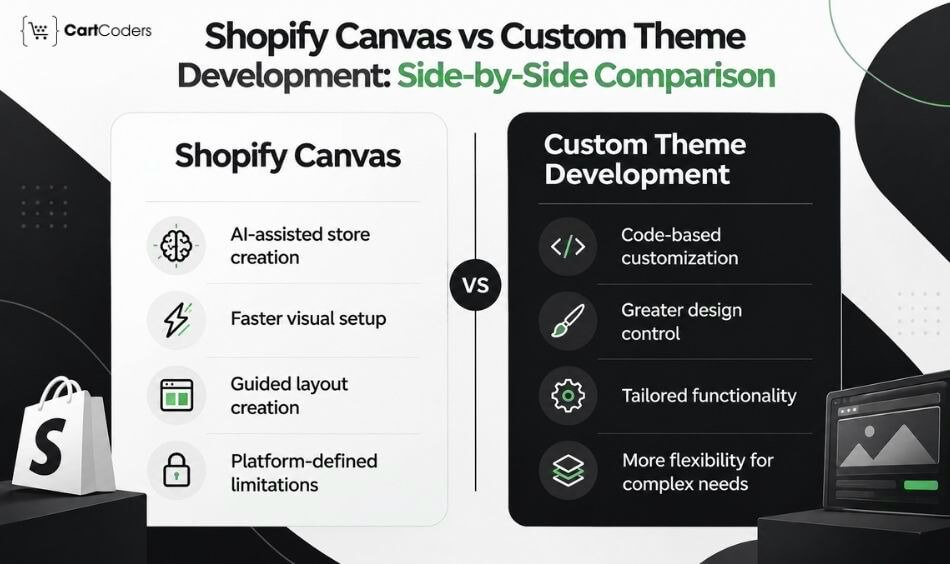
The right choice becomes clearer when both options are compared against actual business requirements.
| Factor | Shopify Canvas | Custom Theme Development |
| Speed | Faster for initial drafts and AI-assisted design changes | Depends on scope, development, and QA |
| Code ownership | Less suitable for formal code-management workflows | Direct control over maintainable theme code |
| Apps and integrations | App blocks and embeds have launch limitations | Can support app extensions, APIs, and integrations |
| Markets | Market-specific customization is limited | Can account for regional storefront requirements |
| Translations | Direct translation editing is unavailable in Canvas | Localization workflows can be built and maintained |
| Theme updates | Canvas-edited themes do not receive updates | Maintenance and update plans can be defined |
| Custom UX | Suitable for visual concepts | Better for advanced product and collection behavior |
| Shopify Plus | Useful for some design tasks | More suitable for complex B2B and storefront logic |
| Best fit | Simple stores and early redesigns | Complex or highly customized stores |
Speed
Canvas can reduce the time needed to turn a design idea into a visual draft. Custom development generally involves more planning, coding, and testing.
Code Ownership
Custom development offers a clearer route for teams that need direct file control, documentation, Git history, and repeatable releases.
Apps and Integrations
Stores using reviews, subscriptions, product configurators, or external systems need to consider how those functions interact with the theme.
Markets and Translations
Businesses selling across countries or languages need reliable regional content, pricing displays, and localization workflows.
Theme Updates
Maintenance matters beyond launch. Canvas’s current theme-update restriction deserves particular attention.
Custom UX
Shopify Canvas helps merchants create visual layouts and test design ideas quickly. However, stores with advanced product filters, custom variant selectors, bundle builders, or personalized shopping experiences often need custom development.
Shopify Plus
Shopify Canvas can help Shopify Plus merchants create initial storefront designs and test visual changes. However, businesses managing B2B catalogs, company-specific pricing, buyer permissions, and complex integrations need greater technical control.
Best Fit
Canvas suits simpler design requirements. Custom development becomes more useful as storefront functionality and operational dependencies increase.

What Makes Shopify Canvas Better
Canvas has clear strengths, especially when a business needs to move from an idea to a usable design direction quickly.
Fast Store Drafts
A merchant can describe the desired storefront and use Sidekick to create an initial design. This reduces the effort needed to prepare the first version for discussion.
Simple Catalog Launches
A small store with straightforward products may not need extensive custom theme logic. Canvas can provide a useful starting point when the store’s requirements fit its supported capabilities.
Quick Visual Redesigns
Canvas can help merchants try a new visual direction without rebuilding every section manually. This is useful when the existing store needs a refreshed appearance rather than new business functionality.
Design Exploration
Teams can compare ideas for homepage layouts, product presentation, typography, and other visual elements. The value comes from reaching a design decision faster.
Reducing Small Design Requests
Some visual changes that previously required repeated developer involvement may be handled through Sidekick. That can free development time for tasks involving deeper technical requirements.
Lower Early Design Effort
Canvas may reduce the initial effort required to prepare a storefront concept. However, the total project effort still depends on testing, content, apps, and production requirements.
| Canvas Advantage | Why It Helps |
| Fast first draft | Moves from idea to layout quickly |
| Conversational editing | Reduces manual section-by-section work |
| Whole-store workspace | Helps compare templates together |
| Sidekick assistance | Accepts design instructions in plain language |
| Design exploration | Makes early concepts easier to review |
| Light redesigns | Supports visual changes without major new logic |
What Makes Custom Development Better
Custom development becomes more valuable when a storefront needs functionality that extends beyond standard visual design.
Owned and Maintainable Code
Developers can structure theme files, document changes, and use version control. This gives businesses a clearer maintenance process as the storefront grows.
App Blocks and Theme App Extensions
Many Shopify apps use theme app extensions to add storefront functionality. Custom development can account for these integrations and test their behavior across different templates.
Multi-Market and Translation Workflows
International stores often need different languages, currencies, regional content, and customer experiences. These requirements need careful planning, especially where Canvas has current restrictions.
Custom Product Features
Bundle builders, fit tools, product configurators, advanced variant selectors, and specialized product information often require custom logic. These features also need testing across devices and customer scenarios.
Integrations With ERP, CRM, PIM, and 3PL
A growing store may exchange data with inventory, customer management, product information, and fulfillment systems. Custom development supports the storefront-side requirements of these connections, while backend integration work may also be necessary.
B2B, Shopify Plus, and Headless Builds
Shopify Plus and B2B stores may need company accounts, buyer roles, custom catalogs, pricing rules, and advanced workflows. Headless commerce requires a separate frontend architecture, making it a different technical project from Canvas-based theme editing.
Git, Backups, and Controlled Deployments
A structured development process can include code reviews, backups, staging environments, and controlled releases. This is especially important when a store has multiple developers or frequent changes.
| Custom Development Need | Why Canvas May Not Be Enough |
| App-heavy storefront | App blocks and embeds have launch restrictions |
| Multi-market selling | Regional customization needs additional workflows |
| Multilingual storefront | Translation management needs separate handling |
| Product configurator | Custom logic and testing are required |
| B2B commerce | Pricing, catalogs, and buyer permissions need planning |
| Shopify Plus | Advanced storefront requirements may need development |
| Headless commerce | Requires a separate frontend architecture |
| Connected systems | ERP, CRM, PIM, and API workflows need technical work |
| Long-term maintenance | Code review and release management become important |
For businesses with these requirements, custom Shopify theme development provides a more controlled approach to storefront functionality and maintenance.
Canvas Limitations That Affect Business Decisions
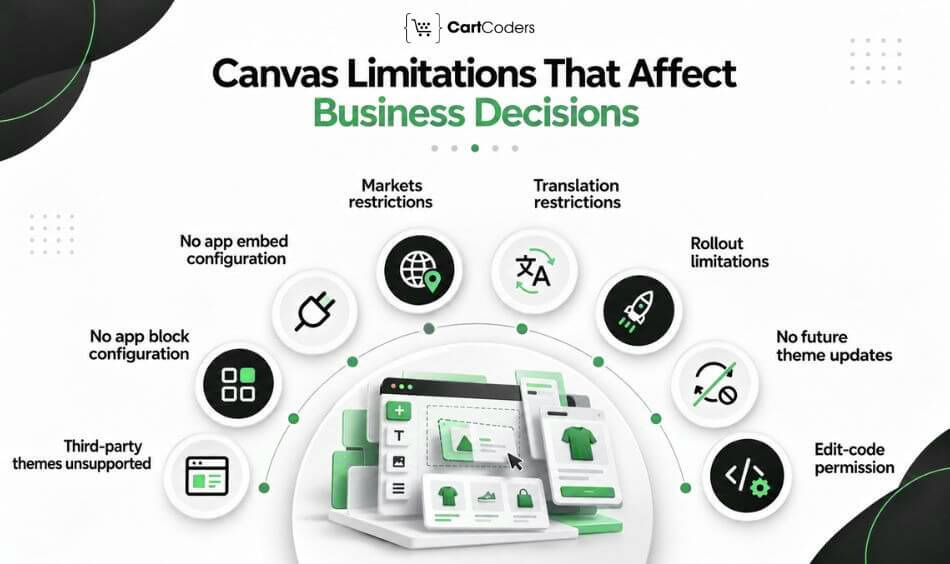
Canvas launched in October 2026 with restrictions that merchants should review before choosing it for an existing store. Shopify documents these limitations in its Canvas launch changelog.
Third-Party Themes Are Not Supported
Canvas currently supports Shopify-developed themes and custom themes, but not third-party Theme Store themes. Merchants using an unsupported theme may need a different approach.
App Blocks and App Embeds Are Not Supported at Launch
Canvas cannot currently add or configure app blocks and app embeds. This affects stores using app-based reviews, subscriptions, upsells, popups, and other storefront functions.
Markets and Translations Need Other Workflows
Market-specific customization and direct translation editing are not supported in Canvas at launch. International merchants should review how these requirements will be handled outside the Canvas workspace.
Canvas-Edited Themes Do Not Receive Future Theme Updates
This limitation affects long-term maintenance. Businesses should consider how they will handle improvements, fixes, and future theme changes.
Staff Need Edit Code Permission
Canvas requires appropriate theme-related permissions, including edit-code access for relevant staff workflows. Access should be limited to employees who are authorized to make storefront changes.
Teams Should Test Before Publishing
An AI-generated design may look correct, but important customer interactions still need review. Test product pages, apps, navigation, mobile layouts, analytics, and checkout behavior before publishing.
| Canvas Limitation | Business Impact |
| Third-party themes unsupported | Some existing stores cannot use their current theme |
| No app block configuration | App-based storefront features need separate handling |
| No app embed configuration | Scripts and widgets require review |
| Markets restrictions | Regional storefront work needs another process |
| Translation restrictions | Multilingual content needs separate management |
| Rollout limitations | Controlled releases need planning |
| No future theme updates | Maintenance responsibilities increase |
| Edit-code permission | Staff access requires governance |
When Shopify Canvas Is the Right Choice
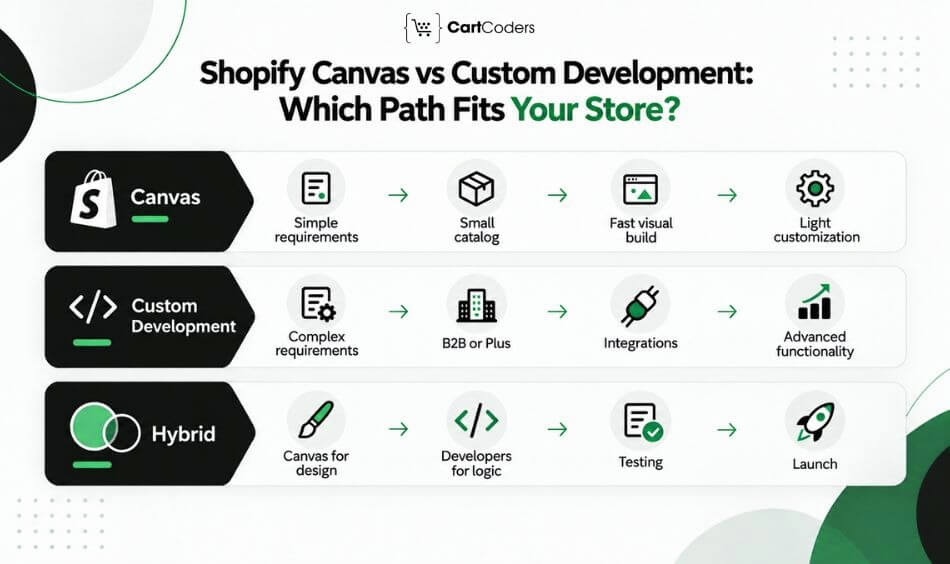
Canvas makes the most sense when a store’s requirements are straightforward and visual speed matters more than advanced technical control.
New Store With Simple Requirements
A new merchant can use Canvas to prepare an initial storefront design without beginning with custom code.
Small Product Catalog
Stores with a limited number of products and simple purchasing requirements may have fewer technical dependencies.
Fast Visual Concept
Canvas can help teams prepare a concept for review before committing to a larger design project.
Light Redesign
An existing store with supported theme requirements may use Canvas to test a new visual direction.
Seasonal Campaign Page
Canvas may help create or revise campaign-related designs when the required templates and functionality are supported.
Founder-Led Brand Testing
Founders can compare visual directions and refine their brand presentation before investing in more advanced development.
| Store Situation | Why Canvas Fits |
| New simple store | Faster design starting point |
| Small catalog | Fewer technical dependencies |
| Campaign concept | Quick visual experimentation |
| Light redesign | Easier design iteration |
| Early brand testing | Faster concept comparison |
| Small internal team | Less initial design effort |
When Custom Theme Development Is the Right Choice
Custom development is more appropriate when the storefront has complex requirements or must work closely with other business systems.
Shopify Plus Stores
Shopify Plus businesses may need advanced checkout-related capabilities, custom workflows, B2B functions, and enterprise integrations. These requirements often need more than AI-assisted theme editing.
B2B and Wholesale Storefronts
Wholesale businesses may require company-specific catalogs, buyer permissions, quantity rules, and negotiated pricing. The storefront must work correctly with these commercial rules.
Multi-Market or Multilingual Stores
Businesses selling across regions need reliable language, content, pricing, and market-specific experiences. A development-led approach can account for these requirements from the beginning.
App-Heavy Stores
Stores using several apps need careful compatibility testing. Subscriptions, reviews, loyalty programs, bundles, and product recommendations can all affect storefront behavior.
Complex Product Pages
Products with advanced options, compatibility requirements, sizing tools, or configurable bundles often need tailored interfaces.
Large Catalog Stores
Large catalogs require thoughtful filtering, navigation, product cards, and search experiences. The challenge is not only displaying products but helping customers find the right ones.
Integrated Commerce Systems
Businesses connected to ERP, CRM, PIM, 3PL, or other platforms need reliable data exchange and technical maintenance.
| Store Situation | Why Custom Development Fits |
| Shopify Plus | Advanced workflows and integrations |
| B2B | Catalog, pricing, and buyer logic |
| Multi-market | Regional storefront requirements |
| Multilingual | Translation and localization management |
| Subscription business | App and checkout compatibility |
| Large catalog | Search, filtering, and navigation |
| High-traffic store | Performance and conversion risk |
| Integrated store | API and operational dependencies |
Businesses can review Shopify Plus development or Shopify app development when these requirements form part of the project.
How Growing Stores Can Combine Canvas and Custom Themes
Many businesses do not need to choose between Canvas and developers for every task. A hybrid workflow can use Canvas for visual direction while developers handle the functionality, testing, and maintenance requirements.
Use Canvas for Design Direction
Start with a visual concept, homepage layout, or supported theme redesign. Review whether the design fits the brand and customer journey.
Use Developers for Store Logic
Developers can handle custom product behavior, metafields, app integrations, API connections, and other requirements that need direct technical work.
Review Theme Structure Before Launch
Before publishing, confirm that the theme structure supports future changes. The team should understand which elements are AI-generated, which are custom-built, and how maintenance will be handled.
Test Apps, Tracking, Speed, and Accessibility
Review app behavior, analytics events, page performance, keyboard accessibility, mobile interactions, and important buying journeys.
Decide Who Owns the Live Theme
Assign responsibility for code changes, updates, documentation, and production releases. This prevents confusion when the store needs changes after launch.
Suggested workflow: Canvas concept → Developer review → UX refinement → App and integration testing → SEO and CRO checks → Production launch.
| Phase | Canvas Role | Developer Role |
| Concept | Generate initial design | Review technical feasibility |
| Branding | Test visual direction | Create reusable design rules |
| UX | Suggest page layouts | Refine navigation and customer journeys |
| Product pages | Prepare visual concepts | Build variants, metafields, and logic |
| Apps | Limited configuration support | Configure and test integrations |
| SEO | Provides page design | Review technical SEO requirements |
| Performance | Requires validation | Address code and loading issues |
| Launch | Preview changes | Complete QA and release planning |
Cost and Maintenance Considerations
The cheapest starting option is not always the least expensive approach over several years. Businesses should consider design effort, development work, testing, app compatibility, and future maintenance together.
Canvas May Reduce Early Design Effort
Canvas can reduce the time spent preparing initial layouts and visual concepts. This may be useful for businesses with simple requirements and limited design resources.
Custom Development Has More Upfront Planning
Custom development generally requires requirements gathering, architecture decisions, coding, and testing. That effort can be justified when the store needs functionality that cannot be handled through standard theme controls.
Maintenance Risk Differs Between Both
Canvas introduces particular maintenance considerations because Canvas-edited themes do not receive future theme updates. Custom development also requires maintenance, but teams can plan code reviews, version control, and releases from the beginning.
Theme Updates Matter for Long-Term Stores
A business should know how it will handle future Shopify changes, theme improvements, security considerations, and compatibility issues.
Cheap Launches Can Become Expensive Without QA
A fast launch can create later costs if apps fail, tracking breaks, product pages confuse customers, or mobile performance suffers. Testing should be part of the budget regardless of the development method.
| Cost Area | Shopify Canvas | Custom Theme Development |
| Initial design | May require less effort | More planning and implementation |
| Custom functionality | Limited by supported capabilities | Additional development cost |
| App compatibility | Needs careful testing | Can be planned during development |
| Maintenance | Requires a separate strategy | Can follow documented procedures |
| QA | Still necessary | Should be part of delivery |
| Future changes | May need developer involvement | Easier to manage when code is well structured |
SEO, CRO, and Accessibility Checks Before Choosing
A storefront can look polished and still perform poorly for customers or search engines. Canvas and custom development both require quality checks before publication.
SEO Is More Than Page Design
Search visibility depends on more than visual layout. Review page titles, descriptions, heading structure, canonical URLs, internal links, structured data, and indexable content.
CRO Needs Journey Review
Conversion rate optimization should consider how customers move through the store. Review the hero message, product discovery, product details, trust signals, cart interactions, and checkout journey.
Accessibility Needs Manual Testing
Automated scans cannot identify every accessibility barrier. Keyboard use, focus states, form labels, screen reader behavior, and contrast should be checked manually where appropriate.
Mobile UX Needs Separate Review
Mobile testing should cover navigation, tap targets, content order, product galleries, sticky elements, and loading behavior. A desktop preview alone cannot confirm mobile usability.
Analytics and Tracking Must Be Tested
Check GA4, advertising pixels, conversion events, consent behavior, and checkout tracking after theme changes. Broken tracking can make it difficult to judge whether the redesign helped the business.
| Review Area | What to Check |
| SEO | Metadata, headings, schema, links, indexation |
| CRO | Product discovery, trust, cart, checkout |
| Accessibility | Keyboard access, labels, focus, contrast |
| Mobile UX | Layout, tap targets, content order |
| Analytics | GA4, pixels, events, checkout tracking |
| Apps | Scripts, widgets, compatibility |
| Speed | Images, JavaScript, layout stability |
For stores planning a redesign, Shopify CRO services can help connect design changes with customer behavior and measurable outcomes.
How to Choose: A Quick Decision Guide
The decision should start with the store’s actual requirements, not the popularity of AI design tools.
Choose Canvas if Speed Matters More Than Deep Control
Canvas is a reasonable option when the main requirement is creating a design draft or making supported visual changes quickly.
Choose Custom Development if Scale and Logic Matter More
Choose development-led work when the store depends on custom product functionality, connected systems, advanced apps, or complex commercial rules.
Choose Hybrid if You Want AI Speed With Expert Review
A hybrid approach can work when Canvas helps the team agree on a design, but developers are needed to make the storefront production-ready.
Avoid Rushing if Your Store Depends on Apps or Markets
Stores with app-heavy experiences, regional requirements, or complex operations should review compatibility before adopting Canvas.
| Decision Question | If Yes | Recommended Approach |
| Need a fast first draft? | Yes | Canvas |
| Small and simple store? | Yes | Canvas or hybrid |
| Depend on app blocks? | Yes | Custom development |
| Sell across Markets? | Yes | Custom development |
| Need unique product UX? | Yes | Custom development |
| Run Shopify Plus or B2B? | Yes | Custom development |
| Want AI speed with technical review? | Yes | Hybrid |
| Need structured code maintenance? | Yes | Custom development |
If the decision is between a standard theme and a custom-built theme rather than Canvas, see our separate guide to custom vs pre-made Shopify themes.
How CartCoders Helps With Canvas and Custom Theme Development
Shopify Canvas can make early design work faster, but merchants still need a storefront that supports their products, customers, and operations.
CartCoders helps businesses decide whether Canvas is suitable, where custom development is needed, and how to prepare a reliable Shopify storefront.
Canvas Output Review
We review Canvas-generated layouts for usability, design consistency, technical limitations, and future development needs.
Custom Shopify Theme Development
Our team builds custom sections, product experiences, and theme functionality using Shopify’s supported development architecture.
Shopify Plus Storefront Planning
We support Shopify Plus businesses with storefront requirements involving B2B, advanced workflows, and integrations.
B2B and Wholesale Theme Logic
Our developers work with wholesale catalog requirements, pricing-related interfaces, buyer experiences, and other B2B storefront needs.
App, API, and Integration Setup
We support app integration and connections with external platforms through Shopify integration services.
CRO, SEO, Speed, and Accessibility Checks
We review important storefront quality factors before launch, including mobile usability, technical SEO, page performance, accessibility, and conversion journeys.
Post-Launch Support
Our team supports ongoing theme changes, compatibility checks, maintenance, and technical improvements as store requirements change.
Contact us to choose the right Shopify build approach for your store goals, timeline, and growth plans.
Final Verdict: Match the Build Approach to Store Complexity
Shopify Canvas can reduce the time needed to turn an initial idea into a visual storefront concept. Custom development adds the technical control required for complex product journeys, B2B selling, integrations, performance, accessibility, and long-term maintenance.
A hybrid approach may offer the most practical balance. Merchants can use Canvas to shape early layouts, then involve developers to validate feasibility, build advanced functionality, and test the complete customer journey. The right decision is not based on speed alone. It should reduce future rework, protect storefront quality, and give the business enough flexibility as its requirements change.
Frequently Asked Questions
No. Canvas supports AI-assisted design, while custom development remains useful for advanced functionality, integrations, code management, and complex storefront requirements.
Canvas can reduce some design tasks, but developers remain important for custom logic, integrations, app compatibility, performance, accessibility, and maintenance.
Shopify’s current Canvas requirements state that theme files cannot be downloaded from Canvas. Businesses needing exportable files should review another development workflow.
No. Shopify states that themes edited in Canvas do not receive future theme updates, making maintenance planning important.
Canvas may help with design concepts, but complex stores often require custom development for Markets, translations, apps, integrations, and advanced business logic.
Canvas may reduce initial design effort. Total cost depends on functionality, compatibility, testing, maintenance, and the development work required after design.
Choose Canvas for fast visual drafts, simple store launches, supported redesigns, and early design exploration when technical requirements are limited.
Choose custom development for advanced product experiences, app-heavy storefronts, integrations, B2B requirements, localization, and structured code maintenance.
Developers can review Canvas output and help plan improvements. The implementation approach depends on Canvas restrictions and the store’s technical requirements.
Yes. Canvas can support early design direction, while developers handle feasibility, custom functionality, integrations, testing, and long-term maintenance planning.


