
Building a Shopify store has traditionally meant choosing a theme, arranging sections, adjusting settings, and bringing in a developer when the design needs to go beyond what the theme allows. Shopify Canvas changes that workflow by putting conversation at the center of store design.
Launched on October 1, 2026, Shopify Canvas is a new AI-powered design surface where merchants work with Sidekick, Shopify’s AI agent, to create and change storefronts. Instead of moving through page settings one section at a time, a merchant can describe the result they want and watch Sidekick apply those changes across the store.
The important difference is that Canvas is not simply showing an AI-generated mockup. Shopify says the workspace renders the real code behind the store, allowing merchants to review interactive pages, animations, different products and collections, and multiple screen sizes.
That makes Canvas an important step in Shopify’s AI direction. But it is still in early access, and several launch limitations affect third-party themes, app blocks, Markets, translations, rollouts, and theme updates.
So the practical question is not only what Shopify Canvas can build. Merchants also need to know when Canvas is enough and when a store still requires experienced Shopify design, development, CRO, or integration work.
Quick Answer: What Is Shopify Canvas?
Shopify Canvas is an AI-powered store design workspace that lets merchants create and edit Shopify themes by working with Sidekick. Merchants can describe a store or design change in natural language, review the result in a visual workspace, and continue refining it through AI prompts or direct editing.
Canvas is currently in early access and available only to certain stores. Shopify also limits Canvas editing to desktop devices.
| Question | Short Answer |
| What is Shopify Canvas? | An AI-assisted Shopify store design workspace powered by Sidekick. |
| How does it work? | Merchants describe changes and Sidekick works on the theme. |
| Is Canvas just a static preview? | No. Shopify says it renders the real store code. |
| Can merchants edit manually? | Yes. Supported blocks, text, and settings can also be edited directly. |
| Does Canvas replace developers? | No. Complex functionality and technical validation can still require developers. |
| Is Canvas available to every store? | No. It is currently in early access for eligible stores. |
| Is Canvas available on mobile? | Canvas itself currently requires a desktop device. |
Shopify Canvas Is a Chat-Based AI Store Builder
Canvas changes the starting point for Shopify design. Instead of knowing which setting controls a particular layout, merchants can describe the result they want. A request might ask Sidekick to create a stronger product-focused homepage, change a section’s visual direction, or rethink an entire template. This makes store design more conversational, particularly during early concept development.
It Works With Sidekick, Shopify’s AI Agent
Sidekick is the AI layer doing much of the work inside Canvas. It interprets the merchant’s request, works on the theme, and shows the changes inside the same visual workspace. Merchants can respond with feedback and continue refining the design instead of starting a new manual editing process after every change.
It Edits Real Store Code, Not Only a Static Preview
This is one of Canvas’s most important distinctions. Shopify says Canvas renders the actual code behind the store. Merchants can therefore preview interactions and animations rather than looking only at a generated screenshot or static design concept.
It Helps Merchants Build and Redesign Faster
Canvas can reduce the effort needed to reach a useful first design. A new merchant can describe the brand and store they want to build. An existing merchant can duplicate a supported theme into Canvas and experiment with a redesign without changing the original theme. That can shorten the distance between an idea and something the team can review.
It Has Important Launch Limits
Canvas is still early. Shopify currently lists limitations around third-party themes, app blocks, app embeds, Markets customization, translations, rollouts, theme downloads, and theme updates. These limitations matter considerably for established stores with more complex configurations.
Why Shopify Canvas is Becoming Popular?
Canvas is significant because it moves AI from isolated content or code assistance into the core storefront design process. Shopify merchants have already been using Sidekick and AI-generated theme blocks. Canvas brings those capabilities into a larger workspace where AI can participate in store-wide design work.
Store Building Is Becoming Conversational
Traditional visual editors ask merchants to understand the structure of the editor first. Canvas reverses part of that relationship. The merchant can begin with intent:
“Make the homepage feel more editorial and put more emphasis on the new collection.”
Sidekick can interpret that request and make changes that the merchant then reviews. The user still needs judgment but less knowledge of where every setting lives.
Shopify Is Bringing AI Into Core Store Design
Canvas is not a separate third-party page builder added on top of Shopify. It integrates into Shopify’s Online Store workflow and works seamlessly with Sidekick. Shopify has also given Sidekick the ability to work directly with theme files for more ambitious design tasks. This tighter relationship between AI and theme architecture is what separates Canvas from a basic prompt-to-page generator.
Merchants Want Faster Launch and Redesign Cycles
A design idea often goes through several rounds before development even starts. Canvas can make those early rounds faster because a merchant can generate a direction, review it visually, request changes, and compare the result without manually rebuilding each concept.
This can be particularly useful for:
- New-store concepts
- Seasonal design changes
- Brand refreshes
- Homepage revisions
- New product launches
- Early redesign planning
AI Can Reduce the First-Draft Design Burden
The first version rarely needs to be perfect. It needs to be useful enough for the team to react to. Canvas can give merchants that starting point faster. Instead of beginning from an empty design discussion, the team can respond to an actual storefront direction.
Complex Stores Still Need Strategy and Technical Review
Speed does not automatically create a better store. Navigation, product discovery, accessibility, page performance, SEO, tracking, integrations, checkout requirements, and conversion behavior still need deliberate review. Canvas can accelerate design execution. It does not decide whether every design decision is right for the business.
How Does Shopify Canvas Work With Sidekick?
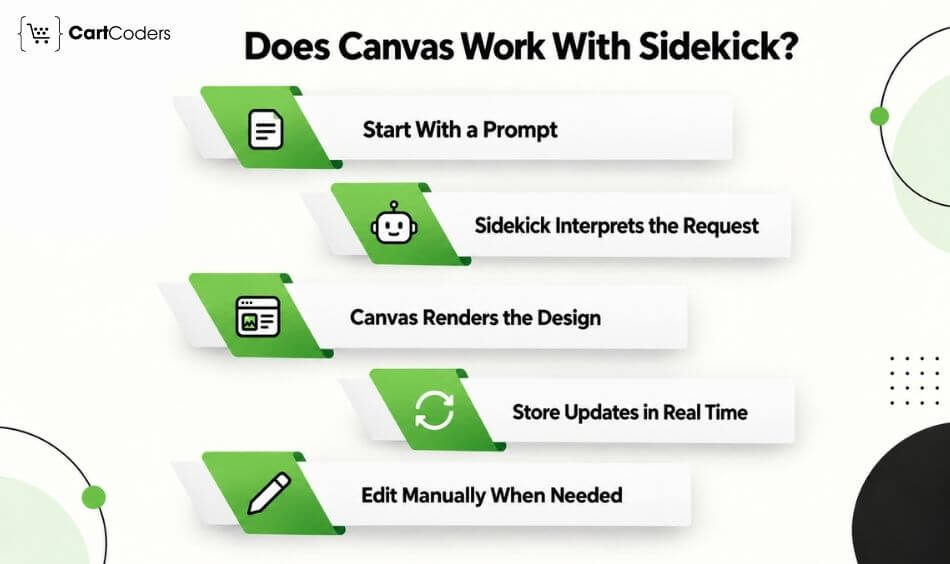
The workflow is easier to understand when viewed as a cycle rather than a one-time AI generation.
Merchant request → Sidekick interprets → Canvas renders → Merchant reviews → Sidekick or merchant refines
| Step | What Happens |
| Prompt | Merchant describes the store or desired change |
| Interpretation | Sidekick works out what needs to change |
| Build | Sidekick modifies the supported theme |
| Render | Canvas shows the result visually |
| Review | Merchant checks design, content, and behavior |
| Refine | Changes continue through prompts or direct editing |
| Publish | Approved changes become visible to customers |
The Merchant Starts With a Prompt
When creating a new theme, the merchant begins by describing the brand and the store they want. The prompt does not need to be code. It can describe the business, visual direction, products, audience, or desired experience. A more specific prompt generally gives Sidekick clearer direction.
For example:
“Create a minimalist skincare storefront for customers aged 25–40. Use strong product photography, simple navigation, clear ingredient information, and a calm visual style.”
That provides much more context than simply asking for a “modern Shopify store.”
Sidekick Interprets the Store Design Request
Sidekick translates the merchant’s description into theme work. For existing stores, merchants can also select specific blocks or areas and ask Sidekick to change them. This helps narrow the context when the request applies only to one part of the design.
Canvas Renders the Store Visually
Canvas displays store templates together in a zoomable workspace. Merchants can move across the template overview and open individual templates when they need to inspect details. This wider view makes it easier to judge whether the homepage, collection pages, product templates, and other parts of the store feel visually connected.
The Store Updates as Sidekick Works
Sidekick’s changes appear in Canvas for review. Because the merchant and Sidekick are working against the same design, the process becomes iterative. A merchant can react to what has changed and provide another instruction without translating the result into a separate design document first.
Merchants Can Still Click and Edit Manually
Canvas is not chat-only. Merchants can edit supported block settings, change text directly where supported, and adjust theme-level settings such as typography and colors. Shopify also provides version history for restoring an earlier state when needed. This gives merchants a useful combination: AI for broader changes and direct controls for smaller adjustments.

What Can Merchants Do With Shopify Canvas?
Canvas covers more than generating a homepage. Shopify positions it as a workspace for building and changing themes across the store.
| Canvas Use Case | How It Can Help |
| New store launch | Creates an initial theme from a brand description |
| Store redesign | Provides a workspace for broader visual changes |
| Homepage update | Helps rethink hero, content, and product sections |
| Product storytelling | Supports changes to product templates |
| Seasonal campaign | Speeds up campaign design exploration |
| Brand refresh | Helps carry visual decisions across templates |
| Small team store | Reduces some early manual design work |
Build a New Store From a Brand Description
A merchant can create a new theme and describe the brand and store to Sidekick. Sidekick then creates the starting theme and opens it in Canvas as an unpublished theme. The merchant can continue refining it before anything becomes visible to customers.
Redesign an Existing Store
Canvas can also be used with supported existing themes. Shopify lets merchants duplicate a supported theme into Canvas. The copy becomes separate from the original, allowing the merchant to experiment while the existing theme remains intact. This can be useful when a team wants to compare a redesign before committing to it.
Change Individual Store Sections
Not every Canvas task needs to be a full redesign. A merchant can select an area and ask Sidekick to change it. This can be useful when the current store works well overall but one hero, promotional block, product section, or content area needs a different direction.
Test Layouts, Animations, and Interactions
Because Canvas renders working store code, merchants can review more than appearance. Shopify says merchants can preview full interactivity and animation, which gives teams more context than a static mockup. The result still needs QA before publishing, especially when custom behavior or customer-critical flows are involved.
Review Store Pages in a Full Visual Workspace
Canvas places templates together so merchants can assess the store as a broader system. That matters because an attractive homepage does not automatically mean the product, collection, and other templates feel connected to the same brand.
Edit Elements Manually When Needed
AI does not need to handle every adjustment. Merchants can directly change supported text, block settings, and theme settings. That makes Canvas useful for mixed workflows where AI handles broader design work and the merchant makes precise follow-up changes.
What Can Shopify Canvas Not Do Yet?
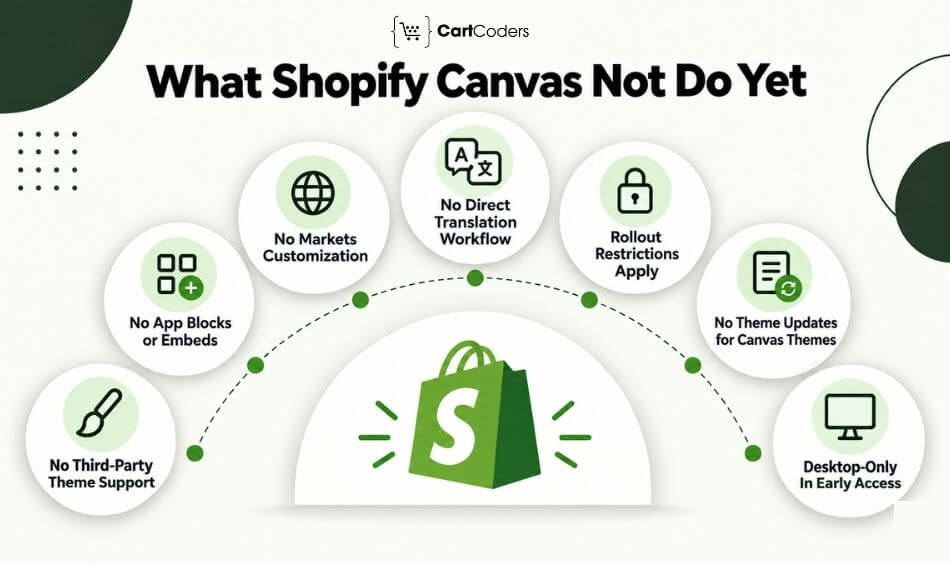
This is where merchants need to look beyond the excitement around the launch. Canvas is in early access, and Shopify documents several restrictions that can materially affect an existing store.
| Current Consideration | Why It Matters |
| Third-party themes unsupported | Many stores may need a different theme path |
| App blocks cannot be configured in Canvas | App-heavy storefronts need additional planning |
| App embeds cannot be configured in Canvas | Some storefront app functions need separate handling |
| Market customization unavailable | International stores have less regional control inside Canvas |
| Direct Canvas translation unavailable | Multilingual workflows need another route |
| Rollout restrictions | Controlled theme release workflows need review |
| Canvas-edited themes do not receive theme updates | Long-term maintenance needs planning |
| Theme files cannot be downloaded | Development workflows may be affected |
| Desktop required | Canvas editing itself cannot currently be done on mobile |
No Third-Party Theme Store Theme Support at Launch
Shopify currently says Canvas works with themes developed by Shopify and with custom themes. Third-party themes are not supported. For a merchant heavily invested in a third-party Theme Store theme, this can be a deciding factor before adopting Canvas.
No App Blocks or App Embeds at Launch
Canvas currently does not let merchants add or configure app blocks or app embeds. That matters for stores using storefront apps for reviews, subscriptions, recommendations, bundles, loyalty, size tools, merchandising, and many other customer-facing features. The theme may look right in Canvas while still requiring separate app configuration and compatibility testing.
No Markets Customization at Launch
Merchants cannot currently customize a theme for different Markets directly in Canvas. A business serving several regions should therefore review how its localized storefront requirements fit the Canvas workflow before moving an important theme into it.
No Direct Translation Workflow in Canvas
Theme content cannot currently be translated directly in Canvas. Shopify directs merchants toward Translate & Adapt for translation work. Multilingual stores therefore need to account for this additional workflow rather than assuming Canvas handles every localized version.
Rollouts Have Restrictions
A Canvas-edited theme can be added to a rollout as a replacement for the main theme, but Shopify places restrictions on editing Canvas themes through Rollouts. Stores using controlled launches or experimentation workflows should check the current rules before planning a release.
Canvas-Edited Themes Do Not Receive Theme Updates
This is a significant maintenance consideration. Shopify states that themes edited in Canvas do not receive theme updates. For a long-lived storefront, teams should think about how future fixes, improvements, and theme maintenance will be handled.
Canvas Is Desktop-Only in Early Access
Canvas currently requires a desktop device. This should not be confused with Shopify’s separate Online Store Editor, which has mobile Sidekick capabilities. The Canvas design workspace itself is desktop-only at present.
Shopify Canvas vs Theme Editor vs Shopify Developer
Canvas does not make every other Shopify design route obsolete. Each option serves a different type of work.
| Option | Best For | Control | Main Consideration |
| Shopify Canvas | Fast AI-assisted theme creation and redesign | Medium to high | Early-access limitations |
| Theme editor | Structured manual theme changes | High within theme capabilities | More section-by-section work |
| Shopify developer | Custom functionality and complex storefronts | Highest | Requires specialist time |
| Page builder | Marketing pages and reusable layouts | Varies | App cost and compatibility |
| Headless storefront | Highly custom frontend experiences | Very high | Larger technical scope |
Canvas for Fast AI-Assisted Store Creation
Canvas is useful when speed of design exploration matters. It can create a new starting point, help merchants rethink existing templates, and make conversational design changes without requiring every adjustment to begin with code.
Theme Editor for Manual Section Control
The standard theme editor remains useful when a merchant wants predictable control over sections, blocks, app embeds, and supported theme settings. Shopify has explicitly said Canvas is not replacing the existing editor yet.
Developers for Custom Logic and Scalable Stores
AI-generated theme work does not cover every commerce requirement. A Shopify store development team becomes more important when the store needs custom theme logic, advanced product experiences, app integrations, B2B workflows, API connections, performance work, or functionality that extends beyond the available design controls.
How to Choose the Right Option
Use the simplest route that safely handles the requirement. Canvas may be enough for a straightforward design concept. The theme editor may be faster for a controlled settings change. A developer is more appropriate when the change affects custom code, business logic, integrations, or high-risk customer journeys. These tools can also work together rather than competing with one another.
Shopify Canvas vs Shopify AI Store Builder
Canvas can easily be confused with Shopify’s earlier AI Store Builder, but their roles are different. AI Store Builder creates a starting point. Canvas provides a broader workspace for continuing the design process with Sidekick.
| Area | Shopify AI Store Builder | Shopify Canvas |
| Main role | Generate an initial store direction | Create, edit, and redesign themes |
| AI interaction | Prompt to initial layout | Ongoing conversation with Sidekick |
| Workspace | Starting-store generation | Broader visual design environment |
| Best for | Getting from idea to first draft | Iterating across store design |
| Human review | Required | Required |
| Developer role | Advanced refinement | Advanced customization and validation |
AI Store Builder Creates a Starting Layout
Shopify’s AI Store Builder helps merchants move from a business description toward an initial storefront direction. Its value is speed at the beginning of the store-building process.
Canvas Supports Broader Store Design Work
Canvas goes further into ongoing theme creation and editing. Merchants can work across templates, make changes with Sidekick, inspect results, and continue refining the theme inside the same environment.
Sidekick Enables Conversational Editing
Canvas makes Sidekick part of the design process rather than using AI only for initial generation. The merchant can react to the current store and ask for another change based on what is already visible.
Canvas Is Better Suited to Iteration and Redesign
An existing merchant may not need an entirely new AI-generated store. Canvas is relevant because it can also work as a redesign environment for supported themes, making it useful beyond first-time store creation.
Both Still Need Human Review
AI can generate an attractive first result while missing commercial context. Product hierarchy, navigation, trust, accessibility, SEO, mobile usability, page speed, analytics, and conversion paths still need human judgment before publication.
How Does Canvas Fit Into Shopify’s AI Roadmap?
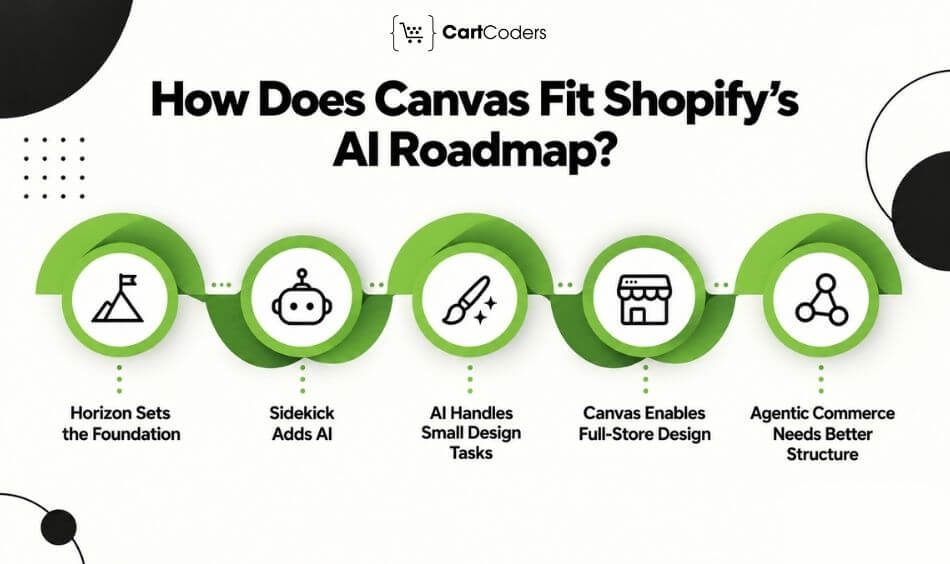
Canvas makes more sense when viewed as part of Shopify’s wider shift toward AI-assisted commerce.
Horizon Theme Blocks Set the Foundation
Shopify has been moving themes toward more modular structures through Horizon and theme blocks. A more structured theme architecture gives AI better building blocks to work with when interpreting and changing storefront design.
Sidekick Brings AI Into Store Operations
Sidekick already works across multiple Shopify tasks. For store design, Shopify has expanded Sidekick’s ability to work directly with theme files and inspect its own changes, making it more capable of handling broader storefront work.
AI Block Generation Handles Smaller Design Tasks
AI-generated theme blocks allow merchants to request individual pieces of storefront functionality or design. This represents a narrower level of AI assistance than a full-store workspace.
Canvas Extends AI Into Full-Store Design
Canvas brings those ideas together across the theme. Instead of generating only a block or starting layout, merchants can work with Sidekick across a visual representation of their templates.
Agentic Commerce Needs Better Store Structure
As commerce becomes more AI-assisted, structured product information, reliable navigation, accurate content, and technically sound storefronts become more important, not less. AI can help create interfaces faster, but the underlying commerce structure still determines whether customers and automated systems can interpret the store correctly.
Who Should Use Shopify Canvas?
Canvas is likely to provide the most immediate value where design speed matters and technical complexity remains manageable.
| Merchant Type | Canvas Fit |
| First-time founder | Strong starting point |
| Small DTC brand | Useful for rapid design iteration |
| Simple catalog | Good candidate for early testing |
| Seasonal seller | Helpful for visual campaign concepts |
| Existing merchant | Useful for supported redesign work |
| Agency or design team | Useful for rapid concept exploration |
New Merchants Launching Quickly
A founder who knows the brand but has limited theme experience can describe the desired store and get something concrete to review. That can reduce time spent learning every design control before the first version exists.
Small Teams Without In-House Designers
Small teams often need to make many storefront decisions with limited resources. Canvas can help them reach early design directions faster, although important customer-facing decisions should still be reviewed carefully.
Brands Testing a New Visual Direction
Canvas can be useful for testing whether a different visual style fits the brand before committing to a larger redesign. A team can create or duplicate a supported theme and use that environment for experimentation.
Existing Stores Planning a Light Redesign
Not every redesign requires a new technical architecture. When the underlying store works well and the main requirement is visual, Canvas may help a team move through early redesign work faster.
Merchants With Simple Catalogs
Simple catalogs generally have fewer storefront dependencies. They can be stronger early candidates than stores with complex B2B logic, multiple localized storefronts, or heavily app-dependent experiences.
Teams That Want Faster First Drafts
Canvas can also help agencies, internal teams, and developers create a stronger starting point. The value does not have to be “AI replaces the design team.” It can simply mean less time spent reaching the first version worth discussing.
Who Should Wait or Use a Shopify Developer Instead?
Canvas becomes less straightforward as storefront complexity rises.
Stores Using Third-Party Themes Heavily
Canvas currently does not support third-party themes. If your storefront depends heavily on one, moving toward Canvas may require more than opening the existing theme in a new editor.
Stores Relying on App Blocks or App Embeds
App-heavy storefronts should be cautious because Canvas cannot currently add or configure these elements. A Shopify app development review can also help when the store depends on custom functionality that needs to coexist with AI-generated theme changes.
B2B or Shopify Plus Stores With Complex Logic
B2B commerce may involve company accounts, catalogs, negotiated pricing, buyer roles, payment terms, integrations, and custom workflows. Those requirements extend well beyond visual design. Shopify Plus development remains relevant when the storefront is only one part of a larger commerce system.
Multi-Market or Multilingual Stores
Canvas’s current markets and translation limitations make international stores a less straightforward fit. The design may look correct in the default experience while regional content, translations, or market-specific requirements still need separate work.
High-Traffic Stores With CRO Requirements
A large store cannot judge a redesign only by appearance. Changes should be reviewed against customer behavior, conversion paths, mobile UX, speed, merchandising, and analytics. A Shopify UI/UX audit can help identify whether an AI-generated redesign improves the journey or simply changes its appearance.
Stores With ERP, CRM, or Custom App Integrations
Canvas is a theme-design environment. It does not replace the architecture behind connected commerce operations. Stores tied to ERP, CRM, fulfillment, marketplace, or other systems still need reliable Shopify integration services when those systems affect storefront behavior or data flow.
How Can Shopify Canvas Help With Store Redesign and CRO?
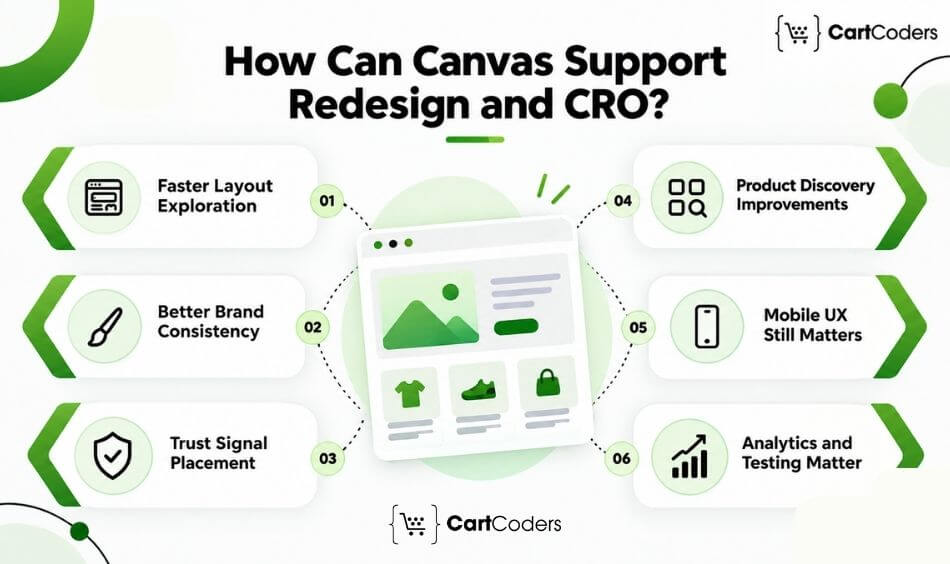
Canvas can speed up the design side of CRO, but it cannot prove that a new layout will convert better. That distinction matters.
| CRO Area | What to Review After Canvas Changes |
| Hero section | Is the offer clear quickly? |
| Navigation | Can shoppers reach relevant products easily? |
| Product page | Are price, variants, benefits, and proof clear? |
| Collection page | Are filters and product cards useful? |
| Cart | Is the next action obvious? |
| Mobile | Does the layout remain usable at smaller widths? |
| Trust | Are shipping, returns, reviews, and guarantees clear? |
| Analytics | Are important events still being measured? |
Faster Layout Exploration
CRO work often begins with a hypothesis about what might reduce friction. Canvas can make it faster to visualize alternative layouts before investing more development time in a direction.
Better Brand Consistency Checks
Because templates can be viewed within the broader Canvas workspace, teams can compare how design decisions carry across the storefront. Brand consistency matters because customers move between home, collection, product, cart, and content pages rather than experiencing each page in isolation.
Product Discovery Improvements
A redesign can reconsider how shoppers find categories, collections, featured products, and important product information. Canvas can assist with the layout. The team still needs to validate whether those changes match actual shopper behavior.
Trust Signal Placement
Reviews, shipping information, returns policies, guarantees, payment messaging, and other trust cues need appropriate placement. AI can suggest a visual arrangement, but the merchant needs to decide which information matters at each stage of the buying journey.
Mobile UX Review Still Matters
Canvas lets merchants preview templates at different widths, including mobile widths. That does not remove the need for actual mobile QA. Tap targets, sticky elements, menus, app behavior, content length, image loading, and cart movement should still be tested from a shopper’s perspective.
Analytics and Testing Still Matter
A redesign should not be declared successful because it looks cleaner. Conversion rate, add-to-cart behavior, product engagement, checkout movement, page speed, and other relevant signals need measurement. For stores with meaningful traffic, controlled experimentation may be more reliable than replacing a proven layout based only on preference. This is where Shopify CRO services can complement Canvas by connecting design decisions to customer behavior and measurable outcomes.
Shopify Canvas vs Third-Party AI Page Builders
Canvas also changes the decisions merchants make when considering a page-builder app.
| Option | Best For | Watch Out For |
| Shopify Canvas | Native AI-assisted theme design | Early-access limitations |
| Shopify theme editor | Theme-supported manual changes | Slower for broad redesigns |
| Third-party builder | Landing pages and template libraries | Cost, compatibility, performance |
| Custom theme development | Distinct UX and custom logic | Requires development work |
| Headless storefront | Advanced frontend control | Larger technical scope |
Canvas Has a Native Shopify Advantage
Canvas is part of Shopify’s own theme workflow and works directly with Sidekick. That gives it a closer relationship with Shopify’s theme architecture than an external page-builder layer.
Third-Party Builders May Offer More Templates
Established page builders may offer mature template libraries, widgets, or specialized landing-page workflows that Canvas does not yet provide. Merchants should compare the actual use case rather than assuming native or third-party wins automatically.
App Dependency Can Affect Store Speed
Adding another page-building app can introduce scripts, markup, or ongoing app dependencies. The impact varies by product and implementation, so measure performance rather than assume it.
Theme Compatibility Needs Review
Compatibility matters whichever route you choose. Canvas currently has explicit theme restrictions, while third-party builders can have their own theme or app conflicts. Check the real store stack before committing to a design workflow.
Custom Development Still Offers the Most Control
A custom theme or headless Shopify storefront remains relevant when the brand needs functionality or frontend behavior that goes beyond what standard theme workflows provide.
The trade-off is greater development scope in exchange for greater control.
How Should Merchants Use Shopify Canvas Strategically?
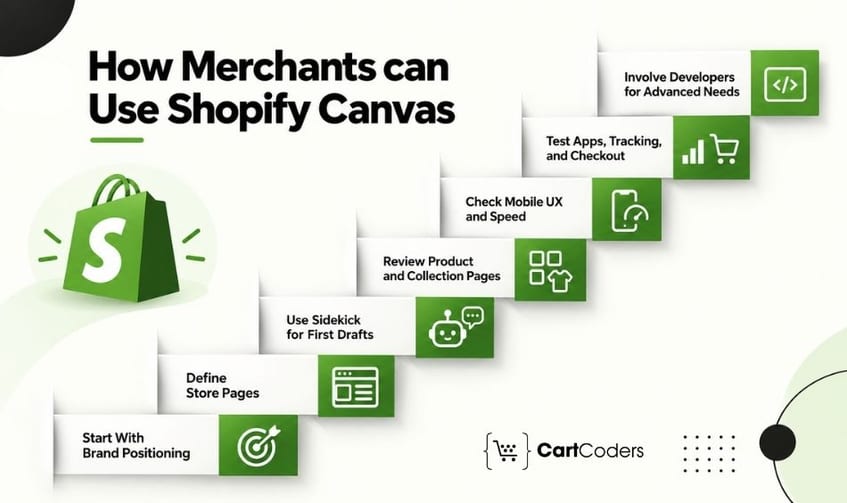
The strongest Canvas workflow starts before the first prompt. AI works better when the merchant has already defined what the store needs to communicate and what customers need to accomplish.
Start With Brand Positioning
Define the audience, product category, main value proposition, brand tone, visual direction, and key offer.
Instead of prompting:
“Build a fashion store.”
Give Sidekick useful context:
“Create a premium women’s activewear store for customers who value understated design. Keep navigation simple, emphasize fabric and fit on product pages, and use editorial photography with restrained typography.”
The second prompt gives the system a clearer design problem to solve.
Define Required Store Pages
List the templates and customer journeys needed before redesign work expands. Typical requirements may include:
- Homepage
- Collection pages
- Product pages
- Cart
- About page
- FAQ
- Contact page
- Policy pages
- Campaign landing pages
This reduces the risk of creating an attractive homepage while leaving the rest of the buying journey unresolved.
Use Sidekick Prompts for First Drafts
Use Canvas to create the initial direction rather than expecting the first result to be final. Ask for one meaningful change at a time when possible. Review the result and then refine it with clearer feedback.
Review Product and Collection Pages
These pages deserve as much attention as the homepage. Check whether shoppers can:
- Find relevant products
- Compare options
- Interpret variants
- Understand pricing
- Find size or specification information
- Identify delivery and return information
- Add the right item to the cart
A visually strong store can still fail if product discovery is confusing.
Check Mobile Layout and Speed
Canvas provides different preview widths, but previewing is only part of launch review. Test the actual experience across common devices. Pay attention to menus, typography, product galleries, filters, forms, sticky elements, cart controls, and page loading.
Test Apps, Tracking, and Checkout Flow
Before publishing, verify the parts of the store that AI design work can easily overlook:
- App blocks and embeds
- Review widgets
- Subscription tools
- Search and filtering
- Analytics events
- Advertising pixels
- Consent tools
- Cart behavior
- Checkout movement
- Product feeds
- Third-party scripts
Canvas currently has explicit app-block and app-embed restrictions, making this check especially important.
Bring Developers In for Advanced Needs
Bring a Shopify developer into the process when the design starts touching custom logic, integrations, performance-sensitive code, B2B workflows, complex apps, or non-standard storefront behavior. The developer does not need to replace the Canvas workflow. They can take the AI-generated direction and make the parts that require engineering production-ready.
What Mistakes Should Merchants Avoid With Shopify Canvas?
Canvas makes design faster, which can also make it easier to publish changes before they have been properly reviewed.
| Mistake | Better Approach |
| Publishing the AI result immediately | Review UX, content, mobile, and functionality |
| Ignoring launch limitations | Check compatibility before moving the theme |
| Focusing only on the homepage | Review the full purchase journey |
| Skipping SEO | Check headings, metadata, content, and links |
| Ignoring apps | Test storefront apps separately |
| Skipping analytics | Verify events and pixels |
| No technical review | Bring in specialists where complexity requires it |
Treating AI Output as Final
AI-generated design should be treated as a strong draft, not automatic approval. Review copy, hierarchy, images, spacing, product information, calls to action, accessibility, and customer journeys before publishing.
Ignoring Launch Limits
Canvas’s current limitations can affect the long-term viability of a theme. Check third-party theme requirements, app dependencies, Markets, translations, rollouts, theme updates, and theme-file needs before committing important production work.
Forgetting Mobile Review
A layout can look polished at desktop width and still create problems on a smaller screen. Test real mobile behavior instead of relying only on visual similarity.
Skipping Product Page Strategy
The homepage gets attention because it is visually prominent, but many shoppers arrive directly on collection or product pages from search, social, ads, or recommendations. Those pages need their own content and conversion logic.
Missing SEO Basics
AI design work does not remove the need for search fundamentals. Review page titles, heading structure, indexable content, internal linking, image text alternatives, canonical behavior, structured data, and page performance where relevant.
Not Checking App and Theme Compatibility
A redesign can interfere with apps, scripts, or theme-dependent functionality. Compatibility testing should happen before publication, particularly when the store relies heavily on third-party storefront tools.
Publishing Without CRO or Tracking Review
A redesign can change customer behavior and analytics at the same time. Confirm that important events, pixels, forms, product actions, and conversion measurements still work so the team can evaluate what happened after launch.
How Can CartCoders Help With Shopify Canvas and AI Store Builds?
Canvas can shorten the route from an idea to a working theme, but established Shopify stores often need work beyond AI-assisted design. CartCoders can review the Canvas output and handle the technical, UX, and commerce requirements that need specialist attention before launch.
Shopify Canvas Strategy Review: Assess whether Canvas fits your current theme, app stack, store complexity, localization needs, and redesign goals.
AI-Generated Store Design Cleanup: Refine AI-generated layouts across navigation, spacing, hierarchy, product presentation, mobile behavior, and customer journeys.
Custom Shopify Theme Development: Handle custom theme work, Liquid development, storefront functionality, and complex Shopify store development requirements.
CRO and UX Review: Review product discovery, product pages, mobile journeys, cart behavior, trust elements, and other conversion factors through Shopify UI/UX audit services and CRO work.
App, API, and Checkout Setup: Test third-party apps and connected systems, including custom apps, APIs, ERP and CRM connections, storefront integrations, and other technical requirements.
SEO, Speed, and Accessibility Checks: Review technical SEO basics, page performance, responsive behavior, accessibility considerations, and theme quality before publication.
Shopify Plus and B2B Store Support: Support complex stores with company accounts, catalogs, pricing rules, integrations, checkout requirements, and operational workflows.
Final Verdict: Is Shopify Canvas Right for Your Store?
Shopify Canvas makes experimentation easier, especially when merchants want to explore ideas without starting from scratch. Its real value is in reducing the effort between an initial concept and a usable storefront.
That does not make every store a good fit for Canvas. The right choice depends on the store’s complexity, existing setup, growth plans, and how much control the team needs over the final experience.
For merchants, the best approach is to treat Canvas as a design accelerator, not a complete store-building strategy. It can speed up exploration while leaving room for expert decisions where the store needs deeper customization or technical control.
Frequently Asked Questions
Shopify Canvas is an AI-assisted theme design workspace launched in October 2026. It lets eligible merchants build and change Shopify themes with Sidekick while viewing store templates in a broader visual workspace.
Merchants describe a store or design change to Sidekick. Sidekick works on the theme, and Canvas displays the result for review. Merchants can continue refining it through conversation or make supported direct edits.
Yes, Canvas can be considered an AI-assisted store builder, but it is broader than a one-time store generator. It also provides an ongoing workspace for theme editing and redesign with Sidekick.
Shopify’s current Help Center says Canvas is available on plans that include theme customization and is in early access for certain stores. Merchants should check their store eligibility and current Shopify plan rather than assuming universal availability.
Yes. Sidekick is the AI agent merchants work with inside Canvas to create and change themes.
Canvas can create a new theme from a description and make broader store-design changes. Current limitations around third-party themes, app blocks, app embeds, Markets, translations, and other features mean it may not cover every requirement of a complex store.
No. Canvas can reduce some manual design and early development work, but developers remain relevant for custom logic, integrations, complex apps, Shopify Plus requirements, performance work, accessibility, and advanced storefront functionality.
Canvas itself currently requires a desktop device. Shopify separately offers mobile capabilities in its Online Store Editor, so the two experiences should not be confused.
Canvas currently does not support third-party themes. Shopify also states that app blocks and app embeds cannot currently be added or configured in Canvas.
Canvas provides a wider AI-assisted workspace where merchants can work with Sidekick across their theme. The theme editor remains the established interface for structured manual theme editing and currently handles some workflows Canvas does not.
Yes, for supported themes. Shopify lets merchants duplicate a supported theme into Canvas and work on the copy separately from the original theme.
Review mobile usability, navigation, product and collection pages, apps, tracking, SEO, accessibility, speed, checkout movement, content accuracy, Markets or translation requirements, and any custom functionality before publishing.
CartCoders can review Canvas-generated themes, refine UI/UX, build custom Shopify functionality, configure apps and integrations, review CRO and performance, and handle Shopify Plus or B2B requirements that extend beyond Canvas.


