
Most Shopify Plus merchants spend months refining product pages, ad campaigns, and store design. The checkout page often stays untouched, built from the default template, with no fields, design, or logic adjusted to match how the business actually operates.
A buyer who reaches checkout has already decided to purchase. What happens next determines whether that decision becomes a completed order or an abandoned cart. Shopify Plus checkout customization gives merchants full control over the checkout experience. From field configuration and branding to payment logic and custom scripts, Shopify Plus offers tools that standard Shopify does not offer.
Brands that use these tools correctly report measurable gains in conversion rate, average order value, and repeat purchase behavior. This guide covers the most effective Shopify Plus checkout customization ideas, how each one works in practice, and where to start if your checkout is losing buyers who were ready to buy.
Quick Answer
Shopify Plus checkout customization means changing the design, fields, payment methods, discount logic, and overall flow of your checkout page using Checkout Extensibility, Shopify Scripts, and the Checkout Branding API. Merchants can add custom fields, apply automatic discounts, display loyalty points, and match branding to the rest of the store. These changes directly reduce cart abandonment and increase completed orders.
Why Does Shopify Plus Checkout Customization Affect Revenue Directly?
The checkout page is the decision point in the purchase process. It is also where most eCommerce purchases fall apart. Studies consistently report cart abandonment rates above 70%, and a large share of those exits happen at checkout, not at the product page or cart stage. Friction at this final step costs real revenue.
Shopify Plus gives merchants the tools to remove that friction. Standard Shopify plans allow basic theme editor changes to the checkout. Shopify Plus goes further by opening Checkout Extensibility, Shopify Scripts, and the Checkout Branding API, each of which handles a different layer of the checkout experience.
What Standard Shopify Cannot Do at Checkout?
Standard Shopify restricts checkout editing to limited theme controls. You can upload a logo, change a color, and adjust some text labels, but you cannot add custom fields, run server-side logic, build custom components, or change the checkout flow for specific customer types. These restrictions are by design for lower-tier plans.
Shopify Plus removes those restrictions entirely. The platform gives access to Shopify Scripts for server-side discount and shipping logic, Checkout UI Extensions for building custom components, and the Checkout Branding API for deep visual customization. These tools together make a significant difference in what the buyer experiences and how often they complete the purchase.
Who Benefits Most from Shopify Plus Checkout Customization?
Brands with high transaction volumes gain the most because small conversion rate improvements produce large revenue differences at scale. A brand processing one million dollars per month that improves its checkout conversion rate by two percentage points gains measurably more than a smaller store with the same percentage improvement.
Beyond scale, any brand with specific buyer needs benefits directly. Subscription services need custom fields for delivery scheduling. Gift retailers need message input boxes. Age-restricted product sellers need verification steps. International brands need a multi-currency and multi-language checkout. Standard Shopify cannot serve these needs at the checkout level; Shopify Plus can.
What Can You Customize in the Shopify Plus Checkout?
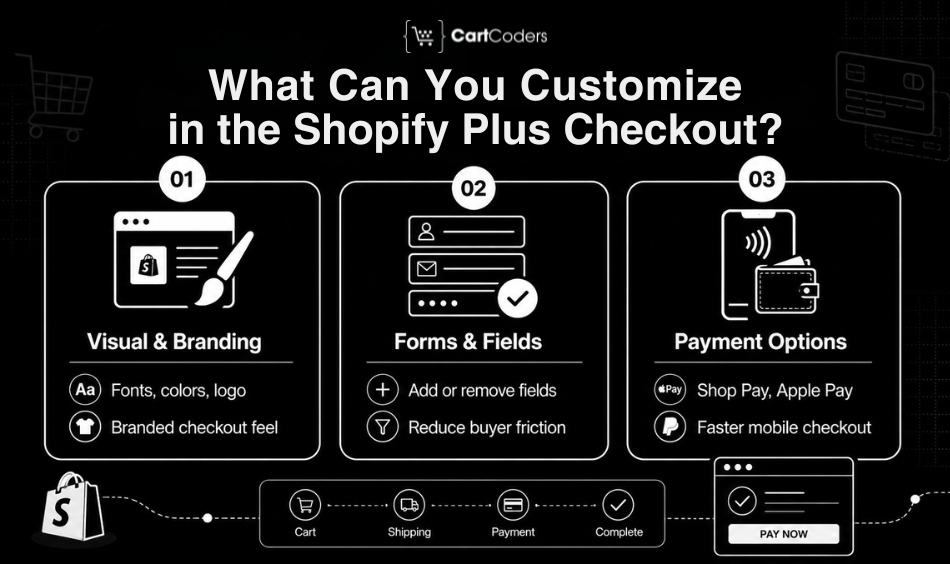
Before choosing specific customization ideas, it helps to understand what Shopify Plus actually lets you change. The checkout platform covers three distinct layers: visual design, form configuration, and functional logic through scripts and extensions. Each layer addresses a different category of buyer friction.
Visual and Branding Layer
The Checkout Branding API lets merchants apply custom fonts, colors, button styles, background images, and logo placement across the entire checkout experience. The goal is consistency; a buyer moving from a branded product page to a generic checkout page experiences a trust gap. A checkout that looks and feels like the rest of the store removes that gap and keeps the buyer focused on completing the order.
In user testing, visual inconsistency at checkout correlates with hesitation and exit. Buyers who feel they have moved to a different site or payment processor pause and reconsider. A checkout that matches the brand reduces that pause and keeps conversion momentum intact.
Form and Field Configuration
Shopify Plus lets merchants add, remove, and relabel fields in the checkout form. A store selling customized products can add a text input for personalization details. A B2B-focused store setup can remove irrelevant fields and pre-fill known information for account customers. A regulated product seller can add a checkbox for terms or age confirmation before payment.
Reducing unnecessary fields also improves conversion. Every field a buyer has to complete adds friction. Removing fields that do not apply to the transaction shortens the form, reduces the load, and speeds up the process for buyers who are ready to purchase.
Payment and Express Checkout Configuration
Shopify Plus allows merchants to prioritize and configure express payment methods such as Shop Pay, Apple Pay, Google Pay, and PayPal. These methods reduce checkout time dramatically for mobile buyers and repeat customers who already have payment details stored.
On mobile, the difference between typing in a card number and tapping an express payment button is often the difference between a completed order and an abandoned cart. Placing express payment methods prominently above the standard form, rather than below it, produces measurable improvement in mobile conversion rates across most store categories.
Which Shopify Plus Checkout Customization Ideas Deliver the Best Results?
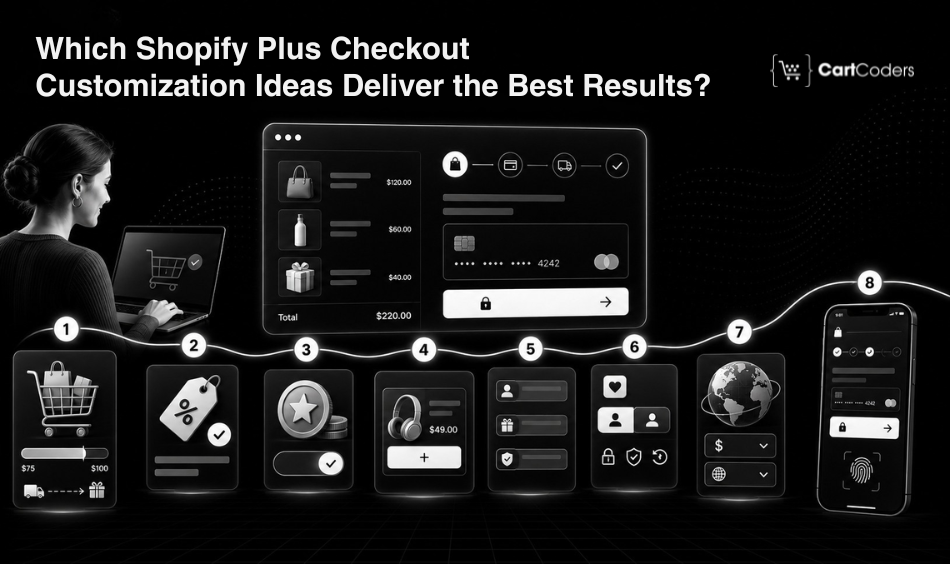
Not every customization produces the same outcome. Some have a direct and immediate effect on conversion rate. Others improve average order value or build retention through loyalty and personalization. Here are the ideas that consistently move the needle across different types of Shopify Plus stores.
Free Shipping Threshold With a Real-time Progress Bar
A progress bar that updates in real time as a buyer adds items to the cart is one of the most effective checkout additions available on Shopify Plus. When a buyer sees ‘Add $14 more to qualify for free shipping,’ many respond by adding another item rather than paying a shipping fee. The comparison is immediate and concrete: a specific dollar amount versus a shipping charge they want to avoid.
This works because the psychology is simple and the action required is minimal. The buyer is not evaluating free shipping in the abstract. They see a gap, they see a way to close it, and adding one more item feels like the smart move. Average order value rises, and the store delivers free shipping to buyers who have made a more deliberate purchase decision.
Automatic and Conditional Discounts Using Shopify Scripts
Shopify Scripts run server-side logic at checkout, applying discounts based on cart contents, customer tags, purchase history, or product combinations. The buyer sees the discount applied automatically without typing a code or taking any additional steps. The offer feels built into the purchase rather than added as a promotion.
A customer tagged as a wholesale buyer sees their tier pricing applied at checkout. A cart containing three or more items from the same collection triggers a bundle discount automatically. A first-time buyer identified through customer account status sees a welcome offer applied without any friction. These configurations remove barriers and make the checkout experience feel intelligent and personal.
Loyalty Program Integration at Checkout
Displaying a customer’s loyalty points balance during checkout, with the option to redeem points toward the current order, is a retention driver with a direct effect on purchase completion. A buyer who sees ‘You have 320 points worth $16 – apply to this order’ has a reason to stay that did not exist before the integration.
The redemption experience also reinforces the value of the loyalty program itself. A buyer who redeems points at checkout feels rewarded rather than purely transactional. That experience drives return visits and increases lifetime value. The integration requires connecting the loyalty platform, whether Smile.io, LoyaltyLion, or Yotpo, to the checkout through Checkout UI Extensions.
Product Upsells and Cross-sells Built Into the Checkout Flow
Shopify Checkout Extensibility allows merchants to add product recommendation blocks within the checkout page without disrupting the payment flow. These blocks appear as ‘Frequently bought with‘ or ‘Complete the set‘ suggestions, positioned before the payment confirmation step.
Generic bestseller lists at checkout do not perform well. Recommendations that relate directly to what the buyer already has in their cart produce meaningfully higher attach rates. A buyer purchasing a camera lens who sees a compatible lens hood as a recommendation is far more likely to add it than a buyer seeing an unrelated product. CartCoders builds these recommendation blocks with logic tied to cart contents, product relationships, and customer purchase history.
Custom Fields for Personalized and Regulated Products
Custom checkout fields are not optional for product categories that require specific buyer information at the point of sale. Engraving details, gift messages, delivery date preferences, age verification, medical disclaimers, and custom print specifications must all be collected before the order is processed.
Shopify Plus Checkout Extensibility supports adding these fields cleanly, connecting them to order metadata, and surfacing them in the admin without breaking the standard checkout flow. The configuration matters: a poorly placed custom field that uses confusing labels or appears without context will increase abandonment rather than reduce it. Well-designed fields that appear only when relevant keep the form clean for buyers who do not need them and fully functional for those who do.
Cart Abandonment Recovery Signals Within the Checkout
Post-abandonment emails address buyers after they have already left. Shopify Plus checkout customization lets merchants reduce exit rates before they happen by placing specific signals within the checkout page itself. These are passive additions that require no buyer action and consistently lower exit rates at the final step.
A ‘Your cart is saved’ message near the checkout header tells the buyer they can return without losing their items. A visible guest checkout option removes the friction of mandatory account creation for first-time buyers. Security badges, payment icons, and return policy reminders placed near the payment fields reduce hesitation at the moment when buyers are most likely to second-guess the purchase.
Multi-currency and Multi-language Checkout for International Stores
A checkout that displays pricing in the buyer’s local currency and uses their language for every field label, button, and confirmation message removes a significant trust barrier for international traffic. Buyers are far less likely to abandon when they understand exactly what they are being charged and can read the form without translating it mentally.
Shopify Plus supports this natively, but the configuration requires accuracy. Showing a currency conversion that does not match the buyer’s expectation, or a poorly translated field label that creates ambiguity, produces more hesitation than a well-designed English checkout would. A properly configured multi-currency, multi-language checkout increases conversion rates for international audiences without requiring separate checkout flows for each region.
Mobile-first Checkout Configuration
Mobile devices now account for more than half of global eCommerce traffic, but mobile conversion rates remain significantly lower than desktop. The gap is widest at checkout. A form that requires extensive scrolling, has small tap targets, does not support auto-fill for address and payment fields, and does not prioritize express payment methods will consistently lose mobile buyers who were ready to complete the purchase.
Shopify Plus checkout customization allows mobile-specific configuration: tap-friendly button sizing, field spacing appropriate for touchscreens, auto-complete support for address inputs, and strategic placement of express payment options at the top of the checkout flow. Combined with Shop Pay’s one-tap checkout experience for returning buyers, a properly configured mobile checkout directly reduces the abandonment gap between mobile and desktop traffic.
How CartCoders Approaches Shopify Plus Checkout Customization
CartCoders is a certified Shopify Plus agency that has built and customized checkout experiences for brands across fashion, health and wellness, food and beverage, B2B wholesale, and specialty retail. The team works across the full stack of Shopify Plus checkout tools like Checkout Extensibility for UI extensions, Shopify Scripts for discount and pricing logic, the Checkout Branding API for visual configuration, and third-party app integrations for loyalty, upsell, and personalization layers.
The work begins with identifying where the current checkout is losing buyers. GSC data, session recording analysis, and GA4 funnel data typically reveal specific drop-off points that can be addressed through targeted customization. CartCoders prioritizes changes that have a direct and measurable revenue impact before addressing secondary improvements.
If your store is generating checkout page impressions but converting at a low rate, or if buyers are reaching checkout and not completing the order, a focused checkout audit is the right starting point.
Ready to Build a Checkout That Converts?
Your checkout page is one of the highest-value assets on your entire store. A buyer who reaches it has already decided they want your product. The checkout determines whether that intention becomes a completed order or a missed sale. Every day without a properly configured checkout is a day of preventable revenue loss.
CartCoders builds Shopify Plus checkout customization solutions that address the specific drop-off points in your purchase flow. From branding and field configuration to Shopify Scripts, upsell extensions, and mobile optimization, the team builds checkouts that work for how your buyers actually behave. Contact CartCoders today!
Conclusion
Shopify Plus checkout customization is not about making your checkout look better for its own sake. It is about removing every obstacle between a buyer who wants your product and the completed order. A checkout built with the right structure, payment options, branding, and logic changes the outcome at the most important moment in the purchase process.
The ideas covered in this guide are proven, practical, and available to every Shopify Plus merchant. The question is which ones address the specific friction points in your current checkout flow. Start with the changes that target your highest drop-off points, measure the result, and build from there.
Frequently Asked Questions
Shopify Plus checkout customization covers changes to the checkout page’s design, fields, payment options, discount logic, and flow using tools like Checkout Extensibility, Shopify Scripts, and the Checkout Branding API. It gives merchants full control over what buyers experience at the final purchase step, capabilities that standard Shopify does not provide.
With Shopify Plus, you can change the visual design, add or remove form fields, apply automatic discounts through Shopify Scripts, add product upsell blocks, integrate loyalty programs, configure express payment methods, and support multiple languages and currencies. Standard Shopify allows none of these changes at the checkout level.
Standard Shopify provides limited checkout editing through the theme editor. Shopify Plus opens Shopify Scripts, Checkout Extensibility, and the Checkout Branding API, which allow deep functional and visual customization not available on lower-tier plans. The difference is significant for brands with specific buyer needs or high transaction volumes.
Checkout Extensibility is Shopify’s framework for building custom checkout components without editing the core checkout code. Developers use Checkout UI Extensions to add features like custom fields, upsell blocks, and loyalty integrations. These components stay compatible with Shopify platform updates, which protects the customization investment over time.
Yes. Using Checkout Extensibility, you can integrate loyalty platforms like Smile.io, LoyaltyLion, or Yotpo to display a customer’s points balance and allow redemption during checkout. The integration does not redirect the buyer away from the payment flow, so it adds value without adding steps.
Yes. Mobile-specific checkout configuration, including express payment placement, tap-friendly button sizing, auto-fill support, and form simplification, reduces the abandonment gap between mobile and desktop buyers. Mobile checkout optimization is consistently one of the highest-impact changes available to Shopify Plus merchants.
Simple visual changes and branding updates typically take two to five business days. Complex work, including custom scripts, loyalty integrations, upsell extensions, or multi-region checkout configurations, takes two to four weeks depending on scope and the number of third-party integrations involved.
Low CTR with reasonable impressions usually points to a title or meta description that does not match what the searcher expects to find. It can also indicate a ranking position below 20, where organic click-through rates are very low. Improving content depth, targeting featured snippet formats, and refreshing the title and meta description are the key steps.


