

Magento to Shopify catalog migration is one of the most challenging stages of a platform transition. Although the store owners hope the process will be easy, the facts are more complicated because Magento and Shopify use entirely different product structures. But it is made easier by choosing a Magento-to-Shopify variant migration expert like CartCoders.
Magento stores product data in an Entity-Attribute-Value (EAV) model that supports unlimited custom attributes, flexible option sets, advanced product types, and layered navigation. Shopify, in turn, has a simplified product structure with fixed attributes, limited variant rules, and a varied approach to metafields and inventory records.

These variations pose migration problems on attribute, variant, bundle, image, SKU and multistore data. According to reports, 29% of the users leaving Magento turn to Shopify as their next online store to handle the end-to-end business operations.
This guide describes how to migrate products from Magento to Shopify without data loss, broken variants, or harming SEO. You will get to know the entire workflow, attribute mapping strategies, variant conversion rules, bundle transformations, image fixes and the most frequently encountered errors solutions.
What Makes Magento to Shopify Product Migration Challenging
Magento to Shopify product migration involves more than just exporting and uploading data. The layers in which product information is stored in Magento differ from the structured fields used in Shopify. Such a discrepancy creates several technical difficulties.
Attribute and Option Differences
Magento EAV stores are EAV-based, in which attributes are stored across multiple tables. Attributes may be store view, conditional, and custom. Shopify stores fields in simple and metafields.
Challenges include
- Attributes specific to the store that do not correspond directly to Shopify.
- Multi-select attributes that are impossible to map into simple text fields.
- Store view values that are not available in Shopify.
- Magento attribute sets that do not collapse in Shopify.
This involves attribute mapping.
Variant Limits and Product Rules
Magento also allows configurable products, which have unlimited combinations of variants. Shopify offers both 3- and 100-variant options.
Issues include
- Magento products with configurable products of over 100 options.
- Products with a greater number of options than three.
- Full custom option structures that are not compatible with Shopify.
Migration requires reorganization of these products.
Image, Gallery, and Media Mapping Issues
Images are stored in a media folder and referenced using relative URLs in Magento. Shopify uses CDN paths.
Common problems
- Images are missing after import
- Gallery images that are not attached to variants.
- Broken URLs
- Duplicate gallery entries
These involve washing and replacement.
SKU and Inventory Structure
Magento SKUs may be copied across stores, or generated from distinct alternatives. Shopify needs special SKUs.
Typical SKU issues
- Duplicate SKUs across views
- SKUs created through option values.
- Inventory is maintained on a site-to-site basis rather than internationally.
They should be normalized prior to migration.
How to Migrate Products from Magento to Shopify?
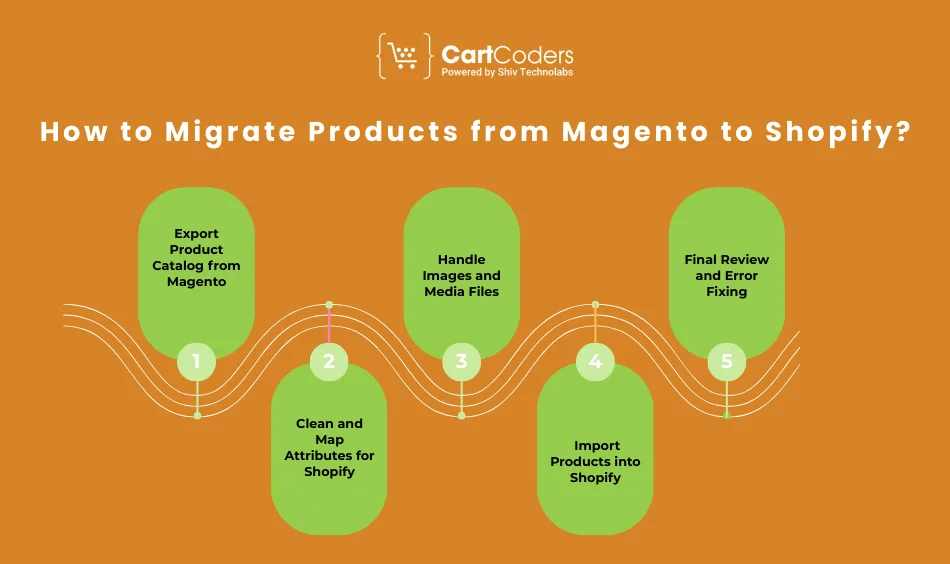
The following outlines the entire process to migrate products from Magento to Shopify.
Step 1. Export Product Catalog from Magento
Export your entire catalog containing
- Simple products
- Configurable products
- Bundle and grouped items
- Digital files
- Custom attributes
- Galleries and media
CSV, XML and API extraction are examples of export sources. Large catalogs are best extracted using API.
Step 2. Clean and Map Attributes for Shopify
There is no match between Shopify fields and Magento attributes. Sanitize the data and develop a mapping plan.
Mapping tasks
- Migrate Magento attributes to Shopify metafields.
- Merge similar attributes
- Convert configurable attributes into variant options
- Remove unsupported or empty fields
Accurate mapping eliminates loss of data.
Step 3. Handle Images and Media Files
Magento images are stored in a nested media folder. Take away all the pictures and re-glue them to the merchandise.
Tasks
- Rebuild gallery structure
- Reattached missing base pictures.
- Fix invalid URLs
- Bulk upload through API
This prevents shattered images in Shopify.
Step 4. Import Products into Shopify
You can import through
- Shopify CSV
- Migration apps
- Custom API scripts
Migration using API is the most stable with a catalog of more than 5000 products.
Step 5.Final Review and Error Fixing
Check for
- Missing images
- Variant mismatches
- Incorrect option names
- Metafield errors
- Products are in the inappropriate collections
You will ensure your catalogue is correct prior to launch.
Attribute Mapping: How to Convert Magento Attributes into Shopify Metafields
The Magento attributes should be rearranged according to Shopify’s metafield system.
What Magento Attributes Should Be Mapped?
Attributes that require migrating are
- Color
- Size
- Material
- Brand
- Technical specifications
- Care instructions
- Custom flags
The mapping of Magento product attributes to Shopify metafield guarantees that none of the product details are lost.
Attribute to Metafield Structure
Arrange your metafield namespace and keys well.
Key steps
- namespace, such as custom or details.
- develop mapping rules of every attribute
- The metafield naming limitations of Shopify
- Be consistent on data formats.
Proper structure is a guarantee of long-term maintainability.
Plan Your Magento To Shopify Shift With Professionals
CartCoders reviews your product setup before migration.


Troubleshooting of Attribute Mapping Errors.
Common issues
- Missing fields after import
- Invalid attribute values
- Truncated data
- Misplaced metafields
Fix by pre-checking the column names and cleaning values prior to importing.
Variant Migration: Converting Configurable Products into Shopify Variants

Magento to Shopify variants migration is most complicated because of configurable products.
Understanding Variant Logic Differences
Simple products are associated with Magento configurables via attributes. Shopify variants are made by using option sets.
- Major differences
- Magento supports an unlimited number of attributes.
- Shopify only supports 3 options.
- Variant combinations cap at 100
This calls for reorganization.
Handling Variant Combinations
You have to turn Magento combinations into Shopify variant sets.
Steps
- Elicit combinations of attributes.
- Map color, size material
- Reassign inventory
- SKU Map to every Shopify variant.
This maintains variant data consistency.
Avoiding Shopify’s Variant Limit Problems
When your catalog of products in Magento contains more than 100 variations of a single configurable product, then utilize.
- Product splitting
- Advanced variant appsto Shopify.
- Metafields, rather than variants.
This makes products upload effectively.
Magento Bundle, Grouped, and Digital Products Migration
Magento also supports advanced product types, which Shopify does not have natively.
Converting Bundle Products
Magento bundles would be customizable product packages. Shopify lacks built-in support of bundling.
Solutions include
- Bundling logics recreated with apps.
- Line item properties
- metafield rules
- Build your own bundle feature.
This maintains bundle action.
Grouped Products Migration
Grouped products should be transcended into Shopify products.
Options
- Change to single standalone products.
- Change to variants where possible.
- Use applications to replicate grouped behavior.
The group’s logic cannot be migrated.
Digital Products Migration
Downloadable links at Magento support digital products.
Steps
- Extract download files
- Attach files to Shopify online products.
- Use digital delivery apps
- Test link generation
Computerized objects need file reattaching.
Image Migration: Fixing Missing, Broken and Incorrect Files
The most troublesome task of Magento to Shopify image migration is often the images.
How Magento Stores Product Pictures.
Magento stores images in
- pub media catalog product
- References to databases using relative paths.
Some installations use absolute URLs.
Shopify Image Structure
Shopify has an image system that is based on a CDN. URLs change after upload.
Rules include
- Sanitized naming
- Automatic resizing
- CDN caching
Typical Image problems of Migration.
Typical problems
- Missing galleries
- poor choice of the base image.
- Duplicate images
- Variant images not assigned
How to Fix Them
Fixes include
- Bulk image reupload
- DN mapping
- Correct variant to image assignment
- API scripts of galleries.
This fixes the issue where Shopify doesn’t import Magento products with images.
Advanced Migration For Large Catalogs and Multi Store Setup
Branches with over 10,000 products or several Magento websites should use sophisticated methods.
Multi-Store Catalog Merging
There are store view and website layers in Magento stores.
Tasks
- Add international and store-specific information.
- Merge attributes
- Normalize SKUs
- Handle currency variations
SKU Normalization
Big-box stores are known to carry duplicate SKUs. Normalize before importing.
Steps
- Strip formatting
- Remove duplicates
- To develop standard naming conventions.
Large Catalogs API Migration
API migration supports
- Large volumes
- Bulk metafield assignment
- Fast image upload
- Proper relationship mapping.
Most suitable for enterprise catalogs.
Common Problems in Magento to Shopify Product Migration With Fixes
Duplicate SKU Errors
Fix by
- Normalizing SKUs
- Removing duplicates
- Giving different SKUs to different variants.
Variant Mismatch
Occurs when
- More than 3 options exist
- There are over 100 variations.
Solution
- Split products
- Use metafields
Missing Attributes
Fix by
- Maintaining proper column names.
- Proper mapping of attributes.
- Adding custom metafields
Image Missing After Import
Fix by
- Reattaching gallery images
- Using correct folder paths
- Bulk reupload
Damaged Downloadable Products
Fix by
- Reassigning files
- Using digital delivery apps
- Testing link expiration settings.
Need Help Moving a Large Magento Catalog to Shopify?
Moving a complex Magento catalog is a demanding task that needs experience and planning on both sites. CartCoders is a company that offers high-quality Magento to Shopify products migration with the right data mapping, correct variant conversion, solid bundle substitution, and full image removal on all the products in your store.
Attribute Mapping
Custom attribute mapping to naming consistency Shopify metafields.
Variant Conversion
Complete migration of Magento products that are dynamically configured to Shopify variants that conform to platform constraints.
Bundle Handling
Map products and products with complex workflows and applications.
Image Cleanup
Restructuring gallery, repairing lost images and updating CDN paths.
Large Catalog Migration
Migration API is designed to handle a thousand-plus product catalog.
Conclusion
The possibility of migrating products from Magento to Shopify requires thorough consideration and a deep understanding of both platforms. Attributes, variants, bundles, images, and SKUs should be managed with high precision to prevent errors.
By adhering to a systematic strategy and having the right attribute mapping, splitting variants, media reorganization, as well as SKU normalization, you can easily convert the most complicated Magenta catalog to Shopify.
CartCoders is the best Shopify development company with hands-on expertise in Magento to Shopify catalog migration and provides high-quality technical implementation, complete data cleansing, and automation tools for all types of stores. Our team of Magento-to-Shopify image migration experts can handle full-store migrations, taking care of every edge of migration. Get ready to experience hassle free Magento to Shopify Product Migration with CartCoders.
Contact us today and let our team of experts take care of end to end migration.
Frequently Asked Questions (FAQs)
Export the Magento catalog, clean attributes, convert configurable products to Shopify variants, import images, and use CSV or the API to import. Check for any errors in the reviews and correct any missing fields or pictures.
Yes, Magento attributes can be transferred to Shopify metafields using appropriate namespaces and naming conventions. This saves product specifications and custom fields.
Generate combinations of variants in Magento and map the attributes, such as color and size and generate Shopify options. Keep SKU and inventory in line with the process.
Shopify does not have built-in support of bundles; thus, you have to recreate bundles with the aid of apps or line item properties. Automation or manual conversion of every Magento bundle into a Shopify one.
Grouped products can be transformed into single items or variants based on your strategy. Shopify does not support grouping natively, so grouped logic would need to be reconstructed.
The lack of pictures is due to incorrect media folder names or broken links. Reblog via Shopify or an API script to place galleries appropriately.
Get all gallery pictures, store them on Shopify’s CDN, and associate each file with its corresponding product. Large galleries are advised to be automated.
Clean up SKUs, eliminate duplicates, and assign each variant a distinct identifier prior to import.
Shopify accommodates simple, variant and digital products. Bundled and grouped products need applications to replicate such a behavior.
Downloadable files can be extracted and linked to Shopify digital products using digital delivery applications. Test links before launch.
Yes, attributes, SKUs and store view data must be combined and then imported to Shopify. Consolidation is essential.
Custom migration via the API yields the best results. Large catalogs can also be imported using tools such as Matrixify.


